
Best Processor Motherboard Combo planning is where most build budgets go wrong, usually by pairing a strong chip with a board that cannot feed it or an expensive board with a processor that will never use it. These pairings keep both sides balanced.
As an Amazon Associate we earn from qualifying purchases at no extra cost to you.





As an Amazon Associate we earn from qualifying purchases at no extra cost to you.
By Ryan Cole, hardware writer at NVIDIAReview.
Verdict at a glance
Updated October 2026. The short answer: for a gaming PC, pair AMD’s Ryzen 7 9850X3D or 9800X3D with a good B850 board; it is the fastest gaming combination available and AM5 still has an upgrade path. Mixed gaming and productivity buyers should look at Intel’s Core Ultra 7 270K Plus on an 800-series board, and tight budgets are best served by a Ryzen 5 on B650 or B850.
- Best overall: Ryzen 7 9850X3D with ASUS TUF Gaming B850-E (bundle) – top-tier gaming, Gen5 M.2, mid-range board cost.
- Best value: Ryzen 7 9800X3D with MSI MAG B650 Tomahawk WiFi – still the gaming sweet spot from our main list.
- Best budget: Ryzen 5 7600 with ASRock B650M Pro RS, or Ryzen 5 9600X with a B850 board for Gen5 storage.
- Best premium: Ryzen 9 9950X3D with ASUS ROG Strix X870E-E for gaming plus heavy content work; Ryzen 7 9850X3D with MSI PRO X870E-P if you mainly need USB4 and extra lanes.
- Best Intel: Core Ultra 7 270K Plus with a Z890 or B860 board for strong multi-threaded performance.
How to Match the Best Processor Motherboard Combo
A processor and a board are bought together but rarely chosen together. The best processor motherboard combo balances power delivery, connectivity and memory cost rather than maximising any one of them. Four checks keep the pairing sensible.
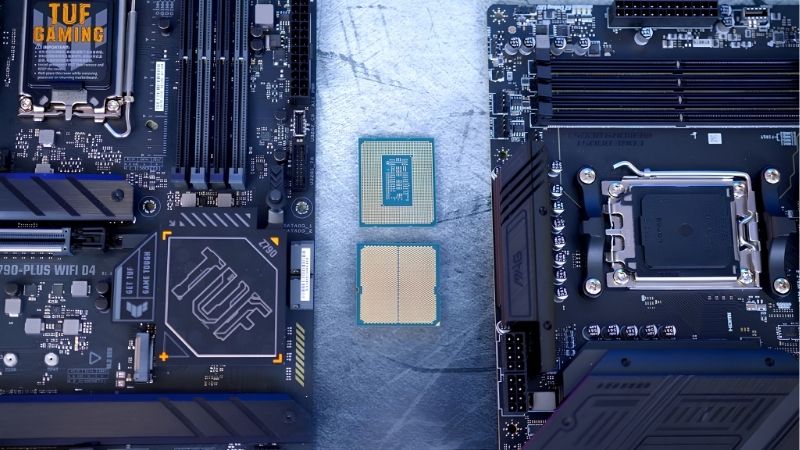
Match Board Tier to Package Power
Start with what the chip actually draws. A six-core sits near 88 W package power, an eight-core with stacked cache lands around 162 W, and a sixteen-core part can hold well over 200 W during a sustained all-core load.
Entry boards handle the first tier comfortably. The middle tier covers everything up to a Ryzen 9, and the premium tier exists for overclocking and heavy sustained workloads rather than gaming performance.
Heatsink mass is the practical indicator. Two thick blocks joined by a heatpipe, sitting where case airflow reaches them, tell you more about sustained behaviour than the phase count printed on the box.
Cooler choice completes the pairing. A board with strong power delivery still throttles if the processor cooler cannot keep up, so budget the three parts together rather than treating cooling as a later decision.
Buy the Chipset Features You Will Actually Use
Count the M.2 slots you need, check which run at Gen5, and confirm what gets disabled when they are populated. Many boards drop SATA ports or halve graphics slot lanes once every slot is filled.
Overclocking support, high-speed networking and rear USB count are the other differentiators. If none of them apply to your build, the mid-range board on the same chipset delivers identical performance for less.
Fan and pump headers deserve a look before ordering. A build with several case fans and a liquid cooler needs more headers than entry boards provide, and a powered hub is easier to buy at the start than to add later.
Memory Is Part of the Combo, Not an Afterthought
AM5 requires DDR5, so an AM5 pairing includes a new kit. Intel’s older platform still offers DDR4 boards, which lets you carry memory across from an existing machine and cut real cost from a budget build.
With memory pricing climbing through 2026, that difference is larger than it used to be. Decide the capacity you need up front rather than planning to add modules later at unknown prices.
Speed matters alongside capacity on AM5, where memory frequency affects performance more than on earlier platforms. A kit on the board’s qualification list saves time that manual tuning would otherwise consume.
Socket Longevity and Firmware Recovery
AM5 will keep receiving new processors through the end of 2029, so a mid-range board bought now can host a second chip. Intel’s next generation requires a new socket, which makes current Intel pairings one-time builds.
If you are combining a newer processor with an older board, confirm it supports firmware flashing without a CPU installed. Without it, an out-of-date board simply will not post with a chip it does not recognise.
Top Picks for the Best Processor Motherboard Combo in 2026
Each best processor motherboard combo below runs from a value build up to a workstation-class system. Specifications are manufacturer-listed, and retail pricing changes weekly, so treat tiers as your guide.
| Processor | Motherboard | Memory | Cooler class | Best for |
|---|---|---|---|---|
| Ryzen 5 7600 | ASRock B650M Pro RS | DDR5, 32 GB | Single tower | Value AM5 gaming |
| Ryzen 7 9800X3D | MSI MAG B650 Tomahawk WiFi | DDR5, 32 GB | Dual tower | High-refresh gaming |
| Ryzen 7 9700X | Gigabyte B850M AORUS Elite WiFi7 | DDR5, 32 GB | Single or dual tower | Efficient compact builds |
| Ryzen 9 9950X3D | ASUS ROG Strix X870E-E Gaming WiFi | DDR5, 64 GB | 360 mm AIO | Gaming plus content work |
| Core Ultra 5 245K | ASUS TUF Gaming B860-Plus WiFi | DDR5, 32 GB | Dual tower | Current Intel mid-range |
| Core i5-12400F | ASRock B760M Pro RS DDR4 | Reuse DDR4, 16-32 GB | Single tower | Lowest total cost |
Ryzen 5 7600 with ASRock B650M Pro RS
This is the cheapest way onto a platform supported through 2029. Six fast cores handle any current title, and the micro-ATX board provides four DIMM slots and two M.2 slots at an entry price.
Rear connectivity is thin and wireless is absent on the base board, so budget for an adapter if you need it. The bundled cooler works but a cheap tower makes the system quieter immediately.
Ryzen 7 9800X3D with MSI MAG B650 Tomahawk WiFi
The gaming sweet spot. Stacked cache delivers some of the highest frame rates available, and the Tomahawk has power delivery and heatsinks well beyond what the chip requires, so nothing throttles under sustained load.
Both parts sit above budget pricing, and the processor needs a serious cooler to hold its clocks. At 4K with a mid-range graphics card, much of the processor advantage will not appear on screen.
Ryzen 7 9700X with Gigabyte B850M AORUS Elite WiFi7
A 65 W eight-core paired with a well-cooled micro-ATX board makes an efficient, quiet system that fits smaller cases. Gen5 storage and current wireless come as standard on the board.
It lacks the stacked cache that separates the X3D parts in gaming, and the board’s firmware interface takes longer to learn than its rivals. Enabling the higher power mode narrows the performance gap at the cost of heat.
Ryzen 9 9950X3D with ASUS ROG Strix X870E-E Gaming WiFi
Sixteen cores with stacked cache paired with a premium board covers gaming and heavy content work in one machine, with extensive rear connectivity, multiple Gen5 slots and USB4 support.
The combined cost is several times the value pairing, and the processor demands a 360 mm loop under sustained all-core load. For gaming alone, most of this pairing is wasted.
Core Ultra 5 245K with ASUS TUF Gaming B860-Plus WiFi
On current Intel hardware this is the balanced choice, with performance cores for gaming, efficiency cores for background work and a board that installs easily thanks to tool-free storage latches.
LGA 1851 received one final refresh with the Core Ultra 200S Plus chips, but no further generation is expected, so treat this as a build you keep rather than upgrade. Memory tuning affects results more here than on the AMD platform.
Core i5-12400F with ASRock B760M Pro RS DDR4
The cheapest complete pairing here, largely because the DDR4 board lets you reuse existing memory. Six cores and twelve threads handle 1080p and 1440p gaming comfortably alongside an entry or mid-range card.
The platform is at its end with no future chips, and the board’s connectivity reflects its price. As a value build today rather than a foundation, it remains difficult to beat on total cost.
More Current Combos for Late 2026
The six pairings above still hold up, but two launches changed the picture this year: AMD’s Ryzen 7 9850X3D in January 2026 and Intel’s Core Ultra 200S Plus refresh, led by the Core Ultra 7 270K Plus, in March 2026. These additional combos cover them, labelled by budget tier.
Ryzen 7 9850X3D with ASUS TUF Gaming B850-E (Best Overall)
This bundle is our new best-overall gaming pairing. The Ryzen 7 9850X3D is the faster successor to the 9800X3D: the same eight Zen 5 cores, 16 threads and 96MB of L3 cache thanks to 3D V-Cache, but with a maximum boost clock raised from 5.2GHz to 5.6GHz. AMD rates it at 120W TDP, though reviewers measured sustained draw closer to 164W at the EPS connector, so a capable dual-tower air cooler or 240mm liquid cooler is the right partner.
The ASUS TUF Gaming B850-E board is the sensible match. B850 makes a PCIe 5.0 primary M.2 slot mandatory, so you get Gen5 storage support without paying for X870 extras, and the TUF line focuses on durable power delivery and heatsinks rather than RGB. Independent board roundups from outlets such as PCBuildHelper make the same point: a good B850 board feeds the 9850X3D without throttling, and an X870E board adds connectivity rather than gaming performance.
Strengths: the fastest gaming CPU family available in 2026 on a board tier that does not waste money, plus the AM5 upgrade path. For a high-refresh 1440p or 1080p esports build with an RTX 5070 Ti, RTX 5080 or RX 9070 XT, this pairing removes the CPU as a bottleneck.
Drawbacks: B850 does not guarantee a PCIe 5.0 graphics slot or USB4, so check the listing if you want either. The 9850X3D also carries a premium over the 9800X3D for a modest real-world gaming gain, and at 4K the difference largely disappears.
Compared with the Ryzen 7 9800X3D and MSI MAG B650 Tomahawk pairing in our main list, this combo adds higher boost clocks and mandatory Gen5 M.2 support. If you already own the 9800X3D combo, there is no reason to upgrade.
Ryzen 7 9850X3D with MSI PRO X870E-P (Best Premium Connectivity)
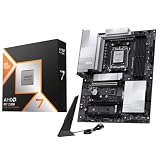
Choose this bundle if your gaming PC doubles as a work machine with lots of fast storage and external devices. X870E boards guarantee PCIe 5.0 for both the graphics slot and the primary M.2 slot, make USB4 mandatory, and use two chipset chips for more lanes, USB ports and SATA connections than X870 or B850.
MSI’s PRO series is the business-focused, no-frills line, which keeps the board cost well below flagship X870E models such as the ROG Strix X870E-E in our main list while delivering the same chipset feature set. Paired with the 9850X3D, you get top-tier gaming plus USB4 for fast external SSDs and docks.
Strengths: full PCIe 5.0 to the GPU and M.2, USB4, and the most expansion headroom of any combo here outside the ROG Strix pairing. It is also a natural home for a future AMD processor upgrade on AM5.
Drawbacks: the PRO line’s power delivery and cooling are adequate for an eight-core X3D chip but less overbuilt than gaming-branded X870E boards, so it is not the board for a 16-core overclocking project. For pure gaming, the B850 bundle above performs the same for less.
Compared with the Ryzen 9 9950X3D and ROG Strix X870E-E pairing in our list, this combo trades eight cores and the premium board features for a much lower total cost while keeping X870E connectivity.
Ryzen 5 9600X with a B850 Board (Best Budget AM5 with Gen5 Storage)

The Ryzen 5 9600X is the entry point to Zen 5. Six cores and twelve threads with boost clocks up to 5.4GHz handle every current game, and its 65W default TDP lets it run on entry B850 boards such as the ASRock B850 Pro-A or MSI PRO B850-S WIFI6E with a single-tower cooler. AMD’s 105W mode, enabled in the BIOS, adds some multi-threaded performance at the cost of heat.
The reason to pick B850 over the B650 used in our Ryzen 5 7600 combo is longevity: B850’s mandatory PCIe 5.0 M.2 slot and newer firmware make it the better foundation if you plan to drop a newer X3D chip into the same board in a couple of years.
Strengths: low power, low cooling requirements and a clean upgrade path. With an RTX 5060 Ti or RX 9060 XT, it is a balanced 1080p and 1440p gaming platform that leaves room in the budget for 32GB of DDR5.
Drawbacks: in gaming it trails the X3D chips by a clear margin, and it costs more than the Ryzen 5 7600 for a small performance gain. Entry B850 boards may lack Wi-Fi or have only basic VRM heatsinks, so check the exact model.
Against the Ryzen 5 7600 and ASRock B650M Pro RS pairing in our list, this combo costs a bit more in exchange for Zen 5 efficiency and Gen5 storage support.
Core Ultra 7 270K Plus with a Z890 or B860 Board (Best Intel)

Intel’s Core Ultra 7 270K Plus changed the Intel recommendation in 2026. It enables the full Arrow Lake die, with 8 performance cores and 16 efficiency cores, 36MB of L3 cache, P-core boost up to 5.5GHz, a 125W base and 250W turbo power rating, and official CUDIMM memory support up to 7200 MT/s. TechPowerUp found it faster in games than every non-X3D Ryzen and close to the Ryzen 9 9950X in applications, while TechSpot measured gaming results close to the Core i9-14900K.
It uses the same LGA 1851 socket as the Core Ultra 5 245K in our main list, so it drops into Z890, B860 and H810 boards after a BIOS update. Pair it with a B860 board such as the ASUS TUF Gaming B860-Plus WiFi for gaming, or a Z890 board if you want memory overclocking and more PCIe 5.0 lanes.
Strengths: excellent multi-threaded performance for streaming, video editing and compiling at a mid-range tier, plus good gaming. It also means LGA 1851 owners did get one more round of processors to upgrade to.
Drawbacks: X3D Ryzen chips remain faster for pure gaming, the chip runs hot under full load and needs a strong cooler, and performance depends more on fast memory than AMD’s X3D parts. LGA 1851 is not expected to see another generation, so treat this as a build you keep. Update the board BIOS before installing the CPU; owner reports show some older firmware will not boot it.
Compared with the Core Ultra 5 245K combo in our list, the 270K Plus adds eight efficiency cores and higher clocks for a modest step up in tier, making it the better Intel buy for most people.
GIGABYTE X870 AORUS Elite WIFI7 with Ryzen 7 9700X or 9800X3D (Best X870 Board Pairing)

If you want USB4 and Wi-Fi 7 without moving to X870E pricing, the X870 AORUS Elite WIFI7 is the board to build around. X870 makes USB4 mandatory and guarantees PCIe 5.0 to both the graphics slot and primary M.2, and GIGABYTE’s listing adds four M.2 slots, Wi-Fi 7, 2.5GbE networking and EZ-Latch tool-free installation.
Pair it with a Ryzen 7 9700X for an efficient eight-core creator build, or with a Ryzen 7 9800X3D or 9850X3D for gaming. GIGABYTE released AGESA 1.2.8.0 BIOS updates in January 2026 with optimised 9850X3D support and its X3D Turbo Mode 2 feature, so check you are on that firmware or newer before installing a new X3D chip.
Strengths: the full X870 feature set, four M.2 slots for large storage arrays and modern wireless at a mid-range board tier. EZ-Latch makes GPU and M.2 installation easier for first-time builders.
Drawbacks: X870 uses a single chipset chip, so it has fewer USB and SATA ports than X870E. For gaming alone, a B850 board performs identically for less, and USB4 is only worth paying for if you have devices that use it.
Compared with the Gigabyte B850M AORUS Elite WiFi7 in our Ryzen 7 9700X combo, this full-size X870 board adds USB4, a guaranteed PCIe 5.0 graphics slot and more M.2 slots.
Ryzen 7 9850X3D: BIOS Version Note
Every 600-series and 800-series AM5 board can run the Ryzen 7 9850X3D, but only with firmware that recognises it. Board makers shipped support at different AGESA levels: GIGABYTE’s optimised BIOS uses AGESA 1.2.8.0, ASRock added “upcoming CPU” support in its 1.2.7.1 releases, and MSI pointed buyers to its pre-1.3.0.0 updates. Boards that have sat in a warehouse may ship with older firmware and will not post. Before you buy, confirm the board has BIOS Flashback (a USB port and button that update firmware without a CPU), or that the retailer has updated it. Then install the newest BIOS on your board’s CPU support page.
AM5 Chipset Tier Table: B650 vs B850 vs X870 vs X870E
| Chipset | Graphics slot | Primary M.2 | USB4 | Typical VRM class | Best paired with | Board tier |
|---|---|---|---|---|---|---|
| B650 | PCIe 4.0 | PCIe 4.0 (5.0 optional) | Optional | Entry to mid | Ryzen 5 7600 / 9600X, Ryzen 7 9800X3D on better models | Budget |
| B650E | PCIe 5.0 | PCIe 5.0 | Optional | Mid | Ryzen 7 and Ryzen 9 | Budget to mid-range |
| B850 | PCIe 4.0 guaranteed (5.0 on many boards) | PCIe 5.0 required | Optional | Mid | Ryzen 7 9800X3D / 9850X3D | Mid-range |
| X870 | PCIe 5.0 | PCIe 5.0 | Required | Mid to high | Ryzen 7 / Ryzen 9 creator builds | Mid-range to premium |
| X870E | PCIe 5.0 | PCIe 5.0 | Required | High | Ryzen 9 9950X3D, heavy I/O | Premium |
The VRM column is a general guide: power delivery varies widely between models on the same chipset, so compare power stage ratings and heatsink size on the specific board. Frame rates are effectively identical across chipsets with the same CPU, GPU and memory.
What 2026 Conditions Mean for Pairing Decisions
Three market factors change how the budget around a best processor motherboard combo should be split this year, and all three point the same way.
Nothing New Arrives Before CES 2027
The next generation of desktop processors from both makers is reportedly slipping to around CES in January 2027. Waiting means several months followed by launch pricing and early firmware issues on a new platform.
Current combinations are mature, with settled firmware and memory compatibility lists. For a machine you need now, that stability is worth more than a newer model number.
AM5 Longevity Changes Where to Spend
AMD has committed to new processors on AM5 through the end of 2029, so the board outlives the chip. Spending a little more on the board and a little less on the processor is a rational split on that platform.
On Intel’s current socket the opposite applies, since there is no upgrade path. Buy the processor you want to keep and match the board to it rather than paying for future headroom.
Memory Costs Are Reshaping Budgets
DRAM pricing has kept climbing through 2026, with new capacity not expected before late 2027. On mid-range builds, memory can now cost as much as the motherboard.
That makes DDR4 pairings genuinely attractive at the budget end, and it argues for buying your full capacity in one kit rather than expanding later at unpredictable prices.
How We Compared
We did not bench-test these combinations ourselves. Pairings were chosen using manufacturer specifications (core counts, power ratings, chipset feature requirements, board power delivery), AMD’s and Intel’s published chipset documentation, independent review data from TechPowerUp, TechSpot, Tom’s Hardware, PCGamesN and PCWorld for CPU performance, motherboard and chipset guides from Puget Systems and TechSpot, board makers’ BIOS release notes, and owner reports on firmware and stability. Price tiers reflect typical street pricing in October 2026 and will move.
Frequently Asked Questions
These come up most often once someone has a best processor motherboard combo in mind and starts checking compatibility.
Are bundled CPU and board deals actually cheaper?
Sometimes, particularly at the budget end. Check the exact board model in the bundle, since the savings often come from pairing a good processor with an entry board you would not have chosen.
Can I use DDR4 memory on an AM5 board?
No. AM5 is DDR5 only, so an AM5 build always includes new memory. Reusing DDR4 means staying on an older Intel or AM4 platform.
Will a cheap board slow down a fast processor?
Not in games, but under sustained all-core load a weak power delivery section can throttle. The risk is real with twelve and sixteen-core chips and negligible with six-core parts.
Do I need firmware flashing without a CPU?
It matters when pairing a new processor with a board manufactured earlier. If the board supports it, an out-of-date unit can be updated on the bench; without it, you may need a loaner chip.
See More:
- What Is the Best Thermal Paste
- Best PC Case Fans 120mm
- Thermal Paste Best Brand
- Best Thermal Paste Brands
- Best CPU Cooler Reddit
Is the Ryzen 7 9850X3D worth it over the 9800X3D?
Only if you are buying new and the gap between them is small. The 9850X3D raises maximum boost from 5.2GHz to 5.6GHz with the same cores and cache, which gives a modest gaming uplift. Existing 9800X3D owners should not upgrade.
Do I need X870E for a Ryzen 7 9850X3D?
No. A quality B850 board handles it comfortably. X870 and X870E add USB4, more PCIe 5.0 lanes and extra I/O, not gaming performance.
Will a Core Ultra 7 270K Plus work in my B860 board?
Yes, after a BIOS update. The Core Ultra 200S Plus chips use the same LGA 1851 socket as the original Core Ultra 200S series, and board makers have released firmware across Z890, B860 and H810 boards.
Final Thoughts
The best processor motherboard combo is the one where neither part is waiting on the other. Match board tier to package power, buy only the chipset features you will use, and count memory as part of the pairing. On AM5, favour the board slightly since it can host a second processor through 2029; on current Intel, buy the chip you intend to keep.











Write Your Review
No reviews yet. Be the first to share your experience!