
- Top Pick: GIGABYTE B850M Eagle WIFI6E AMD AM5 mATX Motherboard, Support AMD Ryzen 9000/8000/7000 Series, DDR5, 8+2+2 Power Phase, 2X M.2, PCIe 5.0, USB-C, WIFI6E, 2.5GbE LAN, EZ-Latch, 3-Year Warranty
- Best Value: GIGABYTE B550 Eagle WIFI6 AMD AM4 ATX Motherboard, Supports Ryzen 5000/4000/3000 Processors, DDR4, 10+3 Power Phase, 2X M.2, PCIe 4.0, USB-C, WIFI6, GbE LAN, PCIe EZ-Latch, EZ-Latch, RGB Fusion
- Premium Choice: GIGABYTE B850M AORUS Elite WIFI6E ICE AMD AM5 mATX Motherboard, Support AMD Ryzen 9000/8000/7000 Series, DDR5, 12+2+2 Power Phase, 2X M.2, PCIe 5.0, USB-C, WIFI6E, 2.5GbE, EZ-Latch, 5-Year Warranty
Best M-ATX Motherboard shopping means deciding what you can live without. The smaller format drops expansion slots and some rear connectivity, but modern micro-ATX boards keep the power delivery and storage that actually matter for a gaming build.
As an Amazon Associate we earn from qualifying purchases at no extra cost to you.


As an Amazon Associate we earn from qualifying purchases at no extra cost to you.
By Ryan Cole, hardware writer at NVIDIAReview.
How to Choose the Best M-ATX Motherboard for Your Build
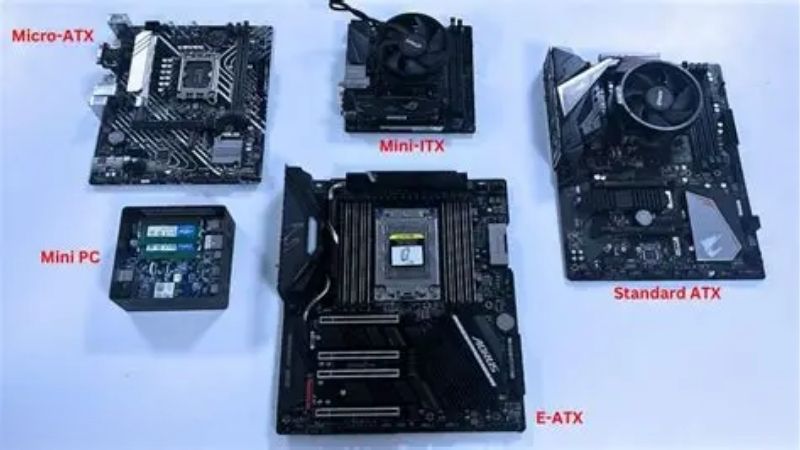
Micro-ATX sits between full ATX and mini-ITX, keeping four memory slots and a normal cooler mounting area while shortening the board. Four checks decide whether a given model gives up too much.
What the Smaller Format Actually Costs You
You lose expansion slots below the graphics card, which matters if you run a capture card, a sound card or a network adapter alongside it. Most gaming builds never use those slots at all.
Rear connectivity is usually trimmed too, with fewer USB ports and sometimes no high-speed ports at the back. Count what you actually plug in before assuming the reduced panel is a problem.
Unlike mini-ITX, micro-ATX keeps four DIMM slots on most models and the standard cooler keep-out area, so tower coolers and memory kits fit exactly as they would on a full-size board.
That is the main reason to choose this format over mini-ITX. You keep normal cooling options and memory capacity while shortening the board, which is a far smaller compromise than moving to a single expansion slot and two DIMMs.
Storage Slots and How Lanes Are Shared
Two M.2 slots are standard at the mid-range, with three on some models. The important detail is what happens when they are all populated, since a board may disable SATA ports or drop the graphics slot to eight lanes.
Check which slots run at Gen5 and which at Gen4. Gen5 drives are fast but run hot, and in a compact case an M.2 heatsink with airflow across it matters more than the rated sequential speed.
Slot position is worth checking too. A drive sitting directly beneath the graphics card runs considerably warmer, so on a two-slot board the second position is often the better home for a drive you write to heavily.
Power Delivery in a Shorter Board
Compressed layouts leave less room for VRM heatsinks, so the gap between a budget and a mid-range micro-ATX board is wider than at full size. That shows up under sustained all-core loads rather than in games.
For a six or eight-core processor, almost any current board is sufficient. For a twelve or sixteen-core chip in a small case, buy the model with visibly larger heatsinks and a stronger power stage arrangement.
Case airflow feeds directly into this. The best m-atx motherboard in a sealed chassis will still run its power stages hot, so a mesh front and a rear exhaust do part of the work a bigger heatsink would otherwise have to.
Case Fit, Cooler Clearance and Cable Routing
Micro-ATX fits both dedicated micro-ATX cases and any ATX chassis, which gives you flexibility. In a small case, check that the front panel and power connectors are not blocked by a radiator or drive cage.
Fan headers are often fewer on these boards. If you plan a well-ventilated build, budget for a powered fan hub rather than assuming four or five headers will be available.
Check the rear panel layout against your desk as well. Micro-ATX boards sometimes group USB ports tightly, which becomes awkward with wide wireless dongles or several thick cables in adjacent sockets.
Top Picks for the Best M-ATX Motherboard in 2026
These six cover both platforms from budget to upper mid-range. Specifications are manufacturer-listed and vary by revision, and retail pricing at the time of writing in August 2026 changes weekly.
| Board | Platform | Memory | M.2 slots | Notes |
|---|---|---|---|---|
| MSI MAG B650M Mortar WiFi | AM5 | Four DDR5 slots | Two | Strong power delivery |
| ASUS TUF Gaming B650M-Plus WiFi | AM5 | Four DDR5 slots | Two | Tool-free M.2 latches |
| Gigabyte B850M AORUS Elite WiFi7 | AM5 | Four DDR5 slots | Two or more | Gen5 storage, Wi-Fi 7 |
| ASRock B650M Pro RS | AM5 | Four DDR5 slots | Two | Budget pick |
| ASUS TUF Gaming B860M-Plus WiFi | LGA 1851 | Four DDR5 slots | Two or more | Current Intel platform |
| ASRock B760M Pro RS | LGA 1700 | DDR5 or DDR4 versions | Two or more | Reuse existing memory |
MSI MAG B650M Mortar WiFi
The Mortar is the best m-atx motherboard for most builders and the one they usually land on. Power delivery is generous for the format and handles a Ryzen 9 without complaint, and the board carries four DIMM slots, two M.2 slots and current wireless networking.
It costs more than the budget options, and MSI’s overlapping product names make it easy to order a lesser model by mistake. Rear USB count is adequate rather than generous.
ASUS TUF Gaming B650M-Plus WiFi
ASUS brings its quality-of-life features down to this tier, including tool-free M.2 latches that make storage installation quick. Power delivery suits any mainstream processor, and firmware is the most feature-complete here.
Pricing sits above equivalent boards from ASRock and Gigabyte for a similar specification. Heatsink coverage is good but not the largest in the group, which matters under long all-core loads.
Gigabyte B850M AORUS Elite WiFi7
This is the upper end of sensible micro-ATX: Gen5 storage support, current wireless, thick VRM heatsinks and enough power delivery headroom for high core counts in a compact case.
The firmware interface takes longer to learn than its rivals, and the extra heatsink mass makes some connectors awkward to reach once a graphics card is installed. Neither affects how it runs.
ASRock B650M Pro RS
ASRock puts a full four DIMM slots and two M.2 slots on a board priced well below the rest of this list, which makes it the obvious choice for a value AM5 build with a six or eight-core processor.
Wireless is absent on the base version, rear connectivity is thin and the VRM heatsinks are modest. Pair it with a high core count chip under sustained load and it will run hotter than the boards above.
ASUS TUF Gaming B860M-Plus WiFi
For a current Intel build, this covers the essentials with solid power delivery, tool-free storage installation and reliable firmware. It is the straightforward micro-ATX option on the newer socket.
The platform has a shorter road ahead than AM5, since Intel’s next generation requires another socket change. Price also sits above comparable boards from the value brands.
ASRock B760M Pro RS
The DDR4 versions of this board are the reason to consider it, letting you carry memory over from an older system and cut a significant cost from a budget build on a mature, well-supported platform.
LGA 1700 receives no future processors, so this is a value build today rather than an upgrade path. Rear connectivity and heatsink coverage reflect the price.
What 2026 Conditions Mean for Micro-ATX Buyers
Board and memory pricing have moved in different directions this year, which affects how to spread the budget around the best m-atx motherboard you choose. Three points matter.
AM5 Keeps Receiving Processors Through 2029
AMD confirmed at Computex 2026 that AM5 will accept new processors through the end of 2029, while Intel’s next generation moves to a new socket. A micro-ATX AM5 board can therefore serve two chips.
That makes the mid-range boards easier to justify than the cheapest ones, since the difference is spread over a longer service life and a future processor upgrade.
Memory Pricing Should Shape the Rest of the Budget
DRAM pricing has continued climbing through 2026, with forecasts revised upward for the second half of the year and new production capacity not expected before late 2027. Memory is now a larger share of a build than it used to be.
Buying the memory capacity you need once, rather than planning to add modules later at unknown prices, is the safer approach. That is one argument for four DIMM slots even in a compact build.
Cheap Boards Are Getting Scarcer
Motherboard sales have fallen more than twenty five percent, manufacturers have concentrated on mid and upper tiers, and promotional pricing ended in early 2026. Genuinely cheap boards with modern features are harder to find.
The mid-range now represents the clearest value, particularly in micro-ATX where heatsink area is already constrained by the format.
Availability is the other consideration. Micro-ATX ranges are smaller than full ATX to begin with, so when a popular model goes out of stock the alternatives at the same price point are limited.
Frequently Asked Questions
These come up most often once someone has shortlisted their best m-atx motherboard options and starts checking exactly what the smaller format gives up.
Does micro-ATX cool worse than full ATX?
The board itself does not change airflow, but shorter layouts leave less room for VRM heatsinks. In practice that only matters with high core count processors under sustained all-core load.
Can a micro-ATX board go in an ATX case?
Yes. ATX cases include micro-ATX standoff positions, so you gain flexibility rather than losing it. You simply leave the upper expansion slot positions unused.
Do these boards support a 360 mm radiator?
That depends on the case, not the board. Many micro-ATX chassis top out at 240 mm in the roof, so check the case specification before planning a larger loop.
Are four memory slots better than two?
Four slots allow later capacity increases, which matters with memory pricing rising. Two-slot boards can be marginally better for very high memory speeds, but the flexibility is usually worth more.
See More:
- What Is the Best Thermal Paste
- Best PC Case Fans 120mm
- Thermal Paste Best Brand
- Best Thermal Paste Brands
- Best CPU Cooler Reddit
Final Thoughts
The best m-atx motherboard for most builds is a mid-range AM5 model with four DIMM slots, two M.2 slots and visible VRM heatsinks, since that combination covers any mainstream processor and leaves an upgrade path through 2029. Buy budget only if your processor is modest, and check your case clearance and fan header count before ordering.











Write Your Review
No reviews yet. Be the first to share your experience!