
- Top Pick: ARCTIC Liquid Freezer III Pro 360 A-RGB – AIO CPU Cooler, Water Cooling
- Best Value: ARCTIC Liquid Freezer III Pro 360 – AIO CPU Cooler,3 x 120 mm Water Cooling
- Premium Choice: CORSAIR Nautilus 360 RS Liquid CPU Cooler – 360mm AIO – Low-Noise – Direct Motherboard Connection – Daisy-Chain – Intel LGA 1851/1700, AMD AM5/AM4 – 3X RS120 Fans Included – Black
What is the best AIO CPU cooler is really three questions: how much heat you need to move, how much radiator your case will accept, and how much noise you are prepared to live with. Answer those in order and the shortlist narrows to a handful of genuinely different designs. Radiator space usually decides it.
As an Amazon Associate we earn from qualifying purchases at no extra cost to you.





As an Amazon Associate we earn from qualifying purchases at no extra cost to you.
By Ryan Cole
How to Choose the Best AIO CPU Cooler for Your Build
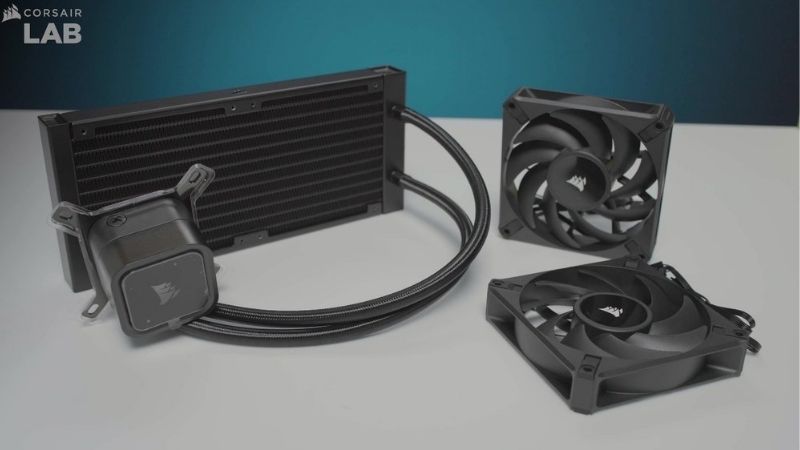
An all-in-one liquid cooler is a closed loop with a pump, tubing and a radiator. The parts that vary between models are radiator area, radiator thickness, pump behaviour and fan quality, and each one changes the result in a predictable way. Working out what is the best AIO CPU cooler means comparing those four things.
Radiator size and thickness
Radiator surface area sets the ceiling on how much heat the loop can shed. A 240mm unit suits processors in the 125W to 180W range, while 280mm and 360mm sizes give the margin needed by chips that sustain 200W or more during long workloads. Radiator length is the first number your case specification will limit.
Thickness matters almost as much as length. Most radiators measure between 27mm and 30mm, but some run to 38mm, which adds capacity while risking collisions with motherboard heatsinks when the unit is mounted in the top position of a case. Measure the gap above the motherboard before choosing a thick radiator.
Pump design, speed control and noise
The pump moves fluid between the cold plate and the radiator, and it runs constantly. A pump connected to a PWM header can be curved down during light workloads, whereas one wired to a fixed voltage header simply runs at full speed all the time. A pump left at full duty is the most common source of unexplained hum.
Pump noise is a low hum rather than the airflow rush of a fan, so it is more noticeable in a quiet room. Look for models with a documented PWM pump range, and expect to spend a few minutes tuning the curve in BIOS after installation. Tuning the pump curve takes a few minutes and is worth doing.
Fans, static pressure and mounting position
Radiator fans push air through dense fins, which needs static pressure rather than raw airflow. Ratings above roughly 2 mmH2O are typical for fans supplied with quality units, and a wide PWM range keeps the system quiet when the load is light. Static pressure ratings appear in the fan specification.
Mounting position changes results too. A front-mounted radiator draws cool outside air across the fins and warms the case slightly, while a top mount exhausts directly but receives air already heated by the graphics card during gaming sessions. Front intake usually wins on CPU temperature.
Case compatibility and tubing routing
Before buying, confirm the radiator length your case supports, the clearance above the motherboard, and whether tubing exits at the correct end for your layout. A 360mm radiator typically needs around 400mm of rail plus room for fittings and bends. Clearance decides what is the best AIO CPU cooler far more often than performance does.
Tubing length and stiffness decide how tidy the build looks. Short, stiff tubes can pull awkwardly on the pump block in tall cases, so check reviews or product photos of a build similar to yours before committing to a specific model. Look for a build using your exact case before committing to a model.
Top Picks: Five AIO Coolers Worth Buying in 2026
These five units cover capacity, quiet operation, ecosystem features, display extras and budget. Deciding what is the best AIO CPU cooler for you starts with the radiator size your case allows, so check that column first. Stock and pricing were checked in August 2026 against current listings.
| Cooler | Radiator | Notable feature | Best for |
|---|---|---|---|
| Arctic Liquid Freezer III 360 | 360mm, 38mm thick | VRM fan on pump block | Maximum capacity |
| NZXT Kraken 360 | 360mm, 27mm thick | Round LCD display | Display and software |
| Corsair iCUE Link H150i | 360mm, 27mm thick | Single-cable fan chain | Cable management |
| Lian Li Galahad II Trinity 360 | 360mm, 27mm thick | Daisy-chained fans | Balanced all-rounder |
| Cooler Master MasterLiquid 360L Core | 360mm, 27mm thick | Dual-chamber pump | Budget builds |
Arctic Liquid Freezer III 360
Arctic uses a thicker 38mm radiator than most competitors and mounts a small fan on the pump block to cool the voltage regulators around the socket. The bundled P12 PRO fans have a wide PWM range, so the unit can stay quiet at low loads. That block fan is a genuine functional extra rather than a styling choice.
The extra thickness limits where it fits, particularly in top-mount positions in mid-towers with tall motherboard heatsinks. The cabling around the pump is also untidy compared with newer ecosystem designs, and the base model has no lighting at all. Check the space above your memory before planning a top mount.
NZXT Kraken 360
The Kraken’s round LCD screen is the headline, showing temperatures, images or system data through NZXT’s software. Underneath it is a conventional 27mm radiator with three 120mm fans, and the pump block rotates so the display stays upright in any orientation. The screen is the reason to buy it.
You pay a premium for the screen, and the cooling result is close to units costing considerably less. The software also has to run continuously for display features, which some builders would rather avoid on a gaming system. Software running permanently is a fair trade only if you use the display.
Corsair iCUE Link H150i
Corsair’s Link system chains the radiator fans together so a single cable returns to a hub, which removes most of the wiring behind the tray. For builders who dislike cable spaghetti, that is a genuine practical benefit rather than a marketing feature. Cable clutter behind the tray is a real build quality issue.
The trade-off is lock-in: expansion means buying more Link components rather than standard fans. It is also among the most expensive options here, and iCUE software is heavier than the utilities bundled with competing coolers. Plan the fan count at purchase, because expanding later costs more.
Lian Li Galahad II Trinity 360
This is the balanced choice, pairing a standard 27mm radiator with daisy-chained fans that reduce cabling without a proprietary ecosystem. Build quality is high, the pump runs quietly on a sensible curve, and mounting hardware covers current AMD and Intel sockets. It is the safe recommendation if no single feature appeals.
There is no screen and no VRM fan, so it lacks a standout feature next to rivals. Lian Li also sells several similar variants with different pump tops, which makes choosing the right listing more confusing than it should be. Read the model number carefully so you buy the version you intended.
Cooler Master MasterLiquid 360L Core ARGB
The budget entry covers the essentials: a 360mm radiator, three ARGB fans and a dual-chamber pump that separates incoming and outgoing coolant. For a mid-range processor it delivers most of the benefit of pricier units at a noticeably lower price. For a mid-range chip that is most of the benefit for less money.
Fan and pump acoustics are less refined at high speed, and the bundled software is basic compared with Corsair or NZXT. Warranty terms are also shorter than some rivals, which is worth weighing on a component that contains a moving part. Warranty length carries real weight on any sealed liquid unit.
What the 2026 Market Means for Liquid Cooling
Cooling is one of the few component categories behaving predictably this year, which affects both what to buy and when to buy it. Two market factors are directly relevant. They also shape the answer to what is the best AIO CPU cooler right now, because timing affects price more than usual this year.
Cooler pricing has moved, but modestly
Coolers have seen roughly 6% to 8% price movement and power supplies around 6% to 10%, with promotional pricing policies withdrawn from the start of February 2026. Compared with the memory market, that is a mild shift rather than a disruption. Cooling has stayed close to normal while other categories have not.
The effect is that budget and mid-range liquid coolers now sit closer together than they did a year ago. Prices quoted here reflect August 2026, and it is worth confirming the current figure and stock status on the listing before ordering. Confirm stock as well as price.
November discounts still apply to cooling
The usual advice to wait for late November does not hold for memory, storage or prebuilt systems, because that stock was built against high 2026 contract pricing. Coolers, fans and cases are outside that constraint and should see genuine reductions. Cooling hardware is not tied to the memory contract problem.
If your system runs stably today, waiting until 27 November is a reasonable plan for a liquid cooler purchase. If it is throttling under load in the meantime, fresh thermal compound is a cheap interim fix worth doing first. Paste is a cheap holding measure while you decide what is the best AIO CPU cooler for your case.
When an AIO is not the right purchase
With no new CPU or GPU generation arriving before CES in January 2027, spending on cooling is defensible. Even so, if your processor sits well below its thermal limit under load, a liquid cooler buys aesthetics and a little quiet rather than performance. Spending on cooling is defensible; spending on a screen is a choice.
Air cooling remains the better value for chips under roughly 150W, and it has no pump to fail. Choose liquid when radiator space is available and the processor genuinely sustains high power, not because a screen looks good in build photos. Air cooling also has no pump to fail three years from now.
Frequently Asked Questions
Common questions from readers weighing an all-in-one liquid cooler against air, covering lifespan, maintenance, sizing and leaks. They cover what happens after installation rather than at the shopping stage, which is where most readers asking what is the best AIO CPU cooler end up.
How long does an AIO cooler last?
Manufacturers generally quote pump lifetimes in tens of thousands of hours and back units with warranties between three and six years. The pump is the wear item, so a longer warranty is a reasonable proxy for the confidence a brand has in its own design. Treat the warranty as the number that matters most here.
Do AIO coolers need refilling?
Sealed units are not designed to be topped up, and most have no fill port. Small coolant losses through the tubing occur very slowly over years, which is one reason capacity gradually declines rather than failing suddenly in a healthy unit. Slow coolant loss is normal and not a sign of a defect.
Is 240mm enough, or should I buy 360mm?
A 240mm radiator handles mid-range processors comfortably. Move to 360mm when the chip sustains 200W or more, or when you want the same temperatures at lower fan speeds, which is usually the more compelling reason for the upgrade. Lower fan speed for the same temperature is the real upgrade.
Are leaks a real risk?
Failures are uncommon in units from established brands, and most problems reported are pump noise or pump failure rather than coolant escaping. Mounting the radiator so the tubes are not at the highest point of the loop also helps reduce air noise over time. Mount the radiator so the tubes are not the highest point.
See More:
- best CPU cooler for Ryzen 5 5600X
- best small form factor CPU cooler
- best SFF CPU cooler
- best CPU cooler for i9-14900K
Final Thoughts
Asking what is the best AIO CPU cooler leads back to your own constraints: radiator clearance, processor power and noise tolerance. Confirm what your case accepts, match the radiator to the heat your chip actually produces, then choose the quietest unit in that size class. The rest is preference rather than performance.











Write Your Review
No reviews yet. Be the first to share your experience!