
Best RAM sticks for gaming is slightly the wrong way to frame the purchase, because the best RAM sticks for gaming are never bought individually. Memory is sold and validated as matched kits, and mixing separately purchased modules is one of the most common causes of instability in an otherwise healthy build.
As an Amazon Associate we earn from qualifying purchases at no extra cost to you.




As an Amazon Associate we earn from qualifying purchases at no extra cost to you.
By Ryan Cole
How to Choose the Best RAM Sticks for Gaming
Memory specifications look complicated but only three numbers matter for gaming. These four checks cover those, plus the mistake that causes most problems when buying the best RAM sticks for gaming.
Always Buy a Matched Kit
Two modules sold together are tested to run at their rated speed as a pair. Two identical modules bought separately are not, and may refuse to run at the advertised profile together.
Adding a second kit later to double capacity carries the same risk. If you think you will want 64GB eventually, buying a 64GB kit now is safer than adding to a 32GB pair.
Two sticks also beat four at high speeds. Populating all four slots increases the load on the memory controller and often forces a lower stable frequency on both AMD and Intel platforms.
Match Speed to the Platform, Not the Box
On AM5, DDR5-6000 with the memory controller running in sync is the practical sweet spot, and faster kits usually require a divider that undoes the gain. On Intel, higher speeds scale further.
On DDR4, the equivalent target is 3600 MT/s for AM4 and 3200 to 3600 for Intel boards. Beyond that, gains are small and stability becomes harder to achieve.
Check your motherboard’s memory support list if you plan to run a high-speed kit. Boards vary in how many modules they can drive at a given frequency, particularly with four slots filled.
Read the Timings, Not Just the Speed
A DDR5-6000 CL30 kit outperforms a DDR5-6400 CL40 one in most workloads, because the lower latency more than compensates for the small frequency difference.
CAS latency is the headline number, and it is the one worth comparing between kits of the same speed grade. Tighter secondary timings help too but are harder to compare across brands.
Kits built on well-regarded memory chips tune further if you ever want to adjust them manually. That only matters to enthusiasts, since a rated profile covers everything most builders need.
Choose Capacity Over Everything Else
32GB is the sensible target for a gaming build in 2026, with 16GB now the bare minimum for current titles. Running short of memory causes stutter, which is far worse in play than slightly lower bandwidth.
64GB only helps if you record, stream or run creative applications alongside games. At current memory prices, that capacity is a significant cost for a benefit most players never see.
Buy the capacity in one kit rather than planning to expand later. Adding a second pair down the line often forces a lower speed and reintroduces the compatibility risk you avoided at the start.
Top Picks: Best RAM Sticks for Gaming
The best RAM sticks for gaming are always sold as kits, so these six DDR5 and DDR4 sets are chosen on the balance of speed, timings and price. Memory pricing is moving quickly this year, so check current listings before ordering.
| Kit | Type | Speed | Timings | Best For |
|---|---|---|---|---|
| G.Skill Trident Z5 Neo RGB | DDR5 | 6000 MT/s | CL30 | Best AM5 pairing |
| Corsair Vengeance DDR5 | DDR5 | 6000 MT/s | CL30 | Best all-round pick |
| Kingston FURY Beast DDR5 | DDR5 | 6000 MT/s | CL36 | Value DDR5 |
| Crucial Pro DDR5 | DDR5 | 5600 MT/s | CL46 | Plain, broad compatibility |
| G.Skill Ripjaws V DDR4 | DDR4 | 3600 MT/s | CL16 | Best DDR4 kit |
| Corsair Vengeance LPX DDR4 | DDR4 | 3200 MT/s | CL16 | Low profile DDR4 |
G.Skill Trident Z5 Neo RGB
DDR5-6000 CL30 with an EXPO profile tuned for AM5 makes this the natural pairing for a Ryzen build. The memory controller runs in sync at this speed, which is where the platform performs best.
The tall heat spreader can interfere with large air coolers, so check the clearance figure before buying. It also carries a price premium over plainer kits with effectively the same underlying performance.
Corsair Vengeance DDR5
The same 6000 CL30 target in a lower-profile package with both EXPO and XMP profiles, making it a safe choice regardless of which platform you are building on.
The non-RGB version is noticeably cheaper and performs identically, so buy that unless lighting genuinely matters to the build. Corsair’s compatibility list is worth checking against your specific board model first.
Kingston FURY Beast DDR5
A 6000 MT/s kit at looser CL36 timings, sold at a lower price than the CL30 options. The performance difference in games is small enough that the saving usually makes sense.
You give up a little latency and some tuning headroom compared with the tighter kits above. For a build that will run at its rated profile and never be adjusted afterwards, that is a reasonable trade.
Crucial Pro DDR5
Plain modules built on Micron silicon with conservative JEDEC-adjacent timings, which makes them exceptionally reliable across boards that are known to be fussy about memory compatibility.
They are also the safest choice when populating four slots, where tuned high-speed kits often refuse to run at their rated profile with every slot filled.
Performance trails the tuned 6000 CL30 kits, and there is no lighting or heat spreader styling. Buy it for compatibility and price rather than benchmark position.
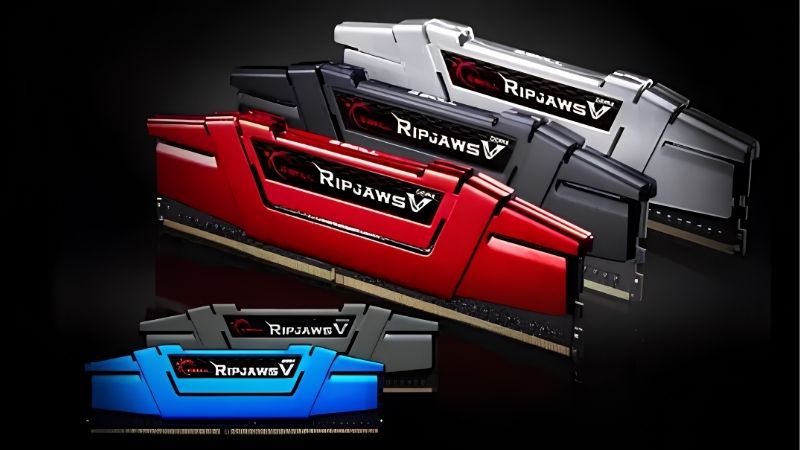
G.Skill Ripjaws V DDR4
DDR4-3600 CL16 remains the sweet spot for AM4 builds, keeping the Infinity Fabric in sync while offering tight timings. It also works well on Intel DDR4 boards.
The category is shrinking as manufacturers shift production toward DDR5, so availability of specific capacities varies between retailers. Prices have also risen along with the wider memory market this year.
Corsair Vengeance LPX DDR4
A low-profile DDR4 kit that clears every large air cooler without difficulty, running at 3200 CL16 which suits Intel DDR4 boards and works acceptably on AM4.
3200 is a step below the AM4 sweet spot, so Ryzen builds lose a small amount of performance. The clearance advantage matters more in a build with a large dual-tower cooler.
What 2026 Memory Prices Mean for This Purchase
Memory has been the most volatile component category this year, and that changes the usual advice about buying more than you need.
Prices Rose Through Both Halves of the Year
DRAM contract pricing climbed through Q3 and Q4 of 2026, with NAND following, and new manufacturing capacity is not expected before late 2027. Supply for this year is largely committed already.
That means buying the best RAM sticks for gaming is about buying the right capacity rather than the most you can afford. Over-buying costs considerably more than it did a year ago.
Late-Year Sales Will Not Rescue This Category
Stock sold in November is built from expensive contract memory, so the usual advice to wait for a sale does not apply to RAM, SSDs or prebuilt systems this year.
Coolers, cases, fans and motherboards still discount normally. If you are timing a build, buy the memory when you need it and time the other components around a sale instead.
32GB Is the Sensible Landing Point
Given pricing, 32GB at a good speed grade is the right target for almost every gaming build. It covers current titles comfortably without paying for capacity that sits unused.
If you already own a working 16GB kit, adding capacity is less urgent than it looks. Check whether the games you play are actually running short of memory before spending at current prices.
Task manager during a long session is enough to tell. If usage sits well below the limit with a browser open alongside the game, the upgrade can wait until pricing settles down.
Nothing arriving before CES in January 2027 changes this either. Zen 6 and Nova Lake have both slipped to next year, so no platform launch will suddenly shift memory requirements.
That also means a kit bought today stays relevant. DDR5 remains the standard on both current sockets, so the modules carry into your next build as long as you stay on DDR5.
Frequently Asked Questions
These four questions cover the most common confusion in this category, particularly around mixing kits and choosing speed grades.
Can I mix RAM sticks from different kits?
It sometimes works but is not validated, and the system may refuse the rated profile or become unstable under load. Buying a single matched kit avoids the problem entirely.
Is 32GB necessary or is 16GB enough?
16GB runs current games, but several recent titles push close to that limit with background applications open. 32GB is the comfortable target and the sensible choice for a new build.
Does faster memory actually improve frame rates?
Yes, but modestly, and mainly at 1080p where the processor sets the pace. At 1440p and 4K the graphics card is the limit, so speed matters far less than having enough capacity.
Should I enable EXPO or XMP?
Yes. Without it, memory runs at a conservative default speed well below what you paid for. Enabling the profile in BIOS is a single setting and is the whole point of buying a rated kit.
See More:
Final Thoughts
The best RAM sticks for gaming are a matched 32GB kit at DDR5-6000 CL30 for a current build, or DDR4-3600 CL16 if you are on an older platform. Buy two modules rather than four, enable the profile in BIOS, and resist over-buying capacity at current prices. Capacity and a working profile matter far more than chasing the highest speed grade on the shelf.











Write Your Review
No reviews yet. Be the first to share your experience!