
Best CPU cooler for gaming is not a single product, because a Ryzen 5 and a Core Ultra 9 need very different amounts of capacity. This guide matches one cooler to each realistic tier, from a sub-$25 tower to a thick 360mm radiator, with the clearance figures that decide whether it actually fits the case you already own.
As an Amazon Associate we earn from qualifying purchases at no extra cost to you.








As an Amazon Associate we earn from qualifying purchases at no extra cost to you.
By Ryan Cole
How to Pick the Best CPU Cooler for Gaming
Over-buying wastes money and case space; under-buying costs boost clocks. These four checks put you in the right tier before you start comparing individual models of the best CPU cooler for gaming.
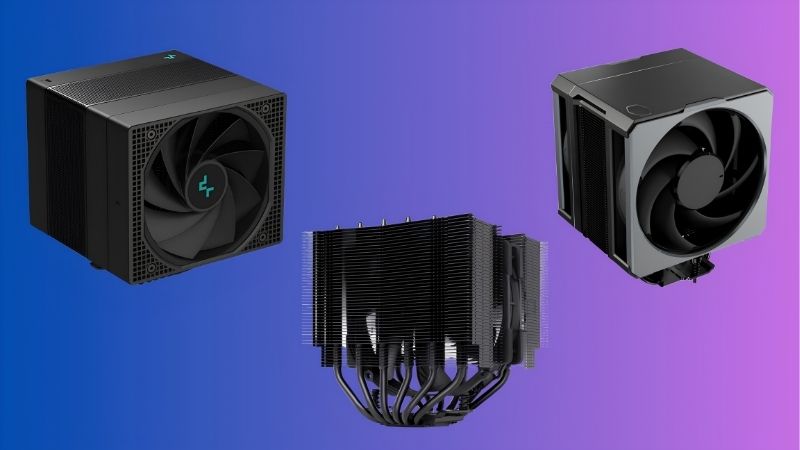
Find Your CPU’s Power Tier First
Chips split roughly into three groups: 65W-class parts like the Ryzen 5 9600X and Core i5, 105-142W parts such as the Ryzen 7 9800X3D and Core i7, and flagship parts that can pull well past that under load.
The first group runs fine on an entry tower. The second wants a proper dual tower or a thick 240mm radiator. Only the third genuinely benefits from 360mm liquid, and even then mostly during long all-core work.
Gaming rarely loads all cores at once, so a chip that looks demanding on paper may sit well below its ceiling in practice. Check what your actual games pull before paying for headroom you never use.
Let the Case Narrow the Field
Cooler height limits are printed in every case manual and are worth trusting. A 168mm tower in a chassis rated for 165mm does not fit, regardless of how many builders claim they forced the panel closed.
Radiator support is equally specific. Some cases list 360mm roof support but only with slim radiators, and front mounts often conflict with the front edge of a long motherboard or a tall RAM kit.
Measure once with the side panel off and a tape measure against the motherboard tray. It takes two minutes and prevents the most common return in the whole cooling category.
Decide How Quiet You Want the Build
A larger cooler at the same temperature runs slower and quieter, which is the main reason to move up a tier. If your machine sits on the desk rather than under it, that difference is worth real money.
Fan quality matters as much as size here. Cheap fans at low RPM often produce more motor hum and bearing noise than a good fan spinning faster, so the quiet option is not always the biggest one.
Pump noise is the AIO equivalent. A pump running at a fixed moderate speed is usually less intrusive than one that ramps with load, and most software lets you set that manually.
Think About the Next CPU, Not Just This One
AMD has committed to supporting AM5 with new processors through 2029, so a cooler bought for an AM5 board today will almost certainly serve the chip that replaces the current one.
Intel builders should note the next platform changes socket, so check whether your chosen brand ships free brackets for new sockets. Several do; a few charge for them or quietly discontinue older kits.
Brand longevity matters more than it looks. A cooler from a company that still supplies brackets a decade later can move through two or three builds instead of being scrapped with the board.
Top Picks: Best CPU Cooler for Gaming by Tier
One pick per tier, so you can find your chip in the table and stop comparing. The best CPU cooler for gaming at 65W is not the same product as the one a flagship needs. Specifications are from manufacturer documentation, and street pricing shifts week to week in the current market.
| Cooler | Tier | Height / Radiator | Suits |
|---|---|---|---|
| Thermalright Assassin X 120 R SE | Entry | 150mm | 65W chips, i3 / R5 |
| Thermalright Phantom Spirit 120 SE | Mid-range | 154mm | i5 / R5 / R7 gaming |
| Deepcool AK500 | Mid, tight cases | 158mm single tower | Narrow chassis, tall RAM |
| Noctua NH-D15 G2 | Flagship air | 168mm | i9 / R9, silent builds |
| Arctic Liquid Freezer III 360 | Flagship liquid | 360mm, 38mm thick | High-draw Intel |
| Noctua NH-L12Sx77 | Small form factor | 77mm | ITX and console-size cases |
Thermalright Assassin X 120 R SE
A single-tower, four-heatpipe design at 150mm, this is the honest floor of the category. On a 65W chip it holds temperatures well below throttling while costing about the same as a decent set of case fans.
It runs out of capacity on anything above the mid tier, and the single fan is audible at full speed. As a replacement for a stock cooler on a budget gaming build, it is hard to beat.
Thermalright Phantom Spirit 120 SE
Seven heatpipes and two fans in a 154mm dual-tower package make this the sweet spot for most gaming builds. It covers everything from a Core i5 to a Ryzen 7 without any thermal drama.
The mounting hardware is functional rather than refined, and the bundled paste is worth replacing. Otherwise this is the cooler most people should buy and then stop thinking about.
Deepcool AK500
When a dual tower will not clear RAM or the side panel, a strong single tower solves it. The AK500 uses five heatpipes with a flat contact base and keeps the fan clear of the first DIMM slot.
You give up a few degrees against dual towers at the same price, and the single fan works harder for the same result. In a narrow chassis that is the correct trade to make.
Noctua NH-D15 G2
Eight heatpipes, two 140mm NF-A14x25 G2 fans and a 168mm stack put this at the top of air cooling, with LBC and HBC versions offset for different socket hotspots. The warranty runs six years.
It is expensive, tall, and picky about case clearance and RAM height. Choose the wrong variant for your socket and you lose part of the advantage you paid for, so read the model suffix carefully.
Arctic Liquid Freezer III 360
A 38mm-thick radiator, P12 Pro fans and a VRM fan on the pump block give this AIO more capacity per dollar than anything else in the segment. It is the pick for a flagship Intel chip.
Roof clearance is the constraint, since radiator plus fans needs more than 60mm. The VRM fan also adds a faint idle whir, which matters only in a genuinely silent room.
Noctua NH-L12Sx77
At 77mm this low-profile cooler fits compact cases while handling considerably more heat than a 47mm design. Air moving downward also cools the VRM and M.2 slots that towers leave untouched.
It costs more than some full-size towers and still cannot match them under sustained load. In an SFF build with a mid-range chip, it is the sensible ceiling.
What 2026 Prices Mean for This Purchase
Cooling sits in an unusual position this year: prices rose modestly while other categories moved sharply, which changes the calculation around when to buy.
Waiting for Newer Hardware Buys You Nothing
RTX 50 Super, Zen 6 and Intel Nova Lake have all shifted to CES in January 2027. There is no cooling-relevant launch between now and then, and socket standards are not changing in the meantime.
That makes the best CPU cooler for gaming an unusually safe purchase right now. Whatever you buy will still mount on the platform you are running through at least one more CPU generation.
Budget Options Are Thinner Than They Were
Motherboard sales fell more than 25% and manufacturers concentrated on mid and high-end SKUs, with cooler and PSU pricing up roughly 6-8% and promotional pricing rules tightened from February.
Practically, that means fewer sub-$30 coolers worth owning and more pressure to step up a tier. Entry models from established brands are still fine; the disposable no-name tier has largely disappeared.
A Cooler Is the Cheapest Real Upgrade Left
With GPU prices up sharply and memory locked into expensive contracts, cooling is one of the few areas where modest spending still produces a measurable change in how a machine performs and sounds.
If your CPU is hitting its thermal ceiling in long sessions, a better cooler recovers clock speed that is currently being trimmed away. That is a genuine gain, not a marketing figure.
Frequently Asked Questions
Once the tier is clear, these four questions decide most purchases of the best CPU cooler for gaming, so they are worth settling before you order anything.
Is the stock AMD or Intel cooler good enough?
For a 65W chip in a well-ventilated case, a stock cooler prevents throttling but runs loud under load. Any decent aftermarket tower drops both temperature and noise noticeably, which is why it is the standard first upgrade.
Does an X3D chip need a bigger cooler?
No. X3D parts have a lower power ceiling than flagship Intel chips, but they concentrate heat in a small area, so contact quality matters more than raw capacity. A quality dual tower is plenty.
Should I buy a cooler with a display?
Only if you actively tune the chip. A readout is useful while adjusting PBO or power limits, but it adds cost and a USB header requirement without improving cooling performance in any way.
Can I reuse my cooler on a new motherboard?
Usually yes, provided the bracket for the new socket exists. Most major brands sell or supply upgrade kits, and AM4 to AM5 keeps the same mounting hole spacing, which simplifies that particular move.
See More:
Final Thoughts
The best CPU cooler for gaming is the one sized to your chip and your case, not the largest one your budget technically allows. Identify your power tier, check the height and radiator figures in your case manual, then buy the quietest option in that tier. On AM5 in particular, a good cooler bought now will outlast the processor it is cooling.










Write Your Review
No reviews yet. Be the first to share your experience!