
- Top Pick: NEWEGG Motherboard CPU Memory Combo -B550M Motherboard Bundle with Ryzen 5 5500 6-Core 3.6 GHz Socket AM4 65W CPU and 16GB (2 x 8GB) 288-Pin PC RAM DDR4 3200 Desktop Memory
- Best Value: Micro Center CPU Motherboard Combo – Intel i9-14900K 14th Gen 24-Cores LGA 1700 Desktop Processor Bundle with TUF Gaming Z790-Plus WiFi Gaming Motherboard
- Premium Choice: MICRO CENTER AMD 5500 Processor with ASUS TUF Gaming A520M Plus Motherboard
Best motherboard CPU combo decisions go wrong in one of two directions: a fast processor crippled by a board that cannot feed it, or an expensive board carrying a chip that will never use half its features. Balancing the two halves against each other, and against the memory and cooler they need, is most of the job here.
As an Amazon Associate we earn from qualifying purchases at no extra cost to you.


As an Amazon Associate we earn from qualifying purchases at no extra cost to you.
By Ryan Cole, PC hardware writer at NvidiaReview
How to Choose the Best Motherboard CPU Combo
Picking the best motherboard CPU combo means treating both parts as one purchase with one budget. Three things settle it: confirming socket and firmware compatibility, matching the board tier to what the processor actually demands, and remembering the memory and cooler that come with them.
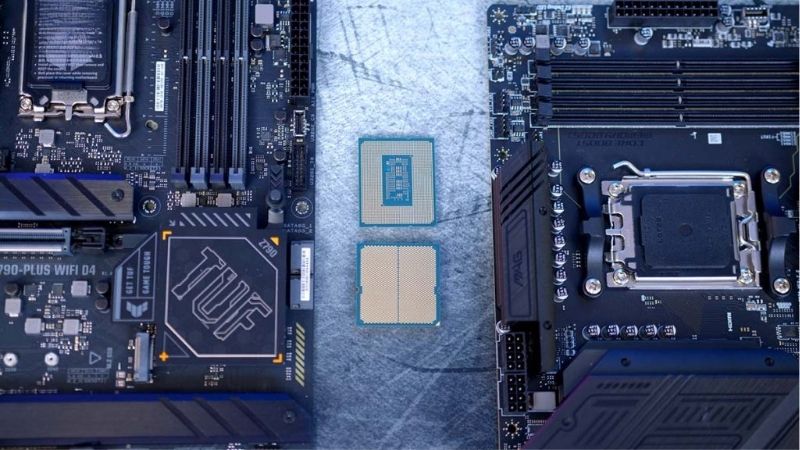
Socket, Chipset and BIOS Compatibility
Match the socket first: AM5 for current Ryzen chips with DDR5, AM4 for the Ryzen 5000 series with DDR4, and Intel’s LGA1851 for its newest processors. A board and chip on different sockets is the most expensive mistake available, and no adapter exists to bridge them.
Firmware matters almost as much on older boards. A board that has sat in a warehouse may ship with firmware predating your processor, so check the vendor support list and strongly prefer boards with BIOS Flashback, which lets you update with no chip installed at all.
Matching Board Tier to Processor Demand
An eight-core gaming chip capping at 162W runs perfectly on a mainstream board, and pairing it with a flagship buys connectivity rather than performance. A 16-core processor pulling toward 230W is different, and there a board with heavy VRM heatsinks genuinely earns its price.
The reverse mistake is just as common. Putting a high-core-count processor on an entry board with thin power delivery produces throttling during sustained loads, which no amount of cooling elsewhere fixes. Aim for a board one tier above the minimum your chip requires.
Budget for the Memory and Cooler Too
A combo is really four purchases. Current AM5 chips want a 6000 MT/s EXPO kit running a 1:1 memory controller ratio, and DDR5 pricing has risen enough in 2026 that it now takes a much larger share of the total than most people planning a build expect it to.
Cooling is the fourth. Many Ryzen processors ship without a cooler, and the ones that include one deserve better for sustained loads. Factoring both into the combo budget from the start avoids the familiar situation of a fast chip throttling under a bundled heatsink.
Top Picks: Best Motherboard CPU Combo for Each Budget
These five pairings for the best motherboard CPU combo run from a budget AM4 upgrade to a 16-core workstation. All figures are vendor-published specifications, and availability varies by retailer, so confirm both parts before ordering. Pricing tiers were checked in August 2026.
| Processor | Motherboard | Platform | Memory | Best for |
|---|---|---|---|---|
| Ryzen 5 5600 | MSI MAG B550 Tomahawk | AM4 | DDR4 | Budget builds |
| Ryzen 5 8600G | ASRock B650M Pro RS | AM5 | DDR5 | No discrete graphics |
| Ryzen 5 7600 | ASUS TUF Gaming B650-Plus WiFi | AM5 | DDR5 | Mainstream gaming |
| Ryzen 7 9800X3D | MSI MAG B850 Tomahawk WiFi | AM5 | DDR5 | High-end gaming |
| Ryzen 9 9950X3D | MSI MAG X870 Tomahawk WiFi | AM5 | DDR5 | Gaming and production |
Ryzen 5 7600 with ASUS TUF Gaming B650-Plus WiFi – Best Overall
Six cores and twelve threads at up to 5.1GHz covers 1080p and 1440p gaming comfortably, and the TUF board provides a DrMOS power array, four DIMM slots, a PCIe 5.0 storage slot and firmware that behaves predictably. Neither half limits the other in any meaningful way.
Six cores is starting to show its age with heavy background tasks such as capture software running alongside a game. The board offers Wi-Fi 6 rather than newer standards. As a balanced pairing on a socket supported through 2029, it is the sensible default for most builds.
Ryzen 5 5600 with MSI MAG B550 Tomahawk – Best Budget Combo
On AM4 with DDR4, this pairing costs a fraction of a current-generation equivalent. The 5600 delivers six cores at up to 4.4GHz within 65W, and the B550 Tomahawk provides PCIe 4.0, dual M.2 slots and power delivery well beyond what this processor asks for.
AM4 has reached the end of its life, so there is no meaningful upgrade path beyond the Ryzen 5000 series, and DDR4 pricing has risen alongside everything else. Where the goal is a working gaming machine for the least money, it remains genuinely hard to beat.
Ryzen 7 9800X3D with MSI MAG B850 Tomahawk WiFi – Best for Gaming
Eight cores with 96MB of L3 cache makes this among the strongest gaming processors available, and pairing it with a mainstream B850 board rather than a flagship is deliberate. At a 162W package limit, the Tomahawk’s power delivery has enormous margin and identical frame rates.
The chip runs warm because of its stacked cache die, so budget for a proper dual-tower cooler rather than a bundled one. The board lacks USB4. Together they represent the point where spending more on either half stops producing any measurable improvement in games.
Ryzen 5 8600G with ASRock B650M Pro RS – Best Without a Graphics Card
With graphics card prices where they are, a processor with capable integrated graphics is a legitimate strategy. The 8600G handles esports titles and light gaming without a discrete card, and the budget Micro-ATX board keeps the rest of the platform cost minimal.
Integrated graphics remain well behind even entry discrete cards for modern titles, and this chip carries less cache than its siblings. It is a stopgap rather than a destination. As a way to build now and add a graphics card when prices settle, it works well.
Ryzen 9 9950X3D with MSI MAG X870 Tomahawk WiFi – Best for Mixed Work
Sixteen cores with stacked cache on one die handles gaming and production equally, and this is the pairing where board choice genuinely matters. The X870 Tomahawk provides 14+2+1 power stages with 80A parts, dual 8-pin connectors and USB4, which suits a 230W package limit.
It is an expensive combination, and gaming alone does not justify it over the eight-core option. Sustained all-core work also needs a 360mm cooler and real case airflow. For a machine that earns its keep between gaming sessions, the extra cores and connectivity pay for themselves.
What the 2026 Market Means for Combo Buyers
Buying both core components together in 2026 means navigating a market that has shifted since most build guides were written, which changes what the best motherboard CPU combo looks like. Three factors should shape the decision before you order either half.
Nothing New Launches Before CES 2027
AMD’s Zen 6 processors and Intel’s Nova Lake have both slipped to CES in January 2027. If you were holding off on a combo purchase to see what appears next, the honest answer is that nothing significant arrives until then, so waiting means waiting well into next year.
That stability has an upside. Current platforms are mature, firmware is well tested, and the memory compatibility quirks that troubled early adopters have largely been resolved. Buying now means fewer surprises during assembly than the same combination caused a year ago.
AM5 Has a Confirmed Path to 2029
AMD committed at Computex 2026 to supporting socket AM5 with new processors until the end of 2029, while Intel’s next generation requires a different socket. For a combo purchase, that turns the board into a longer-term asset than the processor sitting on it.
It also changes how to split the budget. If a newer chip may drop into the same board in 2028, spending slightly more on power delivery and firmware quality is easier to justify than buying the cheapest board that will run today’s processor and nothing beyond it.
Memory Now Competes With Both Halves
DRAM prices have climbed substantially through 2026, with further increases forecast and no meaningful new capacity before late 2027. A 32GB DDR5 kit now takes a far larger share of a build than it did, which squeezes what remains for the processor and board.
The practical response is to buy the memory capacity you genuinely need rather than overspecifying, target 6000 MT/s with tight timings, and absorb the pressure on the board rather than the processor. A cheaper board with a faster chip beats the reverse in almost every workload.
Frequently Asked Questions
The questions builders ask most when buying both core parts together: whether bundles genuinely save money, how to check compatibility properly, which half deserves the larger share of the budget, and whether the best motherboard CPU combo must be a current-generation one.
Do combo bundles actually save money?
Sometimes, particularly in physical stores where processor and board bundles are discounted meaningfully. Online bundles vary, and it is worth pricing both parts separately before assuming the package is cheaper. The saving, where it exists, is usually on the two most expensive core parts.
How do I confirm the two parts work together?
Match the socket, then check the board vendor’s processor support list for your exact model and note the required BIOS version. If your chip is newer than the board generation, prefer a board with BIOS Flashback so you can update firmware without borrowing another processor.
Should I spend more on the board or the processor?
The processor, in almost every case. A mainstream board runs any gaming chip at full speed, while a faster processor genuinely changes performance. Only high-core-count chips under sustained load justify moving budget toward the board for better power delivery and cooling.
Is an AM4 combo still sensible in 2026?
Only for a tight budget or when reusing existing DDR4 memory. The platform is finished, so there is no upgrade path beyond the Ryzen 5000 series. For a new machine you expect to keep, AM5 costs more initially but has processor support running through 2029.
See More:
- Best thermal compound paste
- Thermal paste at Best Buy
- Graphics card at Best Buy
- Best AM4 CPU for gaming
- Best motherboard for 9800x3d
Final Thoughts
The best motherboard CPU combo is a balanced one. The Ryzen 5 7600 with a TUF B650 board covers most gaming builds, the 9800X3D on a B850 Tomahawk is the high-end gaming answer, and AM4 still makes sense on a tight budget. Budget for memory and a cooler in the same plan.











Write Your Review
No reviews yet. Be the first to share your experience!