
Best CPU cooling for gaming is a system rather than a single purchase: the cooler on the socket, the air moving through the case, the paste under the block and the fan curve driving all of it. Get one of those wrong and a premium cooler behaves like a mid-range one, no matter what the box promised about wattage ratings.
As an Amazon Associate we earn from qualifying purchases at no extra cost to you.






As an Amazon Associate we earn from qualifying purchases at no extra cost to you.
By Ryan Cole
How to Plan the Best CPU Cooling for Gaming
Most disappointing results trace back to a mismatch between parts, not to a weak cooler. Work through these four decisions in order and the best CPU cooling for gaming in your specific case becomes obvious.
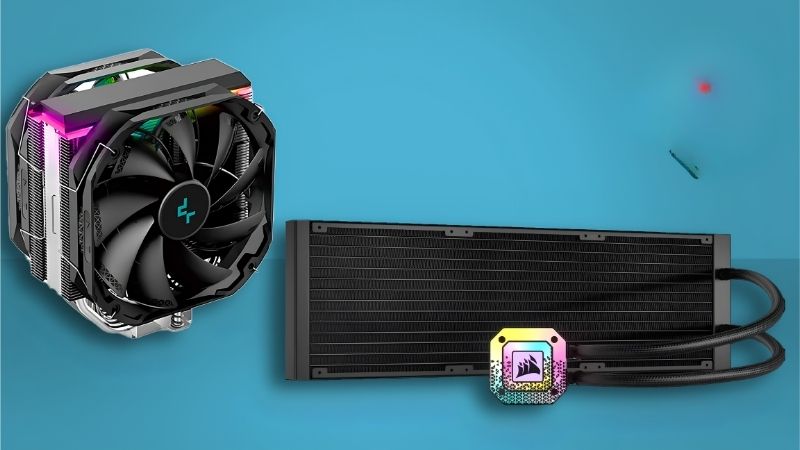
Air or Liquid: What Actually Decides It
Air wins on simplicity, cost and lifespan, with no pump to fail and nothing to leak. For gaming loads on mainstream chips, a good dual tower and a 240mm AIO land within a few degrees of each other.
Liquid wins on two specific things: it moves heat away from the VRM area and out of the case directly, and it fits builds where a tall tower cannot. Flagship Intel parts under long all-core load also favour radiators.
Case shape often decides for you. A compact chassis with a 155mm ceiling and a 240mm front mount narrows the field faster than any benchmark chart will.
Case Airflow Sets the Ceiling
A cooler can only reject heat into the air around it. If intake is choked by a solid front panel or a clogged dust filter, the tower is recirculating warm air and no amount of fan speed fixes that properly.
Aim for a slight positive or neutral pressure balance with intakes at the front and bottom, exhaust at the rear and roof. Two or three quality intake fans usually beat one expensive fan spinning hard.
Check ambient temperature too. Every degree in the room is a degree at the die, which is why summer builds in unconditioned rooms report numbers that look alarming and are actually normal.
Contact Quality: Paste, Pressure and Frames
Mounting pressure and paste application matter more than the compound brand. A flat, even contact with a mid-tier paste beats a premium compound spread unevenly or squeezed under a partly tightened bracket.
On LGA1700 boards, a contact frame corrects socket bending and often recovers several degrees. Newer sockets have improved this, but the frame remains a cheap fix on older Intel builds still in daily use.
Tighten mounting screws in a diagonal pattern, a couple of turns at a time, until they stop. Uneven tension tilts the coldplate and leaves one corner of the die measurably hotter than the rest.
Fan Curves and Sensor Choice
The best CPU cooling for gaming still sounds bad if the curve is wrong, and this is the one adjustment that costs nothing. Tie CPU fans to a smoothed package temperature with a short delay rather than instantaneous readings. Gaming produces rapid spikes, and an aggressive curve turns those into constant audible ramping.
Set a floor speed high enough to keep air moving, then a gentle slope to the target. Most builds sound better with fans at a steady mid speed than with fans that idle silently and then surge.
Case fans can run on a separate, flatter curve tied to a motherboard sensor. That keeps chassis airflow constant while only the CPU fans respond to load, which removes most of the audible pulsing.
Top Picks for the Best CPU Cooling for Gaming
The best CPU cooling for gaming rarely comes from one box, so these six parts cover the whole stack: two socket coolers, a compact option, case fans, paste and an SFF choice. Specifications come from manufacturer documentation, and pricing tiers shift week to week.
| Product | Role | Key Spec | Best For |
|---|---|---|---|
| Thermalright Phantom Spirit 120 SE | Air cooler | 7 heatpipes, 154mm | Value flagship air |
| Arctic Liquid Freezer III 240 | AIO | 240mm, 38mm radiator | Compact liquid builds |
| Noctua NH-U12A chromax.black | Single tower | 158mm, 2 x 120mm | Tight RAM clearance |
| Arctic P12 PWM PST (5-pack) | Case fans | 120mm, static pressure | Airflow on a budget |
| Arctic MX-6 | Thermal paste | Non-conductive, 4g | Remounts and refreshes |
| Thermalright AXP90-X47 | Low-profile air | 47mm height | Small form factor |
Thermalright Phantom Spirit 120 SE
Seven heatpipes, a dual-tower stack and two 120mm fans at 154mm height make this the sensible default for a gaming build. It clears most RAM kits and handles mid to upper-tier chips without noticeable throttling.
Fan clips are stiff and the included paste is unremarkable, so plan to replace the compound at some point. Beyond that, there is very little to criticise at the price it usually sells for.
Arctic Liquid Freezer III 240
The 240mm version keeps the 38mm-thick radiator and VRM fan from its larger sibling, so it punches above typical 240mm units. It suits cases with a front mount but no room for a triple radiator.
Thickness is the catch: 38mm plus fans is more than some front brackets allow, so check the manual before ordering. The small VRM fan also adds a low whir that quiet-build purists will notice.
Noctua NH-U12A chromax.black
A single 120mm-class tower with two NF-A12x25 fans, this fits where dual towers cannot while cooling close to them. The black finish and 158mm height make it a clean fit in most mid-towers.
It is expensive for a single tower, and the price gap against a Thermalright dual tower is hard to justify on numbers alone. You are buying fan quality, mounting hardware and a six-year warranty.
Arctic P12 PWM PST 5-Pack
Case airflow is the half of cooling most builders underspend on. Five static-pressure 120mm fans with daisy-chain PST cabling cost less than one premium fan and transform a restrictive chassis.
They are plain looking with no RGB and a fixed frame colour, and the cable daisy chain limits per-fan control. For raw airflow per dollar, nothing mainstream comes close.
Arctic MX-6
A non-conductive compound with an easy spread and no cure time, MX-6 is the safe pick for anyone remounting a cooler. Non-conductive matters if a smear reaches board components during installation.
It is not the highest-performing paste on paper, and the syringe design is awkward for very small dots. For a gaming build the difference against a premium compound is usually within a degree or two.
Thermalright AXP90-X47
At 47mm tall, this downdraft cooler unlocks genuinely small ITX cases while still handling a 65W gaming CPU. It also blows air across the VRM and M.2 area, which tower coolers ignore entirely.
Capacity is limited, so pair it with a mid-range chip rather than a flagship, and expect audible fan speed under load. In an SFF build that is a fair trade for the volume saved.
What the 2026 Market Means for Cooling Upgrades
Cooling is one of the few PC categories where buying now is straightforwardly the right call. Here is the context behind that, without the usual urgency pitch.
Cheap Upgrades Still Deliver Real Gains
With GPU pricing up sharply and memory contracts locked high, many builders cannot justify a graphics upgrade this year. Paste, a better cooler, case fans and a decent PSU still produce measurable improvements.
A machine that was quietly thermal-limited will hold higher boost clocks after a cooling refresh. That is not a marketing claim; it is what happens when a chip stops trimming frequency to stay inside its thermal budget.
Prices Rose, but Discounts Are Still Honest Here
Cooler and PSU pricing climbed roughly 6-8% during 2026 while manufacturers shifted focus to higher-margin models, and promotional pricing rules tightened in February. Budget options are fewer than they were.
Late-November sales remain worth watching for cooling parts specifically. Memory and prebuilts are built from expensive contract DRAM this cycle, but coolers, fans, cases and paste still see genuine discounts.
Nothing New Is Coming Before 2027
RTX 50 Super, Zen 6 and Nova Lake have all moved to CES in January 2027, so there is no imminent launch that changes cooling requirements. Sockets and mounting standards will not shift in the meantime.
If you are on AM5, that platform takes new CPUs through 2029, so a cooler bought today stays useful across at least one more chip. Buy for the case you own rather than the build you might make later.
Frequently Asked Questions
These come up constantly when people plan the best CPU cooling for gaming, and the answers are less complicated than forum threads suggest.
Do case fans really affect CPU temperature?
Yes, significantly. A tower cooler pulls in whatever air the case supplies, so poor intake raises the starting temperature of every calculation. Adding two decent intake fans commonly drops load temperatures by several degrees.
Is a 240mm AIO better than a good air cooler?
Not necessarily. A thick 240mm radiator matches or slightly beats a strong dual tower, while a thin budget 240mm often loses. Compare radiator thickness and fan quality rather than assuming liquid wins by default.
How much difference does thermal paste make?
Between mainstream compounds, usually one to three degrees. Between fresh paste and dried-out paste from five years ago, the gap can be ten degrees or more, which is why remounting matters more than brand choice.
Should intake or exhaust fans be stronger?
Slightly positive pressure, meaning a little more intake than exhaust, keeps dust out through filters instead of unfiltered gaps. Exact balance matters less than having unobstructed intake paths at the front and bottom.
See More:
Final Thoughts
The best CPU cooling for gaming comes from matching four things: a cooler sized to your chip, a case that can actually feed it air, fresh paste under even pressure, and a fan curve that does not chase every spike. Spend on the cooler first, then the case fans, then the compound. A balanced stack at moderate cost beats one expensive part fighting a restrictive chassis.










Write Your Review
No reviews yet. Be the first to share your experience!