
Best AMD CPU for gaming and productivity comes down to a choice inside AMD’s own range, because Ryzen splits into cache-heavy X3D parts that win games and high core-count parts that win render times. This guide ranks six chips by the specific workload each one suits, staying entirely within the AM5 lineup.
As an Amazon Associate we earn from qualifying purchases at no extra cost to you.






As an Amazon Associate we earn from qualifying purchases at no extra cost to you.
By Ryan Cole
How to Choose the Best AMD CPU for Gaming and Productivity
AMD’s range forks cleanly, and the fork is the whole decision. Working out which side your hours sit on removes most of the difficulty of naming a best AMD CPU for gaming and productivity, and these four checks establish it quickly.
Name the Application, Not the Category
Productivity is too broad to shop against. Video encoding and 3D rendering scale almost linearly with cores; photo editing and audio work barely do. Code compilation sits in between and responds strongly to memory bandwidth as well as thread count.
Write down the two or three applications that actually consume your time. A Ryzen 9 makes obvious sense for Blender or Handbrake, and almost none for Lightroom, where a faster eight-core chip finishes the same job just as quickly.
Single CCD Versus Dual CCD Behaviour
Ryzen 7 parts use one core complex, while Ryzen 9 chips use two. Communication between the complexes adds latency, which occasionally makes a twelve or sixteen-core chip slightly slower in games than an eight-core one despite the higher specification.
AMD’s chipset drivers and Windows scheduling handle this well now, but the effect has not vanished. If gaming is the priority and rendering is occasional, a single-CCD Ryzen 7 avoids the issue entirely and costs considerably less.
Cache Only Helps One Half of the Workload
The stacked L3 on X3D parts produces large gains in games and almost none in rendering, compilation or encoding. It is a gaming feature that happens to sit on a productivity-capable chip, not a general performance uplift.
That is why the 9800X3D beats the 9950X in games while losing badly in Cinebench. Decide which of those two results you would rather have, because no chip below the flagship gives you both at once.
Plan Cooling and Memory Capacity Together
Ryzen 9 parts at 170W need a 360mm AIO or a large dual-tower air cooler to hold all-core clocks through a long render. The X3D chips run at 120W and are easier to cool, though they still need more than a bundled unit.
Memory capacity matters as much as the processor. Production work wants 32GB as a floor and 64GB for video timelines, and running short stalls a render far more severely than having two fewer cores does.
What the 2026 Market Means for AMD Dual-Purpose Builds
Three market conditions affect how the budget should be split on a machine that both plays and works, and they shift what the best AMD CPU for gaming and productivity is worth paying at any tier this year.
Zen 6 Does Not Arrive Until CES 2027
AMD’s next architecture has slipped to CES in January 2027, alongside Intel’s Nova Lake. Waiting for more cores at the same price means at least six months to announcement, then longer before retail supply and firmware settle.
For a machine that earns money, that wait has a real cost. Current Zen 5 parts have mature platform firmware and will still sit in the same socket when Zen 6 arrives, which makes buying now the low-risk choice.
AM5 Support Runs Through 2029
AMD confirmed at Computex 2026 that the socket keeps receiving new processors until the end of 2029. That makes a staged approach viable: buy a Ryzen 7 now for the gaming side and add cores later when a render workload grows.
The requirement is a board that can feed the eventual chip. Pair even a modest starting processor with a B850 or X870 board carrying 80A power stages, because that board will still be working in three years.
Memory Pricing Should Shape the Core Count
DRAM prices rose again through 2026 with no new fab capacity before late 2027. For a dual-purpose build that wants 64GB rather than 32GB, the memory has become a significant line item rather than a cheap upgrade.
Budget the capacity first and choose the processor around it. Stepping from sixteen cores down to twelve to afford the larger kit is almost always the better trade, because insufficient memory stalls work that extra cores would only have accelerated.
Top Picks: Best AMD CPU for Gaming and Productivity
These run from the most gaming-focused to the most production-focused, so the best AMD CPU for gaming and productivity in your case depends on where your week actually goes. Pricing moves constantly, so verify cost and availability before committing.
| Processor | Cores / Threads | CCDs | Boost Clock | TDP | L3 Cache |
|---|---|---|---|---|---|
| Ryzen 5 9600X | 6 / 12 | 1 | 5.4 GHz | 65W | 32MB |
| Ryzen 7 9700X | 8 / 16 | 1 | 5.5 GHz | 65W | 32MB |
| Ryzen 7 9800X3D | 8 / 16 | 1 | 5.2 GHz | 120W | 96MB |
| Ryzen 9 9900X | 12 / 24 | 2 | 5.6 GHz | 120W | 64MB |
| Ryzen 9 9950X | 16 / 32 | 2 | 5.7 GHz | 170W | 64MB |
| Ryzen 9 9950X3D | 16 / 32 | 2 | 5.7 GHz | 170W | 128MB |
Ryzen 5 9600X
The 9600X is the entry point for a machine that leans heavily toward gaming with light production duties. Six Zen 5 cores at 5.4 GHz within 65W handle photo editing, document work and light streaming alongside strong 1440p gaming.
Six cores is a genuine ceiling for real production work. A video export or a large compile will take noticeably longer than on any other chip here, so treat this as a gaming PC that can also work rather than a dual-purpose machine.
Ryzen 7 9700X
Eight cores at 5.5 GHz in a 65W envelope make the 9700X the efficiency choice, and it is the cheapest chip here that handles both sides credibly. It runs cool, stays quiet and covers photo work, light video editing and streaming.
Without stacked cache it trails the 9800X3D clearly in games, and eight cores mean sustained rendering is slow next to a Ryzen 9. It is the right pick when both workloads are moderate and neither dominates.
Ryzen 7 9800X3D
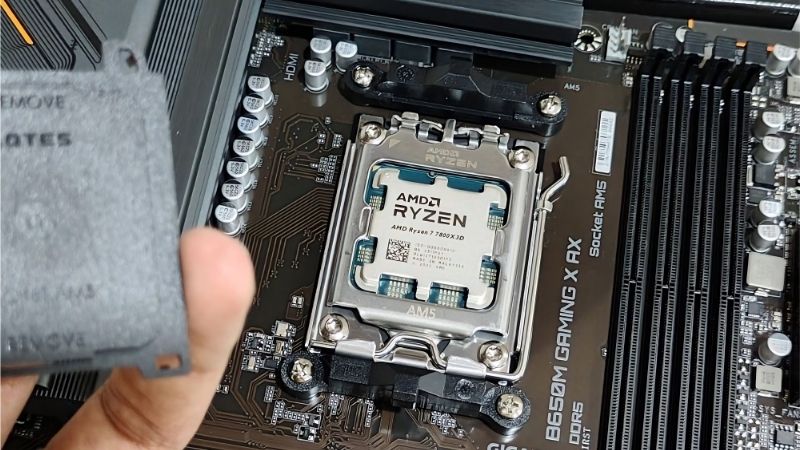
With 96MB of L3 cache on a single core complex, this is the fastest gaming processor AMD sells at any price, and eight Zen 5 cores still handle editing, streaming and everyday production work without frustration.
Against a twelve or sixteen-core chip it loses heavily in Cinebench, Blender and long encodes. Choose it when gaming leads and production follows, which honestly describes most builds people call balanced.
Ryzen 9 9900X
Twelve cores and 64MB of L3 within 120W give the 9900X most of the multithreaded capability of the flagship without the price or the cooling demands. It is the sensible middle when rendering and encoding are regular parts of the week.
It uses two core complexes, so games occasionally see a small penalty against single-CCD parts, and it has no stacked cache. Expect it to sit behind the 9800X3D in frame rates while finishing renders considerably faster.
Ryzen 9 9950X
Sixteen Zen 5 cores boosting to 5.7 GHz make this the fastest non-cache consumer chip AMD offers for pure production. Long Blender renders, large compile jobs and heavy video encodes finish roughly twice as fast as on an eight-core part.
The 170W TDP demands serious cooling and a board with 80A power stages, and gaming performance is mid-tier by AMD standards. If games matter at all, the 9950X3D is worth the step up rather than this chip.
Ryzen 9 9950X3D
The flagship refuses the trade-off entirely, pairing sixteen cores with stacked cache so it renders like a 9950X and games close to a 9800X3D. For a genuinely balanced workload it is the only chip that answers both questions.
It is expensive, draws 170W and needs both strong cooling and a capable board. If your hours lean clearly toward one workload, a cheaper chip delivers that side just as well and leaves budget for memory or storage.
Frequently Asked Questions
These questions come up repeatedly once builders narrow the hunt for a best AMD CPU for gaming and productivity to Ryzen alone rather than comparing brands.
Is a Ryzen 9 worth it if I mostly game?
No. Games rarely use more than eight cores effectively, so twelve or sixteen cores produce little or no frame rate gain. A 9800X3D will feel faster in games than a 9950X while costing less, and the extra cores only pay off in sustained rendering.
Do dual-CCD Ryzen 9 chips hurt gaming performance?
Slightly, in some titles. Cross-complex latency can put a twelve or sixteen-core chip marginally behind an eight-core part in games. Current chipset drivers and Windows scheduling manage it well, so the gap is small rather than disqualifying.
Should I buy a 9900X or a 9800X3D?
Count your hours. The 9900X finishes renders and encodes substantially faster; the 9800X3D wins games by a clear margin. If gaming is more than half of what the machine does, the cache matters more than the four extra cores.
How much cooling do these chips need?
The 65W parts run happily on a good air tower. The 120W chips want a large dual-tower cooler or a 240mm AIO, and the 170W Ryzen 9 parts realistically need a 360mm AIO or an equivalent air cooler to hold all-core clocks.
See More:
- Who makes the best motherboard
- Best budget AM5 CPU for gaming
- What is the best thermal paste pattern
- Best mini ITX computer case
- Best desktop RAM for gaming
Final Thoughts
The best AMD CPU for gaming and productivity depends entirely on which application actually fills your week. The 9800X3D is the honest answer when gaming leads, the 9900X when rendering leads, and the 9700X when both are moderate. Only the 9950X3D avoids the trade-off, and it charges accordingly. Budget your memory capacity before your core count, because that constraint bites harder. Figures reflect August 2026 and should be verified before purchase.











Write Your Review
No reviews yet. Be the first to share your experience!