
- Top Pick: YAWYORE Gaming PC, AMD Ryzen 7 5700X, GeForce RTX 5060 Desktop Computer
- Best Value: GMKtec M5 Ultra Gaming Mini PC Ryzen 7 7730U (Upgraded 7430U/ 5825U), 32GB RAM 512GB SSD Dual NIC LAN 2.5GbE Desktop Computers, Triple 4K Display, WiFi 6E, USB-C, BT 5.2, DP, HDMI 2.0
- Premium Choice: Getorli Mini PC AMD Ryzen 5 3500U (4C/8T, Max 3.7GHz) Small Desktop Computer 16GB DDR4 RAM 512GB NVMe SSD Budget Micro Compact PCs 4K HD Dual HDMI WiFi 6 BT5.3 Prebuilt OS-Home Office Gaming Streaming
Best computer RAM for gaming is rarely the highest number on the box, because memory performance depends on how frequency, latency and the controller ratio interact. A cheaper 6000 CL30 kit routinely beats an expensive 8000 kit on AMD. Here is how that works, and six kits that get it right.
As an Amazon Associate we earn from qualifying purchases at no extra cost to you. Product prices and availability are accurate as of the date shown and are subject to change.







As an Amazon Associate we earn from qualifying purchases at no extra cost to you. Product prices and availability are accurate as of the date shown and are subject to change.
By Ryan Cole
How to Pick the Best Computer RAM for Gaming
Four specifications determine how a kit actually performs, and only one appears prominently on the packaging. Understanding the other three is how you identify the best computer RAM for gaming rather than paying for numbers your platform cannot use.
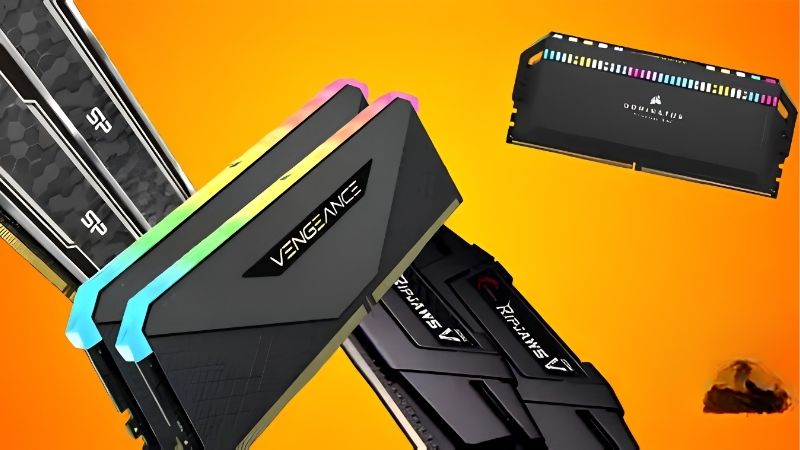
Frequency and Latency Work Against Each Other
A kit advertised at 6000 MT/s with CL30 timings completes a memory access faster than a 6400 kit running CL40, despite the lower headline frequency. True latency is the CAS number divided by the frequency, not the CAS number considered on its own.
That is why the two figures always have to be read together rather than separately. A cheap high-frequency kit with loose timings is a common trap, and it can perform worse in games than a slower kit with tight timings sold at a lower price.
The 1:1 Ratio Is the Real Ceiling on AMD
Ryzen 7000 and 9000 processors run the memory controller and the fabric in step up to roughly DDR5-6000. Above that the controller drops to a divided ratio, which adds latency and usually cancels out the extra bandwidth.
This is the single most important fact for an AMD build. DDR5-6000 CL30 is the correct target, and spending more on an 8000 kit typically produces slower gaming performance rather than faster.
Intel Scales Further Than AMD
Core Ultra 200 series processors have a different memory architecture and continue gaining from higher frequencies well past 6000. Kits at 7200 or 8000 MT/s are genuinely useful there in a way they are not on Ryzen.
That difference means a kit bought for one platform may be a poor match for the other. Check which profile the kit carries too, since EXPO is AMD’s standard and XMP is Intel’s, though many kits now include both and work on either platform without manual configuration.
Enable the Profile or You Wasted the Money
Memory ships running at a conservative JEDEC default, typically well below its rated speed. Until you enable EXPO or XMP in the BIOS, an expensive kit performs no better than the cheapest module on the shelf.
It is a single toggle in the BIOS, and it remains the most common oversight in a first build by a wide margin. If a new machine feels slower than expected, this is the first setting worth checking before you investigate anything else.
What the 2026 Market Means for Memory Buyers
Memory pricing has moved more than any other component this year, and three developments should change how you shop for the best computer RAM for gaming, particularly at the top of the range.
DRAM Contract Prices Keep Rising
TrendForce raised its forecast again for the second half of 2026, and the apparent slowdown reflects buyers refusing higher prices rather than any improvement in supply. Manufacturing capacity remains the constraint.
No new fabrication capacity arrives before late 2027, and SK hynix has reportedly sold out its 2026 output. The pressure on DDR5 pricing therefore continues into next year regardless of retail demand.
Seasonal Sales Will Not Help Here
Waiting until late November is poor advice for memory this year. Stock in that window was built using components purchased at 2026 contract rates, so genuine reductions on kits and pre-built systems are unlikely to materialise.
Coolers, fans, cases and power supplies still see genuine discounts in that period. If your build needs memory, buy it when you need it rather than gambling on a seasonal drop that the underlying supply chain simply does not support.
Buy the Sweet Spot, Not the Halo Kit
Rising prices make the case for restraint stronger than usual. A 6000 CL30 kit on AM5 delivers essentially all the gaming performance available from the platform, and paying for 7200 or 8000 there returns nothing.
The money saved is better spent on capacity or on the graphics card instead. Buying 32GB at the sweet spot beats 16GB of a halo kit in every practical scenario, including the ones the halo kit is specifically marketed for.
Top Picks: Best Computer RAM for Gaming by Specification
These are chosen for the combination of frequency and latency their platform can actually use, which is what makes one the best computer RAM for gaming and another a waste of money. Confirm your board takes DDR5 or DDR4 first, and check heat spreader clearance against your cooler.
| Kit | Speed | Timings | Profile | Platform Fit |
|---|---|---|---|---|
| G.Skill Trident Z5 Neo RGB 32GB | DDR5-6000 | CL30 | EXPO | AM5 sweet spot |
| Corsair Vengeance 32GB | DDR5-6000 | CL30 | EXPO and XMP | Either platform |
| G.Skill Trident Z5 RGB 32GB | DDR5-7200 | CL34 | XMP | Intel Core Ultra |
| Kingston Fury Beast 32GB | DDR5-6000 | CL36 | XMP | Value DDR5 |
| Crucial Pro 32GB | DDR5-5600 | CL46 | XMP | Budget entry |
| G.Skill Ripjaws V 32GB | DDR4-3600 | CL16 | XMP | AM4 sweet spot |
G.Skill Trident Z5 Neo RGB 32GB DDR5-6000 CL30
This is the reference specification for an AMD build. EXPO validation means one BIOS toggle brings up 6000 CL30, which lands exactly where the memory controller runs in step with the fabric.
Tall heat spreaders conflict with large dual-tower air coolers, so check the clearance figure first. It also costs more than plainer kits at the same specification, and the performance difference against them is negligible.
Corsair Vengeance 32GB DDR5-6000 CL30
Carrying both EXPO and XMP profiles makes this the most flexible kit here, working equally well on AMD and Intel boards. That matters if you might switch platform before you replace the memory.
The low-profile version clears virtually every air cooler, which removes the usual physical headache. The RGB variant costs more and reintroduces the height problem, so choose the plain one unless lighting matters.
G.Skill Trident Z5 RGB 32GB DDR5-7200 CL34
On an Intel Core Ultra build the higher frequency genuinely converts into performance, because that architecture keeps scaling past the point where Ryzen stops. CL34 at 7200 gives better true latency than 6000 CL30.
Put this kit in an AM5 board and it will run slower than a cheaper 6000 kit once the controller drops to a divided ratio. It is a platform-specific purchase and a waste of money on the wrong one.
Kingston Fury Beast 32GB DDR5-6000 CL36
Fury Beast delivers the correct frequency at looser timings for less money, which is a sensible trade when memory prices are climbing. The latency difference against CL30 is small enough to be difficult to notice in games.
Kingston validates across a wide range of boards, which makes this a safe pick when compatibility is uncertain. The trade is limited headroom if you later want to tighten timings manually.
Crucial Pro 32GB DDR5-5600
At 5600 with relaxed timings this is the budget entry, and it still runs dual channel at a speed most games cannot distinguish from 6000 once the graphics card is the limiting factor.
Latency is noticeably looser than the sweet-spot kits, which shows up in CPU-limited scenarios and simulation-heavy titles. It is the right choice only when the price gap to a 6000 CL30 kit is genuinely large.
G.Skill Ripjaws V 32GB DDR4-3600 CL16
For AM4 and DDR4 LGA 1700 boards, 3600 CL16 occupies the same position that 6000 CL30 does on DDR5. It is the point where the Infinity Fabric on Ryzen 5000 runs in step with the memory.
DDR4 receives no further development, so this belongs in an existing platform rather than a new build started from scratch. The heat spreaders are moderately tall and can conflict with the largest dual-tower air coolers.
Frequently Asked Questions
These questions come up whenever builders try to work out which specification makes the best computer RAM for gaming actually worth paying more for.
Is DDR5-6000 CL30 really the best for AMD?
For Ryzen 7000 and 9000, yes. It is the fastest speed at which the memory controller and fabric stay in a 1:1 ratio. Faster kits force a divider that adds latency and usually cancels out the bandwidth gain.
What is the difference between EXPO and XMP?
EXPO is AMD’s memory profile standard and XMP is Intel’s. Both do the same job, storing the rated speed and timings so a single BIOS toggle applies them. Many kits carry both profiles and work on either platform.
Do I need to enable the profile manually?
Yes. Memory boots at a conservative JEDEC default that is well below the rated speed, so an expensive kit performs like a cheap one until you enable EXPO or XMP in the BIOS. It is one toggle and easily missed.
Does CAS latency matter more than frequency?
Neither alone. True latency is CAS divided by frequency, so a 6000 CL30 kit beats a 6400 CL40 kit despite the lower number on the box. Always read the two figures together rather than shopping on frequency.
See More:
- Who makes the best motherboard
- Best budget AM5 CPU for gaming
- What is the best thermal paste pattern
- Best mini ITX computer case
- Best desktop RAM for gaming
Final Thoughts
The best computer RAM for gaming is whichever kit lands on your platform’s sweet spot and gets its profile enabled. On AM5 that is DDR5-6000 CL30 and nothing faster; on Core Ultra it is worth going to 7200 or beyond; on AM4 it is DDR4-3600 CL16. Read frequency and timings together, buy 32GB rather than a faster 16GB kit, and remember that memory left at JEDEC defaults performs like the cheapest module available. Figures reflect August 2026 and should be verified before purchase.





Write Your Review
No reviews yet. Be the first to share your experience!