
- Top Pick: Thermalright 5 Pack TL-C12C-S CPU Fan 120mm ARGB Case Cooler Fan, 4pin PWM Silent Computer Fan with S-FDB Bearing Included, up to 1550RPM Cooling Fan(5 Quantities)
- Best Value: DARKROCK 3-Pack 120mm Black Computer Case Fans
- Premium Choice: Thermalright TL-C12C-S X3 CPU Fan 120mm ARGB Case Cooler Fan, 4pin PWM Silent Computer with S-FDB Bearing Included, up to 1550RPM Cooling Fan(3 Quantities) (TL-C12C X3)
Best case fans setup is a question about balance and placement rather than about buying more fans. Three well-positioned units in a case with a clear path beat six fighting each other. This guide covers the layouts that work and six fans worth putting in them.
As an Amazon Associate we earn from qualifying purchases at no extra cost to you.


As an Amazon Associate we earn from qualifying purchases at no extra cost to you.
By Ryan Cole
How to Plan the Best Case Fans Setup
Airflow follows a path from intake to exhaust, and every restriction on that path costs more than an extra fan gains. These four principles define the best case fans setup for almost any layout you are likely to build in.
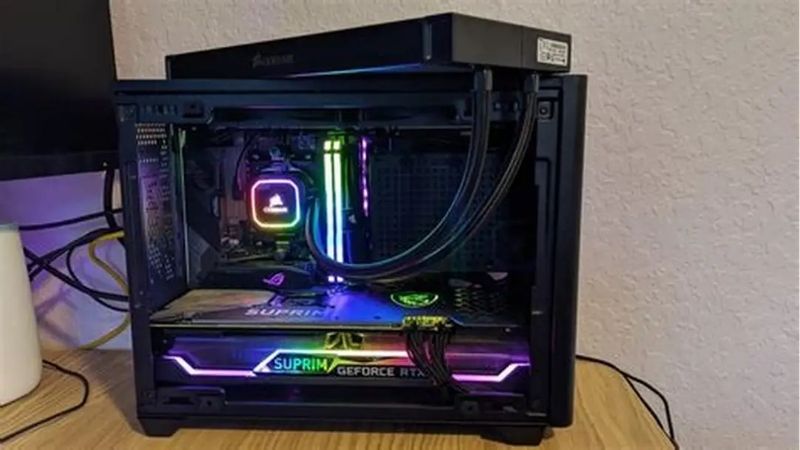
Front and Bottom In, Rear and Top Out
Warm air rises, so the natural layout draws cool air in low at the front and expels it high at the back and top. Fighting that convection with reversed fans produces worse results and more noise.
The rear exhaust matters most, because it sits directly behind the CPU cooler and clears the hottest air in the case. If a build has only two fans, one front intake and one rear exhaust is the correct pair, and adding a third belongs at the front.
Slight Positive Pressure Keeps Dust Out
Running marginally more intake than exhaust means air leaves through filtered intakes rather than entering through unfiltered gaps. That measurably reduces dust accumulation over a year of use.
The effect is modest and does not require a large imbalance to work. Three intakes against two exhausts is plenty, and chasing a large pressure difference simply adds noise without a corresponding benefit to either temperature or dust.
Static Pressure Versus Airflow Fans
Fans optimised for airflow move more air through open space, while static pressure designs push air through restrictions. Radiators, dense mesh panels and drive cages all need pressure-optimised fans to work properly.
An unobstructed rear exhaust or a top vent can use either type. Matching the fan to the restriction in front of it changes results more than buying a more expensive fan of the wrong kind, which is a common and costly mistake.
Fan Count Has a Point of Diminishing Returns
Going from two fans to four produces a clear improvement in most cases. Going from four to seven usually does not, because the case’s intake and exhaust openings become the limiting factor rather than the fans.
Spend the difference on quality instead. Three good fans running at moderate speed are quieter and often cool better than six cheap ones running fast to compensate for poor blade design, and they draw less power doing it.
What the 2026 Market Means for Airflow Upgrades
Three market conditions have made case airflow a more common upgrade this year, and two of them argue for sorting out the best case fans setup now rather than later.
Cheap Upgrades Are Where the Returns Are
Graphics card pricing remains elevated, so improving hardware you already own is the practical route to better performance. Extra case fans, fresh thermal compound, a better CPU cooler and a decent power supply all deliver real gains.
Case fans are the cheapest of those upgrades and by far the most neglected. A machine running one exhaust fan behind a dust-clogged front filter will drop several degrees from a proper layout alone, before any component is replaced.
Fans and Cases Still See Real Discounts
Memory and pre-built systems will not fall meaningfully this November, since that stock uses components bought at this year’s elevated contract prices. Fans, coolers, cases and power supplies remain a different category.
Buying a multi-pack of fans during a seasonal sale is one of the better value moves available all year. The absolute savings are modest, so do not delay an upgrade that a hot-running machine needs today in the hope of a discount.
The Budget Component Tier Has Thinned
Vendors shifted their ranges upward through 2026 and promotional pricing ended in February. Fan pricing has risen slightly alongside cases and power supplies, which raises the cost of a full airflow refresh.
Multi-packs remain the way to avoid that. Buying three or five matched fans in one box costs considerably less per unit than individual retail packaging, and it guarantees consistent noise and lighting across the whole case.
Top Picks: Fans for the Best Case Fans Setup
Each entry names the position it suits best, because the best case fans setup uses different fan types in different places. Confirm your case takes 120mm or 140mm before ordering, since the two are not interchangeable.
| Fan | Size | Type | Best Position | Notes |
|---|---|---|---|---|
| Arctic P12 PWM PST | 120mm | Static pressure | Radiators and mesh | Sold in multi-packs |
| Arctic F12 PWM | 120mm | Airflow | Rear and top exhaust | Lowest cost |
| Noctua NF-A12x25 | 120mm | Balanced | Any position | Category benchmark |
| be quiet! Silent Wings 4 | 120 / 140mm | Balanced | Quiet builds | Lowest noise |
| Thermalright TL-C12C-S | 120mm | Airflow | Intake | Budget multi-pack |
| Lian Li Uni Fan SL Infinity | 120mm | Balanced | Visible intake | Daisy-chain mounting |
Arctic P12 PWM PST
The P12 is the default recommendation for any position facing a restriction, whether that is a radiator, a dense mesh front panel or a drive cage. The PST daisy-chaining lets several run from one motherboard header.
It is not the quietest fan at full speed, and the plain black finish will not suit a showcase build behind glass. For a mesh-fronted case running at moderate RPM it is difficult to beat on cost per unit.
Arctic F12 PWM
The F12 is the airflow-optimised sibling, designed for unobstructed positions like a rear exhaust or an open top vent. It moves more air than the P12 where nothing is blocking it, at very low cost.
Put it in front of a radiator and it underperforms noticeably, which is the one mistake worth avoiding with this fan. It also lacks the refinement of premium units in blade noise once speeds climb past about half throttle.
Noctua NF-A12x25
The A12x25 remains the reference point for 120mm fans, built with tighter blade-to-frame tolerances than anything else in the category. It performs well in both open and restricted positions, which very few fans manage without a clear compromise one way or the other.
It costs several times what the Arctic fans do, which makes filling a case with them expensive. The standard colour scheme also clashes with most builds, though a black version exists at a further premium.
be quiet! Silent Wings 4
For a build where noise is the priority, Silent Wings 4 is the quietest credible option at a given airflow. The decoupled mounting reduces vibration transmitted into the case panels, which is often the real source of hum.
Raw airflow sits behind the leaders, so a quiet build needs either more of them or a case with generous ventilation to compensate. They are also expensive relative to the Arctic multi-packs, which makes filling a case costly.
Thermalright TL-C12C-S
Thermalright sells these in multi-packs at a price that makes filling a case genuinely cheap. Performance is competent for intake duty in a case with reasonable ventilation, and the value is hard to argue with.
Bearing quality and long-term acoustics are less proven than the established brands, and unit-to-unit consistency varies more than it should. For a budget build being refreshed rather than a system you intend to keep five years, that trade is acceptable.
Lian Li Uni Fan SL Infinity
These interlock and share a single cable run, which removes most of the wiring behind the motherboard tray. The infinity mirror lighting is the best-looking option here for a visible front intake.
They cost considerably more than purely functional fans, and the lighting depends on Lian Li’s own controller and software running. Airflow is good rather than class-leading, so this is honestly an aesthetics purchase with competent cooling attached.
Frequently Asked Questions
These questions come up whenever someone starts planning the best case fans setup properly rather than simply adding more fans.
How many case fans do I need?
Three or four covers almost every mid tower properly: two front intakes, one rear exhaust and optionally one top exhaust. Beyond that the case’s own vent openings become the limiting factor rather than the fans, so additional units add noise and cost far more than they add cooling.
Should I run positive or negative pressure?
Slightly positive, meaning marginally more intake than exhaust. Air then leaves through filtered openings rather than entering through unfiltered gaps, which reduces dust. A small imbalance is enough; a large one just adds noise.
Do I need static pressure fans everywhere?
No. Use them where air must pass through a restriction, such as a radiator, a dense mesh panel or a drive cage. Open positions like a rear exhaust work fine with cheaper airflow-optimised fans.
Is a top-mounted radiator intake or exhaust?
Exhaust in most builds, since warm air rises and the top position expels it naturally. Front-mounting a radiator as intake lowers graphics card temperatures instead, at the cost of slightly warmer air circulating inside the case, which is a reasonable trade in a GPU-heavy build.
See More:
- Who makes the best motherboard
- Best budget AM5 CPU for gaming
- What is the best thermal paste pattern
- Best mini ITX computer case
- Best desktop RAM for gaming
Final Thoughts
The best case fans setup is front and bottom intake, rear and top exhaust, with slightly more intake than exhaust and static pressure fans wherever air meets a restriction. Three or four good fans beat six cheap ones, and the Arctic P12 and F12 cover most positions at a cost that makes filling a case realistic. Clean the intake filters while you are in there, because a clogged filter quietly undoes the whole layout no matter how good the fans sitting behind it happen to be. Figures reflect August 2026 and should be verified before purchase.











Write Your Review
No reviews yet. Be the first to share your experience!