
- Top Pick: Getorli Mini PC AMD Ryzen 5 3500U (4C/8T, Max 3.7GHz) Small Desktop Computer 16GB DDR4 RAM 512GB NVMe SSD Budget Micro Compact PCs 4K HD Dual HDMI WiFi 6 BT5.3 Prebuilt OS-Home Office Gaming Streaming
- Best Value: Gaming Laptop 2026,Office & Windows 11 Pro Laptops with 16GB RAM 512GB SSD
- Premium Choice: NIMO 15.6" IPS FHD-Light Gaming-Laptop,AMD Ryzen 5 6600H 16GB DDR5 RAM 256GB SSD (Beat i5-1335U, 6 Cores Up to 4.5GHz) AMD Radeon 660M GPU-Computer with 100W Type-C Backlit Keyboard Fingerprint
Best budget RAM for gaming has become a genuinely difficult category in 2026, because DRAM pricing has risen faster than any other component. The cheap kits still exist, but the compromises have moved. Here are six that remain worth buying and the corners you should not cut.
As an Amazon Associate we earn from qualifying purchases at no extra cost to you.


As an Amazon Associate we earn from qualifying purchases at no extra cost to you.
By Ryan Cole
How to Choose the Best Budget RAM for Gaming
Cutting the memory budget is possible, but only in certain directions. These four checks separate the best budget RAM for gaming from a saving that creates a problem you will pay to fix within two years.
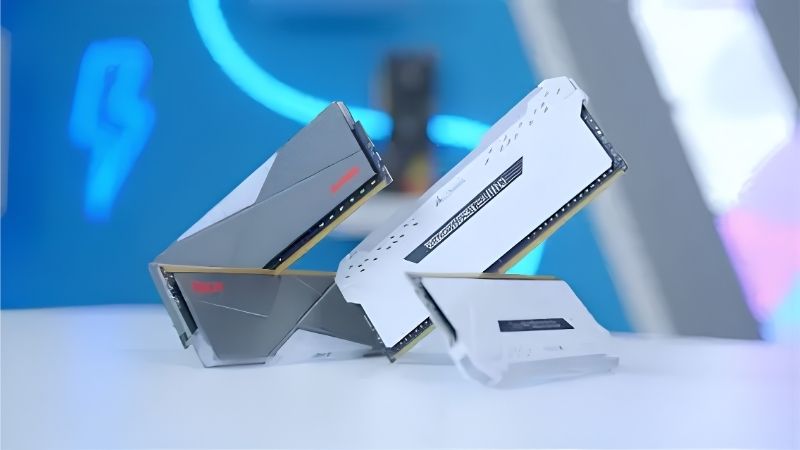
Cut Speed Before You Cut Capacity
A DDR5-5600 kit performs within a few percent of a 6000 CL30 kit in most games, particularly once the graphics card becomes the limiting factor at 1440p and above. That is a saving with almost no practical consequence attached to it.
Dropping from 32GB to 16GB saves less money and creates a constraint you will actually notice. Modern titles increasingly push past 16GB with a browser open in the background, so the capacity cut is the one that comes back to bite within a couple of years.
Skip RGB and Tall Heat Spreaders
Lighting adds a meaningful premium to an otherwise identical kit, and the taller heat spreaders that usually accompany it create clearance conflicts with large air coolers that a plain kit would never have caused.
A plain low-profile kit costs less, fits under any cooler and performs identically in every measurable way. On a budget build where the memory sits behind a tower cooler anyway, the lighting is money spent on something you will never actually see.
Do Not Buy Single Sticks
A single 16GB module runs in single channel and costs real performance, frequently more than the entire difference between a budget kit and a premium one. Two 8GB sticks beat one 16GB stick in every gaming scenario worth measuring.
Always buy a matched two-stick kit rather than accumulating modules over time. Combining separately purchased sticks is the most common cause of a machine refusing to train its memory profile, even when the printed specifications match exactly.
Check the Profile Is Present
The very cheapest modules sometimes ship without an EXPO or XMP profile at all, which means they run at the conservative JEDEC default permanently. That is a far larger performance loss than any timing difference between two properly specified kits.
Confirm the listing states a profile and a rated speed above the JEDEC baseline before ordering. A kit with no profile is not a bargain, it is a slower product sold at a lower price for a very specific reason.
What the 2026 Market Means for Budget Memory
Memory is the component most distorted by current conditions, and three developments make hunting the best budget RAM for gaming harder than it was two years ago.
Prices Are Rising Through the End of the Year
TrendForce raised its DRAM forecast again for the second half of 2026, and the apparent slowdown in increases reflects buyers refusing to pay rather than supply catching up with demand.
New fabrication capacity does not arrive before late 2027, and SK hynix has reportedly sold its entire 2026 output already. A budget kit bought today is likely to be a noticeably more expensive kit in six months time.
Black Friday Is the Wrong Plan This Year
Stock sold in November was manufactured from memory purchased at 2026 contract rates, so meaningful reductions on kits and pre-built systems are unlikely. The usual seasonal advice does not hold for this category.
Coolers, case fans, cases and power supplies still see genuine discounts. If a build needs memory, buying now is the better bet than delaying and hoping the market moves in your favour.
DDR4 Has Become a Real Budget Argument Again
Because DDR5 has absorbed the sharpest price increases, an AM4 or DDR4 LGA 1700 build can undercut an equivalent DDR5 machine by a meaningful margin, particularly if you already own compatible modules from a previous system.
The trade is a finished platform with no upgrade path at all. That is acceptable for a machine you expect to replace wholesale in three years, and a poor choice for one you intend to keep and improve over time.
Top Picks: Best Budget RAM for Gaming Kits Worth Buying
The first four are DDR5 for current boards and the last two are DDR4 for AM4 and older Intel platforms, so the best budget RAM for gaming depends on which half you are shopping. Confirm which standard your motherboard accepts before ordering.
| Kit | Standard | Capacity | Speed | Profile | Notes |
|---|---|---|---|---|---|
| Crucial Pro 32GB | DDR5 | 2x16GB | 5600 MT/s | XMP | Cheapest 32GB |
| Kingston Fury Beast 32GB | DDR5 | 2x16GB | 6000 MT/s | XMP | Best value at 6000 |
| Teamgroup T-Create Expert 32GB | DDR5 | 2x16GB | 6000 MT/s | EXPO | Low profile |
| Patriot Viper Venom 16GB | DDR5 | 2x8GB | 6000 MT/s | XMP | Tightest budget |
| G.Skill Ripjaws V 32GB | DDR4 | 2x16GB | 3600 MT/s | XMP | AM4 sweet spot |
| Teamgroup T-Force Vulcan Z 32GB | DDR4 | 2x16GB | 3200 MT/s | XMP | Lowest cost |
Crucial Pro 32GB DDR5-5600
This is usually the cheapest route to a full 32GB of DDR5, and capacity is the one specification worth protecting on a tight budget. At 5600 it runs dual channel comfortably, and most games will not distinguish it from a 6000 kit behind the same graphics card.
Timings are noticeably looser than the sweet-spot kits, which shows in CPU-limited titles and large simulation games. Crucial modules also rarely offer tuning headroom, so what you buy is what you get.
Kingston Fury Beast 32GB DDR5-6000
Fury Beast hits the correct frequency for an AM5 build at a price well below the tightly timed kits sitting beside it. CL36 rather than CL30 costs a small amount of true latency that is genuinely hard to detect while gaming.
Kingston validates across a broad range of boards, which makes it a low-risk choice. The trade is limited overclocking headroom, so this is a kit to enable the profile on and leave alone.
Teamgroup T-Create Expert 32GB DDR5-6000
The T-Create line uses a genuinely low-profile heat spreader, which is the practical advantage on a budget build where a large air cooler overhangs the memory slots. It carries EXPO for AMD boards.
Teamgroup’s board validation list is narrower than Kingston’s or Corsair’s, so check your specific motherboard model. Availability is also less consistent, which matters when you are shopping on price.
Patriot Viper Venom 16GB DDR5-6000
When the budget genuinely will not stretch to 32GB, this is the sensible 16GB option: two 8GB sticks running at the correct frequency with a working XMP profile, rather than a single module stuck in single channel.
16GB is the real compromise here, and it is the one most likely to need fixing later on. Buy it only if the alternative is not building at all, and leave the other two slots free for an eventual second matching kit.
G.Skill Ripjaws V 32GB DDR4-3600
On AM4 or a DDR4 LGA 1700 board, 3600 CL16 is the correct target and Ripjaws V has been the default recommendation at that specification for years. It undercuts equivalent DDR5 by a clear margin.
DDR4 is a finished standard, so this belongs in an existing platform rather than a new build. Heat spreaders are moderately tall and can conflict with the largest dual-tower air coolers.
Teamgroup T-Force Vulcan Z 32GB DDR4-3200
Vulcan Z is the cheapest credible DDR4 kit, with a low-profile design that clears any cooler and an XMP profile that brings it to 3200 with one toggle. For a budget AM4 refresh it does the job.
3200 sits below the 3600 sweet spot for Ryzen 5000, which costs a small amount of performance in CPU-limited titles. On a build pairing an older processor with a modest graphics card, that difference is entirely academic.
Frequently Asked Questions
These questions come up constantly from builders working out how far the search for the best budget RAM for gaming can go before it starts costing them.
Is 16GB enough in 2026?
It runs almost everything at 1080p, but modern titles increasingly exceed it once a browser and chat client are open. If the budget stretches at all, 32GB is the better purchase, because the later upgrade costs more than the difference now.
Should I buy DDR4 to save money?
Only if you already own an AM4 or DDR4-capable board. DDR4 kits are considerably cheaper, but the platform receives no new processors, so a fresh build on DDR4 saves money now and closes the upgrade path entirely.
Is slower memory a safe saving?
Yes, more so than reducing capacity. A 5600 kit sits within a few percent of a 6000 CL30 kit in most games once the graphics card is the bottleneck. Dropping from 32GB to 16GB is the cut that causes real problems.
Can I add a second kit later?
You can try, and it frequently fails to train even when specifications match, because modules are validated as a set. Buying one 32GB kit up front is far more reliable than planning to add a matching pair later.
See More:
- Who makes the best motherboard
- Best budget AM5 CPU for gaming
- What is the best thermal paste pattern
- Best mini ITX computer case
- Best desktop RAM for gaming
Final Thoughts
The best budget RAM for gaming right now is a plain 32GB two-stick kit without lighting, at 5600 or 6000 depending on how the prices sit when you buy. Cut frequency before you cut capacity, avoid single modules entirely, and confirm the kit carries an EXPO or XMP profile rather than running permanently at JEDEC defaults. With DRAM prices still climbing and no new capacity before late 2027, waiting is unlikely to make this easier. Figures reflect August 2026 and should be verified before purchase.











Write Your Review
No reviews yet. Be the first to share your experience!