
Best gaming motherboard for AMD in 2026 almost always means an AM5 board, and for the majority of gaming builds that means a B650 or B850 model rather than one of the flagship chipsets. AMD has committed to new CPUs on this socket through 2029, which makes the board a longer-term purchase than it used to be on either platform.
As an Amazon Associate we earn from qualifying purchases at no extra cost to you.


As an Amazon Associate we earn from qualifying purchases at no extra cost to you.
By Ryan Cole
How to Choose the Best Gaming Motherboard for AMD
AM5 boards span a wide price range with surprisingly little gaming performance between them. These four checks show where the money actually goes when choosing the best gaming motherboard for AMD builds.
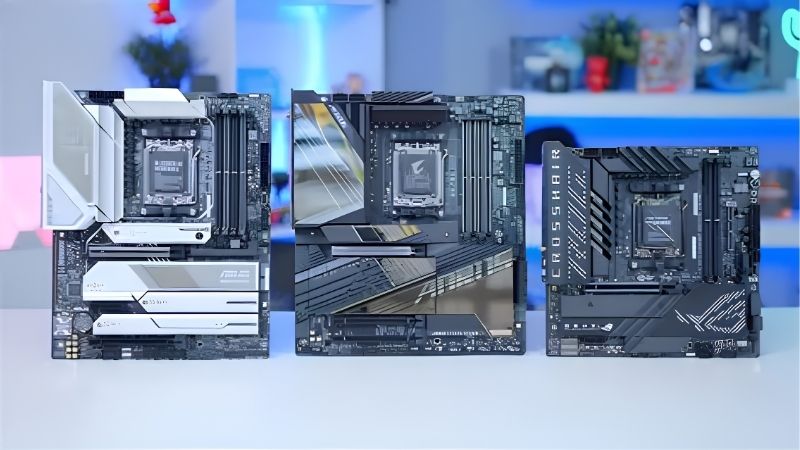
Know What Each Chipset Adds
B650 covers gaming completely: PCIe 5.0 to storage on most models, adequate lanes, and support for every Ryzen 7000 and 9000 chip. B650E adds Gen5 to the graphics slot, which no current GPU needs.
B850 is the updated mid-range with broader Gen5 provision and newer connectivity. X670E and X870E add lanes and USB4 for people running several drives, capture cards or high-speed external peripherals.
Prices between chipsets overlap heavily once discounts are applied. A well-specified B650 board on sale is often a better buy than a bare-bones B850 at full price, so compare boards rather than chipset names.
For a single graphics card and one or two NVMe drives, the chipset makes no difference to frame rates. Choose based on the ports and slots you will genuinely populate.
Size the VRM to Your Ryzen Chip
A Ryzen 5 9600X or 7 9800X3D is undemanding, and any mid-range board handles them without throttling. X3D parts in particular run within a modest power envelope despite their gaming performance.
A Ryzen 9 under sustained all-core load is different, and there a board with heatsinked power stages earns its price. Even then, gaming rarely produces that load for any length of time.
Treat marketing phase counts with some caution. A well-cooled eight-phase design often outperforms a bare sixteen-phase board, because heatsink coverage matters more than the number on the box.
Count M.2 Slots and Check Lane Sharing
Two M.2 slots cover most gaming builds, but check what populating the second slot disables. On several models it drops SATA ports or reduces lanes to the secondary PCIe slot, which the specification table lists in small print.
Gen5 storage is available across much of the range and runs hot for little gaming benefit. A quality Gen4 drive in the slot above the graphics card is the sensible configuration.
If you stream with a capture card, plan the layout before buying. A long graphics card can physically block the second full-length slot on compact boards.
Check Memory Support and BIOS Maturity
AM5 is DDR5 only, and EXPO profiles at moderate speeds are more reliable than chasing the highest rated kits. Two DIMMs populated is also more stable than four at high frequencies.
Board firmware has matured considerably since launch, and long memory training times at first boot are normal rather than a fault. Update the BIOS before troubleshooting anything else.
Four DIMM slots are useful for capacity but harder to run at high speed. If you want 64GB, a two-stick kit at a moderate rated speed is more reliable than four sticks pushed hard.
Top Picks: Best Gaming Motherboard for AMD
The best gaming motherboard for AMD depends on your chip and storage plans, so these six run from budget mATX to a full X870E, with the specifications that matter. Pricing shifts frequently, so compare current listings before deciding.
| Board | Chipset | Form Factor | M.2 Slots | Best For |
|---|---|---|---|---|
| ASUS TUF Gaming B650-PLUS WiFi | B650 | ATX | 2 | Best all-round pick |
| MSI MAG B850 Tomahawk WiFi | B850 | ATX | 3 | Long-term builds |
| Gigabyte B650 AORUS Elite AX | B650 | ATX | 3 | Value with Wi-Fi |
| ASRock B650M Pro RS | B650 | mATX | 2 | Tight budgets |
| ASRock B650E Steel Legend WiFi | B650E | ATX | 3 | Gen5 graphics slot |
| ASUS ROG Strix X870E-E Gaming WiFi | X870E | ATX | 4 | Storage-heavy systems |
ASUS TUF Gaming B650-PLUS WiFi
Solid power delivery, two heatsinked M.2 slots, 2.5G Ethernet, Wi-Fi and BIOS Flashback make this the board most AMD gaming builds should use. It runs anything up to a Ryzen 9 without complaint.
Rear USB provision is adequate rather than generous, and there is no Wi-Fi 7. Neither affects gaming, and the saving over a Strix board is better spent on the graphics card.
MSI MAG B850 Tomahawk WiFi
The Tomahawk line consistently offers power delivery above its price bracket, and the B850 version adds broader Gen5 support, three M.2 slots and current networking hardware.
It costs noticeably more than a B650 equivalent for capability gaming does not use today. The argument for it is longevity on a socket that receives new CPUs through 2029.
Gigabyte B650 AORUS Elite AX
Three M.2 slots with heatsinks, Wi-Fi and a competent VRM at a mid-range price make this a strong value option, particularly when discounted against nearby TUF Gaming boards.
Gigabyte’s BIOS is less approachable than MSI or ASUS, and lane sharing on the third M.2 slot affects SATA availability. Read the manual before planning storage.
ASRock B650M Pro RS
A budget mATX board that covers the essentials: DDR5, two M.2 slots and enough VRM for a Ryzen 5 or a 7800X3D. It builds a genuinely cheap AM5 system without obvious weak points.
No Wi-Fi on the base model, basic rear I/O and limited headers are the compromises. Pair it with a mid-range chip rather than a Ryzen 9.
ASRock B650E Steel Legend WiFi
The E suffix brings PCIe 5.0 to the graphics slot alongside three M.2 slots and Wi-Fi, in a light colourway that suits themed builds. VRM provision is generous for the price.
No current graphics card saturates Gen4, so that headline feature does nothing today. Buy it for the storage provision and styling rather than the Gen5 graphics slot.
ASUS ROG Strix X870E-E Gaming WiFi
Four M.2 slots, USB4, 5G Ethernet and Wi-Fi 7 make this the option for a system running multiple fast drives, a capture card and high-speed external storage alongside gaming.
It is expensive, and a gaming build with one graphics card and two drives gains nothing measurable from it. This is a workstation-adjacent board that happens to game well, and most people should spend the difference on a better GPU instead.
What 2026 Pricing Means for AM5 Buyers
The AM5 value case has shifted this year, mostly because of what has happened around the board rather than to it.
Socket Support Through 2029 Changes the Maths
AMD confirmed at Computex 2026 that AM5 accepts new processors through the end of 2029, while Intel’s next platform moves to a different socket. That is a genuine argument for spending slightly more on the board.
The best gaming motherboard for AMD is one you can keep across two CPUs. Buying a decent B650 or B850 now means the next upgrade is a chip swap and a BIOS update rather than a rebuild.
Budget Boards Are Getting Scarcer
Motherboard sales fell more than 25% and manufacturers shifted focus toward mid and high-end SKUs, with promotional pricing rules tightened from February. Entry-level options are thinner than they were.
Practically, the sub-$140 tier now has fewer boards worth owning. The mid-range has absorbed that demand, which is where most of the sensible AM5 options currently sit.
There is also no launch to wait for. Zen 6 has moved to CES in January 2027, so the chips available today are the ones you will be buying for the next several months.
Price the Memory Alongside the Board
DRAM contract pricing rose through Q3 and Q4 of 2026, with new capacity not arriving before late 2027. DDR5 kits are a much larger share of a build budget than they were a year ago.
That also means late-November sales are unreliable for memory this year, since November stock is built from expensive contract DRAM. Boards, coolers, cases and fans still see genuine discounts, so those are the parts worth timing around a sale rather than the memory kit.
Frequently Asked Questions
These four questions settle most decisions about the best gaming motherboard for AMD systems, and the answers are less complicated than the chipset naming suggests.
Do I need B650E or X870E for gaming?
No. Both add PCIe 5.0 provision that current graphics cards cannot use. A standard B650 or B850 board delivers identical gaming performance with the same CPU and graphics card.
Is AM5 better value than LGA 1700 right now?
It costs more upfront but receives new CPUs through 2029, while LGA 1700 does not. For a fixed-specification budget build, Intel’s legacy platform still wins on price alone, so the answer depends on whether you plan to upgrade the chip later.
How much VRM do I need for a 9800X3D?
Less than people assume. X3D chips run within a modest power envelope despite their gaming performance, so any mid-range board with heatsinked power stages handles one comfortably without VRM thermal issues.
Should I update the BIOS before first boot?
If the board supports Flashback and the chip is newer than the board stock, yes. It takes a few minutes with a USB drive and removes the most common cause of a finished system that will not post.
See More:
Final Thoughts
The best gaming motherboard for AMD today is a mid-range B650 or B850 with two or three M.2 slots, decent power delivery and the networking you will actually use. Skip the E-suffix chipsets unless you need the storage lanes, price the DDR5 kit alongside the board, and remember that this socket takes new processors through 2029. That longevity is the real reason to buy AM5 rather than any single feature on the box.











Write Your Review
No reviews yet. Be the first to share your experience!