
- Top Pick: STGAubron Gaming PC Desktop,Core I5,RX 560 4G,16G RAM,512G SSD
- Best Value: The Horizon Autherium Dragon RGB I9 RTX Gaming PC || 64GB RAM || 5TB Storage || Core I9 Upto 5.4Ghz || RTX 5070 OC || Windows 11 PRO || 360MM AIO || 2.4GB/s WiFi, VR, Gaming Ready Desktop Computer
- Premium Choice: GMKtec M6 Ultra Gaming Mini PC Ryzen 7640HS 32GB RAM DDR5 1TB SSD
Best desktop RAM for gaming is settled by your motherboard before you compare a single kit, because DDR4 and DDR5 are physically incompatible and no adapter exists. Once the socket decides the standard, the remaining choices are capacity, stick count and speed. Here are six kits across both.
As an Amazon Associate we earn from qualifying purchases at no extra cost to you.







As an Amazon Associate we earn from qualifying purchases at no extra cost to you.
By Ryan Cole
How to Choose the Best Desktop RAM for Gaming
Desktop memory has fewer variables than the marketing suggests, and getting four of them right identifies the best desktop RAM for gaming in almost any build. None require overclocking knowledge, only a look at your motherboard specification first.
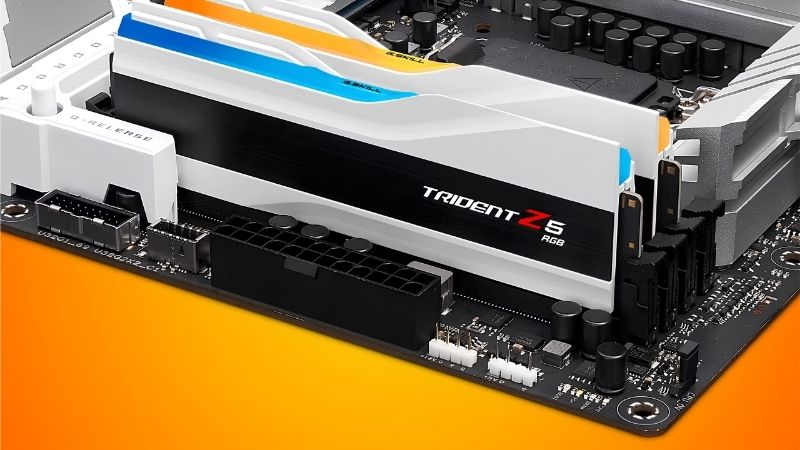
Your Socket Decides DDR4 or DDR5
AM5 and Intel’s LGA 1851 accept DDR5 exclusively. AM4 accepts DDR4 exclusively. LGA 1700 boards come in both varieties, so a B760 or Z790 board can take either, but never both in the same board.
Check the specification page before ordering, because the notch positions differ and a DDR5 module physically will not seat in a DDR4 slot. This is the single most common ordering mistake in a first build, and two minutes of checking avoids it entirely.
32GB Is the Sensible Target, 16GB Is the Floor
Modern titles increasingly reach beyond 16GB once a browser and a chat client are running alongside them in the background. A 32GB kit removes the question for the life of the machine and costs less overall than upgrading twice.
16GB still runs almost everything at 1080p and remains defensible on a tight budget, particularly with a two-stick kit that leaves the other slots free for later. Going to 64GB buys nothing in games and belongs in a production machine instead.
Buy Two Sticks, Not Four
Two modules run in dual channel and put the least strain on the memory controller, which is why a matched two-stick kit trains reliably at its rated speed. Filling all four slots, particularly with dual-rank modules, frequently forces the controller to drop speed.
Buying a single 32GB kit as two 16GB sticks also leaves room to expand later without discarding anything. Mixing two separately purchased kits is the most common cause of failed memory training, even when the specifications match on paper.
Speed Matters Less Than the Label Suggests
On AM5, DDR5-6000 with CL30 timings is the practical sweet spot because it keeps the memory controller at a 1:1 ratio. Faster kits usually force a divider that costs more latency than the extra bandwidth returns.
Intel’s Core Ultra 200 series scales further, so an 8000MT/s kit is worth having there. On DDR4 platforms, 3600 CL16 occupies the same sweet-spot position that 6000 CL30 does on DDR5.
What the 2026 Market Means for Memory Buyers
Memory is the component most affected by current market conditions, and three developments change what the best desktop RAM for gaming is worth paying this year, as well as when to buy it.
DRAM Prices Are Still Climbing
TrendForce raised its forecast again for the second half of 2026, with DRAM contract prices continuing to rise across the year. The slowdown that has appeared reflects buyers refusing to pay rather than supply improving.
New fabrication capacity is not scheduled before late 2027, and SK hynix has reportedly sold out its 2026 memory output already. That means the pressure continues regardless of demand softening at the retail end.
Black Friday Will Not Rescue a Memory Purchase
The usual advice to wait until late November does not apply this year. Stock sold in that window was manufactured from memory bought at 2026 contract rates, so genuine reductions on DDR5 kits and pre-built systems are unlikely.
Real discounts still appear on coolers, case fans, cases and power supplies. If you need memory now, buy it now, because delaying a build in the hope of a seasonal drop is a poor bet this particular year.
Take the Money From the Processor Instead
Because memory is not optional and cannot be substituted, the budget has to flex somewhere else. The processor is the least painful place, since a six-core chip and an eight-core chip land within a few percent at 1440p.
Dropping from a Ryzen 7 to a Ryzen 5 typically covers the DDR5 increase entirely, and the frame rate difference at 1440p is small. Cutting the memory kit to 16GB instead saves less money and creates a problem you will have to fix within two years.
Top Picks: Best Desktop RAM for Gaming Kits Ranked
The first four are DDR5 for current platforms and the last two are DDR4 for AM4 and older Intel boards, so the best desktop RAM for gaming in your case depends on the socket. Confirm which standard your motherboard takes before ordering, since the two are not interchangeable.
| Kit | Standard | Speed | Timings | Profile | Best For |
|---|---|---|---|---|---|
| G.Skill Trident Z5 Neo RGB 32GB | DDR5 | 6000 MT/s | CL30 | EXPO | AM5 builds |
| Corsair Vengeance 32GB | DDR5 | 6000 MT/s | CL30 | EXPO and XMP | Either platform |
| Kingston Fury Beast 32GB | DDR5 | 6000 MT/s | CL36 | XMP | Value DDR5 |
| Teamgroup T-Force Delta RGB 32GB | DDR5 | 6000 MT/s | CL30 | EXPO | Lighting builds |
| G.Skill Ripjaws V 32GB | DDR4 | 3600 MT/s | CL16 | XMP | AM4 and LGA 1700 |
| Corsair Vengeance LPX 32GB | DDR4 | 3600 MT/s | CL18 | XMP | Cooler clearance |
G.Skill Trident Z5 Neo RGB 32GB
The Neo line is validated specifically for AMD EXPO, which means a single BIOS toggle brings up DDR5-6000 CL30 without manual tuning. On a Ryzen 7000 or 9000 build that combination sits exactly at the 1:1 sweet spot.
The heat spreaders are tall enough to conflict with large dual-tower air coolers, so check your cooler’s published memory clearance figure first. It also carries a clear price premium over plainer kits for performance that is effectively identical in games.
Corsair Vengeance 32GB DDR5-6000
The plain Vengeance kit is the most broadly sensible DDR5 purchase, carrying both EXPO and XMP profiles so it works equally well on AMD and Intel boards. That flexibility matters if you might change platform later.
Its low-profile version clears almost every air cooler, which removes the most common physical headache. The RGB variant costs more and reintroduces the height problem, so buy the plain one unless lighting matters to you.
Kingston Fury Beast 32GB DDR5-6000
Fury Beast is the value entry to DDR5-6000, undercutting the tighter-timed kits while running the same frequency. CL36 rather than CL30 costs a small amount of latency that is difficult to notice in games.
Kingston validates broadly across boards, which makes it a safe choice when you are unsure about compatibility. The trade is that it will not reach the tuning headroom the premium kits offer if you later want to push timings.
Teamgroup T-Force Delta RGB 32GB
The Delta RGB delivers DDR5-6000 CL30 with EXPO support and the most even lighting diffusion in the category, which is the reason to choose it over the alternatives at similar money.
Height is the usual RGB penalty, so confirm cooler clearance before ordering. Teamgroup’s board validation list is narrower than Corsair or Kingston, so check your specific motherboard model rather than assuming compatibility.
G.Skill Ripjaws V 32GB DDR4-3600
For an AM4 build or a DDR4 LGA 1700 board, 3600 CL16 is the equivalent sweet spot to DDR5-6000 CL30. Ripjaws V has been the default recommendation at that specification for years and remains widely available.
DDR4 is a finished standard, so this is a kit for an existing platform rather than a new one. The heat spreaders are moderately tall, which can still conflict with the largest air coolers.
Corsair Vengeance LPX 32GB DDR4-3600
The LPX low-profile design is the answer when a large air cooler overhangs the memory slots, which is common on AM4 builds using dual-tower coolers. It clears nearly everything.
CL18 timings are slightly looser than the Ripjaws kit, costing a negligible amount of latency in practice. Like all DDR4, it belongs in a machine being refreshed rather than one being built from scratch.
Frequently Asked Questions
These questions come up whenever builders start pricing the best desktop RAM for gaming properly rather than treating memory as an afterthought at checkout.
Is 16GB still enough for gaming?
It runs almost everything at 1080p, but modern titles increasingly push past it once a browser and chat client are open. 32GB is the sensible target for a machine you keep several years, and the gap in cost is smaller than a later upgrade.
Should I buy two sticks or four?
Two. A matched two-stick kit runs in dual channel with the least strain on the memory controller and trains reliably at its rated speed. Four modules, especially dual-rank ones, frequently force the controller to run slower.
Can I mix two separately bought kits?
It often works and it frequently does not, even when the specifications match. Modules are validated as a set, so a single 32GB kit is far more reliable than two 16GB kits bought months apart.
Does faster memory improve frame rates?
Up to the sweet spot, yes. Moving from DDR5-4800 to 6000 CL30 on AM5 produces a measurable gain. Beyond that the controller drops out of its 1:1 ratio and the extra frequency stops converting into performance.
See More:
- Who makes the best motherboard
- Best budget AM5 CPU for gaming
- What is the best thermal paste pattern
- Best mini ITX computer case
Final Thoughts
The best desktop RAM for gaming in 2026 is a 32GB two-stick kit at the sweet spot for your platform: DDR5-6000 CL30 on AM5, the same or faster on Intel, and DDR4-3600 CL16 on AM4. Buy one matched kit rather than combining two, check heat spreader height against your cooler, and take the budget from the processor rather than the capacity. Prices are rising, so waiting is unlikely to help. Figures reflect August 2026 and should be verified before purchase.











Write Your Review
No reviews yet. Be the first to share your experience!