
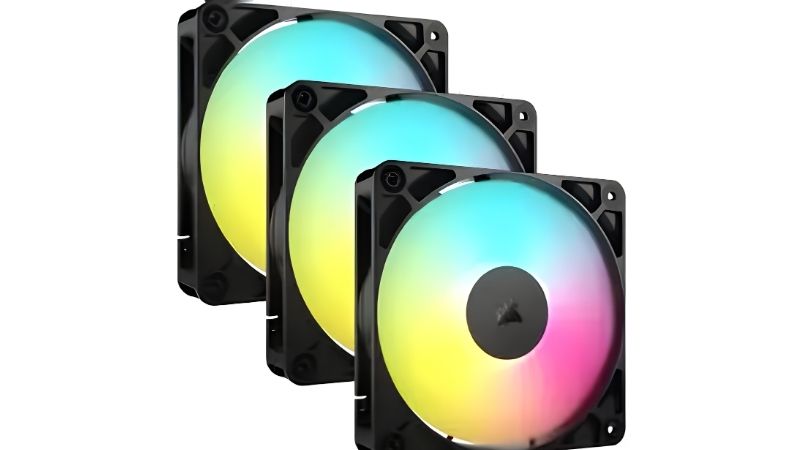
- Top Pick: Thermalright TL-C12C-S X3 CPU Fan 120mm ARGB Case Cooler Fan, 4pin PWM Silent Computer with S-FDB Bearing Included, up to 1550RPM Cooling Fan(3 Quantities) (TL-C12C X3)
- Best Value: Thermalright 5 Pack TL-C12C-S CPU Fan 120mm ARGB Case Cooler Fan, 4pin PWM Silent Computer Fan with S-FDB Bearing Included, up to 1550RPM Cooling Fan(5 Quantities)
- Premium Choice: Thermalright TL-C12C-S X3 CPU Fan 120mm ARGB Case Cooler Fan, 4pin PWM Silent Computer Fan wth S-FDB Bearing Included, up to 1550RPM Cooling Fan(3 Quantities)
Best CPU case fans are the ones that work in both jobs: pushing air through a dense heatsink or radiator, and moving volume across an open case panel. Most fans are optimised for one job or the other, so this guide covers the specifications that separate the two roles and picks out the models that genuinely handle both without compromise.
As an Amazon Associate we earn from qualifying purchases at no extra cost to you.






As an Amazon Associate we earn from qualifying purchases at no extra cost to you.
By Ryan Cole
How to Choose the Best CPU Case Fans
The best cpu case fans have to survive two very different jobs, because a fan bolted to a CPU cooler faces a completely different resistance profile than one hanging on a case panel. Understanding which number matters where saves you from buying an expensive fan that underperforms in the position you installed it.
Static Pressure Versus Airflow
Airflow, quoted in CFM or cubic metres per hour, measures how much air a fan moves with nothing in the way. Static pressure, quoted in mmH2O, measures its ability to push through resistance such as heatsink fins, a radiator or a dust filter.
On a CPU cooler or radiator, static pressure dominates. A fan rated at 2.5 mmH2O will beat one rated at 1.2 mmH2O through a dense fin stack even if the second fan quotes a higher CFM figure on paper.
For an open intake or exhaust, airflow matters more. The good news is that modern high-pressure designs give up very little raw airflow, which is why a small number of models genuinely work everywhere in a build.
Size, Thickness and Clearance
A 140mm fan moves the same air as a 120mm fan at lower RPM, which is quieter. The catch is fitment: many CPU coolers and most 240mm and 360mm radiators are built around 120mm mounting, so 140mm is a case-panel option more than a cooler option.
Thickness is the other variable. Standard fans are 25mm deep; 30mm designs such as the Phanteks T30 deliver noticeably more pressure but will collide with tall memory or a side panel in tighter cases. Measure before you order.
Bearing Type and Expected Life
Fluid dynamic bearings are the mainstream choice and typically carry MTTF ratings above 100,000 hours. Sleeve bearings are cheaper and fine for exhaust duty but wear faster when mounted horizontally, such as on a top-mounted radiator.
Noctua rates its SSO2 bearing at 150,000 hours and backs it with a six-year warranty, which is the longest in the category. For a system running continuously, that difference matters more than a fraction of a degree in cooling.
Connectors, PWM and Daisy Chaining
A four-pin PWM connector lets the motherboard vary speed smoothly and spin fans down to near silence at idle. Three-pin fans run on voltage control, which is workable but coarser and usually will not go as low.
If you are running six or more fans, connector management becomes real. Arctic’s PST pass-through and Lian Li’s daisy-chain system both cut cable clutter considerably; ARGB models add a separate 5V three-pin header on top of the PWM line.
Top Picks: Best CPU Case Fans Worth Buying
These six span the realistic best cpu case fans shortlist, from a budget five-pack to a premium 30mm high-pressure model. Figures below are manufacturer-rated at maximum speed as of August 2026.
| Fan | Size | Speed Range | Static Pressure | Noise |
|---|---|---|---|---|
| Noctua NF-A12x25 PWM | 120mm | 450-2000 RPM | 2.34 mmH2O | 22.6 dBA |
| Arctic P12 PWM PST | 120mm | 200-1800 RPM | 2.2 mmH2O | 0.3 sone |
| Phanteks T30-120 | 120x30mm | Up to 3000 RPM | Up to 4.5 mmH2O | Mode dependent |
| be quiet! Silent Wings 4 Pro | 120mm | Up to 2500 RPM | 3.0 mmH2O | Speed dependent |
| Lian Li UNI FAN SL-Infinity | 120mm | 800-1900 RPM | 2.54 mmH2O | 29 dBA |
| Thermalright TL-C12C | 120mm | Up to 1500 RPM | Moderate | Low |
Noctua NF-A12x25 PWM – Best Overall
This is the fan that genuinely does both jobs well. The extremely tight 0.5mm tip clearance lets it produce 2.34 mmH2O of pressure while still moving strong volume in open air, so one model can serve radiator, cooler and case duty.
The drawbacks are price and appearance. It costs several times what a competent budget fan does, the brown and beige colour scheme divides opinion, and there is no RGB version. The chromax.black variant fixes the look at a further premium.
Arctic P12 PWM PST – Best Value
Rated at 2.2 mmH2O, the P12 delivers close to premium static pressure for a fraction of the cost, and the PST pass-through connector lets you chain several fans off a single motherboard header. Buying a five-pack is the cheapest route to a well-ventilated case.
Build quality is a step below the premium tier, with more motor hum audible at high RPM and a plainer finish. The two-year warranty is also short compared to what Noctua and be quiet! offer.
Phanteks T30-120 – Highest Pressure
The T30 is 30mm thick rather than the usual 25mm, and that extra depth produces static pressure figures no standard fan matches. It has three physical modes, so you can cap it for silence or unlock it for thick radiators and restrictive builds.
The thickness is also the problem. It will not fit under many side panels, it fouls tall memory when used on a CPU cooler, and at full speed it is genuinely loud. It is a specialist fan, not a general-purpose one.
be quiet! Silent Wings 4 Pro – Best for Quiet Builds
Rated up to 3.0 mmH2O with a fluid dynamic bearing, the Pro version includes both three-pin and four-pin cables plus rubber and hard mounting corners, letting you tune vibration isolation for the mount.
The high-speed model is only quiet if you actually limit its curve; run it at maximum and it is no quieter than rivals. Pricing also sits near Noctua territory without quite matching its performance through dense fins.
Lian Li UNI FAN SL-Infinity – Best RGB Option
The daisy-chain interlocking design removes most of the cable mess from an eight-fan build, and at 2.54 mmH2O it performs well enough to sit on a radiator rather than being purely decorative. Dual-sided lighting looks strong through a glass panel.
It requires the Lian Li controller and its software, which is another utility running in the background. The plastic frame also produces more audible resonance at high RPM than the premium non-RGB competition.
Thermalright TL-C12C – Cheapest Sensible Fan
When you need to fill six mounts without spending much, this is the honest budget answer. Airflow is solid for open case positions and the price per unit is low enough that replacing one after a few years is trivial.
Static pressure is modest, so it is a poor choice for a thick radiator or a dense heatsink. Bearing noise also becomes noticeable sooner than on the premium models, particularly in horizontal mounts.
Fan Buying in the 2026 Component Market
Fans sit in one of the few categories where pricing is still behaving normally, which affects when you should buy the best cpu case fans for an upgrade this quarter.
Cooling Hardware Still Sees Real Discounts
Memory and storage pricing climbed steeply through 2026, but fans, coolers, cases and power supplies have stayed close to normal levels with genuine seasonal deals. Manufacturer increases in this category have been in the single digits.
That makes the November sales period a reasonable time to buy a multi-pack, unlike storage where sale stock carries elevated contract costs. If you are planning a full build, expect your savings to come from this side of the parts list.
Airflow Is the Cheap Upgrade That Still Works
With graphics card prices up sharply and no new architectures until CES in January 2027, more builders are extending the life of current hardware. Replacing three tired case fans is one of the few changes that produces a measurable result for very little money.
A well-planned intake and exhaust layout can drop CPU and GPU temperatures several degrees, which translates into steadier boost clocks and lower fan speeds across the whole system rather than just at one component.
Watch the Budget Tier Thinning Out
Manufacturers have been shifting focus toward mid and high-tier products as entry-level sales decline, and promotional pricing policies tightened in early 2026. Some of the cheapest fan lines are quietly disappearing from listings.
This is not a reason to panic buy. It does mean that if a specific budget model works for your case, buying the multi-pack rather than single units is the safer approach for future replacements.
Frequently Asked Questions
The best cpu case fans questions usually come from builders working out whether one set can cover every mounting position in the chassis.
Can the best cpu case fans be used on a radiator too?
Yes, provided they are high static pressure designs. Fans rated above roughly 2.0 mmH2O work well on radiators and dense heatsinks while still moving good volume in open case positions, which is exactly what makes them versatile.
How many fans does a typical mid-tower need?
Three intakes at the front and one exhaust at the rear is the reliable baseline. Adding top exhausts helps when a radiator is mounted there. Beyond about six fans, returns diminish quickly and noise starts rising faster than temperatures fall.
Should intake or exhaust be stronger?
Slightly positive pressure, meaning marginally more intake than exhaust, keeps dust entering through filtered openings rather than every gap in the chassis. A common setup is three filtered intakes against two unfiltered exhausts.
Are 140mm fans always better than 120mm?
They move similar air at lower speed, which is quieter, but fitment limits them. Most CPU coolers and radiators are built around 120mm spacing, so 140mm is best used on case panels where the mounting holes support it.
See More:
- Best 4TB NVMe SSD
- Best thermal grizzly paste
- Best thermal paste for 7800X3D
- Best motherboard for gaming computer
Final Thoughts
The best cpu case fans are the ones with enough static pressure to work on a heatsink and enough airflow to be useful on a panel, which narrows the field considerably. The NF-A12x25 is the do-everything answer if budget allows, the Arctic P12 covers most builds for far less, and the T30 exists for restrictive setups that need brute force. With cooling parts still discounting normally in late 2026, this is a sensible place to spend an upgrade budget.











Write Your Review
No reviews yet. Be the first to share your experience!