
Best motherboard ASUS makes depends entirely on which of its three ranges you need. Prime covers the basics, TUF Gaming sits in the practical middle, and ROG Strix adds networking and power delivery most gaming builds never use. This guide places six current boards in that hierarchy, with the specifications that decide which tier you actually need.
As an Amazon Associate we earn from qualifying purchases at no extra cost to you.


As an Amazon Associate we earn from qualifying purchases at no extra cost to you.
By Ryan Cole
How to Choose the Best Motherboard ASUS Offers
ASUS sells more board variants than any competitor, and the naming rewards people who already know the pattern. These four checks turn that catalogue into a short list of the best motherboard ASUS makes for your build.
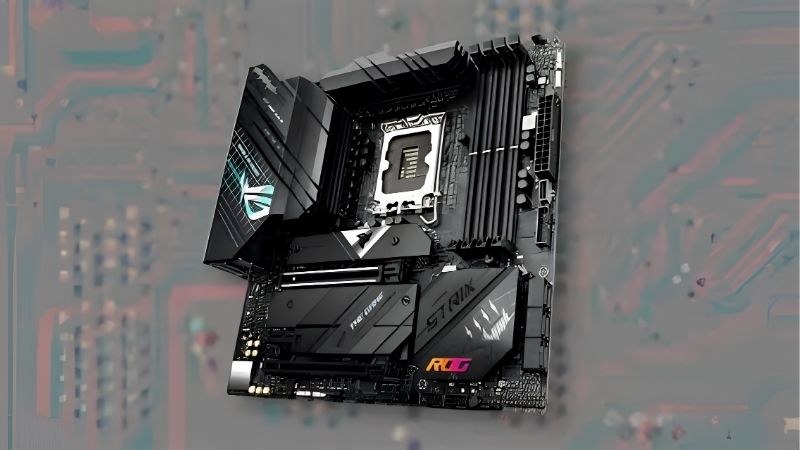
Understand the Range Hierarchy
Prime is the entry tier: functional VRM, basic heatsinks, fewer USB ports and often no Wi-Fi. It is fine for a mid-range CPU in a build where the money is going into the graphics card.
TUF Gaming adds better power delivery, 2.5G Ethernet, Wi-Fi and heatsinked M.2 slots. For most gaming builds this is the correct tier, and stepping above it buys features rather than performance.
ROG Strix brings stronger VRM, more M.2 slots, better audio and faster networking. ROG Maximus and Crosshair sit above that for extreme overclocking, which is irrelevant for a gaming machine.
Match the Chipset to Your CPU Plans
On AMD, B650 and B850 cover gaming comfortably, while X670E and X870E add PCIe 5.0 lanes and connectivity for multi-drive systems. The gaming difference between them is negligible.
On Intel, B760 and B860 handle locked and mid-range chips, with Z790 and Z890 required for memory tuning and CPU overclocking. Pair a K-series chip with a Z board or you lose part of what you paid for.
Note that AM5 and LGA 1851 boards both use DDR5 exclusively. Older DDR4 boards still exist on Intel’s previous platform, but they tie you to a generation that no longer receives new chips.
Check the M.2 and PCIe Layout
Count slots, then check what disables what. Populating a second or third M.2 slot often disables SATA ports or drops the secondary PCIe slot to fewer lanes, which the specification page lists in small print.
ASUS boards commonly place the primary M.2 above the graphics card with a substantial heatsink. That position runs cooler than slots beneath a hot GPU, which matters for sustained transfers on Gen5 drives.
Tool-free M.2 latches appear across the mid and upper ranges now. It sounds minor until the third time you remove a drive without hunting for a tiny screw behind the graphics card.
Look at Networking, Audio and BIOS Features
2.5G Ethernet and Wi-Fi 6E are standard from TUF Gaming upward, with Wi-Fi 7 on newer ROG boards. If your router does not support the newer standard, that upgrade changes nothing today.
BIOS Flashback is the feature worth checking specifically. It allows a firmware update with no CPU installed, which removes the main risk when pairing a new chip with older board stock.
Audio matters less than the marketing implies. Any current ALC-series codec drives headphones adequately, and anyone chasing better sound will use a separate DAC regardless of what the board provides.
Top Picks: Best Motherboard ASUS Sells Right Now
The best motherboard ASUS offers changes with platform and budget, so these six span AM5 and Intel across three price tiers. Specifications come from ASUS documentation, and street pricing moves week to week in the current market.
| Board | Platform | Range | Networking | Best For |
|---|---|---|---|---|
| ASUS TUF Gaming B650-PLUS WiFi | AM5 | TUF Gaming | 2.5G + Wi-Fi 6 | Best all-round AMD pick |
| ASUS ROG Strix B850-F Gaming WiFi | AM5 | ROG Strix | 2.5G + Wi-Fi 7 | Upper mid-range AMD |
| ASUS Prime B650M-A II | AM5 | Prime | 2.5G | Budget mATX builds |
| ASUS TUF Gaming B760-PLUS WiFi | LGA 1700 | TUF Gaming | 2.5G + Wi-Fi 6 | Locked Intel chips |
| ASUS ROG Strix Z890-A Gaming WiFi | LGA 1851 | ROG Strix | 2.5G + Wi-Fi 7 | Current Intel flagship builds |
| ASUS ROG Strix X870E-E Gaming WiFi | AM5 | ROG Strix | 5G + Wi-Fi 7 | Multi-drive and capture setups |
ASUS TUF Gaming B650-PLUS WiFi
This is the board most AMD gaming builds should use: solid power delivery for anything up to a Ryzen 9, two M.2 slots with heatsinks, 2.5G Ethernet, Wi-Fi and BIOS Flashback included.
Rear USB provision is merely adequate and there is no Wi-Fi 7. Neither limits a gaming machine in practice, and the price gap against ROG Strix buys a meaningful chunk of a GPU upgrade.
ASUS ROG Strix B850-F Gaming WiFi
The B850 chipset keeps costs below X870 while adding Wi-Fi 7, more M.2 provision and stronger VRM than the TUF tier. It suits a Ryzen 7 or 9 build that will stay in service several years.
You pay a clear premium over TUF Gaming for features rather than frame rates. Unless you need the extra storage slots or faster wireless, the cheaper board performs identically in games.
ASUS Prime B650M-A II
A compact mATX board that covers the essentials with 2.5G Ethernet and DDR5 support at a genuinely low price. Paired with a Ryzen 5, it produces a capable and inexpensive gaming system.
There is no Wi-Fi, the VRM is sized for mid-range chips, and rear I/O is basic. Those are reasonable compromises at this price, but do not put a Ryzen 9 on it.
ASUS TUF Gaming B760-PLUS WiFi
For a locked Intel chip such as a Core i5-14400F, this board provides everything needed without paying for overclocking support you cannot use. Two M.2 slots, 2.5G and Wi-Fi are all present.
LGA 1700 is now a legacy platform, so treat this as a fixed-specification build rather than an upgrade path. Memory tuning is also limited compared with a Z-series board.
ASUS ROG Strix Z890-A Gaming WiFi
Z890 is the tier that unlocks CPU and memory tuning on current Intel chips, and this board pairs that with Wi-Fi 7, multiple M.2 slots and a substantial power stage in a light colourway.
It is expensive, and much of the capability sits idle unless you actively tune the system. For a locked chip there is no reason to spend here rather than on a B860 board.
ASUS ROG Strix X870E-E Gaming WiFi
The flagship AM5 Strix board adds abundant PCIe 5.0 provision, faster wired networking and enough M.2 slots for a heavy storage setup or a capture card alongside a graphics card.
Very few gaming builds need this much connectivity, and the price reflects that. Buy it if you are running multiple Gen5 drives and add-in cards, not simply because it sits at the top of the range.
What 2026 Pricing Means for ASUS Buyers
Board pricing has moved in a specific direction this year, and it affects which tier represents good value rather than which brand to buy.
The Budget Tier Has Thinned Out
Motherboard sales fell by more than 25% and manufacturers concentrated production on mid and high-end SKUs, while promotional pricing policies tightened from February onward.
In practice, the cheapest Prime boards are harder to find at genuinely low prices, and the TUF Gaming tier has absorbed much of that demand. That is where the best motherboard ASUS currently offers per dollar tends to sit.
AM5 Boards Carry Real Longevity
AMD committed at Computex 2026 to supporting AM5 with new processors through 2029, while Intel’s next platform moves to a different socket entirely. That asymmetry matters when spending on a board.
If you expect to change CPU once during the life of the build, an AM5 board holds its usefulness longer. On Intel, treat the board and chip as a matched pair bought together at the same time.
That does not make Intel a bad choice, only a different one. A locked Intel chip on a B-series board remains a cost-effective gaming machine if you accept it as a fixed configuration.
There Is No Reason to Wait
Zen 6, Intel Nova Lake and the refreshed graphics cards have all moved to CES in January 2027. No board launch between now and then will change what a gaming build needs.
Memory is the part of the build to price carefully, since DRAM contracts rose through both Q3 and Q4. Board pricing itself has been comparatively stable by comparison.
Frequently Asked Questions
These questions come up in nearly every thread about the best motherboard ASUS produces, and the answers are more consistent than the range naming suggests.
Is TUF Gaming enough or should I buy ROG Strix?
For gaming, TUF Gaming is enough in almost every case. ROG Strix adds networking, storage slots and overclocking headroom, none of which changes frame rates with a stock CPU and a single fast drive.
Do ASUS boards support BIOS Flashback across the range?
Most TUF Gaming and ROG boards include it, while Prime models often do not. Check the specification page for your exact model, since it is the feature that saves a build with older firmware.
Is Wi-Fi 7 worth paying extra for?
Only if your router already supports it. Wi-Fi 7 hardware falls back to earlier standards, so on a Wi-Fi 6 network the newer chipset delivers no practical benefit at all.
Does the chipset affect gaming performance?
Barely. Chipset determines connectivity, lane counts and overclocking support rather than frame rates. A B650 and an X870E board with the same CPU and GPU perform within a margin of error in games.
See More:
Final Thoughts
The best motherboard ASUS makes for most gaming builds is a TUF Gaming board on the AM5 platform, with Prime covering tight budgets and ROG Strix reserved for people who genuinely need the extra storage and networking. Match the chipset to your CPU, confirm BIOS Flashback is present, and put the money you save toward the graphics card instead.











Write Your Review
No reviews yet. Be the first to share your experience!