
- Top Pick: ARCTIC Liquid Freezer III Pro 360 A-RGB – AIO CPU Cooler, Water Cooling
- Best Value: ARCTIC Liquid Freezer III Pro 360 – AIO CPU Cooler,3 x 120 mm Water Cooling
- Premium Choice: CORSAIR Nautilus 360 RS Liquid CPU Cooler – 360mm AIO – Low-Noise – Direct Motherboard Connection – Daisy-Chain – Intel LGA 1851/1700, AMD AM5/AM4 – 3X RS120 Fans Included – Black
Best AIO CPU cooler decisions start with your case, not with a performance chart. A 360mm radiator that will not clear your memory modules or your front fan mounts is worthless to you, however well it performs, and a thick radiator plus its fans can eat over 60mm of space, a figure that no product page mentions on its own.
As an Amazon Associate we earn from qualifying purchases at no extra cost to you.
By Ryan Cole, PC hardware writer at NvidiaReview
How to Choose the Best AIO CPU Cooler
The best AIO CPU cooler for one build can be the wrong choice for another, because fit and noise usually matter more than the last two degrees of performance. Three factors settle it: radiator size and thickness, pump and fan acoustics, and the quality of the mounting hardware.
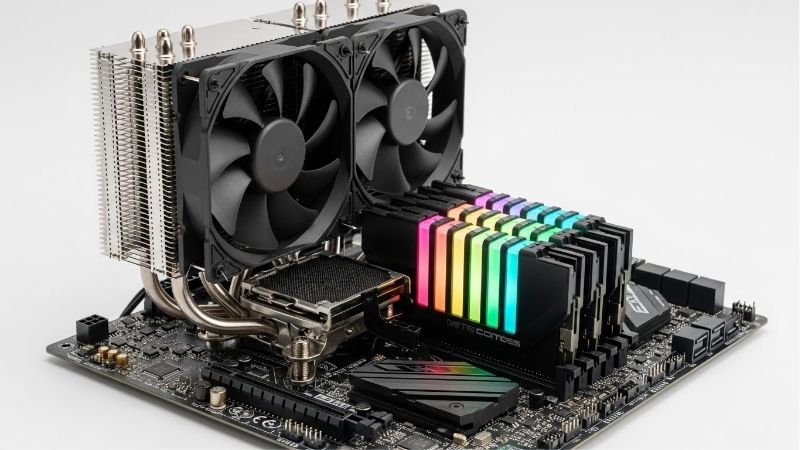
Radiator Size, Thickness and Case Clearance
A 240mm radiator handles mainstream processors comfortably, 280mm adds useful surface area if your case supports it, and 360mm is the sensible target for high-core-count chips under sustained load. Bigger radiators also let fans spin slower for the same temperature, which usually means less noise.
Thickness is the specification people forget. Radiators in this class run from roughly 27mm to 38mm, and you must add 25mm of fan on top. A 38mm radiator with fans needs about 63mm of clearance, which can collide with tall memory modules when mounted at the top of a mid-tower.
Pump Behaviour, Fan Curves and Noise
Pumps in modern units are generally quiet, but they are a constant noise source that air coolers simply do not have. Look for a PWM-controlled pump you can tune down in the BIOS rather than one that runs at a fixed speed, since full pump speed rarely improves temperatures meaningfully.
Fan quality matters just as much. Three cheap fans at 2000 RPM will always be louder than three good ones producing the same airflow at lower speed, and the difference is obvious during long sessions. Check whether the fans use daisy-chained or integrated cabling, which tidies the build considerably.
Mounting Hardware, Offset and Socket Support
AMD AM5 processors run hottest slightly off centre, which is why several current coolers use native offset mounting to shift the cold plate toward the hotspot. On Intel LGA1700 and LGA1851, a contact frame that evens out pressure distribution has become a common inclusion and does measurable good.
Check the bracket situation before buying, especially with an older cooler. Vendors vary in how readily they supply new socket brackets, and a cooler that cannot be remounted on your next platform loses much of its long-term value. Tube length also decides whether top or front mounting is possible.
Top Picks: Best AIO CPU Cooler for Every Build
These five candidates for the best AIO CPU cooler cover thick high-performance radiators, slim units for tight cases and display-equipped models. Specifications are vendor-published; independent testing varies by test bench. Availability and pricing tiers were checked in August 2026.
| Cooler | Radiator sizes | Radiator thickness | Notable feature | Best for |
|---|---|---|---|---|
| Arctic Liquid Freezer III 360 | 240 / 280 / 360 | 38 mm | Integrated VRM fan | Performance per dollar |
| DeepCool Mystique 360 | 240 / 360 | Approx 27 mm | Colour display | Strong thermals plus screen |
| NZXT Kraken 360 | 240 / 280 / 360 | Approx 30 mm | LCD display, quiet pump | Low noise builds |
| Lian Li Galahad II Trinity 360 | 240 / 360 | Approx 28 mm | ARGB fans | Show builds |
| Corsair Nautilus 360 RS | 240 / 360 | Approx 27 mm | Slim radiator | Tight clearance cases |
Arctic Liquid Freezer III 360 – Best Overall Value
Arctic pairs a 38mm radiator with P12 PRO fans, native offset mounting for AMD and Intel, and an integrated VRM fan that actively cools the power stages next to the socket. Fan cables run inside the tube sleeving, so a single connector reaches the board and the build stays tidy.
That 38mm radiator plus 25mm fans needs roughly 63mm of clearance, which rules out some cases and collides with tall memory in top-mounted configurations. The VRM fan adds a small noise source if you leave it at high duty. On value and sustained load performance, nothing here matches it.
NZXT Kraken 360 – Best for Quiet Builds
The Kraken pairs an Asetek-based pump with a circular LCD display on the block, and its reputation is built on how little you hear it. At moderate loads the pump is effectively inaudible, and the bundled fan curves in the software are conservative enough to keep the machine calm during gaming.
It sits at the expensive end of the market, and the display requires the vendor software running to do anything useful, which not everyone wants. Raw thermal performance trails the thicker Arctic unit by a small margin. If noise is your first priority, that trade is easy to accept.
DeepCool Mystique 360 – Best Display Model That Also Performs
The Mystique combines a colour display block with thermal results that sit within touching distance of the strongest units in independent testing. For a build where the cooler is visible through a side panel, it avoids the usual compromise of paying for a screen and losing real cooling capacity.
The screen depends on software support to show anything beyond basic information, and it adds cost against plainer models with similar radiators. The bundled fans are competent rather than exceptional. As a way to get both aesthetics and genuine performance, it is one of the better options.
Lian Li Galahad II Trinity 360 – Best for Show Builds
The Galahad II Trinity leans into appearance, with dense ARGB lighting in both the fans and the pump block and a clean cable routing scheme that suits a glass-panel case. Thermal performance is solid for a 360mm unit and it holds its own against most similarly priced competitors.
Tube length is shorter than several rivals, which restricts mounting flexibility in larger cases and can make front mounting awkward. Getting the lighting fully synchronised generally means running the vendor software alongside your board utility. For a build meant to be looked at, it delivers.
Corsair Nautilus 360 RS – Best for Tight Cases
The Nautilus uses a slim radiator around 27mm thick, which makes it far easier to fit in cases with limited top clearance or in compact chassis where a 38mm unit simply will not go. The mounting hardware is straightforward and the pump runs quietly at default settings.
Less radiator volume means less thermal capacity, so under a sustained all-core load it gives ground to the thicker units, particularly with a high-TDP processor. The fans are middling. When clearance is the binding constraint rather than absolute performance, that compromise is the right one.
What the 2026 Market Means for Cooling Upgrades
Cooling remains one of the few sane corners of the component market this year, which changes where a limited upgrade budget should go and how urgent the purchase really is. Three factors are worth weighing before you order a liquid cooler for an existing machine.
Cooling Is the Affordable Upgrade Right Now
With graphics cards up sharply and memory following, a full platform refresh is out of reach for a lot of builders. A better cooler, fresh compound and decent case fans still deliver measurable gains on an existing machine, particularly if your processor throttles during long rendering or gaming sessions.
That makes a liquid cooler one of the more rational purchases available today. If your chip currently sits on a stock heatsink and drops clocks after twenty minutes of load, moving to a 240mm or 360mm unit recovers sustained performance for a fraction of what a new graphics card costs.
Cooler Prices Have Crept Up Too
Cooling components have risen roughly 6 to 8 percent as manufacturers concentrate on mid-range and premium lines, and the promotional pricing policies that used to soften those figures were withdrawn in February 2026. The very cheapest liquid coolers are also thinning out at the entry end.
The practical advice is to avoid the bargain basement here. A poor pump is a noise source you will live with daily and a reliability risk over several years. Spending one tier up on a unit with a PWM pump and decent fans is money that pays back in acoustics alone.
Late-Year Discounts Are Genuine on Cooling
Waiting for November sales is poor advice for memory, storage and prebuilt systems this year, since that stock was built from expensive contract components. Coolers, fans, cases and power supplies are the exception and continue to see real reductions during that period most years.
So if your machine is running hot today, buy now and stop throttling. If the upgrade is optional and you can wait a few months, holding until late November is reasonable for cooling specifically. All pricing conditions described here reflect August 2026 and should be checked before ordering.
Frequently Asked Questions
The questions builders ask most when moving from air to liquid cooling: how large a radiator to buy, how long a sealed unit lasts, where to mount it, and whether the best AIO CPU cooler is actually necessary at all for a mainstream six or eight-core desktop processor.
Is 240mm enough, or do I need 360mm?
A 240mm unit handles mainstream six and eight-core processors comfortably. Step up to 360mm for high-core-count chips, sustained production workloads, or when you simply want the same temperatures at noticeably lower fan speeds. In practice, case support decides the question before performance does.
How long does a liquid cooler last?
Sealed units typically give five to seven years of service, with the pump being the wear component and coolant permeation reducing capacity slowly over time. A quality air cooler will outlast one, which is a legitimate argument for a tower heatsink if longevity matters more than looks.
Does the best AIO CPU cooler beat a good air cooler?
At the top end, a 360mm unit outperforms the strongest tower coolers under heavy sustained load, but the margin against a premium dual-tower heatsink is smaller than most people expect. Liquid cooling wins clearly on memory clearance, appearance and moving heat directly out of the case.
Should the radiator be mounted at the top or the front?
Top mounting is preferred where clearance allows, because it keeps the pump below the highest point of the loop and helps air bubbles collect away from it. Front mounting works well too and often improves processor temperatures slightly, at the cost of warmer air reaching the graphics card.
See More:
- Best thermal compound paste
- Thermal paste at Best Buy
- Graphics card at Best Buy
- Best AM4 CPU for gaming
- Best motherboard for 9800x3d
Final Thoughts
The best AIO CPU cooler is the largest one your case will genuinely fit with a pump you can tune down. The Arctic Liquid Freezer III wins on value and sustained load if you have 63mm of clearance, the Kraken is the quiet choice, and a slim Nautilus solves fit problems the others cannot. Measure your case first, then pick.
As an Amazon Associate we earn from qualifying purchases at no extra cost to you.













Write Your Review
No reviews yet. Be the first to share your experience!