
- Top Pick: Thermalright Peerless Assassin 120 SE CPU Cooler, 6 Heat Pipes AGHP Technology, Dual 120mm PWM Fans, 1550RPM Speed, for AMD:AM4 AM5/Intel LGA 1700/1150/1151/1200/1851,PC Cooler
- Best Value: Thermalright Assassin X120 Refined SE CPU Air Cooler, 4 Heat Pipes, TL-C12C PWM Fan, Aluminium Heatsink Cover, AGHP Technology, for AMD AM4/AM5/Intel LGA 1150/1151/1155/1200/1700/1851(AX120 R SE)
- Premium Choice: Cooler Master Hyper 212 Black CPU Air Cooler, 4 Heat Pipes, PWM Fan
Best CPU cooler fan choices are decided by static pressure rather than airflow, because a fan bolted to a dense fin stack faces resistance a case panel never creates. This guide covers the numbers that matter when replacing the fan on a tower or a radiator, which models are genuinely worth the swap, and where the upgrade returns nothing at all.
As an Amazon Associate we earn from qualifying purchases at no extra cost to you.





As an Amazon Associate we earn from qualifying purchases at no extra cost to you.
By Ryan Cole
How to Choose the Best CPU Cooler Fan
Picking the best CPU cooler fan is a different exercise from buying case fans. Four specifications decide whether the swap improves temperatures or simply changes the noise.
Static Pressure Is the Number That Counts
Static pressure, quoted in millimetres of water, measures a fan’s ability to push air through resistance. On a heatsink or radiator that resistance is high, which is why a fan rated at 2.5 mmH2O beats one at 1.2 mmH2O regardless of CFM.
Airflow figures are measured with nothing in the way and mislead badly in this application. A fan advertising high CFM but low pressure will stall against a dense fin stack and move far less air than its rating implies.
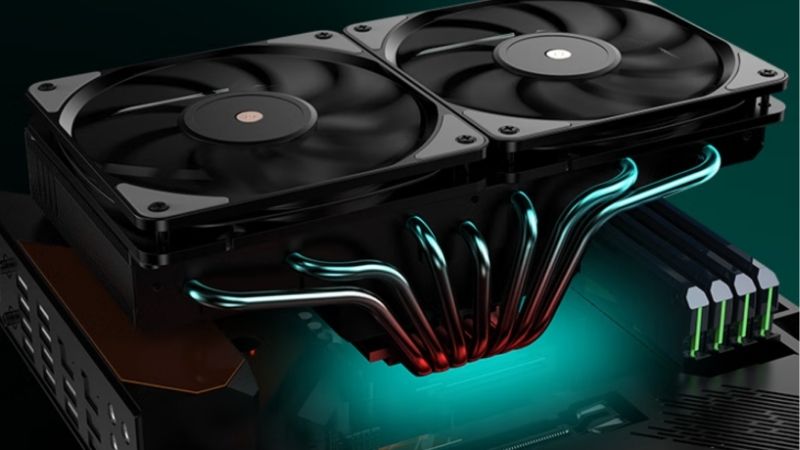
Fin density on the cooler decides how much pressure you need. Open-fin budget towers work well with almost anything, while tightly packed premium heatsinks and thick radiators reward high-pressure designs.
Thickness: 25mm Versus 30mm
Standard fans are 25mm deep and fit essentially everywhere. Thirty millimetre designs such as the Phanteks T30 generate noticeably more pressure and move more air at the same noise level, but they need physical room.
On a CPU tower, the extra five millimetres frequently collides with tall memory heatspreaders or pushes total height past what the case allows. Measure before ordering rather than assuming a fan swap is a drop-in change.
RPM Range and Minimum Speed
The maximum speed determines the ceiling, but the minimum matters more day to day. A fan that idles at 200 RPM is inaudible during light use, while one with a 700 RPM floor is always present in a quiet room.
PWM control quality varies. Cheaper fans produce audible motor buzz at low duty cycles, which is exactly where a well-tuned build spends most of its time, so a low floor is only useful if the fan is clean at that speed.
Push, Pull and Matched Pairs
Adding a second fan in pull configuration on a tower typically gains one to three degrees under sustained load. It is worth doing on a dual-tower cooler, less so on a single tower where the return diminishes quickly.
Use matched fans where possible. Two different models running the same PWM signal spin at different speeds and can create a beat frequency, which is more noticeable than either fan alone.
Orientation is worth double checking as well. Arrows moulded into the frame show airflow direction and blade rotation, and a fan fitted backwards on a tower will fight the exhaust rather than help it.
Top Picks: Best CPU Cooler Fan Models Worth Fitting
These six are chosen for performance through resistance rather than open-air airflow. Specifications are manufacturer-rated at maximum speed as of August 2026.
| Fan | Size | Max Speed | Static Pressure | Best For |
|---|---|---|---|---|
| Noctua NF-A12x25 PWM | 120 x 25mm | 2000 RPM | 2.34 mmH2O | Towers and radiators |
| Phanteks T30-120 | 120 x 30mm | 3000 RPM | Up to 4.5 mmH2O | Thick radiators |
| be quiet! Silent Wings 4 Pro | 120 x 25mm | 2500 RPM | 3.0 mmH2O | Quiet high pressure |
| Arctic P12 PWM PST | 120 x 25mm | 1800 RPM | 2.2 mmH2O | Value replacements |
| Noctua NF-A14x25 G2 | 140 x 25mm | 1500 RPM | High | 140mm coolers |
| Thermalright TL-C12C-S | 120 x 25mm | 1500 RPM | Moderate | Budget swaps |
Noctua NF-A12x25 PWM – Best Overall
This is the best cpu cooler fan for most situations. The extremely tight 0.5mm tip clearance is why it produces 2.34 mmH2O while staying quiet, and it is the safest single choice for a tower, a radiator or a case mount. The SSO2 bearing carries a six year warranty.
Price is the obvious problem, since it costs several times a competent budget fan. The brown and beige colour scheme also has no lighting option, though the chromax.black version addresses appearance at a further premium.
Phanteks T30-120 – Highest Pressure Available
The extra five millimetres of depth produce static pressure no standard fan matches, and three physical modes let you cap it for silence or unlock it for thick radiators. On a restrictive build it is the strongest option here.
Thickness is the constraint. It fouls tall memory on many CPU towers, may not clear a side panel, and at full speed it is genuinely loud. Treat it as a specialist fan for radiators rather than a general upgrade.
be quiet! Silent Wings 4 Pro – Best Quiet High-Pressure Option
Rated at 3.0 mmH2O with a fluid dynamic bearing, the Pro version includes both three-pin and four-pin cables plus rubber and hard mounting corners, letting you tune vibration isolation for the cooler you are fitting it to.
It is only quiet if you actually limit the curve, since the high-speed variant reaches 2500 RPM. Pricing also sits close to Noctua without quite matching it for performance through very dense fin stacks.
Arctic P12 PWM PST – Best Value Replacement
At 2.2 mmH2O the P12 delivers most of the pressure of premium fans for a small fraction of the cost, and the PST connector chains several from one header. Replacing the stock fans on a budget AIO is where it shines.
Build quality sits below the premium tier, with more motor hum audible at higher duty cycles. The two year warranty is short against the five and six year coverage the premium brands offer.
Noctua NF-A14x25 G2 – Best 140mm Choice
For coolers built around 140mm mounting, this delivers high pressure at just 1500 RPM, which means substantial cooling at a noise level a 120mm fan cannot match. It is the natural pairing for large dual-tower heatsinks.
Fitment is the limitation, since most radiators and many towers use 120mm spacing. It is also expensive, and on a cooler designed around 120mm fans an adapter bracket is rarely worth the trouble.
Thermalright TL-C12C-S – Cheapest Sensible Swap
When a stock fan has developed bearing noise and you simply want it gone, this replaces it for very little money while moving adequate air through an open-fin tower.
Static pressure is modest, so it is a poor match for a dense premium heatsink or a thick radiator. Bearing noise also appears sooner than on the higher-tier options, particularly in horizontal mounts.
Why Fan Upgrades Make Sense in 2026
Cooling accessories sit in one of the few categories where the market is behaving normally, which affects when to buy the best cpu cooler fan for your build.
Cheap Upgrades Still Deliver Real Gains
With graphics pricing elevated and no new architectures arriving before CES in January 2027, more builders are extending the life of existing systems. Replacing a worn or underspecified cooler fan is among the cheapest changes that produces a measurable result.
A processor running several degrees cooler holds boost clocks longer during extended sessions. On a machine three or more years old, a fresh fan plus new thermal compound often restores performance people assumed was lost to age.
Cooling Parts Still Discount Properly
While memory and storage climbed steeply through 2026, fans and coolers stayed close to normal pricing with genuine seasonal reductions and manufacturer increases in the single digits.
That makes November a legitimate time to buy, unlike storage where sale stock carries elevated contract costs. There is no urgency here, so waiting for a specific model to hit a good price costs nothing.
The Budget Tier Is Narrowing
Manufacturers have shifted focus toward mid and high-tier products as entry-level sales declined, and promotional pricing tightened in early 2026. Some of the cheapest fan lines are quietly leaving listings.
If a budget model works well on your cooler, buying a multi-pack rather than a single unit is the safer approach for future replacements, since finding the same model again in two years is less certain than it used to be.
Frequently Asked Questions
The best cpu cooler fan question usually arrives with these, from builders wondering whether the swap is worth the effort at all.
Will the best cpu cooler fan actually lower my temperatures?
On a cooler shipped with a mediocre fan, a high-pressure replacement typically gains two to four degrees under sustained load. On a premium cooler whose fan was designed for its fin density, the gain is usually within a degree.
Should I add a second fan in push-pull?
On a dual-tower cooler it is worth one to three degrees and is generally worth doing. On a single tower the return diminishes quickly, and the added noise often outweighs the benefit unless you are near the thermal limit.
Can I use case fans on a CPU cooler?
Only if they are high static pressure designs. A fan optimised for open airflow will stall against a dense fin stack and move far less air than its CFM rating suggests, which is why the pressure figure matters more here.
Do thicker fans always perform better?
They generate more pressure and move more air at the same noise level, but only if they physically fit. On a CPU tower the extra depth frequently collides with memory or the case panel, which makes 25mm the practical default.
See More:
- Best 4TB NVMe SSD
- Best thermal grizzly paste
- Best thermal paste for 7800X3D
- Best CPU case fans
- Best motherboard for gaming computer
Final Thoughts
The best CPU cooler fan for most builds is the NF-A12x25, which handles towers, radiators and case mounts without compromise. The T30-120 is the specialist choice for thick radiators with room to spare, and the Arctic P12 covers budget swaps for a fraction of the cost. With cooling parts still discounting normally through late 2026, this is a low-cost upgrade worth timing to a sale.











Write Your Review
No reviews yet. Be the first to share your experience!