
Best 32in 4K gaming monitor recommendations usually jump straight to premium OLED, which is the wrong starting point for most buyers. If you play on a console or run a mid-range graphics card, a 144Hz IPS or mini-LED panel delivers nearly the same experience for a fraction of the cost, and frees budget for the hardware driving it.
As an Amazon Associate we earn from qualifying purchases at no extra cost to you.


As an Amazon Associate we earn from qualifying purchases at no extra cost to you.
By Ryan Cole
How to Choose the Best 32in 4K Gaming Monitor on a Budget
The gap between a mid-priced panel and a flagship one is narrower than the price difference suggests. These four checks show where the extra money on the best 32in 4K gaming monitor genuinely buys something.
Decide Whether You Actually Need OLED
OLED wins on contrast and motion clarity, and in a dark room the difference is obvious immediately. In a bright room with a matte-panel alternative, much of that advantage is lost to reflections and ambient light washing out the image.
The practical question is what you play. Cinematic single-player games benefit most from OLED contrast, while competitive shooters and general use gain far less from it.
Mini-LED is the middle path, adding local dimming zones to an IPS panel. It improves dark scenes considerably without the burn-in caution or the premium pricing of OLED.
Match the Panel to Your Console or GPU
PS5 and Xbox Series X output 4K at up to 120Hz over HDMI 2.1, so a 144Hz panel covers console gaming completely. Paying for 240Hz adds nothing on a console setup.
On PC, a mid-range graphics card at 4K typically lands between 60 and 100fps in modern titles with upscaling enabled. A 144Hz panel with a wide adaptive sync range suits that comfortably.
Frame generation raises the numbers but adds latency, so it suits single-player titles more than competitive ones. Plan the refresh rate around what you get without it.
Check Response and Overdrive Behaviour
Quoted response times are best-case figures measured on specific transitions. Real behaviour depends on the overdrive implementation, which can introduce visible overshoot on some IPS panels.
Look for a panel with a usable middle overdrive setting rather than one that only works at maximum. That detail matters more day to day than the number printed on the box.
Reviews with pixel transition measurements are worth reading here. Two panels quoting the same response time can behave very differently once adaptive sync is running at variable frame rates.
Look at Connectivity and Everyday Usability
Two HDMI 2.1 ports are worth having if a console and a PC share the screen. A KVM switch and USB-C add convenience for anyone connecting a work laptop as well.
Stand adjustment, VESA mounting and on-screen menu quality all affect daily use more than a small specification difference. A poor stand is the most common complaint about budget panels, and a monitor arm solves it cheaply if the screen supports VESA mounting.
Top Picks: Best 32in 4K Gaming Monitor Options
The best 32in 4K gaming monitor for most budgets is an IPS or mini-LED panel, so these six are weighted toward value with one premium OLED included for comparison. Specifications come from manufacturer documentation, and pricing in this category changes frequently.
| Monitor | Panel | Refresh | Ports | Best For |
|---|---|---|---|---|
| Gigabyte M32U | IPS | 144Hz | 2x HDMI 2.1, USB-C | Best overall value |
| LG UltraGear 32GR93U | IPS | 144Hz | 2x HDMI 2.1 | Colour out of the box |
| Dell G3223Q | IPS | 144Hz | 2x HDMI 2.1 | Console and PC sharing |
| INNOCN 32M2V | Mini-LED | 160Hz | HDMI 2.1, USB-C | HDR on a budget |
| Samsung Odyssey Neo G7 | Mini-LED VA | 165Hz | 2x HDMI 2.1 | Contrast without OLED |
| Samsung Odyssey OLED G8 G80SD | QD-OLED | 240Hz | HDMI 2.1, DP 1.4 | Premium comparison |
Gigabyte M32U
Two HDMI 2.1 ports, USB-C and a built-in KVM make this the most practical panel in the category for a desk shared between a console, a gaming PC and a laptop.
The stand offers limited adjustment, HDR is nominal, and the design is plain. None of that undermines what it does well, which is deliver 4K at 144Hz with the right ports at a fair price for a shared desk.
LG UltraGear 32GR93U
A 4K 144Hz IPS panel with strong out-of-box colour accuracy and HDMI 2.1 on both inputs. Brightness handles a well-lit room comfortably and the panel coating manages reflections well.
Contrast is typical for IPS, so dark scenes look washed compared with mini-LED or OLED. There is no KVM either, which is worth noting if you regularly switch between two systems.
Dell G3223Q
Built around console and PC sharing, with two HDMI 2.1 inputs, solid factory calibration and a stand with proper height and tilt adjustment. Dell’s warranty terms are among the better ones.
It has fallen behind newer panels on refresh rate and HDR capability over the past couple of years. Buy it when discounted, since at full price several alternatives on this list offer more for the money.
INNOCN 32M2V
A mini-LED panel with a substantial number of dimming zones at a price well below the established brands, plus USB-C connectivity. HDR performance is genuinely better than any IPS alternative here.
Firmware and on-screen menus are rougher than those from the major manufacturers, and support is harder to reach if something goes wrong. Zone haloing is also visible around bright objects on dark backgrounds.
Samsung Odyssey Neo G7
A curved mini-LED VA panel that combines deep native contrast with local dimming, producing dark scenes closer to OLED than any IPS screen manages. Refresh runs to 165Hz.
VA response times trail IPS, so fast motion shows more smearing in dark scenes. The curve also divides opinion at this size, particularly for spreadsheet and desktop work alongside gaming sessions.
Samsung Odyssey OLED G8 G80SD
Included here as the premium reference point: a 4K QD-OLED panel at 240Hz with per-pixel contrast and a smart platform built in. Nothing else on this list comes close to matching its image quality in a dark room.
It costs roughly double the IPS options, the glossy coating shows reflections in daylight, and full-screen brightness trails LCD panels. Worth the money only if contrast is genuinely your priority and you play in controlled lighting.
What 2026 Hardware Prices Mean for 4K Gaming
The panel is only half the cost of a 4K setup, and the other half has moved sharply this year.
The Graphics Card Is the Real Expense
NVIDIA cut partner supply by around 20% and global GPU pricing rose roughly 19% from late 2025, with several models climbing considerably further since then.
That reinforces the case for a value panel. Choosing the best 32in 4K gaming monitor at 144Hz rather than 240Hz frees meaningful budget for the card that has to drive it.
Consoles Sidestep the Problem Entirely
A PS5 or Xbox Series X outputs 4K at up to 120Hz without any of the current PC component pricing pressure. For console-first players, a mid-priced 144Hz panel is the complete answer.
The fourth-quarter release calendar reinforces that, with major titles arriving on console first. If you are buying a screen for those, there is no need to pay for PC-focused refresh rates.
A capture card is worth budgeting for if you plan to stream console play through a PC setup. That is a far cheaper addition than the graphics card an equivalent PC build would need.
It also means the panel choice stays simple. Two HDMI 2.1 inputs cover the console and the capture-side PC without swapping cables every time you change what you are playing.
Monitors Still See Real Discounts
Unlike memory and prebuilt systems, which are built from expensive 2026 contract DRAM, display panels have not been caught by the same squeeze and still discount normally during major sales.
Coolers, fans and cases are in the same position, so a whole build refresh around a sale still works. Memory is the one component where waiting for a discount is unlikely to pay off this year.
If you can wait, timing a monitor purchase around a sale remains sensible. Nothing significant launches before CES in January 2027, so there is no new panel technology to hold out for.
Frequently Asked Questions
These four questions decide most purchases of the best 32in 4K gaming monitor once a budget is set, and they matter more than any single specification.
Is 144Hz enough at 4K?
For most builds, yes. A mid-range graphics card rarely sustains more than 100fps at 4K in demanding titles, and consoles cap at 120Hz. Higher refresh only pays off with a high-end card.
Does mini-LED beat OLED for gaming?
Not on contrast or response, but it wins on brightness and carries no burn-in caution. In a bright room, a good mini-LED panel can look better in practice despite weaker specifications.
Will a PS5 use the full 4K 144Hz?
No. Console output tops out at 4K 120Hz over HDMI 2.1, so the extra refresh is only usable from a PC. A 120Hz-capable panel covers console gaming completely.
Is 32 inches better than 27 inches at 4K?
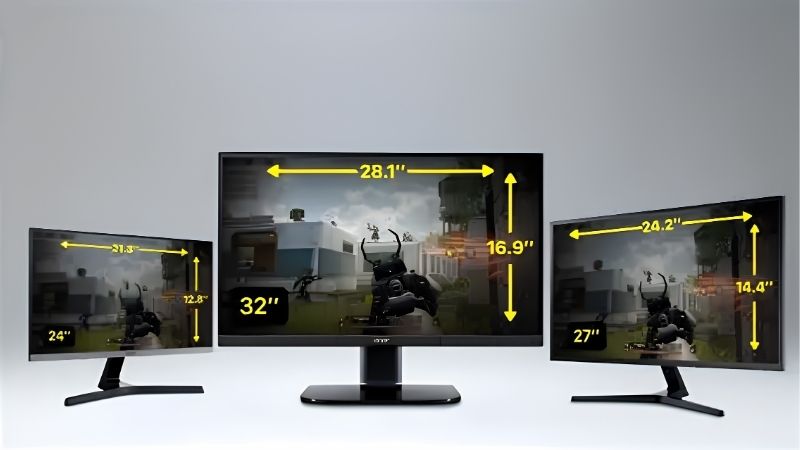
At 32 inches the pixel density is lower, which makes desktop text comfortable without scaling. At 27 inches the image is sharper but usually requires display scaling to keep interfaces readable at normal desk distance.
See More:
Final Thoughts
The best 32in 4K gaming monitor for most buyers is a 144Hz IPS or mini-LED panel with two HDMI 2.1 ports, not a flagship OLED. Work out whether you play in a bright or dark room, confirm the ports match your console and PC, then spend what you save on the graphics card. That balance produces a better setup than a premium screen fed by an underpowered GPU.











Write Your Review
No reviews yet. Be the first to share your experience!