
What is the best CPU thermal paste depends far more on how long you leave it in place than on the conductivity number printed on the tube. Differences between quality compounds are small in practice, while the differences in longevity, application difficulty and electrical risk are considerable.
As an Amazon Associate we earn from qualifying purchases at no extra cost to you.





As an Amazon Associate we earn from qualifying purchases at no extra cost to you.
By Ryan Cole, PC hardware writer at NVIDIA Review.
Working Out What Is the Best CPU Thermal Paste for You
Marketing focuses on peak performance, but the practical differences lie elsewhere. Four factors decide what is the best CPU thermal paste for a given build, and none of them appear prominently on the packaging.
Published Conductivity Figures Are Not Comparable
Thermal conductivity in W/mK is measured differently between manufacturers, so numbers from two brands cannot be compared directly. Noctua declines to publish a figure at all, arguing the metric misleads more than it informs.
What that means in practice is that a compound claiming 12.5 W/mK will not necessarily outperform one claiming eight. Independent testing consistently shows quality pastes separated by low single-digit temperature differences on the same cooler.
Longevity Matters More Than Peak Numbers
Non-curing pastes stay workable for years, while some high-performance compounds dry out faster under sustained heat. A paste that runs one degree cooler on day one but degrades within eighteen months is the worse purchase for most builds.
Curing compounds behave differently again, hardening into a fixed layer. They resist migration well but make future cooler removal harder, occasionally gripping the heat spreader firmly enough to lift the processor from the socket.
Think about how often you open the machine. If the cooler comes off annually for cleaning, reapplication is trivial and longevity matters less. If you build once and forget, choose a compound rated for long service life instead.
Mounting orientation plays a part too. A vertically mounted board lets gravity work against a thin compound over time, which is one reason denser pastes and phase change pads hold their contact patch better in tower cases.
Electrical Conductivity Is a Real Safety Line
Standard ceramic and silicone-based pastes are electrically non-conductive, so a small amount squeezing onto the substrate causes no harm. Liquid metal compounds are conductive and will short components if they spread where they should not.
Liquid metal also reacts with aluminium, which rules out contact with many cooler baseplates. It delivers genuinely lower temperatures on bare dies, but for a standard heat spreader the risk rarely justifies the few degrees gained.
Cleaning up matters as much as applying. Isopropyl alcohol at 90 percent or higher and a lint-free cloth remove old compound cleanly, and a residue-free surface contributes more to good contact than the choice of paste does.
Buy the Right Quantity
A single application on a desktop processor uses a remarkably small amount. Sachets bundled with coolers cover one fitting, while a 4g or 8g syringe covers several builds and works out far cheaper per application.
Larger tubes do not spoil quickly if stored sealed at room temperature. For anyone maintaining more than one machine, the bulk syringe is the obvious choice, and the price gap per gram is substantial at that size.
Storage does matter a little. Keep the cap on and the syringe upright at room temperature, since separation can occur in compounds left for years in a cold garage, requiring a firm mix before the first application.
Top Picks: What Is the Best CPU Thermal Paste by Use Case
Answering what is the best CPU thermal paste depends on whether you prioritise longevity, ease of use or absolute performance, so these six cover each case. Figures are manufacturer claims where published; independent testing methods vary considerably.
| Compound | Type | Electrically Conductive | Published W/mK | Best For |
|---|---|---|---|---|
| Arctic MX-6 | Non-curing paste | No | Not stated | General builds |
| Noctua NT-H2 | Non-curing paste | No | Not published | Fit and forget |
| Thermal Grizzly Kryonaut | Non-curing paste | No | 12.5 | High-output CPUs |
| Arctic MX-4 | Non-curing paste | No | 8.5 | Bulk and value |
| Honeywell PTM7950 | Phase change pad | No | 8.5 | Long-term stability |
| Thermal Grizzly Conductonaut | Liquid metal | Yes | 73 | Bare die, experts only |
Arctic MX-6
MX-6 is the sensible default for almost any build. It is non-conductive, non-curing and thick enough to stay where you place it, while remaining workable enough to spread properly under normal mounting pressure.
Arctic offers it in sizes up to 8g, which covers many applications cheaply. The drawback is viscosity: it is noticeably stiffer than MX-4, which makes it harder to work with in a cold room or on a small die if you are inexperienced.
Noctua NT-H2
This is the compound to choose when you intend to fit the cooler once and leave it. It is non-conductive, non-curing and rated for long service life in place, which suits systems that will not be opened for years.
Noctua’s refusal to publish a conductivity figure is an honesty point rather than a weakness, since the metric is not comparable across brands anyway. The trade-off is cost per gram, which sits above Arctic’s pastes.
Thermal Grizzly Kryonaut
Kryonaut remains a favourite for high-output processors, with a published conductivity of 12.5 W/mK and an application consistency that spreads easily under mounting pressure without excessive force.
It performs consistently under the sustained loads a 170W chip generates. The honest caveat is longevity, since it is known to dry out faster than some competitors under prolonged high temperatures, making it better suited to regular reapplication.
Arctic MX-4
MX-4 is the long-standing value option and remains entirely adequate for mainstream builds. It is non-conductive, forgiving of imperfect technique and sold in a 20g syringe that costs very little per application.
For anyone maintaining several machines, that bulk size is the real argument. It sits slightly behind newer compounds under heavy load, though the gap is small enough that it rarely changes cooling behaviour in any meaningful way.
Honeywell PTM7950
PTM7950 is a phase change material supplied as a thin pad rather than a paste. It becomes fluid at operating temperature and then stabilises, which gives it excellent resistance to the pump-out effect that degrades pastes over time.
Laptop and small-form-factor owners favour it for exactly that stability. The drawbacks are handling and sourcing: it must be cut to size and applied to a clean surface, and counterfeit listings are common enough to warrant buying carefully.
Thermal Grizzly Conductonaut
Conductonaut is liquid metal, with a published conductivity far above any paste. On a delidded or bare die it delivers temperature reductions that no conventional compound can match, which is why enthusiasts persist with it.
The risks are equally real. It is electrically conductive, reacts with aluminium coolers and can stain or damage components if it migrates. For a standard heat spreader it is rarely worth the hazard, and it should never be a first-time application.
Where Cooling Upgrades Sit in the 2026 Market
Two market conditions make paste and cooling upgrades a more rational purchase this year than larger component changes.
Cheap Upgrades Still Deliver Real Gains
With graphics card pricing elevated, cooling is one of the few areas where a modest outlay produces a noticeable improvement. Replacing dried paste on a machine several years old often drops temperatures more than any single component swap.
The effect is largest on systems that have never been serviced. If idle temperatures have crept upward while the cooler and fans are clean, degraded paste is the most likely explanation and the cheapest thing to fix.
Cooling Is Still a Genuine Discount Category
The usual advice to wait for seasonal sales does not apply to memory, storage or prebuilt systems this year, since those are assembled from components bought at elevated contract prices. Cooling hardware is a different situation.
Paste, coolers, fans, cases and power supplies remain categories where real discounts still appear. If the reapplication is not urgent, that is one of the few places where waiting for a sale event still makes sense.
Component Prices Have Drifted Upward
Cooling hardware absorbed some broader cost pressure, with cooler pricing up roughly 6 to 8 percent and promotional pricing policies withdrawn in February 2026. Small tubes feel that more than bulk syringes do.
That is a reason to compare price per gram rather than headline price. Buying an 8g syringe instead of two small sachets is usually better value, and the gap has widened as entry-level pricing tightened this year.
Frequently Asked Questions
These questions come up most often when people reapply thermal compound for the first time on a desktop processor.
How much paste should I actually apply?
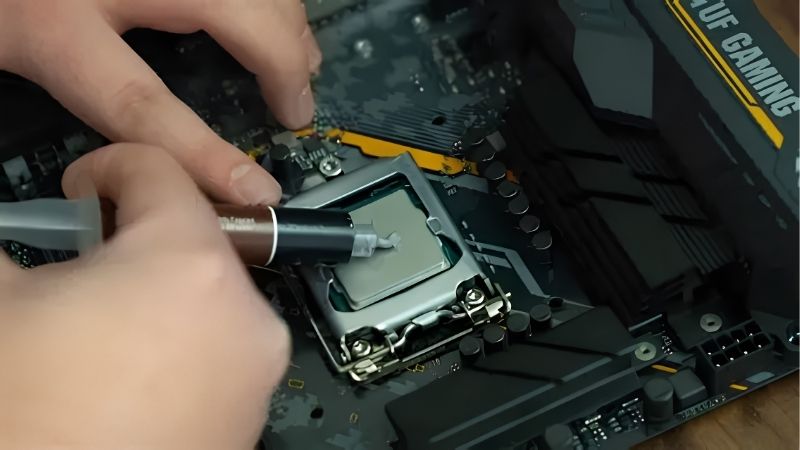
A pea-sized amount at the centre of the heat spreader suits most desktop processors, since mounting pressure spreads it outward. Excess does not improve cooling and simply squeezes out around the edges of the cooler.
How often does thermal paste need replacing?
Every few years for non-curing compounds, or whenever the cooler is removed. If idle temperatures have risen noticeably over time and the heatsink and fans are clean, dried paste is the likely cause worth investigating.
Is the paste bundled with a cooler good enough?
Usually yes. Compound supplied by reputable cooler manufacturers performs adequately for stock operation. Pre-applied pads on stock coolers are fine for a first installation but should be cleaned off and replaced if the cooler comes off.
Does what is the best CPU thermal paste change for a laptop?
Somewhat. Laptops run hot in confined spaces where pump-out degrades paste faster, which is why phase change materials like PTM7950 have become popular there despite being more difficult to apply than a conventional paste.
See More:
- Best MSI motherboard
- Best motherboard processor combo for gaming
- Best B550 motherboard
- Best CPU for streaming
- What is the best AM4 CPU for gaming
Final Thoughts
What is the best CPU thermal paste comes down to your maintenance habits rather than a leaderboard. MX-6 covers most builds well, NT-H2 suits machines you will not open again, PTM7950 solves long-term degradation, and liquid metal belongs only with experienced builders working on bare dies.











Write Your Review
No reviews yet. Be the first to share your experience!