
- Top Pick: GIGABYTE GeForce RTX 5080 Gaming OC 16G Graphics Card, WINDFORCE Cooling System, 16GB 256-bit GDDR7, GV-N5080GAMING OC-16GD Video Card
- Best Value: ASUS TUF Gaming GeForce RTX™ 5080 16GB GDDR7 OC Edition Graphics Card
- Premium Choice: Skytech Gaming King 95 Gaming PC, AMD Ryzen 7 9850X3D 4.7GHz, NVIDIA RTX 5080 16GB VRAM, 2TB NVMe SSD, 32GB DDR5 RAM 6000, 850W Gold ATX 3 PSU, 360 ARGB AIO, Wi-Fi 5, Windows 11, Desktop
What PSU for RTX 5080 is the question to settle before you build around Nvidia’s second-fastest card of the generation. The RTX 5080 is far more efficient than the 5090, but it still pulls real power and produces the same kind of brief spikes that can trip an undersized supply. Pick the right wattage and connector and you get a quiet, stable system; pick wrong and you face random shutdowns or a messy nest of adapters. This step-by-step guide gives you the exact numbers, the standard to look for, and a clear shortlist so you can buy once and buy right.
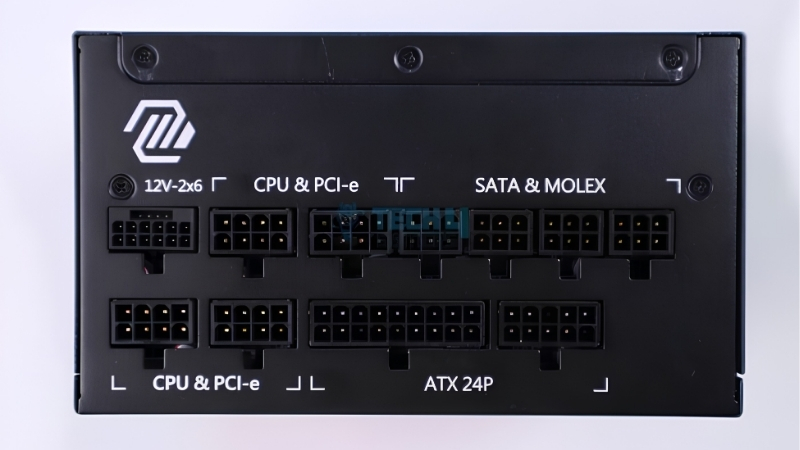
How Many Watts of PSU the RTX 5080 Needs
The short answer: an 850-watt power supply is the right minimum for an RTX 5080, with 1000 watts recommended if you pair it with a high-end CPU, and it should be a modern ATX 3.1 unit with a native 16-pin cable. The 5080 carries a board power of around 360 watts, lower than the flagship, but the rest of your system and the card’s transient spikes are why the recommended figure sits comfortably above that raw number.
As an Amazon Associate we earn from qualifying purchases at no extra cost to you.


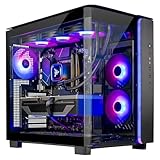


The Recommended Wattage and Why
Nvidia’s guidance for the RTX 5080 is an 850-watt power supply, and for most builds that is the sensible floor. The gap between the card’s roughly 360-watt draw and an 850-watt unit is not waste; it is the headroom that absorbs spikes and powers your CPU, drives, and fans without strain.
If you pair the 5080 with a high-end processor that peaks at 250 watts or more, stepping up to 1000 watts keeps the unit running in its efficient, quiet zone. That is exactly why the well-reviewed 850W and 1000W units linked in this guide are the safe choices for a 5080 system.
It also helps to think in efficiency terms rather than bare survival. A power supply is quietest and coolest at roughly 50 to 70 percent of its rated load, so an 850W to 1000W unit feeding a 5080 system spends most of its life in that comfortable band. Sizing right at the edge of your needs forces the unit to run hot and loud for no real saving.
There is no benefit to going wildly oversized either. A 1200W or 1300W unit on a 5080 spends its life lightly loaded and costs more for nothing, so 850W to 1000W remains the sweet spot for this card.
Accounting for the 5080’s Power Spikes
Like every card in this generation, the RTX 5080 produces brief, sharp power spikes that last only milliseconds yet can momentarily exceed its rated draw. A power supply that handles steady loads fine can still shut down if it cannot ride out those surges.
A modern ATX 3.1 unit is built specifically to tolerate spikes well beyond its rated output, which removes the guesswork. Look for an explicit ATX 3.1 or PCIe 5.1 ready badge on the box, since that is the manufacturer’s shorthand for the exact behaviour the 5080 demands.
It is worth stressing that wattage alone does not guarantee spike tolerance. A large but older unit can still stumble on these surges, whereas a correctly rated ATX 3.1 model is engineered to ride them out. The badge on the box, not just the wattage number, is what tells you the unit is ready for this card.
Step-by-Step: Sizing Your Unit
- Start with the GPU: about 360 watts for the 5080.
- Add your CPU’s peak draw: roughly 125 to 280 watts depending on the chip.
- Add about 100 watts for drives, fans, RAM, and the motherboard.
- Add a 30% buffer for spikes and efficiency, then round up to 850W or 1000W.
This simple math keeps you from both underbuying and overspending. When you land between two sizes, round up; the price gap is small next to the value of a quieter unit with real upgrade headroom.
One more practical note: count every device that draws meaningful power, including AIO pump headers and RGB controllers. They are small individually but add up, and budgeting for them now avoids a borderline unit that copes today but struggles after your next upgrade.
The Right Connector and Standard for an RTX 5080
Wattage settles half the decision; the connector settles the rest. The RTX 5080 takes its power through a single 16-pin input, and the standard your power supply follows decides whether your build looks clean and runs safely or turns into a tangle of adapters. This is the detail wattage-focused buyers often overlook.
ATX 3.1 and the 16-Pin Connector
The 5080 is best paired with an ATX 3.1 power supply, the latest standard, which refines the 16-pin connector for better reliability under load. These units ship with a native cable that plugs straight into the card.
Newer units use the updated 12V-2×6 connector, designed to seat more securely than the original design. For a card you intend to keep for years, a secure, properly seated connection is not a luxury but a basic requirement.
The practical upside of the newer connector is peace of mind during transport. A firmly latched 12V-2×6 plug is far less likely to work loose if you move the PC than an older adapter stack, which means one less thing to re-check after the system has been jostled.
Why a Native Cable Beats an Adapter
You can run a 5080 from an older high-wattage unit using a bundled 8-pin adapter, but adapters add bulk and an extra failure point. A native ATX 3.1 cable removes both, giving you a cleaner install and a more dependable link.
Route that cable into the card in a straight line and avoid a sharp bend right at the plug, which can stop the connector seating fully. A native cable gives you the slack to do this neatly, which is the simplest way to avoid connection worries.
If you already own a recent, high-quality high-wattage unit, reusing it is reasonable, but check its age and warranty first. Capacitors age, and a tired older unit pushed near its limit is a false economy next to a fresh, properly specced power supply that will outlast several graphics cards.
Pros and Cons of Your PSU Options
Here is the honest trade-off between your main choices:
- New ATX 3.1 unit (recommended) – Pros: native secure cable, full spike tolerance, cleanest cabling, ready for future cards. Cons: higher upfront cost.
- Older high-wattage PSU with adapter – Pros: reuses a unit you may already own. Cons: bulky adapters, no guaranteed spike handling, more clutter.
- Undersized unit (avoid) – Pros: none worth the risk. Cons: shutdowns and instability on a card that wants headroom.
For nearly every buyer, a quality 850W to 1000W ATX 3.1 unit is the right answer and a one-time purchase you will carry into your next build.
Remember that the rest of a modern system has grown too. Fast DDR5 memory, several NVMe drives, and high-speed fans all add to the load, and a generous unit absorbs them without complaint while a bare-minimum one leaves no room for the extras that make a build worthwhile.
Timing Your RTX 5080 Power Supply Purchase in 2026
Beyond the specs, there is a real question of when to buy, because the wider hardware market remains tense. Component pricing has been climbing rather than falling, and the relief many buyers are waiting for is still years away. Understanding the landscape helps you decide whether to lock in your unit now or gamble on waiting.
Why Component Prices Are Not Falling Yet
Across the board, laptop and PC component prices have trended upward, and power supplies sit within that same supply chain. The cheap relief buyers hope for is tied to new memory and component capacity that simply is not online yet.
New supply is coming, but slowly. Chinese suppliers such as CXMT are ramping DDR5 output, and Micron is building two new plants in Idaho, yet those facilities are not expected to run until 2027 to 2028. In short, prices have plateaued rather than dropped, and real relief is still years out, so waiting for a steep discount on quality components is a weak bet in 2026.
What This Means for Your Decision
Because prices are stabilising high rather than falling, there is little upside to delaying a power supply you already need. A PSU is also the most reusable part in your build, carried across multiple GPU upgrades, so buying a solid unit now spreads its cost over years.
Locking in a well-reviewed ATX 3.1 unit while current stock is reasonably priced protects you from any renewed climb. The recommended units in this guide are chosen for exactly this kind of lasting value.
In short, treat the power supply as the stable anchor of the build. Cards change every generation, but a strong ATX 3.1 unit bought today will likely serve several of them, spreading its cost and sidestepping a volatile market.
What to Look for Beyond Wattage
A few quality markers separate a great unit from a risky one. Aim for an 80 Plus Gold rating or better for efficient, cool operation, and favour a long warranty, often seven to ten years on premium models, which signals how much the maker trusts the product.
Fully modular cabling is worth the small premium because it lets you install only the cables you need for a cleaner, better-ventilated build. Stick to reputable, well-reviewed brands rather than unknown bargains, since the power supply protects every other component in the system.
Finally, do not overlook physical fit. Check the unit’s depth against your case and confirm the native 16-pin cable is long enough to route cleanly to the top of the card. A great unit on paper still frustrates if its cables are too short for a tidy run.
Choosing the right PSU is the difference between a rock-solid 5080 build and one plagued by random shutdowns. If you are ready to power your card the right way, browse the recommended 850W and 1000W ATX 3.1 units linked throughout this guide and pick the model that matches your CPU and case.
See More:
- How to clean a GPU heatsink
- GPU vertical mount thermals
- GPU thermal throttle temp
- What PSU for RTX 4090
- What PSU for RTX 5080
Conclusion
Settling what PSU for RTX 5080 to buy comes down to three things: aim for 850 to 1000 watts, choose a modern ATX 3.1 unit with a native 16-pin cable, and respect the card’s transient spikes. With component prices holding high and meaningful relief still years away, there is little reason to wait on a part you will reuse across future builds. Follow the wattage steps above, favour a native-connector unit, and check the recommended power supplies to give your RTX 5080 the stable, quiet foundation it deserves.
Top-Rated Picks


Save $1.25

| Product | Brand | Rating | Reviews | Price |
|---|---|---|---|---|
| ARCTIC MX-4 (4 g) – Premium Performance Thermal Paste… | ARCTIC | ★ 4.8 | 104k | $4.99 |
| ARCTIC MX-4 (incl. Spatula, 4 g) – Premium Performanc… | ARCTIC | ★ 4.8 | 71.9k | $5.49 |
| Crucial 8GB DDR4 RAM 3200MHz (PC4-25600), Downclockab… | Crucial | ★ 4.8 | 62.8k | $74.99 |
| AMD Ryzen 5 5600X 6-core, 12-thread unlocked desktop … | — | ★ 4.8 | 30.2k | $177.60 |
| NVIDIA Shield Remote; Voice Search, Motion-Activated,… | — | ★ 4.7 | 10.6k | $25.99 |
Frequently Asked Questions
What wattage is right for an RTX 5080 build?
NVIDIA recommends 850W for a system built around this 360W card. That figure assumes a current high-end processor drawing up to around 200W under load, plus drives, memory and fans. A strong 750W unit works with a more modest CPU, but 850W is the number that leaves genuine margin for spikes and future upgrades.
Which cables does the card need?
A single 16-pin 12V-2×6 connector. Native ATX 3.1 supplies include a dedicated cable, and cards ship with an adapter that combines three PCIe 8-pin connections for older units. If you use the adapter, run three separate cables from three separate ports rather than using any daisy-chained pigtail arrangement.
Does the efficiency rating matter much here?
Gold is the practical sweet spot. It generally signals a decent platform with a single strong 12V rail and reasonable thermal design. Platinum and Titanium units cost significantly more for a few percentage points of efficiency, and that money is better spent on additional wattage headroom or a supply with a ten-year warranty.
Can I reuse a good five-year-old unit?
Possibly, if it is a well-reviewed Gold model of adequate wattage, though capacitors and fan bearings do age. The bigger concern is that pre-ATX 3.0 units were not validated against the sharp microsecond excursions modern cards produce. Random shutdowns during demanding scenes, with no temperature warning, are the classic symptom.
How do I verify the supply is coping after installing?
Log the 12V rail while running a demanding game for twenty minutes. Sustained readings under about 11.6V, unexpected reboots, or heavy coil whine that appears only during graphically intense scenes all suggest the unit is operating at the edge of its capability and should be replaced with something larger.











Write Your Review
No reviews yet. Be the first to share your experience!