
- Top Pick: Skytech Gaming PC King 95, Ryzen 7, RX 9070 XT, 32GB RAM, 1TB SSD
- Best Value: The Horizon Autherium Dragon RGB I9 RTX Gaming PC || 64GB RAM || 5TB Storage || Core I9 Upto 5.4Ghz || RTX 5070 OC || Windows 11 PRO || 360MM AIO || 2.4GB/s WiFi, VR, Gaming Ready Desktop Computer
- Premium Choice: Skytech King 95 Gaming PC Desktop, Ryzen 7 9700X 3.8 GHz (5.5GHz Turbo Boost), NVIDIA RTX 5070 12GB GDDR7, 1TB Gen4 SSD, 32GB DDR5 RAM 6000 RGB, 850W Gold PSU, 360mm ARGB AIO, Wi-Fi, Win 11 Home
Best gaming PC build under $1000 buys noticeably less hardware in 2026 than it did two years ago, because memory and graphics pricing have both moved sharply against builders. This guide sets realistic expectations, then walks through a parts list that still delivers strong 1440p performance without wasting money on the wrong components.
As an Amazon Associate we earn from qualifying purchases at no extra cost to you.





As an Amazon Associate we earn from qualifying purchases at no extra cost to you.
By Ryan Cole
How to Plan the Best Gaming PC Build Under $1000
The best gaming pc build under $1000 is an exercise in allocation rather than shopping. Decide the target resolution first, then spend accordingly, because the wrong split leaves you with a fast processor feeding a graphics card that cannot keep up.
Set the Resolution Target Before Anything Else
At 1080p, a mid-range card comfortably exceeds 100 frames per second in most titles and the processor becomes the limiting factor. That shifts more budget toward the CPU than people expect.
At 1440p, the graphics card dominates and should take the largest single share of the budget. This is the resolution most builds at this price should target, since monitor pricing has stayed reasonable while component costs rose.
Four kay is out of reach at this budget in any honest form. A card capable of driving it comfortably costs more than this entire list, and reducing settings far enough to compensate defeats the point of the resolution.
Budget Allocation That Actually Works
A workable split puts roughly 35 to 40 percent into the graphics card, 15 percent into the processor, and the remainder across board, memory, storage, power supply and case. Deviating far from that usually creates a bottleneck.
The most common error is overspending on the processor. A six-core current-generation chip handles gaming perfectly well, and the money saved against an eight-core part buys a meaningfully faster graphics card.
The second most common is buying a case and lighting first because those are the visible parts. Decide the graphics card and processor before anything else, then fit the remaining components around whatever budget survives.
Where Not to Cut Corners
The power supply is the one component where saving money creates real risk. A quality 600 to 650W unit from a recognised brand with an 80 Plus Bronze rating or better protects everything connected to it.
Memory capacity is the second. Sixteen gigabytes is the working minimum in 2026 and several recent titles push against it, so plan for a kit you can live with rather than assuming you will add more later.
What You Can Safely Skip
Aftermarket CPU coolers, elaborate lighting, high-speed memory beyond the sweet spot and premium cases all add cost without adding frames. The bundled cooler on a 65W processor is genuinely adequate for gaming loads.
Motherboard tier is the other place to economise. A budget board with a modern chipset performs identically in games to one costing three times as much, provided the power delivery matches the processor you install.
Very fast memory kits belong in the same category. Going beyond the 6000 megatransfer sweet spot on AM5 costs noticeably more and returns a difference measured in low single-digit percentages at gaming resolutions.
Parts List: Best Gaming PC Build Under $1000
This list targets 1440p at high settings and assumes you already own a monitor, keyboard and mouse. Pricing in several of these categories moves weekly, so treat the component tiers rather than exact totals as the guide.
| Component | Recommendation | Why |
|---|---|---|
| Processor | AMD Ryzen 5 7600 | Six cores, 65W, cooler included |
| Motherboard | ASRock B650M Pro RS | AM5 with upgrade path to 2029 |
| Memory | 16GB DDR5-6000 CL30 | Sweet spot for AM5 latency |
| Graphics | Radeon RX 9060 XT 16GB | 16GB at 1440p, GDDR6 pricing |
| Storage | 1TB PCIe 4.0 NVMe | Fast enough, room to add later |
| Power and case | 650W Bronze, mesh mid-tower | Headroom plus airflow |
Processor: AMD Ryzen 5 7600
The processor is where the best gaming pc build under $1000 should spend least. Six cores and twelve threads at up to 5.1GHz cover every current game comfortably, and the 65W rating means the bundled cooler is sufficient. That saves a purchase most budget builds do not need to make.
It will show its limits in heavy streaming or video work, where more cores help. If your build doubles as a workstation, this is the component to upgrade later – the socket will accept newer chips for years.
Motherboard: ASRock B650M Pro RS
This micro-ATX board delivers what a budget AM5 build needs: four DIMM slots, a PCIe 5.0 graphics slot, 2.5G Ethernet and adequate power delivery for six and eight-core processors.
Rear connectivity is sparse and there is no onboard Wi-Fi on this variant, so plan on a wired connection or a small adapter. VRM heatsinks are modest, which rules out pairing it with a sixteen-core chip later.
Memory: 16GB DDR5-6000 CL30
Six thousand megatransfers per second at CL30 is the latency sweet spot for AM5 and runs reliably on almost any board with EXPO enabled. Sixteen gigabytes in two sticks keeps dual-channel bandwidth intact.
Thirty-two gigabytes would be preferable and is where a build like this would have landed a year ago. Memory pricing is the single biggest reason this list is more constrained than it used to be.
Graphics: Radeon RX 9060 XT 16GB
Sixteen gigabytes of memory at this tier is unusually generous and matters at 1440p, where several recent titles exceed eight gigabytes at high texture settings. This card also uses GDDR6 rather than GDDR7.
Ray tracing performance trails equivalent NVIDIA cards noticeably, and if you rely on specific creative applications the software ecosystem may push you the other way. Check availability, since stock has been inconsistent.
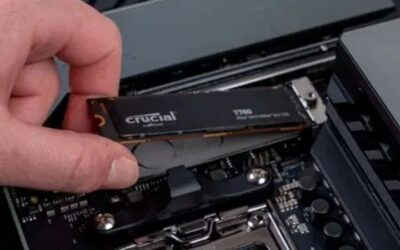
Storage: 1TB PCIe 4.0 NVMe
A terabyte holds Windows plus a handful of large games, and Gen4 speeds load titles indistinguishably from anything faster. Choose a drive with onboard DRAM if the price gap is small.
One terabyte fills quickly with modern install sizes, and adding a second drive later will likely cost more per terabyte than this one does. If the budget stretches, this is the component worth upsizing.
Power and Case: 650W Bronze and a Mesh Mid-Tower
A quality 650W unit leaves headroom for a graphics card upgrade later and protects the rest of the system. Pair it with a mid-tower that has a mesh front panel and includes at least three fans.
Cheaper cases with solid glass fronts choke airflow and cost you several degrees across every component. Bundled fans are rarely good, but they are adequate until you replace them.
Check that the supply has the connectors your graphics card needs rather than relying on adapters. Modern cards vary between traditional eight-pin connectors and the newer twelve-volt standard, and adapters are a common source of instability.
How 2026 Pricing Has Reshaped This Budget
Two market forces have compressed what the best gaming pc build under $1000 can contain, and understanding both helps you decide whether to build now or wait.
Memory and Storage Have Moved Against You
DRAM contract prices rose through 2026 with forecasts pointing to further increases of 13 to 18 percent quarter over quarter, and NAND followed at 10 to 15 percent. New capacity is not expected before late 2027.
The practical effect is that memory and storage now consume a larger share of a fixed budget than they did, which is why sixteen gigabytes appears here where thirty-two would once have been standard.
Graphics Pricing Has Risen Too
Global graphics card pricing climbed roughly 19 percent from late 2025 after partner supply was reduced by around 20 percent. Radeon cards using GDDR6 have been somewhat insulated compared with GDDR7 designs.
That is the main reason this list leans AMD at the graphics tier. It is a pricing observation rather than a brand preference, and it could change if supply conditions shift.
Waiting Is Unlikely to Help
Refreshed lineups from every major vendor slipped to CES in January 2027, so there is no imminent launch that will improve value at this budget. Black Friday will not rescue memory or storage pricing either, since sale stock was built at elevated contract costs.
Genuine discounts still appear on cases, coolers, fans and power supplies. If you want to time anything, time those purchases rather than waiting on the components that actually determine performance.
Frequently Asked Questions
The best gaming pc build under $1000 question raises these predictably, from first-time builders working out whether the budget is still viable.
Can the best gaming pc build under $1000 handle 1440p?
Yes, at high settings in most current titles, particularly with upscaling enabled. Very demanding recent releases will need settings reduced or upscaling set more aggressively, but 1440p is a realistic target at this budget.
Should I buy a prebuilt instead?
Prebuilt pricing has become more competitive as component costs rose, but the savings usually come from the power supply, case and storage. Check those specifications carefully, since they are where manufacturers economise.
Is 16GB of memory really enough?
For gaming alone, yes in almost all current titles. It becomes limiting if you stream, keep many browser tabs open or run demanding background applications. Leave the second pair of DIMM slots free so you can add more later.
What should I upgrade first later on?
Memory capacity, then storage, then the graphics card. The processor can wait longest, and because AM5 will receive new chips through 2029, upgrading it later will not require replacing the board or memory.
Final Thoughts
The best gaming pc build under $1000 in 2026 means a six-core AM5 processor, a 16GB graphics card and sixteen gigabytes of memory, targeting 1440p at high settings. That is less hardware than the same money bought a year ago, and pretending otherwise leads to disappointment. With nothing new arriving before CES 2027 and memory pricing still climbing, building now on a socket supported through 2029 is a defensible plan.










Write Your Review
No reviews yet. Be the first to share your experience!