
- Top Pick: GIGABYTE B550 Eagle WIFI6 AMD AM4 ATX Motherboard, Supports Ryzen 5000/4000/3000 Processors, DDR4, 10+3 Power Phase, 2X M.2, PCIe 4.0, USB-C, WIFI6, GbE LAN, PCIe EZ-Latch, EZ-Latch, RGB Fusion
- Best Value: Asus ROG Strix B550-F Gaming WiFi II AMD AM4 (3rd Gen Ryzen) ATX Gaming Motherboard (PCIe 4.0,WiFi 6E, 2.5Gb LAN, BIOS Flashback, HDMI 2.1, Addressable Gen 2 RGB Header and Aura Sync)
- Premium Choice: GIGABYTE B550M K AMD AM4 Micro-ATX Motherboard, Supports Ryzen 5000/4000/3000 Series Processors, DDR4, 3+3 Power Phase, 2X M.2, PCIe 4.0, USB 3.2 Gen 1, GbE LAN, Q-Flash
Best B550 motherboard shopping in 2026 is a different exercise than it was at launch: AM4 is a finished platform, so you are buying a board to finish a build rather than to start an upgrade path. These six options cover ATX, Micro-ATX and Mini-ITX, with the compromises listed honestly.
As an Amazon Associate we earn from qualifying purchases at no extra cost to you.


As an Amazon Associate we earn from qualifying purchases at no extra cost to you.
By Ryan Cole, PC hardware writer at NVIDIA Review.
How to Choose the Best B550 Motherboard for an AM4 Build
B550 sits between the cheaper A520 and the higher-end X570, and the differences are mostly PCIe generation and lane allocation. Four points decide which is the best B550 motherboard for the CPU and case you already own.
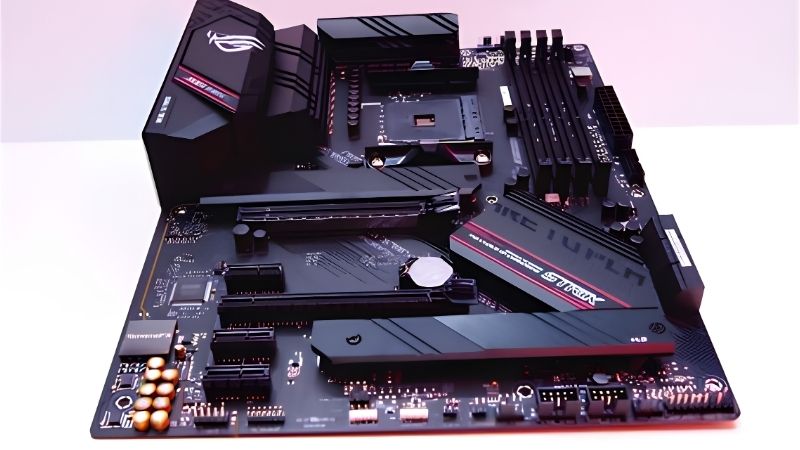
Understand What B550 Gives You Over A520
The headline difference is PCIe 4.0. On B550 the primary graphics slot and one M.2 socket run at Gen4 speeds directly from the CPU, while the chipset-connected lanes remain Gen3. A520 boards run the graphics slot at Gen3 only.
In practice a Gen3 graphics slot costs very little frame rate on most cards, but a Gen4 M.2 socket is a real benefit for storage throughput. B550 also unlocks CPU overclocking, which A520 does not, though that matters less on Ryzen 5000.
Check VRM Quality Against Your CPU
A Ryzen 5 5600 draws modest power and runs on almost any B550 board. A Ryzen 9 5900X or 5950X pulls considerably more under all-core loads, and cheaper boards with thin heatsinks will let the power stages run hot enough to limit sustained boost clocks.
Look for boards with a heatsinked VRM on both the top and side banks rather than a single small block. Mid-tier B550 models typically use a 10+2 or 12+2 arrangement, which is comfortable headroom for anything in the Ryzen 5000 range.
Count M.2 Slots and Rear Connectivity
Most B550 boards ship two M.2 sockets, one Gen4 and one Gen3. If you plan on more than two NVMe drives you will need SATA storage as well, so check the SATA port count before committing to a case with several drive trays.
Networking varies more than you might expect. Better B550 boards use 2.5 Gb Ethernet and Wi-Fi 6, while budget models stick to gigabit with no wireless at all. Adding Wi-Fi later means giving up a PCIe slot or using a USB adapter.
Confirm BIOS Support for Ryzen 5000
Every B550 board supports Ryzen 5000 with the correct firmware, but boards manufactured early may ship with older BIOS versions. That is only a problem if you have no compatible CPU on hand to perform the update in the first place.
BIOS Flashback solves this completely. Boards with that feature let you write new firmware from a USB stick without a CPU installed, which is worth prioritising if you are buying a board and a 5000-series chip together.
Top Picks: Best B550 Motherboard Options for 2026
The best B550 motherboard depends on form factor, so these six cover ATX through Mini-ITX. Specifications come from manufacturer spec sheets; stock on older platforms fluctuates, so verify availability when ordering rather than assuming.
| Model | Form Factor | M.2 Slots | Ethernet | Wireless |
|---|---|---|---|---|
| MSI MAG B550 Tomahawk MAX WiFi | ATX | 2 | 2.5 Gb | Wi-Fi 6 |
| ASUS ROG Strix B550-F Gaming WiFi II | ATX | 2 | 2.5 Gb | Wi-Fi 6 |
| ASUS TUF Gaming B550-PLUS WiFi II | ATX | 2 | 2.5 Gb | Wi-Fi 6 |
| Gigabyte B550 AORUS Elite AX V2 | ATX | 2 | 2.5 Gb | Wi-Fi 6 |
| ASRock B550M Steel Legend | Micro-ATX | 2 | 2.5 Gb | None |
| Gigabyte B550I AORUS Pro AX | Mini-ITX | 2 | 2.5 Gb | Wi-Fi 6 |
MSI MAG B550 Tomahawk MAX WiFi
This is the default recommendation for a full-size AM4 build. It uses a 10+2+1 power design with substantial heatsinks, four DDR4 slots, one Gen4 and one Gen3 M.2 socket, six SATA ports, 2.5 Gb Ethernet and Wi-Fi 6 on board.
It handles a 5800X3D or 5900X without thermal complaints and has a well-regarded BIOS. The main drawback is the absence of BIOS Flashback on some revisions, so check the specific SKU if you intend to build with no spare CPU available.
ASUS ROG Strix B550-F Gaming WiFi II
The Strix sits a tier above most B550 boards in build quality. It combines a 12+2 power stage layout with a reinforced graphics slot, two M.2 sockets with heatsinks, 2.5 Gb Ethernet, Wi-Fi 6 and a more capable onboard audio implementation.
It is the pick if you want the strongest VRM on the platform for a 5950X. The trade-off is price: it typically costs meaningfully more than the Tomahawk while delivering the same gaming performance, so the extra spend is about headroom and features.
ASUS TUF Gaming B550-PLUS WiFi II
The TUF line covers the practical middle ground. A 10+2 DrMOS layout, four DDR4 slots, two M.2 sockets, 2.5 Gb Ethernet and Wi-Fi 6 make it a complete board without the Strix price, and BIOS Flashback is included on this model.
Layout is sensible and the heatsinks are adequate for a 5800X3D. The compromise is rear I/O density, which is thinner than the Strix, and the audio codec is a step down, which matters only if you use headphones directly from the board.
Gigabyte B550 AORUS Elite AX V2
Gigabyte’s mid-tier option offers a 12+2 phase design with direct cooling on both VRM banks, four DDR4 slots and two M.2 sockets, one of which is Gen4. Wi-Fi 6 and 2.5 Gb Ethernet come as standard on the AX version.
It is a strong choice for a 5900X or 5950X thanks to the power delivery. The drawback is that only the primary M.2 slot gets a heatsink, so a second Gen3 drive runs uncovered unless you add an aftermarket heatspreader.
ASRock B550M Steel Legend
For a Micro-ATX build this board packs in more than most. It offers four DDR4 slots, two M.2 sockets, reinforced VRM heatsinking, 2.5 Gb Ethernet and a clean white and grey finish that suits lighter-coloured builds.
It is comfortable with a 5600 or 5700X and adequate for a 5800X3D. The notable omission is onboard wireless, so factor in a Wi-Fi card or USB adapter if the machine will not be connected by cable to the router.
Gigabyte B550I AORUS Pro AX
Mini-ITX AM4 builders are well served here. Two DDR4 DIMM slots, two M.2 sockets, 2.5 Gb Ethernet and Wi-Fi 6 fit onto a 170 x 170 mm board, with the second M.2 mounted on the rear of the PCB to save space.
Two DIMM slots often reach higher stable memory frequencies than four-slot boards. The limitations are inherent to the format: VRM cooling is tighter, so pair it with a 65W or 105W chip rather than a 5950X in a small case.
Where B550 Sits in the 2026 Market
Two developments change how you should think about buying the best B550 motherboard today. Both point to the same conclusion: B550 is a completion purchase rather than a long-term investment.
AM5 Has a Roadmap, AM4 Does Not
AMD confirmed at Computex 2026 that AM5 will accept new processors through the end of 2029. AM4 receives no further CPU generations, so the Ryzen 5000 series is the ceiling for any B550 board you buy today.
That does not make B550 a bad purchase. If you already own DDR4 memory and an AM4 cooler, finishing the build on B550 avoids replacing three components at once, and a 5700X3D still delivers strong 1440p gaming performance.
Memory Pricing Favours Staying on DDR4
DRAM contract pricing climbed sharply through 2026, with further increases forecast for the fourth quarter and no significant new manufacturing capacity expected before late 2027. DDR5 kits have absorbed most of that increase.
If you already own a 32 GB DDR4 kit, that is now a genuine financial argument for staying on AM4 a while longer. Moving to AM5 today means buying memory at elevated prices on top of a new CPU and board.
Budget Boards Are Getting Harder to Find
Manufacturers have shifted production toward mid and high-tier models as overall board sales declined, and promotional pricing policies were withdrawn earlier in the year. Older platform boards like B550 are affected more than current ones.
Practically, that means the exact model you want may be out of stock more often than it used to be. It is not a reason to buy in a hurry, but it is a reason to check availability across several retailers rather than settling immediately.
Frequently Asked Questions
These questions come up most frequently from people finishing or upgrading an AM4 system in 2026.
Is B550 still worth buying instead of X570?
For most builds, yes. X570 adds Gen4 chipset lanes and more M.2 bandwidth, but it also uses an actively or passively cooled chipset that runs warmer. For a single graphics card and two drives, B550 covers the same practical ground.
Can B550 run a Ryzen 7 5800X3D properly?
Yes. The 5800X3D has a locked multiplier and a 105W TDP, which any mid-tier B550 board handles comfortably. Ensure the BIOS is updated to a version listing 5000-series support before installing the chip for the first time.
Does B550 support PCIe 4.0 for graphics cards?
Yes, when paired with a Ryzen 3000 or 5000 processor, the primary x16 slot and the CPU-connected M.2 socket run at PCIe 4.0. Chipset-connected slots remain at Gen3, which is why the second M.2 socket is slower.
Should I buy B550 now or move to AM5?
If you own DDR4 memory and an AM4 cooler, B550 is the cheaper route to a working machine. If you are starting from nothing and want future CPU upgrades, AM5 is the better long-term platform despite the higher entry cost.
See More:
- Best MSI motherboard
- Best motherboard processor combo for gaming
- Best CPU for streaming
- What is the best AM4 CPU for gaming
Final Thoughts
The best B550 motherboard for you depends on which CPU you already own and what form factor your case needs. Full-size builds are well served by the Tomahawk or TUF, high-core-count chips benefit from the Strix or AORUS Elite, and compact builds have solid Micro-ATX and Mini-ITX options that still make AM4 worth completing.











Write Your Review
No reviews yet. Be the first to share your experience!