
- Top Pick: Thermal Grizzly Kryonaut – 1 Gram – Extremely High Performance
- Best Value: Thermal Grizzly Kryonaut – 1 Gram – Extremely High Performance Thermal Paste + 12 Cleaning Wipes 6 Wet & 6 Dry – for Demanding Applications and Overclocking CPU/GPU/PS4/PS5/Xbox
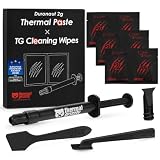
- Premium Choice: Thermal Paste, SYY 2 Grams CPU Paste Thermal
Best thermal paste application method debates have run for two decades, and independent testing keeps reaching the same conclusion: the differences between patterns are small, while the differences between too little and too much are large. Here are five methods compared, and six products suited to each.
As an Amazon Associate we earn from qualifying purchases at no extra cost to you.




As an Amazon Associate we earn from qualifying purchases at no extra cost to you.
By Ryan Cole
Comparing Every Thermal Paste Application Method
Five approaches account for essentially all real-world use. Each has a scenario where it makes sense, and the honest summary is that the best thermal paste application method is worth a degree or two at most on a normal build.
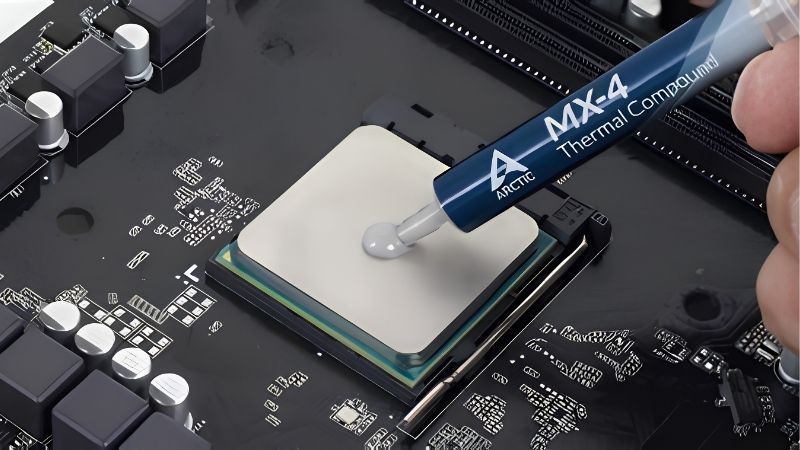
The Central Dot
A single drop in the middle, spread by mounting pressure as the cooler tightens. It is the manufacturer-recommended approach for most desktop processors, and it traps no air because the compound expands outward from one point.
It relies on adequate mounting pressure and a compound that flows. Under a light low-profile cooler, or with a very thick paste applied cold, the outer regions of a large heat spreader can end up underserved. Warming the syringe first solves most of that problem on its own.
The Line and the X
A line along the long axis suits rectangular Intel heat spreaders, where a central dot can leave the short ends thin. An X reaches all four corners and is a reasonable compromise on larger lids, particularly with a compound too thick to flow far on its own.
Both use slightly more compound than a dot for the same coverage, and the X can trap a small air pocket at the centre where the strokes cross. Neither drawback is significant in practice, and testing rarely separates them from a dot by more than a degree.
The Manual Spread
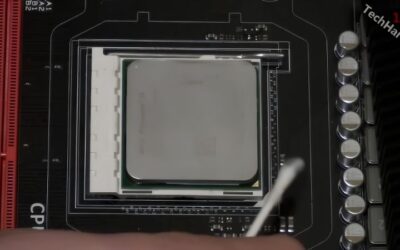
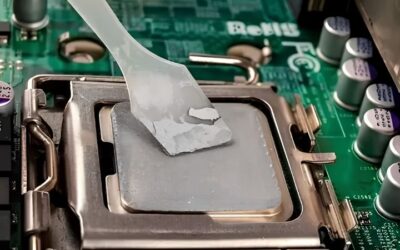
Spreading a thin film with a spatula guarantees full coverage and is the only sensible approach for a bare die, where mounting pressure is too low to distribute a drop and the exposed silicon is far smaller than a heat spreader.
On a normal desktop it introduces more risk than benefit. Working the compound too much can whip air into it, and getting a genuinely even film by hand is harder than letting the cooler do the job. It also uses more material than a drop for no measurable gain.
The Pre-Cut Phase Change Pad
A phase change sheet removes the method question entirely. It is solid at room temperature, liquefies from around 45 degrees, and re-flows with every heat cycle rather than migrating away from the die.
It needs roughly ten heat cycles before performance stabilises, so early readings look poor and benchmarking immediately will mislead you. Cutting the sheet to size takes patience, and it costs more per application than a conventional compound.
What the 2026 Market Means for Repasting
Three conditions have made repasting a more frequent job this year, which is part of why the best thermal paste application method question keeps resurfacing, and one of them changes when to buy the materials.
Cheap Upgrades Are Where the Returns Are
Graphics card pricing remains elevated, so improving existing hardware has become the practical route to better performance. Fresh compound, a better cooler, extra case fans and a decent power supply all deliver measurable gains.
On a machine four or five years old, the original application has usually degraded enough that a repaste alone lowers temperatures noticeably. That single job frequently restores boost clocks that had been throttling unnoticed.
The Budget Component Tier Has Thinned
Vendors shifted their ranges upward through 2026 and promotional pricing ended in February. That primarily affects boards and coolers, but it raises the total cost of a cooling refresh.
Compound remains one of the few categories where a few dollars buys a genuine improvement. It is the cheapest meaningful upgrade in a PC, which is exactly why the method debate keeps resurfacing every year even though the measured differences have never grown.
Cooling Parts Still See Real Discounts
Memory and pre-built systems will not fall meaningfully this November, because that stock uses components bought at this year’s elevated contract prices. Coolers, fans and thermal compounds are a different picture.
Buying compound and cleaning supplies together during a sale is sensible. The savings are small in absolute terms, so do not delay a repaste that a hot-running system needs today, because sustained throttling costs more performance than the discount returns.
Top Picks: Best Thermal Paste Application Method by Product
Each entry names the method it suits best, since the best thermal paste application method depends as much on the tube in your hand as on the processor beneath it. Verify current pricing and availability before ordering.
| Product | Form | Best Method | Break-In Needed | Best For |
|---|---|---|---|---|
| Arctic MX-6 | Paste | Central dot | No | Most desktop builds |
| Cooler Master MasterGel Maker | Paste, flat nozzle | Line | No | Rectangular Intel lids |
| Noctua NT-H2 | Paste with spatula | Dot or spread | No | First-time builders |
| Honeywell PTM7950 | Phase change pad | Cut to size | Yes, ~10 cycles | Laptops and bare die |
| Thermal Grizzly PhaseSheet PTM | Phase change sheet | Cut to size | Yes, ~10 cycles | Long-term desktops |
| Arctic MX-4 45g tub | Paste | Any | No | Repasting many machines |
Arctic MX-6
MX-6 is built for the central dot on a properly pressured mount. It is non-conductive, performs within a couple of degrees of anything more expensive, and resists pump-out well across years of thermal cycling, which is the failure mode that actually ends a paste application.
Its thickness means a cold syringe fights back, so warm it first. Under a light low-profile cooler that same thickness can leave outer areas of a large heat spreader thin, which is the one situation where a spread helps.
Cooler Master MasterGel Maker
The flat nozzle dispenses a wide ribbon rather than a bead, which makes the line method straightforward on the long rectangular lids of Intel processors. It removes most of the guesswork about coverage.
Performance is competitive rather than class-leading, and small tube sizes push up cost per application. The nozzle is the reason to buy it, so it is a poor choice if you intend to use a dot anyway.
Noctua NT-H2
NT-H2 works equally well as a dot or a light manual spread, which makes it the most flexible option here. It spreads predictably, has an exceptionally long shelf life, and most packages include cleaning wipes.
Cost per gram sits well above the Arctic products for a difference that is hard to measure on a normal build. You are buying consistency and packaging rather than degrees, which is a legitimate reason but not a performance one.
Honeywell PTM7950
PTM7950 sidesteps the method debate entirely. Rated around 8.5 W/mK, it stays solid at room temperature, liquefies from roughly 45 degrees and re-flows with every cycle instead of migrating away from the die.
It needs around ten heat cycles to reach stable performance, so judging it on the first run is misleading. On a stock desktop with a good cooler the day-one improvement over a quality paste is small.
Thermal Grizzly PhaseSheet PTM
PhaseSheet applies the same principle in a more polished package, solid at room temperature and liquefying from around 45 degrees. It does not dry out, shows no pump-out and is non-conductive.
Like every phase change material it needs roughly ten cycles to settle, and it costs more per application than a conventional paste. For a machine you intend to leave untouched for five years, that trade is worthwhile.
Arctic MX-4 45g Tub
The large tub makes MX-4 the choice when method matters less than the volume of work in front of you. It flows more readily than MX-6, suits any pattern you prefer, and drops cost per application far below any syringe on the market.
You supply the cleaning materials and applicator, and it gives up a degree or two to MX-6 while resisting migration slightly less well. For repasting several machines a year, neither point is worth arguing about.
Frequently Asked Questions
These questions come up every time the best thermal paste application method debate restarts, and the answers have not meaningfully changed in years.
Which is the best thermal paste application method for temperatures?
The differences between dot, line, X and spread typically land within a degree or two on a desktop build. Volume, surface cleanliness and even mounting pressure all matter considerably more than which shape you draw.
Does spreading paste manually trap air?
It can, if you work the compound too much or apply it unevenly. A central drop spread by mounting pressure expands outward from one point and pushes air ahead of it, which is why it remains the default recommendation.
Is the X method better for large processors?
It reaches the corners of a large heat spreader more reliably than a single dot, which helps on high core-count chips. The trade is slightly more compound used and a small chance of an air pocket where the strokes cross.
Should I use a phase change pad instead?
On laptops, usually yes, since it eliminates pump-out under hard thermal cycling. On desktops it depends on how long the machine stays sealed. It costs more and needs a break-in period, but the method question disappears entirely.
See More:
- Who makes the best motherboard
- Best budget AM5 CPU for gaming
- What is the best thermal paste pattern
- Best mini ITX computer case
- Best desktop RAM for gaming
Final Thoughts
The best thermal paste application method for a normal desktop is a central dot of a quality compound, warmed in your hand, on properly cleaned surfaces, under a cooler tightened evenly. The line suits Intel’s rectangular lids, the manual spread belongs on bare dies, and a phase change pad removes the question for laptops and long-lived systems. Everything else is a rounding error next to using the right amount. Figures reflect August 2026 and should be verified before purchase.







Write Your Review
No reviews yet. Be the first to share your experience!