
- Top Pick: STORMCRAFT Falcon Prebuilt RTX 5070 Gaming PC,R7 7800X3D,32GB DDR5,1TB SSD
- Best Value: STGAubron Gaming PC Desktop,Core I7,RX 580 8G,16G RAM,512G SSD
- Premium Choice: OKAMUS Gaming PC Desktop Computer, i7-6700 CPU Up to 4.0GHz, RX 590 8GB GDDR5 Graphics, 16GB RAM, 512GB M.2 SSD, WiFi 6, BT5.3, 4 ARGB Fans, Win 11 Home, 400W PSU, Prebuilt Gaming Tower
Best CPU for streaming depends on whether you encode on the graphics card or the processor, because that single choice changes the core count you need. This guide compares six current AMD and Intel chips for single-PC streaming setups, covering clocks, power draw and the compromises each one brings.
As an Amazon Associate we earn from qualifying purchases at no extra cost to you.






As an Amazon Associate we earn from qualifying purchases at no extra cost to you.
By Ryan Cole, PC hardware writer at NVIDIA Review.
How to Choose the Best CPU for Streaming
Streaming and gaming pull on the processor in different ways, and hardware encoders have changed the maths considerably. Four factors determine what counts as the best CPU for streaming in a single-machine setup.
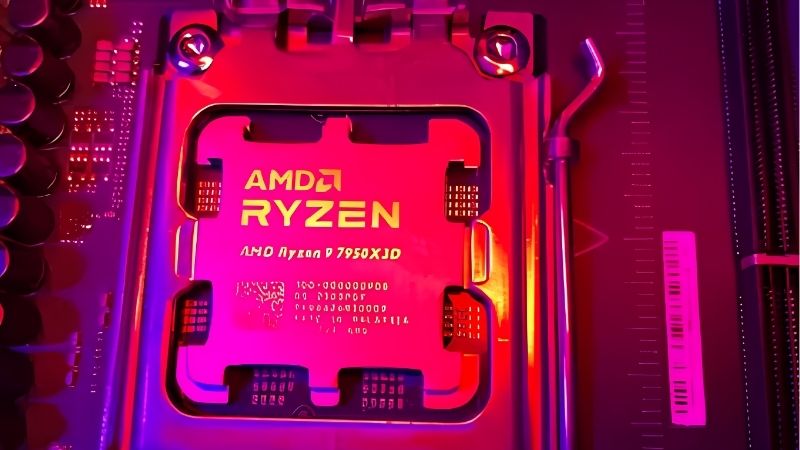
Decide Between GPU and CPU Encoding First
NVIDIA NVENC and AMD’s equivalent encoder handle the video stream on dedicated silicon, leaving the processor almost untouched. With hardware encoding, a six or eight-core chip streams at 1080p60 while gaming without meaningful frame rate loss.
Software x264 encoding is the opposite: it runs on CPU cores and scales with thread count, so twelve or sixteen cores become genuinely useful. Most streamers now use hardware encoding, which makes the higher core counts a productivity choice rather than a streaming necessity.
Look at Cache, Not Just Core Count, for Frame Rates
Games running alongside a stream are more sensitive to cache than to raw core count. AMD’s 3D V-Cache parts carry a much larger L3 pool, which keeps minimum frame rates steadier when background tasks compete for memory bandwidth.
That is why an eight-core X3D chip often produces a smoother stream than a sixteen-core part without the extra cache. If the stream quality complaints you get are about stuttering rather than resolution, cache is usually the more effective fix.
Account for Power Draw and Cooling
A 65W processor stays quiet on a mid-size tower cooler, while a 170W part under sustained encoding load needs a large dual-tower or a 240 mm AIO. Cooler noise matters more when you stream, because the microphone picks it up.
Undervolting and power limits help here. AMD’s Curve Optimizer and Intel’s power limit controls both let you trade a small amount of peak performance for a noticeably quieter machine, which is usually a good deal for a streaming build.
Plan for Memory, Capture and Upgrade Path
Streaming software, a browser with several tabs, chat tools and a game together push past 16 GB easily, so 32 GB is the practical target. Memory speed matters more on AMD platforms, where EXPO profiles around 6000 MT/s are the sweet spot.
Platform lifespan is worth weighing too. AM5 accepts new processors through 2029, whereas LGA 1700 is finished, so an AMD build leaves the door open to a future chip upgrade without replacing memory or cooler mounting hardware.
Top Picks: Best CPU for Streaming in 2026
The best CPU for streaming varies with budget, so these six span entry setups to machines that also edit video. All figures come from manufacturer specifications; no benchmark results are quoted, because independent numbers vary widely by test configuration.
| CPU | Cores / Threads | Max Boost | TDP | Socket |
|---|---|---|---|---|
| Ryzen 9 9950X | 16 / 32 | 5.7 GHz | 170W | AM5 |
| Ryzen 7 9800X3D | 8 / 16 | 5.2 GHz | 120W | AM5 |
| Core Ultra 9 285K | 24 cores | 5.7 GHz | 125W base | LGA 1851 |
| Core Ultra 7 265K | 20 cores | 5.5 GHz | 125W base | LGA 1851 |
| Ryzen 7 7700X | 8 / 16 | 5.4 GHz | 105W | AM5 |
| Ryzen 5 9600X | 6 / 12 | 5.4 GHz | 65W | AM5 |
Ryzen 9 9950X
This is the choice if you encode in software or edit video between streams. Sixteen Zen 5 cores and thirty-two threads boost to 5.7 GHz with 64 MB of L3 cache, giving genuine headroom for x264 encoding alongside a game.
The trade-off is thermal and financial. At a 170W TDP it needs serious cooling to hold peak boost during long sessions, and for pure hardware-encoded streaming most of those cores sit idle, making it poor value for that use alone.
Ryzen 7 9800X3D
For streamers who care most about in-game smoothness, this is the strongest pick. Eight cores and sixteen threads with 3D V-Cache bring total cache to 104 MB, and the 120W TDP is easier to cool than the 9950X.
With NVENC handling the stream, eight cores are ample. The limitation is multi-threaded work: if you also render long video projects, the 9950X finishes those jobs considerably faster, and the X3D chip has less overclocking headroom by design.
Intel Core Ultra 9 285K
Intel’s flagship pairs eight performance cores with sixteen efficiency cores for twenty-four total, boosting to 5.7 GHz. The efficiency cores are well suited to background tasks such as chat overlays and recording, keeping the performance cores free for the game.
Gaming frame rates generally sit behind AMD’s X3D parts at 1080p, which matters if that is your capture resolution. Platform cost is also higher, since LGA 1851 boards start at a steeper price point than mid-range AM5 boards.
Intel Core Ultra 7 265K
The 265K is the more sensible Intel option for most streamers. Twenty cores in total boosting to 5.5 GHz handle a game plus encoding comfortably, and it runs cooler than the 285K under mixed loads.
It offers strong value in productivity relative to price. The drawbacks mirror the 285K: 1080p gaming performance trails the X3D chips, and the platform has less confirmed upgrade runway than AM5 currently does.
Ryzen 7 7700X
Previous-generation AM5 chips remain very capable for streaming. The 7700X runs eight cores and sixteen threads at up to 5.4 GHz with a 105W TDP, and pairs with the same B650 boards and DDR5 memory as newer parts.
It is often the value pick when 9000-series pricing is high. What it lacks is 3D V-Cache, so minimum frame rates in CPU-heavy titles are less consistent than on an X3D chip when a stream is running in the background.
Ryzen 5 9600X
For a budget single-PC setup using hardware encoding, six Zen 5 cores are enough. Twelve threads boosting to 5.4 GHz within a 65W TDP means a modest tower cooler keeps it quiet, which helps with microphone noise.
The honest limit is headroom. Add a demanding game, a browser with many tabs and recording at the same time and six cores can become the bottleneck, so this is a starting point rather than a chip for ambitious multi-source production.
What the Current Market Means for Streaming Builds
A few 2026 developments affect how you should time and budget a streaming machine. None of them argue for rushing, but they do change the calculation on waiting.
No New Processors Until CES 2027
Zen 6 desktop parts and Intel Nova Lake have both slipped to CES in January 2027. If you are wondering whether to hold off for the next generation, the wait is substantial and nothing significant launches in the meantime.
That also means current chips are unlikely to see competition-driven discounts soon. Building when you actually need the machine is defensible; delaying several months in expectation of a price correction is not supported by the announced schedule.
AM5 Support Runs Through 2029
AMD confirmed at Computex 2026 that AM5 will keep receiving new CPUs until the end of 2029. For a streaming build that is meaningful, because you can start with a six or eight-core chip and add cores later without a board change.
Intel’s next platform moves to a new socket, so an LGA 1851 or LGA 1700 build should be planned as complete. Neither approach is wrong, but the total cost of a future upgrade differs enough to influence the initial choice.
Memory Costs Are a Bigger Share of the Budget
DRAM pricing rose sharply through 2026 with further increases forecast, and new manufacturing capacity is not expected before late 2027. For a streaming build, where 32 GB is the practical minimum, that is a real budget line rather than a rounding error.
The sensible response is to price memory alongside the processor rather than treating it as an afterthought. It is also a reason not to over-buy: 64 GB is genuinely useful for heavy video editing, but 32 GB covers gaming plus streaming comfortably.
Frequently Asked Questions
These are the questions that come up most often when people build a single-PC streaming setup.
Do I need a separate streaming PC in 2026?
For most people, no. Hardware encoders on modern graphics cards handle 1080p60 and 1440p streams with minimal impact on game performance. A second machine is mainly worth it for complex multi-camera productions or software encoding at high bitrates.
How many cores are enough for streaming while gaming?
With GPU encoding, six cores work and eight is comfortable. With x264 software encoding at higher quality presets, twelve or sixteen cores become genuinely useful because the encoder itself consumes substantial CPU time.
Does the best CPU for streaming need integrated graphics?
Not usually. Integrated graphics can serve as a fallback display output or a secondary encoder in some configurations, but with a discrete card handling encoding it is a convenience rather than a requirement for a streaming build.
Is 16 GB of memory enough for streaming?
It is tight. Streaming software, a game, a browser and chat tools together push past 16 GB regularly, causing stutters when the system starts paging. 32 GB is the sensible target for a machine that streams and games at the same time.
See More:
- Best MSI motherboard
- Best motherboard processor combo for gaming
- Best B550 motherboard
- What is the best AM4 CPU for gaming
Final Thoughts
The best CPU for streaming is decided by your encoder choice more than by any spec sheet ranking. If your graphics card handles the stream, an eight-core cache-heavy chip delivers the smoothest result for the money, while software encoding and video editing are the only cases that clearly justify stepping up to sixteen cores.











Write Your Review
No reviews yet. Be the first to share your experience!