
- Top Pick: Capture Card, 4K HDMI Video Capture Card, Game Capture Card, 1080P 60FPS Video Capture Device, HDMI to USB 3.0 Capture Card for Streaming, Work with Camera/Xbox/PS4/PS5/PC/OBS
- Best Value: XIIXMASK Video Capture Card, Audio Video Capture Card, USB 3.0 Capture Card 4K HDMI Loop-Out, 1080P 60FPS/2K 30FPS Video Game Capture for Streaming Works for PS5/Switch/Camera/PC/OBS(Black) | Dual-port USB-A/USB-C Video Game Capture, Ultra-Low Latency 4K Pass-Through for PS4/PS5, Switch 1/2, Xbox, PC, Mac, Camera
- Premium Choice: Guermok Video Capture Card, 4K USB3.0 HDMI to USB C, 1080P 60FPS & 2K 30FPS | Capture Card for Streaming, Compatible with iPad Mac OS Windows, Quest 3, OBS, PS5/4, Switch2/1, Xbox, Camera (Silver)
Best stream capture card choices depend on the machine around them far more than on the box specifications. A device rated for 4K60 will deliver considerably less in practice if it ends up sharing a USB controller with your microphone, your audio interface and an external drive during a three-hour broadcast.
As an Amazon Associate we earn from qualifying purchases at no extra cost to you.
By Ryan Cole, PC hardware writer at NvidiaReview
How to Choose the Best Stream Capture Card
Selecting the best stream capture card means auditing your existing rig first. Three things determine whether a device performs to its rating: which slot or port it uses, how much of your USB bandwidth is already committed, and whether your storage can absorb the data it produces.
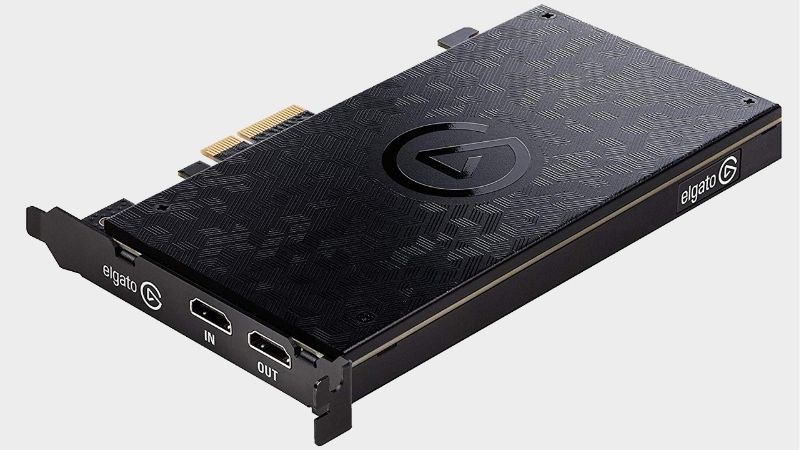
Internal PCIe Versus External USB in a Streaming Rig
Internal cards use a dedicated PCIe link, which keeps capture traffic entirely away from the USB subsystem that your microphone, interface, controllers and drives already share. In a fixed desktop with a free slot, that isolation is the single most reliable improvement you can make.
External devices win on flexibility. They move between machines, work with laptops, and require no case opening. The trade is that a 10Gbps device genuinely needs a 10Gbps port, and many machines have only one or two, often on the rear panel rather than the convenient front connector.
USB Controller Bandwidth and Port Sharing
Motherboards group their USB ports behind a small number of controllers, so plugging a capture device into a hub or a front panel header can place it on the same shared bandwidth as everything else. Dropped frames during long sessions frequently trace back to exactly this.
Check your board manual to see which rear ports belong to which controller, and give the capture device a port of its own where possible. If your audio interface is also bandwidth hungry, separating those two devices onto different controllers solves more problems than any software setting will.
Recording Throughput and Storage Planning
Capturing at 4K60 writes a large volume of data continuously, and a slow drive is a far more common cause of dropped frames than the device itself. A dedicated NVMe drive for recordings removes that variable and costs less than replacing hardware that was never actually at fault.
Never record to the same drive that runs your operating system and the game. If your workflow only produces live broadcasts with no local archive, this matters less, but any creator who edits highlights afterwards should treat recording storage as part of the capture purchase.
Top Picks: Best Stream Capture Card for Each Rig
These five candidates for the best stream capture card cover internal cards for dedicated machines and external units for flexible setups. All figures are vendor-published specifications. Availability and pricing tiers were checked in August 2026 and move with release schedules.
| Device | Format | Max capture | Max passthrough | Best for |
|---|---|---|---|---|
| Elgato 4K Pro | PCIe internal | 4K60 HDR10 | 4K144 | Dedicated streaming PC |
| AVerMedia Live Gamer 4K 2.1 | PCIe internal | 4K60 HDR | 4K144 | Internal alternative |
| Elgato Game Capture 4K X | USB 3.2 Gen 2 | 4K60 HDR10 | 4K144 / 1080p240 | Flexible high refresh |
| Elgato HD60 X | USB 3.0 | 1080p60 / 4K30 | 4K60 HDR10 | Laptop and older PCs |
| Razer Ripsaw HD | USB 3.0 | 1080p60 | 4K60 | Built-in audio routing |
Elgato 4K Pro – Best for a Dedicated Streaming PC
In a second machine built purely for broadcasting, an internal card is the correct engineering answer. The 4K Pro captures 4K60 HDR10 with 4K144 passthrough over PCIe, leaving the entire USB subsystem free for your microphone, interface, control surface and any external storage.
It requires a desktop with a free slot, costs more than the external equivalent, and installation means opening the case. If you later move to a laptop-based setup it becomes useless. For a fixed dual-PC rig that runs for hours at a time, the reliability is worth the inflexibility.
Elgato Game Capture 4K X – Best Flexible Option
The 4K X captures 4K60 with HDR10 and passes through 4K144, 1440p240 or 1080p240 with variable refresh rate support, over a USB 3.2 Gen 2 connection. It suits creators who move between a desktop and a laptop, or who occasionally record away from their usual setup entirely.
That flexibility depends on having a true 10Gbps port available, and older connections quietly reduce what the device can do. It also competes for USB bandwidth with everything else on that controller. Given a dedicated rear port, it performs close to an internal card in practice.
AVerMedia Live Gamer 4K 2.1 – Best Internal Alternative
This PCIe card offers 4K60 HDR capture with 4K144 passthrough, covering the same ground as the Elgato internal option with a different software ecosystem. It is a sensible choice when you already use AVerMedia devices or when the alternative is unavailable at a reasonable price.
Software polish trails Elgato’s, and driver updates arrive less frequently. Like any internal card it needs a desktop and a spare slot, and it will not follow you to a laptop. As a straight substitute in a dedicated machine, it delivers effectively the same capability.
Elgato HD60 X – Best for Laptops and Older Machines
Running over ordinary USB 3.0, the HD60 X captures 1080p60 while passing through 4K60 HDR10 and 1080p120 with VRR support. It asks nothing unusual of the host machine, which makes it the practical choice for laptops or older desktops with no 10Gbps port available anywhere.
Recording is capped at 1080p60, which limits archival footage you intend to crop or reframe later. Since most viewers watch at 1080p anyway, that matters less for live work. As the device least likely to expose a bandwidth problem in an older rig, it is a safe recommendation.
Razer Ripsaw HD – Best Built-In Audio Routing
The Ripsaw HD captures 1080p60 with 4K60 passthrough and includes headphone and microphone passthrough on the unit itself. For console streamers who want party chat and their own voice in the recording without buying a separate audio interface, that saves real setup complexity.
Capture is limited to 1080p60 and passthrough to 4K60, so high frame rate console modes are capped while it is in the chain. Build quality is functional. Where audio routing is the awkward part of your setup rather than resolution, it removes that problem in one purchase.
What the Late 2026 Calendar Means for Streaming Rigs
Demand for the best stream capture card options tracks the games release schedule rather than component pricing, and the next few months are unusually busy on both platforms. Three factors are worth building into your planning before you order hardware for a broadcast rig or upgrade an existing one.
Two Large Releases Before December
Call of Duty Modern Warfare 4 arrives on 23 October and GTA 6 follows on 19 November, the latter on PlayStation 5 and Xbox only. Both draw substantial audiences to streaming platforms, which historically produces a wave of new creators and tighter stock on popular capture devices.
If either release is on your schedule, get the hardware working several weeks early. Bandwidth problems, cable negotiation failures and storage bottlenecks all take time to diagnose, and none of them are things you want to be investigating on the evening of a major launch broadcast.
Console Capture Is Becoming a PC Streamer Requirement
Because GTA 6 has no announced PC version, and precedent points to a long wait with GTA V taking roughly 19 months and Red Dead Redemption 2 around 13, PC-first creators are routing consoles into existing rigs. That changes what the capture device needs to handle.
Size for the console output rather than for your PC. A device that passes 4K120 with variable refresh rate keeps the console experience intact, while your streaming machine handles encoding as usual. That combination is now the most common reason people buy capture hardware at all.
No New Hardware Generation Until CES 2027
Processors and graphics cards from the next generation have slipped to CES in January 2027, so nothing pending will change what your rig can encode or how many PCIe lanes are free. The reason to delay a purchase while waiting for a platform refresh has effectively disappeared.
Buy for the machine you run today, after checking port speeds and slot availability. Accessory discounts around the late November sales remain real this year, unlike memory and storage, though stock on capture devices may be tighter than usual during exactly that period.
Frequently Asked Questions
The questions creators ask most when building a broadcast rig: whether an internal card is worth giving up a PCIe slot, how to diagnose dropped frames properly, what recording storage is required, and whether the best stream capture card needs to record above 1080p at all.
Is an internal card worth the PCIe slot?
In a dedicated streaming machine, usually yes, because the best stream capture card setups keep capture traffic off the USB subsystem your audio gear already uses. In a single-PC setup where the slot might host storage or a sound card, an external device on a dedicated rear port performs closely enough.
Why am I dropping frames during long sessions?
Three usual causes: the device sharing a USB controller with other bandwidth-hungry hardware, recording to the same drive that runs the game, or a port that negotiates a lower speed than the device requires. Check those before assuming the capture hardware is faulty.
What storage do I need for recordings?
A dedicated NVMe drive if you capture at 4K60, since the sustained write rate is substantial. At 1080p60 the requirement is far lower and a decent SATA drive copes. Either way, keep recordings off the drive running your operating system and the game you are playing.
Should I capture above 1080p?
Only if you archive footage for editing, where the extra resolution allows cropping and reframing. Live broadcasts are limited by upload bandwidth and platform transcoding long before capture resolution matters, so many creators record at 1080p60 and never miss the additional pixels.
See More:
- Best thermal compound paste
- Thermal paste at Best Buy
- Graphics card at Best Buy
- Best AM4 CPU for gaming
- Best motherboard for 9800x3d
Final Thoughts
The best stream capture card is whichever one your rig can actually feed. An internal 4K Pro suits a dedicated streaming machine, the 4K X covers flexible high refresh setups given a true 10Gbps port, and the HD60 X keeps older hardware working. Audit your ports and recording drive before paying for higher capture resolution.
As an Amazon Associate we earn from qualifying purchases at no extra cost to you.













Write Your Review
No reviews yet. Be the first to share your experience!