
- Top Pick: Capture Card, 4K HDMI Video Capture Card, Game Capture Card, 1080P 60FPS Video Capture Device, HDMI to USB 3.0 Capture Card for Streaming, Work with Camera/Xbox/PS4/PS5/PC/OBS
- Best Value: Elgato 4K X Capture Card, HDMI 2.1, 4K144 Ultra-Low Latency
- Premium Choice: acer USB 3.0 HDMI Capture Card, 4K HDMI Loop-Out, 1080P 60Hz for Streaming
Best capture card for Switch 2 guides frequently push hardware built for a console that does not exist. Nintendo’s machine outputs through its dock and tops out at 4K60 there, so any device advertising 4K144 passthrough is selling you headroom that this particular console will never once make use of.
As an Amazon Associate we earn from qualifying purchases at no extra cost to you.
By Ryan Cole, PC hardware writer at NvidiaReview
How to Choose the Best Capture Card for Switch 2
Picking the best capture card for Switch 2 recording is refreshingly simple once you accept the console’s output ceiling. Three things matter: matching the device to 4K60 rather than overbuying, getting your voice and chat into the recording, and making sure the dock is part of the chain at all.
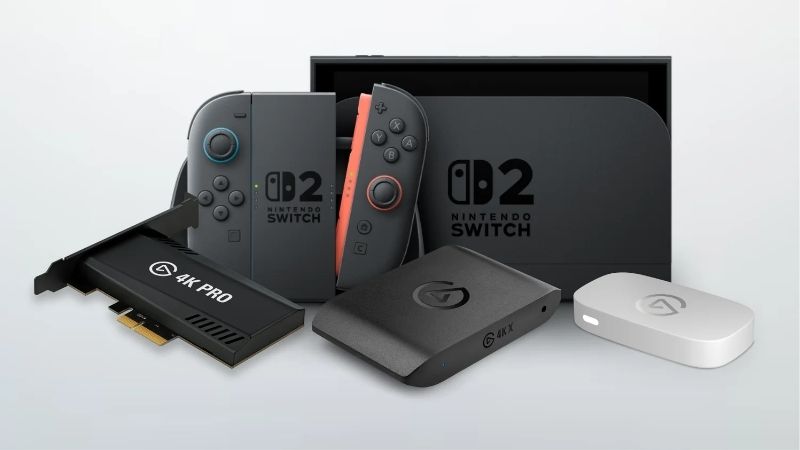
The Console Caps at 4K60 in the Dock
The dock converts the tablet’s display output to HDMI, and that path is capped at 4K60 rather than the 4K120 modes newer televisions advertise. High frame rate play happens on the handheld screen, which never reaches a capture device, so the docked signal is what you are actually recording.
That means a device rated for 4K60 capture and passthrough covers this console completely. Paying extra for 4K144 passthrough only makes sense if the same card will later serve a gaming PC or another console, which is a legitimate reason but not a Switch 2 requirement.
Getting Voice and Chat Into the Recording
Game audio travels over HDMI and arrives with the video automatically. Your commentary does not, and neither does voice chat, which on this console runs through the app and headset rather than the video output, exactly as it does on other current machines.
Devices with an analog audio input solve this in one step by mixing a headset or microphone signal into the capture stream. Without that, you add your microphone separately in software on the recording machine, which works fine for solo commentary but complicates capturing a group session.
The Dock Is Mandatory, and So Is the Cable
A capture device needs an HDMI signal, and the console only produces one when docked. Handheld play cannot be captured directly, so any recording setup starts with the official dock, a free HDMI port on the device, and a display for the passthrough output to feed.
Cables are less demanding here than on a 4K120 console, but a poor cable still causes signals that drop out or refuse to negotiate 4K60 HDR. A certified high speed cable on both sides of the capture device costs very little and eliminates the most common source of setup frustration.
Top Picks: Best Capture Card for Switch 2 Owners
These five candidates for the best capture card for Switch 2 run from a budget 1080p device to an internal card built for a fixed desktop. All figures are vendor-published specifications. Availability was checked in August 2026 and console accessory stock shifts with release schedules.
| Device | Connection | Max capture | Max passthrough | Analog audio in |
|---|---|---|---|---|
| Elgato Game Capture 4K S | USB-C | 4K60 | 4K60 / 1080p240 | Yes |
| Elgato Game Capture Neo | USB | 1080p60 | 4K60 HDR / 1080p120 | No |
| AVerMedia Live Gamer Ultra 2.1 | USB 3.2 Gen 2 | 4K60 HDR | 4K144 | No |
| Elgato Game Capture 4K X | USB 3.2 Gen 2 | 4K60 HDR10 | 4K144 / 1080p240 | No |
| Elgato 4K Pro | PCIe internal | 4K60 HDR10 | 4K144 | No |
Elgato Game Capture 4K S – Best Overall for This Console
The 4K S is sized almost exactly to what this console produces, supporting capture and passthrough up to 4K60 along with 1440p120 and 1080p240 for other sources. It is UVC compliant, so it appears as a standard source in OBS and similar software without installing drivers.
The feature that matters most here is the analog audio input, which lets you mix a headset or microphone directly into the capture rather than routing everything separately. HDR10 tone mapping is limited to Windows. For a Switch 2 owner, this is the device that fits without waste.
Elgato Game Capture Neo – Best Budget Option
Neo captures 1080p60 while passing through 4K60 HDR and 1080p120, over a plain USB connection that works with desktops, laptops and even an iPad with the right cable. Since most viewers watch at 1080p, that capture resolution covers what a live audience will actually see.
Recording is capped at 1080p60, so archived footage cannot be cropped or reframed the way 4K allows, and there is no analog audio input for chat. Passthrough is HDMI 2.0 class. As the cheapest sensible entry into console capture, it does the important part properly.
Elgato Game Capture 4K X – Best If You Also Capture a PC
The 4K X captures 4K60 with HDR10 and passes through 4K144, 1440p240 or 1080p240 with variable refresh rate support. None of that headroom is needed by this console, but it means one device covers a gaming PC or another console at high refresh rates without a second purchase.
It needs a genuine 10Gbps USB-C port, and an older connection quietly reduces what it can do. There is no analog audio input either. Buy it when the Switch 2 is one of several sources in your setup rather than the only reason you are shopping for capture hardware.
AVerMedia Live Gamer Ultra 2.1 – Best Alternative Brand
AVerMedia specifies 4K60 HDR capture with 4K144 passthrough over USB 3.2 Gen 2, and it behaves as a standard source in common recording software. When the Elgato options are out of stock, which happens around major releases, this delivers effectively the same capability.
Like the 4K X, its passthrough headroom is wasted on this console, and the housing feels plainer than the price suggests. The bundled software is basic. It also requires a true 10Gbps port, which catches out people plugging into a front panel connector on an older machine.
Elgato 4K Pro – Best for a Fixed Desktop
Installed in a PCIe slot, the 4K Pro captures 4K60 HDR10 with 4K144 passthrough while keeping capture traffic off the USB subsystem entirely. In a desktop that already runs a microphone, an audio interface and external drives, that isolation avoids a common source of dropped frames.
It requires a desktop with a free slot, costs more than the external options, and cannot follow you to a laptop. For a console that only outputs 4K60, it is more card than strictly necessary. Choose it when the same machine also captures a gaming PC and reliability matters most.
What the Late 2026 Release Calendar Means
Demand for the best capture card for Switch 2 setups is set to climb sharply this autumn for reasons unrelated to component pricing or supply chains. Three factors are worth planning around before you order hardware and start configuring the chain.
A Console-Only Blockbuster Is Driving Demand
GTA 6 launches on 19 November for PlayStation 5 and Xbox with no PC version announced, and precedent suggests a long wait, with GTA V taking roughly 19 months and Red Dead Redemption 2 around 13. Call of Duty Modern Warfare 4 arrives earlier, on 23 October.
Neither is a Nintendo title, but both drive a general surge in capture hardware sales, and stock tightens across the category in the weeks before large releases. If you plan to record over the holidays, buying earlier rather than later is the practical response to that pattern.
Nintendo Releases Cluster Around the Holidays
Nintendo has historically concentrated its biggest first-party launches in the final quarter of the year, which is exactly when creators covering the platform see the largest audiences. That makes autumn the natural time to have a working capture chain rather than a plan to sort one out later.
Set the whole thing up during a quiet week. Confirming that the dock, cable, passthrough display and recording software all cooperate takes an evening, and doing that before a launch is considerably more pleasant than troubleshooting a black preview while an audience waits.
No New Capture Hardware Until CES 2027
Nothing significant is expected in this category before CES in January 2027, and the current generation already exceeds what this console outputs. There is no pending launch that would make waiting worthwhile, since the ceiling here is set by the console rather than the capture device.
Buy for the dock and television you own today rather than a future console. Accessory discounts around the late November sales remain genuine this year, unlike memory and storage, though stock on popular devices may be tight during that same window. Pricing described here reflects August 2026 conditions.
Frequently Asked Questions
The questions Nintendo owners ask most when setting up recording: whether handheld play can be captured at all, if 4K devices are wasted on this console, how voice chat audio gets into the file, and what the best capture card for Switch 2 genuinely needs to support.
Can I capture handheld gameplay?
Not directly. A capture device needs an HDMI signal, which only exists when the console is in its dock. Handheld sessions can be recorded using the console’s own built-in capture for short clips, but anything longer or intended for editing requires docking the machine first.
Is a 4K capture card wasted on this console?
Partly. Docked output tops out at 4K60, so passthrough ratings above that go unused. A 4K60 device is the right match. Buying a higher-rated card still makes sense if it will also capture a gaming PC or another console where those higher modes genuinely apply.
How do I record voice chat with friends?
Voice chat runs through the console app and your headset rather than the HDMI output, so it will not appear automatically. A device with an analog audio input mixes your headset signal into the capture directly, which is the simplest solution for recording group sessions.
Do I need an expensive HDMI cable?
Not for this console, since 4K60 is within the reach of any certified high speed cable. What matters is that the cable is certified rather than a very cheap unbranded one, because poor cables cause intermittent signal loss that looks exactly like a faulty capture device.
See More:
- Best thermal compound paste
- Thermal paste at Best Buy
- Graphics card at Best Buy
- Best AM4 CPU for gaming
- Best motherboard for 9800x3d
Final Thoughts
The best capture card for Switch 2 is one sized to a 4K60 console rather than a high refresh gaming PC. The Elgato 4K S fits that ceiling exactly and adds an analog audio input for chat, Neo covers 1080p streaming for less, and the higher-rated cards only make sense if you capture other sources too.
As an Amazon Associate we earn from qualifying purchases at no extra cost to you.
















Write Your Review
No reviews yet. Be the first to share your experience!