⏱ 8 min read  ·  ✅ Updated Aug 2026
🔥Amazon Prime Day 2026 is coming — don’t miss the best deals.See Top Deals →

Best motherboard for i9 14900K selection is a power delivery question before it is anything else. This is a 24-core chip that draws heavily under sustained load, and the board’s VRM design plus its default power settings determine whether it runs reliably or spends its life throttling.

As an Amazon Associate we earn from qualifying purchases.

By Ryan Cole, PC hardware writer at NVIDIA Review.

Quick answer: For most people in 2026, the best motherboard for i9 14900k is the ASUS ROG Strix Z790-E Gaming WiFi II — our #1 rated choice. See the full ranked comparison, alternatives and buying advice below.

Check Price on Amazon →

How to Choose the Best Motherboard for i9 14900K

The 14900K combines eight performance cores with sixteen efficiency cores, boosting to 6.0 GHz on the best cores. Four considerations shape the best motherboard for i9 14900K, and the first concerns firmware rather than hardware.

How to Choose the Best Motherboard for i9 14900K

Update the BIOS and Use Intel Default Settings

Intel released microcode updates addressing the instability reported on higher-end 13th and 14th Gen processors. Running current firmware is not optional on this chip; it is the single most important step before first boot.

Equally important is choosing the Intel default power profile rather than an unlimited one. Many boards ship with aggressive presets that remove power limits entirely, which raises temperatures sharply for very little real performance gain.

Undervolting is the sensible next step for most owners. Modest voltage reduction alongside the default power profile typically lowers peak temperatures and fan noise while leaving gaming performance essentially unchanged.

Prioritise VRM Phases and Heatsink Mass

Under sustained all-core load this processor pushes serious current through the power stages. Boards using sixteen or more phases with 90A stages have the headroom needed, while thinner designs run hot and pull clocks back.

Heatsink mass matters as much as the phase count. Thick finned VRM blocks joined by a heatpipe hold power stage temperatures far lower during long renders than a flat plate, which translates directly into steadier sustained clocks.

Plan Cooling Before You Choose the Board

No board compensates for inadequate cooling on this chip. A 360 mm AIO or a large dual-tower air cooler is the realistic starting point, and even then the processor will reach high temperatures during extended multi-threaded work.

Board layout affects this indirectly. Check that VRM heatsinks do not foul large air coolers, and that the top M.2 socket is not positioned where an AIO cold plate or its tubing makes access awkward after assembly.

Case airflow completes the picture. A radiator mounted as top exhaust keeps warm air moving out rather than recirculating, and two decent front intakes prevent the graphics card from feeding heat back into the cooler.

Decide Between DDR5 and DDR4 Boards

Z790 exists in both memory flavours and the choice is permanent. DDR5 is the sensible default for a 14900K, since the chip benefits from the extra bandwidth in productivity workloads more than a mid-tier processor would.

DDR4 boards remain worth considering only if you already own a good kit. With DDR5 pricing elevated through 2026, that saving is larger than usual, though it does cap memory performance for the life of the system.

Slot count matters less than population. Two well-matched DDR5 modules generally run high XMP profiles more reliably than four smaller sticks, so buy 32 GB as a matched pair rather than filling every slot.

Top Picks: Best Motherboard for i9 14900K Builds

The best motherboard for i9 14900K depends on how hard you push the chip and how much I/O you use, so these six span flagship down to mid-tier. Specifications come from manufacturer documentation; verify BIOS version support before first boot.

Model Memory M.2 Sockets Wireless Best For
ASUS ROG Strix Z790-E Gaming WiFi II DDR5 5 Wi-Fi 7 Sustained heavy loads
Gigabyte Z790 AORUS Master DDR5 5 Wi-Fi 7 Workstation duty
MSI MPG Z790 Carbon WiFi II DDR5 5 Wi-Fi 7 Balanced enthusiast
MSI MAG Z790 Tomahawk MAX WiFi DDR5 4 Wi-Fi 7 Most gaming builds
ASUS TUF Gaming Z790-PLUS WiFi DDR5 4 Wi-Fi 6 Value with headroom
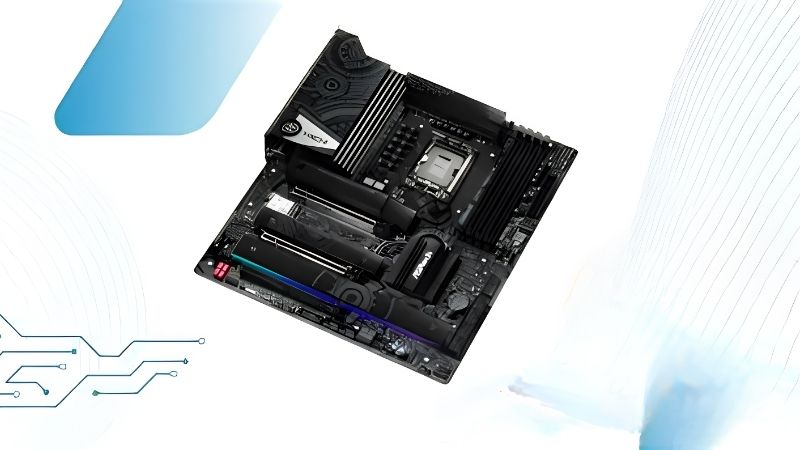
ASRock Z790 Taichi Lite DDR5 4 Wi-Fi 6E Heavy VRM, plain looks

ASUS ROG Strix Z790-E Gaming WiFi II

This is the board for a 14900K that will be worked hard. An 18+1 power stage design with heavy heatsinking, four DDR5 slots, five M.2 sockets, Wi-Fi 7 and a dense rear panel cover both gaming and productivity use.

The BIOS offers precise power limit control, which is exactly what this processor needs. The drawback is price: for a system that mostly games, much of the VRM capability and rear I/O will never be exercised.

Gigabyte Z790 AORUS Master

The AORUS Master is built for sustained multi-threaded work. A heavy digital VRM with substantial finned heatsinks, four DDR5 slots, five M.2 sockets with thermal guards and Wi-Fi 7 make it a genuine workstation-class board.

Its tool-free M.2 and graphics card releases are among the better implementations available. The reservations are cost, which is firmly in flagship territory, and a BIOS layout that some builders find less intuitive than ASUS or MSI.

MSI MPG Z790 Carbon WiFi II

The Carbon sits between the Tomahawk and the flagships and covers most enthusiast needs. A heavy power stage layout with thick heatsinks, four DDR5 slots, five M.2 sockets and Wi-Fi 7 handle the 14900K without strain.

MSI’s tool-free mechanisms make maintenance straightforward once a large graphics card is installed. The compromise is that its pricing sits close to genuine flagships, so it only makes sense when discounted below them.

MSI MAG Z790 Tomahawk MAX WiFi

For most 14900K gaming builds this is the sensible landing spot. A 16+1+1 layout with 90A power stages, four DDR5 slots, four M.2 sockets, 2.5 Gb Ethernet and Wi-Fi 7 provide sufficient headroom at a mid-tier price.

Four M.2 sockets at this level is genuinely useful for large game libraries. The compromises are thinner rear I/O than the Strix and lower M.2 sockets positioned under the graphics card where access is awkward.

ASUS TUF Gaming Z790-PLUS WiFi

TUF is the value option that still has adequate power delivery. A 16+1 DrMOS layout, four DDR5 slots, four heatsinked M.2 sockets, a PCIe 5.0 graphics slot and Wi-Fi 6 make it viable for a 14900K used mainly for gaming.

Power limit controls are easy to reach in the BIOS, which matters on this chip. The honest caveat is that under prolonged all-core rendering it will run warmer than the boards above, so cooling and airflow need attention.

ASRock Z790 Taichi Lite

The Taichi Lite strips the decorative shrouds from a flagship board while keeping the power delivery underneath. That makes it one of the stronger VRM implementations available at a price well below equivalent branded flagships.

For sustained heavy workloads it punches above its price bracket. The trade-offs are plain aesthetics, Wi-Fi 6E rather than Wi-Fi 7, and availability that has been less consistent than the larger manufacturers’ ranges.

What the 2026 Market Means for a 14900K Build

Two developments affect anyone specifying this processor now, and both concern the platform’s future rather than its performance today, which remains competitive.

LGA 1700 Is a Finished Platform

Intel’s Nova Lake moves to the new LGA 1954 socket, so the 14900K is the end of the line for Z790. Any board bought now should be specified around this exact processor rather than around future upgrade plans.

AMD’s position differs sharply, with AM5 receiving new processors through the end of 2029. If the ability to drop in a newer chip matters to you, that comparison deserves weight before committing to this platform.

No New Hardware Until CES 2027

Nova Lake and AMD’s Zen 6 desktop parts have both moved to CES in January 2027. Waiting for the next generation therefore means a long delay, with no intermediate releases to reconsider along the way.

That removes the usual reason to hold off. It also means no competition-driven price correction is scheduled, so if you need the machine now, building now is a defensible decision rather than an impatient one.

Board Availability Has Tightened

Motherboard sales fell more than a quarter and manufacturers shifted production toward mid and high-tier models, with promotional pricing policies withdrawn in February 2026. Mature platforms like Z790 feel that squeeze first.

Flagship boards remain available while entry-level Z790 models restock less reliably. For a 14900K that is largely irrelevant, since the cheapest boards were never the right match for this processor in the first place.

Frequently Asked Questions

These questions come up most often when people specify a board for Intel’s top 14th Gen chip.

Do I need Z790, or will B760 work?

B760 will run the chip but blocks CPU overclocking and generally offers weaker power delivery. For a 14900K specifically, Z790 is the sensible minimum, since the processor’s sustained current draw exposes budget VRMs quickly.

Are the 13th and 14th Gen stability problems resolved?

Intel issued microcode updates addressing the reported instability, so update the BIOS before first boot. Using the board’s Intel default power profile rather than an unlimited preset is also strongly advisable for long-term reliability.

Does the best motherboard for i9 14900K need DDR5?

It is the better pairing. DDR4 boards exist and work, but this processor benefits from the extra bandwidth in productivity workloads, and DDR4 caps that permanently since memory type is fixed by the board.

What cooling does this chip realistically need?

A 360 mm AIO or a large dual-tower air cooler is the practical starting point. Even with good cooling, expect high temperatures during sustained all-core rendering, which is why power limit settings matter so much here.

See More: 

Final Thoughts

The best motherboard for i9 14900K is the one with enough VRM capability and heatsink mass to hold sustained clocks, paired with current firmware and sensible power limits. The Tomahawk covers most gaming builds, the Strix Z790-E and AORUS Master suit heavy workloads, and the Taichi Lite offers flagship power delivery without the styling premium.

Ready to decide? Our #1 pick for 2026 is the ASUS ROG Strix Z790-E Gaming WiFi II.

Check Price on Amazon →

Live price & availability on Amazon.

Explore Our Guides & Free Tools