
- Top Pick: ASUS Z790-AYW WiFi W II Intel Z790 (LGA 1700) ATX Motherboard with PCIe® 5.0, 3X M.2, 12+1 DrMOS, DDR5, WiFi 6, 2.5Gb LAN, HDMI, USB 10Gbps Type-C®, USB 10Gbps Type-C®, Thunderbolt™, USB4®, Aura Sync
- Best Value: GIGABYTE Z790 Eagle AX LGA 1700 ATX Motherboard, Support Intel Core 14th/13th/12th Gen, DDR5, 12+1+1 Power Phase, 3X M.2, PCIe 5.0, USB-C 3.2, WIFI6E, 2.5GbE, Q-Flash, EZ-Latch, RGB Fusion
- Premium Choice: MSI Z790 GAMING PLUS WIFI-AMZ Gaming Motherboard (Support 14th/13th/12th Gen Intel Processors, LGA 1700, DDR5, PCIe 5.0, M.2 Slots, 2.5Gbps LAN, USB 3.2 Gen2, Wi-Fi 6E, Bluetooth 5.3, ATX) (Renewed)
Best Z790 motherboard decisions in 2026 are about completing an Intel build rather than starting an upgrade path, since LGA 1700 has received its final CPU generation. These six boards cover DDR5 flagships down to a DDR4 option, with the trade-offs of each stated plainly.
As an Amazon Associate we earn from qualifying purchases at no extra cost to you.



As an Amazon Associate we earn from qualifying purchases at no extra cost to you.
By Ryan Cole, PC hardware writer at NVIDIA Review.
How to Choose the Best Z790 Motherboard
Z790 sits above B760 by unlocking CPU overclocking and adding more high-speed lanes, but the gap matters less than people assume. Four questions decide which board suits the processor and memory you already own.
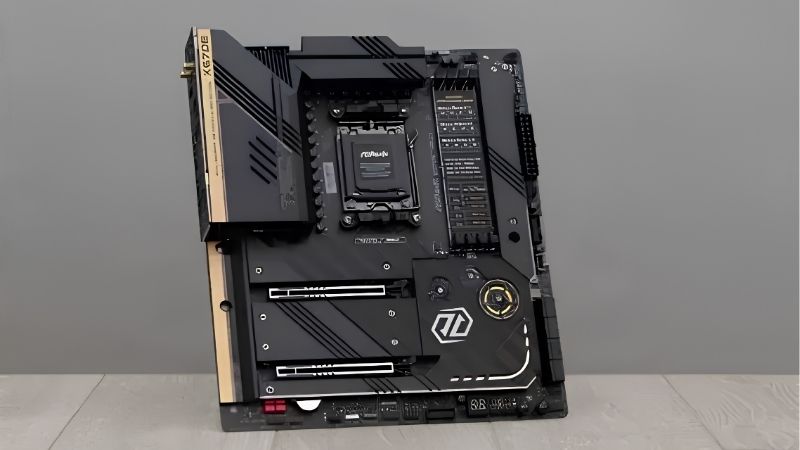
DDR5 or DDR4 Is the First Fork
Z790 boards come in both flavours and the choice is permanent, since memory type is fixed by the board. DDR5 offers higher bandwidth and is the sensible default for a new build, particularly with a 14700K or 14900K.
DDR4 boards remain relevant if you already own a good 32 GB kit. With DDR5 pricing elevated through 2026, reusing existing memory can save a meaningful amount, and the real-world gaming difference between the two is modest.
Match VRM to the Chip You Plan to Run
A Core i5-14600K is undemanding, but a 14900K under sustained all-core load draws serious power and will expose weak power delivery quickly. Boards with 16 or more phases using 90A stages have the headroom that top-end chips need.
Heatsink design matters as much as the phase count. Thick finned VRM blocks joined by a heatpipe keep power stage temperatures far lower during long renders than a thin plate does, and that translates directly into steadier sustained clocks.
Count M.2 Sockets and Check Their Placement
Z790 boards typically offer four or five M.2 sockets, which is one of the platform’s genuine strengths. Check how many sit beneath the graphics card, because those become awkward to reach once a triple-slot cooler is installed.
Bandwidth sharing is the other detail worth reading. On some boards, populating a particular M.2 socket disables SATA ports or drops the second PCIe slot to fewer lanes, which only becomes obvious after the build is finished.
Weigh Networking and Rear I/O Realistically
Most Z790 boards ship 2.5 Gb Ethernet, with higher tiers adding Wi-Fi 7 and occasionally faster wired networking. On a Wi-Fi 6 router the newer radio behaves like Wi-Fi 6, so it is future capability rather than an immediate gain.
Rear USB count is the more practical differentiator. Streaming setups with a capture device, microphone interface, controller dongles and external drives run out of ports quickly, and a powered hub is a poor substitute for high-speed rear connectors.
Top Picks: Best Z790 Motherboard Options in 2026
The best Z790 motherboard for you depends on memory type and CPU tier, so these six range from a DDR5 flagship to a DDR4 value board. Specifications come from manufacturer spec sheets; availability on a mature platform varies, so confirm stock before ordering.
| Model | Memory | Form Factor | Ethernet | Wireless |
|---|---|---|---|---|
| ASUS ROG Strix Z790-E Gaming WiFi II | DDR5 | ATX | 2.5 Gb | Wi-Fi 7 |
| MSI MAG Z790 Tomahawk MAX WiFi | DDR5 | ATX | 2.5 Gb | Wi-Fi 7 |
| Gigabyte Z790 AORUS Elite AX | DDR5 | ATX | 2.5 Gb | Wi-Fi 6E |
| MSI PRO Z790-P WiFi | DDR5 | ATX | 2.5 Gb | Wi-Fi 6E |
| ASUS TUF Gaming Z790-PLUS WiFi | DDR5 | ATX | 2.5 Gb | Wi-Fi 6 |
| ASUS Prime Z790-P WiFi D4 | DDR4 | ATX | 2.5 Gb | Wi-Fi 6 |
ASUS ROG Strix Z790-E Gaming WiFi II
This is the board for a 14900K build that will be pushed hard. It combines an 18+1 power stage design with heavy VRM heatsinking, four DDR5 slots, multiple heatsinked M.2 sockets, Wi-Fi 7 and a dense rear I/O panel.
Sustained all-core loads stay stable and the BIOS gives fine control over power limits, which is useful for taming 14th Gen power draw. The drawback is price: for a locked or mid-tier CPU, most of that capability sits unused.
MSI MAG Z790 Tomahawk MAX WiFi
The Tomahawk is the balanced pick for most Intel builds. A 16+1+1 layout with 90A power stages, four DDR5 slots, four M.2 sockets, 2.5 Gb Ethernet and Wi-Fi 7 cover a gaming machine that also handles editing work.
Four M.2 slots at this price point is the standout feature for large game libraries. The compromise is rear I/O density compared with the Strix, and the lower M.2 sockets sit under the graphics card where they are awkward to access.
Gigabyte Z790 AORUS Elite AX
Gigabyte’s mid-tier Z790 board delivers a strong VRM with thick heatsinks, four DDR5 slots, four M.2 sockets with heatspreaders, 2.5 Gb Ethernet and Wi-Fi 6E. It handles a 14700K without any thermal complaints.
The EZ-Latch tool-free M.2 and graphics card releases are genuinely convenient during maintenance. The main drawback is Wi-Fi 6E rather than Wi-Fi 7, which is only relevant if you already run a newer router at home.
MSI PRO Z790-P WiFi
The PRO line strips decoration to hit a lower price while keeping the substance. A 16+1+1 DrMOS layout, four DDR5 slots, four M.2 sockets, a PCIe 5.0 graphics slot, 2.5 Gb Ethernet and Wi-Fi 6E make it a complete board.
It suits a 14600K or 14700K build where budget goes toward the graphics card instead. The trade-offs are plainer heatsinks, a simpler audio codec and fewer rear USB ports than the gaming-branded boards above it.
ASUS TUF Gaming Z790-PLUS WiFi
TUF occupies the practical middle of the ASUS range. A 16+1 DrMOS power stage layout, four DDR5 slots, four M.2 sockets with heatsinks, a PCIe 5.0 graphics slot, 2.5 Gb Ethernet and Wi-Fi 6 make it a straightforward choice for a 14700K.
Build quality and BIOS behaviour are both solid, and power limit control is easy to reach. The compromises are Wi-Fi 6 rather than a newer standard and a rear I/O panel that is noticeably thinner than the Strix board above it.
ASUS Prime Z790-P WiFi D4
If you own a good DDR4 kit, this is the board that lets you keep it. Four DDR4 slots, multiple M.2 sockets, a PCIe 5.0 graphics slot, 2.5 Gb Ethernet and Wi-Fi 6 sit on a clean, unfussy Prime-series layout.
The saving on memory can be substantial at current DDR5 prices. The honest limitation is bandwidth: DDR4 caps memory performance permanently, so this is a value decision rather than the fastest configuration Z790 can deliver.
Where Z790 Sits in the 2026 Market
Two developments shape how you should think about buying the best Z790 motherboard today. Both point toward treating this as a finished build rather than a platform investment.
LGA 1700 Has No Further CPU Generations
Intel’s Nova Lake moves to the new LGA 1954 socket, so 14th Gen is the end of the line for Z790. That is not a defect, but it does mean any board bought now should be specified around the exact CPU you intend to keep.
AMD’s position differs: AM5 has confirmed CPU support through the end of 2029. If future processor upgrades matter to you, that comparison is worth weighing before committing to an Intel board at a similar price.
Nothing New Launches Before CES 2027
Nova Lake and AMD’s Zen 6 desktop chips have both slipped to CES in January 2027. Waiting for the next platform therefore means a long delay with no intermediate releases to consider.
That also removes any expectation of imminent discounting driven by new competition. Buying when you actually need the machine is reasonable; holding out several months for a price correction is not supported by the current schedule.
Board Prices and Availability Have Tightened
Motherboard sales fell more than a quarter and manufacturers shifted focus toward mid and high-tier models, while promotional pricing policies were withdrawn in February 2026. Mature platforms like Z790 feel that first.
Practically, entry-level Z790 boards restock less reliably than they used to. Check several retailers rather than assuming a particular listing will still be available later, but there is no reason to buy in a hurry either.
DDR4 Ownership Changes the Maths
DRAM contract pricing rose steeply through 2026, with further increases forecast for the fourth quarter and no meaningful new manufacturing capacity expected before late 2027. DDR5 kits absorbed the largest share of that increase.
That makes a DDR4 Z790 board more interesting than it was a year ago. If you already own a good 32 GB DDR4 kit, reusing it can fund a better graphics card, and the gaming difference against DDR5 is smaller than the price gap suggests.
Frequently Asked Questions
These questions come up most often from people finishing an LGA 1700 build in 2026.
Is Z790 worth it over B760?
Only if you plan to overclock the CPU or need the extra M.2 sockets and PCIe lanes. For a locked or stock-clocked chip, B760 delivers the same gaming performance, since Intel’s boost algorithm works normally on both chipsets.
Can a Z790 board run a 12th Gen CPU?
Yes. Z790 supports 12th, 13th and 14th Gen processors on the same LGA 1700 socket, though older boards may need a BIOS update for the newest chips. Cooler mounting is also shared across all three generations.
Should I worry about 13th and 14th Gen stability issues?
Intel released microcode updates addressing the instability reported on higher-end 13th and 14th Gen parts. Update the BIOS to the latest version before first boot and use the board’s default power settings rather than an unlimited profile.
Does the best Z790 motherboard need Wi-Fi 7?
Not unless you already run a Wi-Fi 7 router. On a Wi-Fi 6 or 6E network the newer radio simply operates at the older standard. Wired 2.5 Gb Ethernet remains the better option for latency-sensitive gaming regardless.
See More:
- Best MSI motherboard
- Best motherboard processor combo for gaming
- Best B550 motherboard
- Best CPU for streaming
- What is the best AM4 CPU for gaming
Final Thoughts
The best Z790 motherboard depends on the CPU tier and the memory you already own: the Strix Z790-E suits a hard-pushed 14900K, the Tomahawk and AORUS Elite cover most builds, and the Prime D4 keeps an existing DDR4 kit useful. Specify it as a complete system, since no further LGA 1700 processors are coming.











Write Your Review
No reviews yet. Be the first to share your experience!