
- Top Pick: MSI MPG X870E Carbon WiFi Gaming Motherboard (AMD Ryzen 9000/8000/7000 Series Processors, AM5, DDR5, PCIe 5.0, M.2 Gen5, SATA 6Gb/s, USB 40Gbps, HDMI, Wi-Fi 7, Bluetooth 5.4, 5Gbps LAN, ATX)
- Best Value: ASUS ROG Strix X870-A Gaming WiFi AMD AM5 X870 ATX Motherboard 16+2+2 Power Stages, Dynamic OC Switcher, Core Flex, DDR5 AEMP, WiFi 7, 4X M.2, PCIe® 5.0, Q-Release Slim, USB4®, AI OCing & Networking
- Premium Choice: GIGABYTE X870E AORUS PRO ICE AMD AM5 LGA 1718 Motherboard, ATX, DDR5, 4X M.2, PCIe 5.0, USB4, WIFI7, 2.5GbE LAN, EZ-Latch, 5-Year Warranty
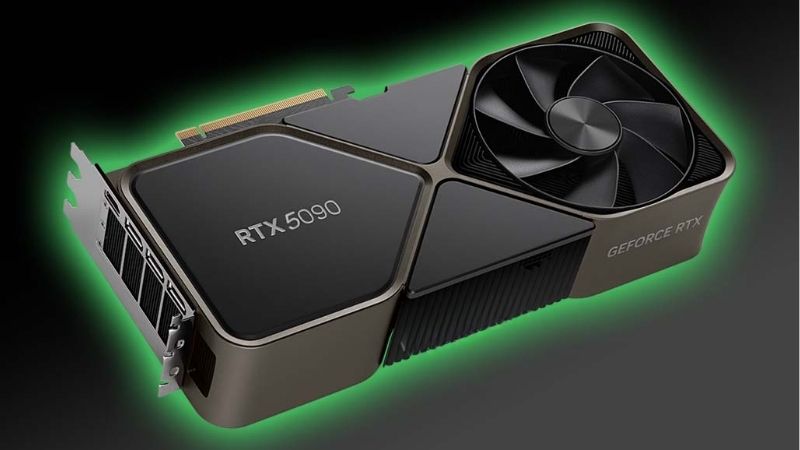
Best motherboard for 5090 selection is less about raw specification than about physical practicality, because this card is enormous, heavy and draws up to 575W. Slot reinforcement, M.2 access underneath it and power supply compatibility matter more than any chipset feature list.
As an Amazon Associate we earn from qualifying purchases at no extra cost to you.


As an Amazon Associate we earn from qualifying purchases at no extra cost to you.
By Ryan Cole, PC hardware writer at NVIDIA Review.
How to Choose the Best Motherboard for 5090 Builds
The RTX 5090 carries 32GB of GDDR7 on a 512-bit bus with a 575W total board power and a 12V-2×6 connector. Four practical considerations shape the best motherboard for 5090 systems as a result.
Slot Reinforcement and Quick Release Matter
This card is heavy enough that an unreinforced PCIe slot is a genuine concern over time. Metal-reinforced slots have become standard on mid-tier boards and above, and they are worth treating as a requirement rather than a bonus.
A quick-release latch on the top slot is equally valuable. With a triple-slot cooler covering the release tab, removing the card without one becomes an exercise in reaching blindly past components you would rather not disturb.
Plan M.2 Access Around the Card
Most boards place two or three M.2 sockets beneath the graphics slot, which a 5090 will cover entirely. Once installed, changing those drives means removing the card, so decide your storage layout before assembly rather than after.
Boards positioning at least one M.2 socket above the graphics slot are noticeably easier to live with. Check the layout diagram rather than the socket count, since three sockets in awkward positions is worse than two accessible ones.
The Power Supply Matters More Than the Chipset
A 575W card demands an ATX 3.1 power supply with a native 12V-2×6 cable rather than an adapter. Transient power spikes are the reason this standard exists, and older units can trip protection even when their wattage looks sufficient.
Budget generously on capacity. Around 1000W is a sensible target for a 5090 paired with a high-core-count processor, and the headroom keeps the unit operating in its efficient range rather than at the edge of its rating.
Cable routing needs planning too. The 12V-2×6 connector sits close to the side panel on many cases, and forcing a tight bend near the plug is exactly the condition that causes contact problems over time.
PCIe 5.0 Is Nice to Have, Not Essential
The 5090 uses a PCIe 5.0 x16 interface, but it does not saturate PCIe 4.0 bandwidth in games. A Gen4 slot costs a very small amount of performance, which matters far less than people assume when comparing boards.
What does matter is lane allocation. Some boards drop the graphics slot to x8 when specific M.2 sockets are populated, and that reduction is more consequential than the generation of the slot itself.
Manuals state this clearly in a lane-sharing table, and it is worth reading before ordering drives. Discovering the constraint after assembly usually means moving a drive to a slower socket you had not planned to use.
Top Picks: Best Motherboard for 5090 Systems
The best motherboard for 5090 builds depends on which processor you pair it with, so these six cover both AMD and Intel platforms. Specifications come from manufacturer documentation; check lane sharing behaviour in the manual before finalising storage.
| Model | Platform | Graphics Slot | Quick Release | Wireless |
|---|---|---|---|---|
| ASUS ROG Strix X870E-E Gaming WiFi | AM5 | PCIe 5.0 x16 | Yes | Wi-Fi 7 |
| Gigabyte X870E AORUS Master | AM5 | PCIe 5.0 x16 | Yes | Wi-Fi 7 |
| MSI MPG X870E Carbon WiFi | AM5 | PCIe 5.0 x16 | Yes | Wi-Fi 7 |
| ASRock X870 Steel Legend WiFi | AM5 | PCIe 5.0 x16 | Yes | Wi-Fi 7 |
| ASUS ROG Maximus Z890 Hero | LGA 1851 | PCIe 5.0 x16 | Yes | Wi-Fi 7 |
| MSI MAG Z890 Tomahawk WiFi | LGA 1851 | PCIe 5.0 x16 | Yes | Wi-Fi 7 |
ASUS ROG Strix X870E-E Gaming WiFi
This is the AM5 board for a system that uses every lane available. An 18+2+2 power stage layout, dual-chipset X870E lane allocation, multiple heatsinked M.2 sockets, USB4 and Wi-Fi 7 leave nothing meaningful missing.
Slot reinforcement and the quick-release mechanism are both well implemented for a card this size. The drawback is cost, and much of what you pay for is downstream connectivity that a single-card gaming build will never touch.
Gigabyte X870E AORUS Master
The AORUS Master is built for sustained workloads and pairs naturally with a 5090 in a workstation-gaming hybrid. A heavy digital VRM, four DDR5 slots, several M.2 sockets with thermal guards and USB4 cover everything.
Its tool-free releases for both M.2 drives and the graphics card are among the better implementations available, which genuinely matters here. The reservations are flagship pricing and a BIOS layout some builders find less intuitive.
MSI MPG X870E Carbon WiFi
The Carbon sits between mainstream and flagship while retaining the features that matter for this card. An 18+2+1 power stage arrangement, USB4, Wi-Fi 7 and MSI’s quick-release latch make it practical to live with.
MSI’s tool-free M.2 clips are quick to work with once the card is removed. The compromise is pricing that sits close to genuine flagships, so it makes most sense when discounted below the ASUS and Gigabyte alternatives.
ASRock X870 Steel Legend WiFi
If the budget is going into the graphics card, this is the sensible AM5 board. A 14+2+1 power design, four DDR5 slots, a CPU-connected Gen5 M.2 socket, USB4 and Wi-Fi 7 arrive at a lower price than competitors.
It runs a high-core-count processor alongside the card without difficulty. The trade-offs are thinner rear I/O and fewer M.2 sockets positioned above the graphics slot, which makes drive changes more disruptive later.
Case support deserves attention alongside the board. A card this heavy benefits from an anti-sag bracket, and several cases now include one, which costs nothing extra and removes a long-term concern entirely.
ASUS ROG Maximus Z890 Hero
For an Intel build this is the flagship pairing. Heavy power delivery for Core Ultra processors, four DDR5 slots, multiple M.2 sockets, Thunderbolt-class connectivity and Wi-Fi 7 make it comprehensively equipped.
Slot reinforcement and release mechanisms are appropriate for a card of this weight. The drawbacks are price, which is substantial even by flagship standards, and an Intel platform whose gaming performance trails AMD’s X3D chips.
MSI MAG Z890 Tomahawk WiFi
The Tomahawk is the practical Intel option and covers a 5090 build properly. A strong power stage layout, four DDR5 slots, multiple M.2 sockets, 2.5 Gb Ethernet and Wi-Fi 7 handle a Core Ultra 9 without strain.
It costs considerably less than the Maximus while providing the same graphics slot capability. The compromise is rear I/O density and an audio implementation below the flagship, neither of which affects graphics performance.
What the 2026 Market Means for a 5090 Build
Three developments shape this decision, and two of them concern the graphics card rather than the board.
Graphics Pricing Has Risen Sharply
NVIDIA reduced partner supply by around 20 percent and graphics pricing climbed roughly 19 percent globally from late 2025, with several manufacturers raising card prices by 15 to 30 percent. Flagship models were not exempt.
That means the card dominates the budget more than usual. Spending proportionally less on the board and more on the power supply is the sounder allocation, since an inadequate power supply is the likelier source of trouble.
The Refreshed Line Has Slipped to CES 2027
RTX 50 Super models have moved to CES in January 2027, held up partly by GDDR7 supply where the higher-capacity modules cost substantially more than the previous generation. Nothing replaces the 5090 before then.
If you are asking whether to wait, the answer is that the wait is long and no successor to the flagship has been announced. Building now is reasonable, though there is equally no urgency to buy this week.
AM5 Gives the Build a Longer Life
AMD confirmed at Computex 2026 that AM5 accepts new processors through the end of 2029. Since the graphics card is the expensive component here, a platform that lets you upgrade the processor later protects that investment.
Intel’s move to LGA 1954 means a current Intel build is a complete system. Neither approach is wrong, but the difference in future upgrade cost is worth weighing when two boards look similarly priced today.
Frequently Asked Questions
These questions come up most often from people specifying a complete system around this card.
Does the best motherboard for 5090 need PCIe 5.0?
Not strictly. The card does not saturate PCIe 4.0 bandwidth in games, so a Gen4 slot costs very little. Lane allocation matters more, since some boards reduce the graphics slot to x8 when certain M.2 sockets are used.
What power supply capacity should I plan for?
Around 1000W with ATX 3.1 compliance and a native 12V-2×6 cable is the sensible target. The standard exists to handle transient spikes, which older units can fail to absorb even when their rated wattage looks adequate.
Will the card block my M.2 sockets?
Almost certainly some of them. Check the board layout for at least one socket above the graphics slot, and plan your storage before assembly, since reaching the lower sockets means removing the card entirely.
Should I choose AMD or Intel for a 5090?
For gaming at 1440p, AMD’s X3D processors generally lead. At 4K the difference narrows considerably since the card does most of the work, which makes Intel competitive if productivity performance also matters to you.
See More:
- Best MSI motherboard
- Best motherboard processor combo for gaming
- Best B550 motherboard
- Best CPU for streaming
- What is the best AM4 CPU for gaming
Final Thoughts
The best motherboard for 5090 builds is one with a reinforced, quick-release graphics slot and at least one accessible M.2 socket above it. Beyond that, spend the money on an ATX 3.1 power supply with real headroom, since that component protects the card far more than an extra chipset tier ever will.











Write Your Review
No reviews yet. Be the first to share your experience!