
Best motherboard for 9800x3d shopping is easier than most builders assume, because AMD’s gaming flagship is not a power-hungry chip. It carries a 120W TDP and a 162W package power limit, which means the money is better spent on connectivity, storage layout and memory support than on an oversized VRM you will never load.
As an Amazon Associate we earn from qualifying purchases at no extra cost to you.
By Ryan Cole, PC hardware writer at NvidiaReview
How to Choose the Best Motherboard for 9800X3D
The Ryzen 7 9800X3D pairs eight Zen 5 cores with 96MB of L3 cache and boosts to 5.2GHz, and unlike earlier X3D parts it is fully unlocked. Three things separate the best motherboard for 9800x3d from one that merely works: power delivery, chipset tier and memory tuning.
VRM Requirements Are Lower Than You Think
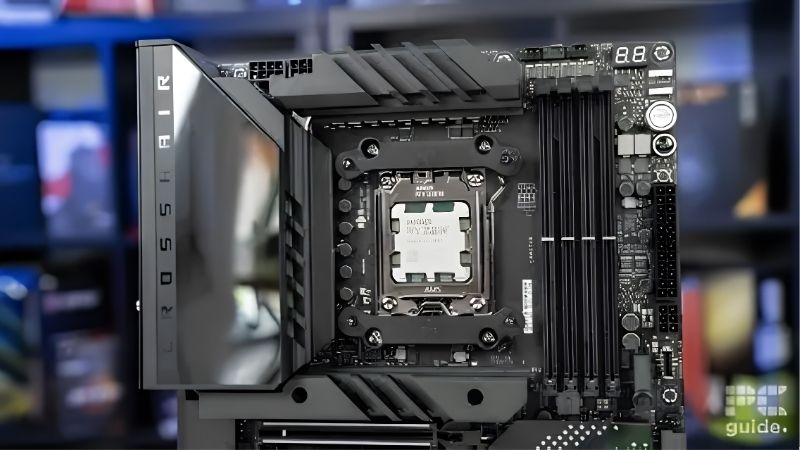
At 162W package power, this processor asks far less of a VRM than a sixteen-core part. A 12-phase design with 60A stages handles it comfortably, and the 14+2+1 arrays with 80A stages found on mid-range boards leave enormous headroom even with an aggressive Curve Optimizer profile.
What matters more is VRM cooling quality and whether the board has dual 8-pin CPU connectors for stable delivery under sustained load. Paying premium prices for a 20-phase flagship VRM on this chip buys you nothing measurable. Put that budget into networking, storage or memory instead.
Chipset Tier: X870, B850 or Existing 600-Series
X870 boards are defined by mandatory USB4 at 40Gbps and PCIe 5.0 graphics support, and they typically ship with Wi-Fi 7 and better rear I/O. B850 keeps PCIe 5.0 for the primary M.2 slot while making the graphics slot optional, which costs nothing in real gaming performance today.
B650 and X670 boards from the previous wave remain fully compatible after a BIOS update, and they are frequently the value play. Check the vendor support list for the required firmware version, and confirm the board has BIOS Flashback so you can update without a compatible older CPU on hand.
Memory Support and EXPO Stability
This chip responds well to fast memory, and the sweet spot remains a 6000 MT/s EXPO kit with a 1:1 memory controller ratio. Four-DIMM boards are convenient but two-DIMM layouts generally clock higher, so if you plan to push beyond 6400 MT/s, an ITX or two-slot ATX board has an advantage.
Look at the vendor QVL before buying a memory kit, and expect to spend an evening validating stability once EXPO is enabled. Running a long memory test after the first boot is worth the time, since instability at high transfer rates often shows up as rare crashes rather than obvious failures.
Top Picks: Best Motherboard for 9800X3D Across Every Budget
These five candidates for the best motherboard for 9800x3d run from full ATX enthusiast boards to value options from the previous chipset wave. All figures are vendor-published; revisions vary, so confirm the exact model number before ordering. Stock was checked in August 2026.
| Board | Chipset | VRM (vendor listed) | Networking | Form factor |
|---|---|---|---|---|
| MSI MAG X870 Tomahawk WiFi | X870 | 14+2+1, 80A SPS | 5G LAN, Wi-Fi 7 | ATX |
| Gigabyte X870 Aorus Elite WIFI7 | X870 | 16+2+2 | 2.5GbE, Wi-Fi 7 | ATX |
| ASUS TUF Gaming B850-Plus WiFi | B850 | DrMOS array | 2.5GbE, Wi-Fi 7 | ATX |
| ASRock B850 Pro-A WiFi | B850 | 14+2+1 | 2.5GbE, Wi-Fi | ATX |
| ASUS ROG Strix B650E-F Gaming WiFi | B650E | 12+2 power stages | 2.5GbE, Wi-Fi 6E | ATX |
MSI MAG X870 Tomahawk WiFi – Best Overall
MSI lists a 14+2+1 duet rail design with 80A smart power stages, dual 8-pin CPU connectors and an 8-layer PCB, which is far more delivery than this chip will ever consume. The rest of the sheet is where it earns the recommendation: USB4 at 40Gbps, 5G LAN, Wi-Fi 7 and a PCIe 5.0 graphics slot.
It is not the cheapest route to a working 9800X3D system, and the plain black aesthetic will not appeal to everyone. Rear USB port count is also merely adequate for a board at this tier. As a build-once-and-forget foundation with genuine future connectivity, it is the easiest pick here.
Gigabyte X870 Aorus Elite WIFI7 – Best Storage Layout
Gigabyte specifies a 16+2+2 phase design alongside four M.2 slots, three of which are PCIe 5.0 x4. Dual USB4 Type-C ports with DisplayPort passthrough, Wi-Fi 7 and 2.5GbE round it out, and the EZ-Latch screwless mechanisms for both M.2 and PCIe make assembly genuinely faster.
Networking drops to 2.5GbE rather than the 5G found on the MSI, and the Realtek ALC1220 audio codec is one tier below the flagship boards. If you run several NVMe drives or plan a Gen5 storage upgrade path, the slot layout here is the most generous in this price bracket.
ASUS TUF Gaming B850-Plus WiFi – Best Mainstream Value
The TUF pairs a DrMOS power array with Wi-Fi 7, 2.5GbE and a PCIe 5.0 M.2 slot, delivering essentially all of the gaming-relevant functionality of an X870 board for noticeably less. For a machine built around this processor and a single graphics card, nothing important is missing.
You give up USB4, which matters if you use high-speed external storage or a docking setup, and the graphics slot runs at PCIe 4.0. Neither limits gaming performance in any measurable way today. It is the board most 9800X3D buyers should look at first before spending more.
ASRock B850 Pro-A WiFi – Best Budget ATX
ASRock lists a 14+2+1 power phase design with Dr.MOS stages and a PCIe 5.0 M.2 slot on a full ATX board at the bottom of the B850 range. For a chip with a 162W package limit, that power delivery is comfortably sufficient even with a tuned Curve Optimizer profile applied.
The trade-offs are in the details: fewer rear USB ports, a more basic audio implementation, and VRM heatsinks that are functional rather than substantial. Case airflow matters more here than on the pricier boards. As the cheapest sensible home for this processor, it does the job without drama.
ASUS ROG Strix B650E-F Gaming WiFi – Best Previous-Generation Value
The B650E chipset provides PCIe 5.0 for both graphics and the primary M.2 slot, and ASUS pairs it with a 12+2 power stage design, 2.5GbE and Wi-Fi 6E. Because it belongs to the previous wave, it frequently sells below newer boards with a comparable specification.
Wi-Fi 6E rather than Wi-Fi 7 is the main compromise, along with the absence of USB4. It also requires a BIOS update for Ryzen 9000 support, so confirm the shipped firmware version or verify that BIOS Flashback is available. Handled correctly, it is the best value on this list.
What the 2026 Platform Market Means for This Build
Choosing the best motherboard for 9800x3d in 2026 involves more strategy than it used to, mostly because of what is happening elsewhere in the parts list. Three market factors are worth understanding before you finalise a basket and commit to a platform for the next few years.
AM5 Is Supported Through 2029
AMD confirmed at Computex 2026 that socket AM5 will continue receiving new processors through the end of 2029, while Intel’s next generation moves to a different socket. That gives an AM5 board bought today a realistic upgrade path spanning several future processor generations.
This is the strongest argument for buying a solid mid-range board rather than the cheapest one available. If the plan is to drop a 2028 processor into the same machine, spending a little more now on VRM cooling, connectivity and BIOS support quality is money that pays itself back.
The Budget Board Segment Is Thinning Out
Motherboard sales have fallen more than 25 percent, and manufacturers have responded by concentrating their attention on mid-range and premium models. Promotional pricing policies were withdrawn in February 2026, which means fewer of the aggressive discounts that used to make entry boards attractive.
Practically, the gap between the cheapest usable board and a well-equipped mid-range one has narrowed. Since the difference is often modest, stepping up one tier for better power delivery, an extra M.2 slot and stronger networking is easier to justify now than it was a year ago.
Memory Pricing Should Shape Your Total Budget
DRAM pricing has risen substantially through 2026 and forecasts point to further increases into the fourth quarter, with meaningful new manufacturing capacity not expected before late 2027. A 32GB DDR5 kit is now a much larger share of the total build cost than it was previously.
The sensible response is to buy the memory capacity you actually need rather than overspecifying, and to prioritise a 6000 MT/s EXPO kit with good timings over a larger, slower one. Waiting for the November sales is unlikely to help with memory this year, though board discounts remain real.
Frequently Asked Questions
The questions that come up most often when specifying a board for this processor. Short answers on chipset choice, reusing an older 600-series board, sensible memory targets, and whether PCIe 5.0 on the graphics slot is something the best motherboard for 9800x3d actually needs today.
Does the 9800X3D need an X870 board?
No. A B850 or B650 board handles its 162W package power limit without difficulty, and gaming performance is effectively identical, so the best motherboard for 9800x3d is often a mid-range one. Pay for X870 only if you specifically want USB4 at 40Gbps and stronger rear I/O.
Will a 600-series board work after a BIOS update?
Yes, provided the vendor has released firmware with Ryzen 9000 support for your exact model. Check the support page before ordering, and strongly prefer boards with BIOS Flashback, which lets you update the firmware with no processor installed if the board ships with older code.
What memory speed should I pair with it?
A 6000 MT/s EXPO kit with tight timings is the practical target, since it keeps the memory controller ratio at 1:1. Faster kits can work but often require manual tuning and may force a less efficient ratio, which erodes the benefit. Check the board QVL before purchasing.
Do I need PCIe 5.0 for my graphics card?
Not today. No current graphics card saturates PCIe 4.0 x16 in a way that affects frame rates measurably. It is a longevity feature rather than a performance one, which is why B850 boards that keep Gen5 for storage and use Gen4 for graphics remain a sensible choice.
See More:
- Best thermal compound paste
- Thermal paste at Best Buy
- Graphics card at Best Buy
- Best AM4 CPU for gaming
Final Thoughts
The best motherboard for 9800x3d is rarely the most expensive one. This chip does not stress a VRM, so the decision comes down to connectivity and how long you plan to keep the platform. The MSI Tomahawk is the strongest all-rounder, the ASUS TUF B850 covers the mainstream, and a discounted B650E board remains the smartest way to spend less.
As an Amazon Associate we earn from qualifying purchases at no extra cost to you.














Write Your Review
No reviews yet. Be the first to share your experience!