
- Top Pick: Capture Card, 4K HDMI Video Capture Card, Game Capture Card, 1080P 60FPS Video Capture Device, HDMI to USB 3.0 Capture Card for Streaming, Work with Camera/Xbox/PS4/PS5/PC/OBS
- Best Value: Audio Express AXHDCAP 4K HDMI Video Capture Card, Cam Link Card Game Audio Adapter HDMI to USB 2.0 Record Capture Device for Streaming, Live Broadcasting, Video Conference, Teaching, Gaming
- Premium Choice: acer USB 3.0 HDMI Capture Card, 4K HDMI Loop-Out, 1080P 60Hz for Streaming
Best capture card streaming decisions are really decisions about where the encoding happens. A card only moves frames into your computer; what turns those frames into a watchable broadcast is your processor or graphics card, and that split is what really determines which device suits your setup and your budget.
As an Amazon Associate we earn from qualifying purchases at no extra cost to you.
By Ryan Cole, PC hardware writer at NvidiaReview
How to Choose the Best Capture Card Streaming Setup
Building the best capture card streaming chain means matching hardware to how you broadcast. Three questions settle it: whether one machine or two is doing the work, how you monitor the game while playing, and how the device behaves inside the software you already use.
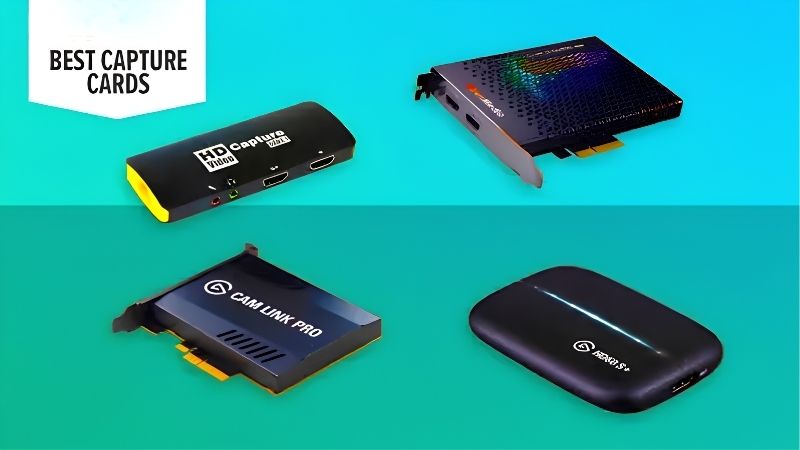
Single-PC Versus Dual-PC Encoding Load
On a single machine, the capture device costs almost nothing in performance but the encoding does. Modern graphics card encoders handle a 1080p60 stream with a small impact on frame rates, which is why most streamers now run everything on one PC without a second thought.
A dual-PC setup removes that overhead entirely by sending video from the gaming machine into a separate streaming box. It costs more, takes more desk space and adds cabling complexity, but the gaming machine stays untouched, which matters for competitive titles at high refresh rates.
Preview Latency and How You Monitor the Game
Every capture device shows a preview that runs slightly behind reality, because the frames must travel into the computer and through your software before appearing. That delay is unimportant for a recording and completely unacceptable for playing, which is what passthrough exists to solve.
Play on the passthrough display and use the preview only for framing your layout. If your setup forces you to play on the preview, choose an internal card, since the shorter data path generally reduces that delay compared with routing everything over a USB controller.
Software Support and Audio Routing
Check that the device appears as a standard video source in your broadcasting software rather than requiring a proprietary application to be running. Most current cards behave properly in OBS and similar tools, but the driver quality and update cadence still differ noticeably between brands.
Audio needs planning too. Game sound arrives over HDMI alongside the video, while your microphone is added separately in software. Console streamers often want party chat included, which usually requires a separate audio interface or a device with headset passthrough built into the unit.
Top Picks: Best Capture Card Streaming Devices
These five picks for the best capture card streaming setups run from a budget 1080p unit to an internal card for a dedicated rig. All figures are vendor-published specifications. Availability was checked in August 2026 and stock levels shift with release schedules.
| Device | Connection | Max capture | Max passthrough | Best for |
|---|---|---|---|---|
| Elgato Game Capture 4K X | USB 3.2 Gen 2 | 4K60 HDR10 | 4K144 / 1080p240 | High refresh single PC |
| Elgato 4K Pro | PCIe | 4K60 HDR10 | 4K144 | Dual PC rigs |
| AVerMedia Live Gamer Ultra 2.1 | USB 3.2 Gen 2 | 4K60 HDR | 4K144 | Console streaming |
| Elgato HD60 X | USB 3.0 | 1080p60 / 4K30 | 4K60 HDR10 | Mainstream streaming |
| AVerMedia Live Gamer MINI | USB 2.0 | 1080p60 | 1080p60 | Tight budgets |
Elgato HD60 X – Best for Most Streamers
Since the vast majority of viewers watch at 1080p, this device covers the actual requirement properly. It captures 1080p60, passes through 4K60 HDR10 and 1080p120 with variable refresh rate support, and runs over ordinary USB 3.0 so it works with laptops and older desktops alike.
Recording above 1080p60 is not possible, which matters if you archive footage for editing and reframing later. The plastic housing is unremarkable. For live streaming specifically, it delivers everything the platform will actually transmit and costs far less than the 4K devices above it.
Elgato Game Capture 4K X – Best for High Refresh Setups
The 4K X captures 4K60 with HDR10 while passing through up to 4K144, 1440p240 or 1080p240 with VRR support, so a high refresh monitor keeps behaving normally while you broadcast. Over USB 3.2 Gen 2 it handles both console sources and a second gaming PC without reconfiguration.
It requires a genuine 10Gbps USB-C port, and an older 5Gbps connection quietly limits what it can do. Recording at 4K also produces large files that need a fast dedicated drive. For a competitive setup running well above 60Hz, it is the external device that keeps up.
Elgato 4K Pro – Best for a Dedicated Streaming PC
Installed in a PCIe slot, the 4K Pro captures 4K60 HDR10 with passthrough to 4K144 and keeps the data path inside the machine. In a dual-PC rig, that avoids competing with microphones, audio interfaces and external drives for USB controller bandwidth during a long broadcast.
It only suits a desktop, occupies a slot you might want for audio or storage, and costs more than the external equivalent. Installation means opening the case. For a second machine dedicated to streaming that never moves, the internal route is the more dependable engineering choice.
AVerMedia Live Gamer Ultra 2.1 – Best for Console Streaming
AVerMedia specifies 4K60 HDR capture with 4K144 passthrough over USB 3.2 Gen 2, which suits streaming from a console in performance mode without dropping your own display. It works with standard broadcasting software rather than demanding its own suite, which keeps setup simple.
Build quality feels plainer than the price suggests, and the bundled software is basic. Like every 10Gbps device it needs the right port to reach its rated figures, which catches people using front panel connectors. For console sources feeding a PC that runs the stream, it is dependable.
AVerMedia Live Gamer MINI – Best Budget Entry
The MINI captures 1080p60 with 1080p60 passthrough over a plain USB connection, which makes it the cheapest legitimate route into console streaming. For someone testing whether they enjoy broadcasting before investing properly, it removes almost all of the cost from that decision.
Passthrough is capped at 1080p60, so it cannot serve a high refresh display or a 4K television, and there is no HDR support. The bundled software is minimal. Within a strict budget and a 1080p60 setup, it does the core job without the compromises found in unbranded devices.
What the Late 2026 Calendar Means for Streamers
Demand for the best capture card streaming hardware follows the games release schedule rather than component pricing, and the coming months are unusually busy for both consoles and PC. Three factors are worth planning around before you order anything for a broadcast setup, especially if you intend to cover a launch.
Two Major Releases Land Before December
Call of Duty Modern Warfare 4 arrives on 23 October, and GTA 6 follows on 19 November for PlayStation 5 and Xbox only. Both are the kind of releases that pull large audiences to streaming platforms, which means new viewers looking for creators covering them at launch.
If you intend to broadcast either title, have the hardware working weeks beforehand. Testing cables, port speeds, audio routing and recording throughput during launch week is the worst possible timing, and stock on popular capture devices tends to tighten in the days before a major release.
PC Streamers Are Adding Consoles
Because GTA 6 has no announced PC version, and past precedent is long, with GTA V taking roughly 19 months and Red Dead Redemption 2 around 13, many PC-first creators are routing a console into their existing setup rather than waiting. That is precisely what a capture device enables.
If you are in that position, size the device around the console’s output rather than your PC. A unit passing through 4K120 with variable refresh rate keeps the console experience intact while your streaming machine handles encoding, which is the cleanest way to run that configuration.
No Hardware Changes Until CES 2027
The next generation of processors and graphics cards has slipped to CES in January 2027, so nothing pending will change what your streaming machine can encode. If you were delaying a capture purchase until the platform picture settled, it has already settled for the rest of this year.
Buy for the machine you have. Confirm your USB port speeds and free PCIe slots first, since both are fixed until you rebuild. Late November discounts on accessories remain genuine this year, so a planned purchase can reasonably wait if your first broadcast is not until December.
Frequently Asked Questions
The questions that come up most when setting up a broadcast chain: how much game performance capture really costs, whether two machines are necessary, how console audio gets handled, and what the best capture card streaming setup looks like on a genuinely modest budget.
Does streaming from one PC hurt game performance?
Some, though less than most people expect. The capture device itself costs almost nothing, while encoding uses graphics card resources. Using your GPU hardware encoder at 1080p60 typically costs a small percentage of frame rate in most titles, which is acceptable outside competitive play.
Do I really need a dual-PC setup?
Only if you play demanding titles at high refresh rates and cannot spare any performance at all, or if you run elaborate production with multiple sources. For the vast majority of streamers, one modern machine with hardware encoding handles gameplay and broadcasting simultaneously without difficulty.
How do I get party chat into the stream?
Console party chat travels over the controller rather than HDMI, so it does not arrive with the video. Capturing it requires either a device with headset passthrough built in or a separate audio interface that splits your headset signal, which is the more flexible long-term solution.
What bitrate and resolution should I stream at?
Most platforms and viewers still favour 1080p60, which is why a device capturing at that resolution covers the requirement completely. Higher capture resolutions matter for archived footage you plan to edit rather than for the live broadcast, where upload bandwidth is usually the real limit.
See More:
- Best thermal compound paste
- Thermal paste at Best Buy
- Graphics card at Best Buy
- Best AM4 CPU for gaming
- Best motherboard for 9800x3d
Final Thoughts
The best capture card streaming setup is the one matched to how you actually broadcast. The HD60 X covers what viewers see for the least money, the 4K X suits high refresh single-PC rigs, and the 4K Pro belongs in a dedicated streaming machine. Test the whole chain well before any launch you plan to cover.
As an Amazon Associate we earn from qualifying purchases at no extra cost to you.
















Write Your Review
No reviews yet. Be the first to share your experience!