
- Top Pick: Elgato 4K Pro Internal Capture Card, 8K60 Passthrough
- Best Value: VIXLW 4K Internal Capture Card, PCIe Capture Card, HDMI, 4K60 Passthrough, Ultra-Low Latency for Streaming & Recording, for PS4,PS5, Xbox, in OBS, YouTube, Single & Dual PC Setups, Black
- Premium Choice: AVerMedia GC573 Live Gamer 4K, Internal Capture Card, Stream and Record 4K60 HDR10 with ultra-low latency on PS5, PS4 Pro, Xbox Series X/S, Xbox One X, in OBS, Twitch, YouTube
Best PCI capture card searches almost always mean modern PCIe x4 internal cards rather than the legacy PCI slot, which disappeared from motherboards years ago. These six internal models cover consumer streaming through broadcast-grade capture, with latency and driver caveats included.
As an Amazon Associate we earn from qualifying purchases at no extra cost to you.







As an Amazon Associate we earn from qualifying purchases at no extra cost to you.
By Ryan Cole, PC hardware writer at NVIDIA Review.
How to Choose the Best PCI Capture Card
Internal cards trade portability for lower latency and a permanent, powered connection. Four factors decide which one fits your machine, starting with a naming point that trips up a lot of buyers.
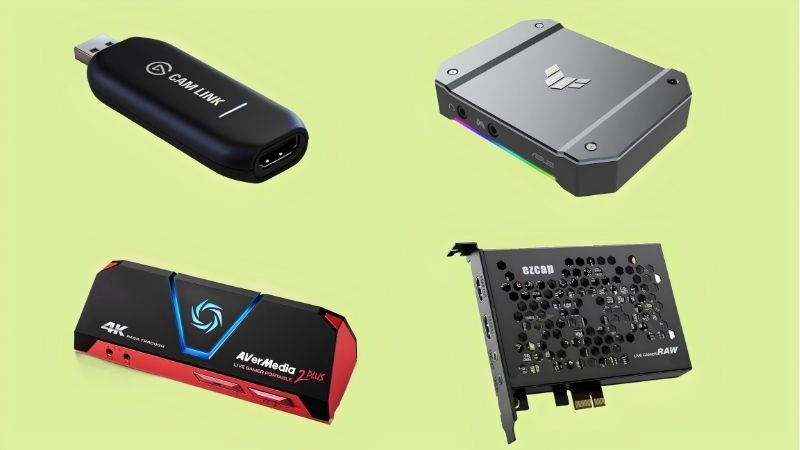
PCI Versus PCIe: What You Are Actually Buying
True legacy PCI slots have not appeared on consumer motherboards for well over a decade. Every current internal capture card uses PCIe, typically an x4 electrical connection, even when listings still describe them using the older term.
That matters when checking your board. An x4 card physically fits an x8 or x16 slot, but a slot wired for only one lane will restrict bandwidth, so read the motherboard manual to confirm which physical slots carry four or more lanes.
Latency Is the Real Advantage
Internal cards avoid USB bandwidth negotiation and buffering, which produces lower and more consistent capture latency. For monitoring gameplay in software rather than on a passthrough display, that difference is genuinely noticeable.
Broadcast-focused cards push this further with very low latency designed for live production. That capability costs more and matters mainly if you switch between sources live rather than recording a single console feed.
Plan Slot Position and Airflow
The main practical obstacle is physical. Modern triple-slot graphics cards cover several expansion slots, so confirm there is a usable x4 slot below the GPU with enough clearance for the capture card and its HDMI cables.
Airflow deserves thought too. A card mounted directly under a hot graphics card sits in warm exhaust, and while these are low-power devices, cramped placement also makes cable routing to the rear bracket considerably more awkward.
Check Driver Maturity and Software Support
OBS compatibility is effectively universal, but driver quality varies between manufacturers and generations. Some cards expose their full mode list only through bundled utilities, which can complicate a clean OBS-only workflow.
For professional cards the software model is different again, often relying on a dedicated SDK and codec package. That is a strength for production use and an unnecessary complication for someone who just wants to record a console.
Decide Between Gaming and Production Cards
Consumer gaming cards prioritise passthrough so you can play on a high-refresh display while recording. Production cards drop passthrough entirely and optimise for latency, signal formats and driver reliability in live switching software.
Choosing the wrong category is the most common mistake here. A broadcast card with no passthrough forces an extra display path for gaming, while a gaming card may lack the SDI input or timing consistency a production workflow expects.
Top Picks: Best PCI Capture Card Options in 2026
The best PCI capture card for you depends on whether this is a streaming setup or a production one, so these six span both. Specifications come from manufacturer documentation; feature sets change between revisions, so verify against the exact model number.
| Model | Interface | Max Capture | Passthrough | Best For |
|---|---|---|---|---|
| Elgato 4K Pro | PCIe x4 | 4K60 HDR10 | 4K144 | Console streaming |
| AVerMedia Live Gamer 4K 2.1 | PCIe x4 | 4K60 HDR | 4K144 | High-refresh setups |
| AVerMedia Live Gamer HD 2 | PCIe x4 | 1080p60 | 1080p60 | Budget 1080p |
| Blackmagic DeckLink Mini Recorder 4K | PCIe x4 | 2160p30 | None | Camera and SDI |
| AVerMedia Live Gamer Duo | PCIe x4 | 1080p60 dual input | 1080p60 | Console plus camera |
| Magewell Pro Capture HDMI 4K Plus | PCIe x4 | 4K | None | Live production |
Elgato 4K Pro
This is the default internal choice for console streaming. It captures up to 4K60 with HDR10 over a PCIe x4 connection and passes through up to 4K144, so a high-refresh display continues working normally while recording runs.
Driver stability and OBS integration are both mature, which counts for a lot in live use. The drawbacks are physical: it needs a free x4 slot, often ends up beneath a large graphics card, and cannot be moved to another machine.
AVerMedia Live Gamer 4K 2.1
AVerMedia’s internal card matches the Elgato closely on paper, with 4K60 HDR capture and 4K144 passthrough plus VRR support so a console is not forced into a fixed refresh mode. It also carries RGB lighting, for whatever that is worth.
It is a genuine alternative when pricing favours it. The reservation is driver consistency, which has historically been less reliable than Elgato’s, so check current firmware and driver notes before choosing it for a live workflow.
AVerMedia Live Gamer HD 2
For a straightforward 1080p60 setup this remains the low-cost internal option. It captures 1080p60 over PCIe x4 with minimal latency and works cleanly in OBS without the USB bandwidth issues external units can present.
If your stream outputs 1080p, that is all the capture resolution you need. The clear limitation is passthrough: it does not offer 4K or high-refresh passthrough, so a modern console or gaming PC output would be constrained on the monitored display.
Blackmagic DeckLink Mini Recorder 4K
This is a different category of product aimed at video work rather than gaming. It accepts both HDMI and SDI input up to 2160p30 on a PCIe x4 card, which makes it useful for camera feeds and professional signal chains.
Blackmagic’s software ecosystem and codec support are excellent for editing workflows. Two limitations matter for gamers: there is no passthrough output at all, and the 2160p30 ceiling means it is not suited to 60 fps console capture.
AVerMedia Live Gamer Duo
The Duo solves a specific problem: two HDMI inputs on a single PCIe x4 card. That lets you capture a console feed and a camera simultaneously without occupying a second slot or a high-speed USB port on the host machine.
For a face-cam streaming setup it removes a lot of cabling complexity. The limitation is resolution, since both inputs are 1080p60 rather than 4K, so it suits 1080p channels rather than anyone recording in higher resolutions.
Magewell Pro Capture HDMI 4K Plus
Magewell builds for live production, and it shows in the latency figures and driver reliability. The card captures 4K over PCIe x4 with very consistent timing, which suits multi-source switching in software such as vMix or OBS Studio.
It is the pick if capture reliability is a business requirement rather than a hobby preference. The drawbacks are cost, which sits well above consumer cards, and the absence of passthrough, so a separate display path must be planned.
What the Current Market Means for Capture Buyers
Demand for the best PCI capture card options has a specific driver this quarter, and it is worth understanding before deciding how much to spend.
GTA 6 Is Console-Exclusive at Launch
GTA 6 arrives on 19 November for PS5 and Xbox with no PC version at launch. Precedent suggests a long wait for the PC release, since GTA V took roughly 19 months and Red Dead Redemption 2 around 13 months to arrive.
For PC streamers that means covering the release requires playing on a console while producing from the existing PC setup. An internal card handles that cleanly without occupying a high-speed USB port already used by other gear.
Do Not Over-Specify for a 1080p Channel
Most streaming platforms deliver 1080p or 1440p to viewers, so 4K capture is chiefly useful for local recordings intended for editing. If your output is 1080p60, a cheaper internal card covers the requirement completely.
Spend the difference where it shows. Better lighting, a decent microphone or an audio interface improves stream quality far more visibly than raising capture resolution beyond what your audience actually receives.
No New Capture Generation Before CES 2027
Major hardware launches across the PC space have moved to CES in January 2027, and there is no announced wave of capture devices due before then. Current models will not be superseded within the next few months.
That makes buying now reasonable if you need the capability. It equally means there is no scheduled discount event to wait for, so the timing decision should follow your content plans rather than the release calendar.
Frequently Asked Questions
These questions come up most often from people fitting an internal capture card to an existing machine.
Does the best PCI capture card need a full x16 slot?
No. These cards use an x4 electrical connection. They fit in a longer physical slot without issue, but a slot wired for only one lane restricts bandwidth, so check the motherboard manual for which slots carry four lanes.
Are legacy PCI capture cards still usable?
Only on very old systems, since consumer motherboards stopped including PCI slots long ago. Anything sold as a PCI capture card today is almost certainly a PCIe device, and the older term persists mainly in product listings.
Is an internal card better than a USB one?
For a fixed desktop, generally yes: lower latency, no USB bandwidth negotiation and no cable clutter. External units win on portability and are the only realistic option for laptops or when no suitable expansion slot is free.
Will an internal capture card slow my graphics card?
On most boards, no. The graphics slot keeps its full lane allocation while the capture card uses chipset lanes. Some layouts do share bandwidth between specific slots and M.2 sockets, which the motherboard manual will state explicitly.
See More:
- Best MSI motherboard
- Best motherboard processor combo for gaming
- Best B550 motherboard
- Best CPU for streaming
- What is the best AM4 CPU for gaming
Final Thoughts
The best PCI capture card is really the best PCIe x4 card for your use case: the Elgato 4K Pro for console streaming, the AVerMedia Live Gamer 4K 2.1 as an alternative, the Live Gamer HD 2 for 1080p budgets, and Blackmagic or Magewell when the work is production rather than gaming. Check slot clearance before ordering.











Write Your Review
No reviews yet. Be the first to share your experience!