
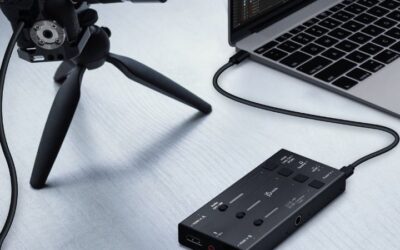
- Top Pick: Capture Card, 4K HDMI Video Capture Card, Game Capture Card, 1080P 60FPS Video Capture Device, HDMI to USB 3.0 Capture Card for Streaming, Work with Camera/Xbox/PS4/PS5/PC/OBS
- Best Value: XIIXMASK Video Capture Card, Audio Video Capture Card, USB 3.0 Capture Card 4K HDMI Loop-Out, 1080P 60FPS/2K 30FPS Video Game Capture for Streaming Works for PS5/Switch/Camera/PC/OBS(Black)
- Premium Choice: Capture Card 4K HDMI Video Streaming to USB 3.0 1080P 60FPS Capture Device
Best gaming capture card choices come down to two numbers most listings blur together: what the card records, and what it passes through to your display. Buying on the passthrough figure alone is the most common mistake, and it is why people end up recording at 1080p on hardware they believed was 4K. This guide separates the two.
As an Amazon Associate we earn from qualifying purchases at no extra cost to you.





As an Amazon Associate we earn from qualifying purchases at no extra cost to you.
By Ryan Cole
How to Choose the Best Gaming Capture Card
Finding the best gaming capture card means matching four specifications to your actual setup rather than buying the highest numbers you can afford. Most people need considerably less capture resolution than they think.
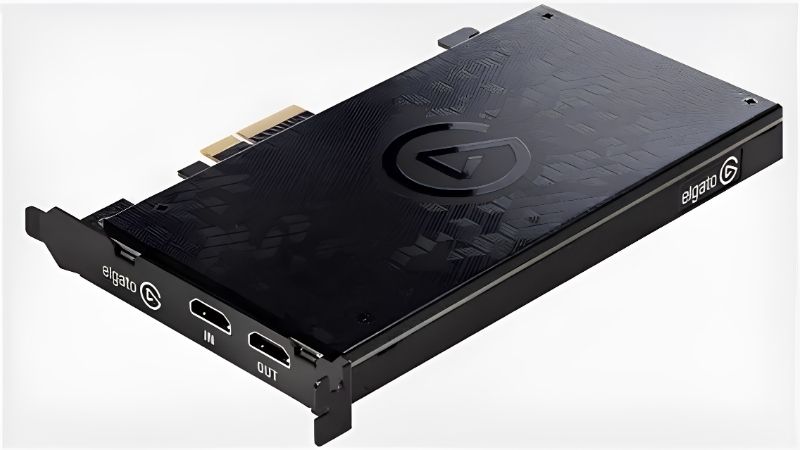
Capture Resolution Versus Passthrough Resolution
Capture resolution is what the card records to your computer. Passthrough is what it sends onward to your monitor or television so you can play without added lag. These are almost always different figures.
A card advertised with 4K144 passthrough may only capture at 1080p60. That is fine if you stream at 1080p, which most platforms still favour, but it is not what the box implies at a glance.
Decide your output resolution first. If you stream at 1080p60, a card capturing at that level costs a fraction of a 4K capture model while feeding your display exactly the same signal.
Internal PCIe Versus External USB
Internal cards sit in a PCIe slot and avoid USB bandwidth limits entirely, which makes them the reliable choice for a dedicated streaming machine or a single-PC setup with a spare slot.
USB cards work with laptops and are simple to move between setups, but they need a genuine USB 3.0 or 3.2 Gen 2 port with enough bandwidth. Shared hubs and front panel headers are a frequent source of dropped frames.
HDMI Version, HDR and Variable Refresh Rate
HDMI 2.1 support matters if your console outputs 4K120 or uses variable refresh rate. Older cards on HDMI 2.0 will force the console down to 4K60, which you may not notice until you check the output settings.
HDR passthrough is common; HDR capture is not. Several cards let you play in HDR while recording in standard dynamic range, which is usually the right compromise since most streaming platforms handle HDR poorly anyway.
Variable refresh rate passthrough is worth confirming separately. Some cards accept the signal but strip the variable timing, which reintroduces tearing on your own display even though the recording looks perfectly normal.
Latency, Encoding and System Load
Hardware encoding on the card reduces load on your processor, while software encoding gives better quality at the same bitrate but uses system resources. On a single-PC setup with a modern graphics card, GPU encoding is often the better route.
Passthrough latency on quality cards is effectively zero because the signal is split before processing. Preview latency inside your streaming software is a separate matter and is why console players should always watch the television rather than the preview window.
Storage speed matters more than people expect once you record locally. Writing 4K60 footage generates large sustained files, and a slow drive will drop frames in a way that looks like a capture card fault.
Top Picks: Best Gaming Capture Card Models Worth Buying
These six cover single-PC setups, dual-PC streaming and console recording at several budget levels. Specifications are manufacturer-published as of August 2026.
| Card | Type | Max Capture | Max Passthrough | Connection |
|---|---|---|---|---|
| Elgato 4K X | External | 4K60 HDR10 | 4K144 | USB 3.2 Gen 2 |
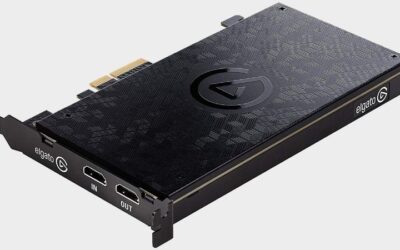
| Elgato 4K Pro | Internal | 4K60 HDR10 | 4K144 | PCIe x4 |
| AVerMedia Live Gamer Ultra 2.1 | External | 4K60 HDR | 4K144 | USB 3.2 Gen 2 |
| Elgato HD60 X | External | 1080p60 | 4K60 HDR | USB 3.0 |
| Elgato Game Capture Neo | External | 1080p60 | 4K60 HDR | USB 3.0 |
| AVerMedia Live Gamer MINI | External | 1080p60 | 1080p60 | USB 2.0 |
Elgato 4K X – Best Overall
The 4K X is the best gaming capture card for most setups. It captures at 4K60 with HDR10 while passing 4K144 through to your display, which means you can play at high refresh rates and still record at full resolution. HDMI 2.1 support covers current consoles properly.
It needs a genuine USB 3.2 Gen 2 port to hit its rated performance, and it costs substantially more than 1080p alternatives. If you stream at 1080p, most of what you are paying for goes unused.
Elgato 4K Pro – Best for Dual-PC Streaming
As an internal PCIe card, the 4K Pro sidesteps USB bandwidth issues entirely and is the more dependable option for a dedicated capture machine running long sessions. Capture and passthrough specifications match the 4K X.
It requires a free PCIe slot with adequate lanes, which rules out most compact builds and many boards where the second slot shares bandwidth with storage. It is also the least portable option here.
AVerMedia Live Gamer Ultra 2.1 – Strongest Alternative
This card matches Elgato on capture and passthrough figures while typically undercutting it on price, and AVerMedia’s HDMI 2.1 implementation handles variable refresh rate signals cleanly from current consoles.
The bundled software is less polished than Elgato’s, and integration with popular streaming applications occasionally needs manual configuration. Driver updates also arrive less frequently.
Elgato HD60 X – Best Value for 1080p Streaming
For anyone streaming at 1080p60, this is where the sensible money goes. It captures at that resolution while passing 4K60 HDR through to the television, so your own gameplay experience is unaffected.
It will not record above 1080p, which limits its usefulness if you later move to 1440p or 4K content. USB 3.0 is also required, so older laptops with only USB 2.0 ports are ruled out.
Elgato Game Capture Neo – Cheapest Elgato Option
The Neo covers the essentials with 1080p60 capture and 4K60 HDR passthrough, plugging into the same software ecosystem for less money than the HD60 X. For a first capture setup, it is entirely adequate.
Build quality is more basic and it lacks the higher bitrate options of the step-up models. Anyone likely to grow into higher resolution content will outgrow it fairly quickly.
AVerMedia Live Gamer MINI – Simplest Budget Choice
Running over USB 2.0, this card works on almost any machine including older laptops, and captures 1080p60 with no drivers required in most cases. As a plug-in recorder for gameplay clips it does the job.
Passthrough is limited to 1080p60, so you cannot play at 4K or high refresh while it is connected. That single limitation rules it out for most current console setups.
Why Capture Cards Are Selling in Late 2026
Demand for the best gaming capture card options has been driven by an unusual set of release decisions this quarter, and it affects both availability and what you should buy.
The Q4 Release Calendar Is Pushing PC Players to Consoles
Grand Theft Auto 6 launched on 19 November for PlayStation 5 and Xbox only, with no PC version announced. Previous Rockstar releases waited well over a year for a PC port, and there is no indication this one will be faster.
The practical result is that a lot of PC gamers now own a console purely for that title. Capturing console output onto an existing PC streaming setup is exactly what these cards exist for, and demand has followed.
Match the Card to the Console You Own
Current consoles output 4K120 and use variable refresh rate, which needs HDMI 2.1 on the capture card to pass through correctly. An older HDMI 2.0 card will silently cap the console at 4K60.
If you only stream at 1080p, that cap may not bother you at all. Check what your console is actually set to output before spending on a card whose main advantage is a passthrough mode you will never enable.
No New Hardware Generation Is Imminent
Refreshed component lineups across the industry have slipped to CES in January 2027, and the capture card market follows a slower cycle than that anyway. There is no imminent replacement worth waiting for.
Cards in this category also discount normally during the November sales, unlike memory and storage where sale stock carries elevated costs. If you are patient, this is a category where waiting for a deal genuinely works.
Frequently Asked Questions
The best gaming capture card question usually arrives with these attached, from people setting up their first capture chain and unsure which specification applies to them.
Do I need the best gaming capture card for a single-PC setup?
Not usually. If you play and stream on the same machine, your graphics card can encode the stream directly with no capture hardware at all. A card becomes necessary for console footage or a dedicated second streaming PC.
Will a capture card add input lag to my gameplay?
Passthrough on quality cards splits the signal before processing, so lag on your own display is effectively zero. The delay you see in your streaming software preview is separate and is why console players should watch the television.
Can I capture 4K if I only stream at 1080p?
You can, and it is worth it if you also produce edited video, since recording at higher resolution gives room to crop and downscale cleanly. For live streaming alone, a 1080p capture card costs far less and looks identical.
Why is my capture card dropping frames?
Most often the USB port. External cards need a genuine USB 3.0 or 3.2 Gen 2 connection with dedicated bandwidth, not a shared hub or a front panel header. Storage write speed and encoder settings are the next things to check.
See More:
- Best 4TB NVMe SSD
- Best thermal grizzly paste
- Best thermal paste for 7800X3D
- Best CPU case fans
- Best motherboard for gaming computer
Final Thoughts
The best gaming capture card for you depends on the resolution you actually publish at, not the highest figure on the box. The Elgato 4K X leads for 4K recording, the 4K Pro suits dedicated dual-PC setups, and the HD60 X covers 1080p streaming for far less money. With console-exclusive releases pushing PC players toward capture setups this quarter and prices discounting normally, there is no reason to overspend on capture resolution you will never publish.

Write Your Review
No reviews yet. Be the first to share your experience!