
Best motherboard for Ryzen 7 7800X3D decisions should be made around the whole machine rather than the board in isolation. This chip is locked, draws 162W at most and only plays games well, so the board’s real job is clearing your cooler, feeding your memory properly and lasting through whatever processor you drop in next.
As an Amazon Associate we earn from qualifying purchases at no extra cost to you.
By Ryan Cole, PC hardware writer at NvidiaReview
How to Choose the Best Motherboard for Ryzen 7 7800X3D
Because this processor cannot be overclocked on the cores, the usual reasons to spend heavily on a board disappear. Three practical questions remain: which chipset tier fits a gaming-only build, whether your cooler physically clears the board, and what you might drop into the socket later.
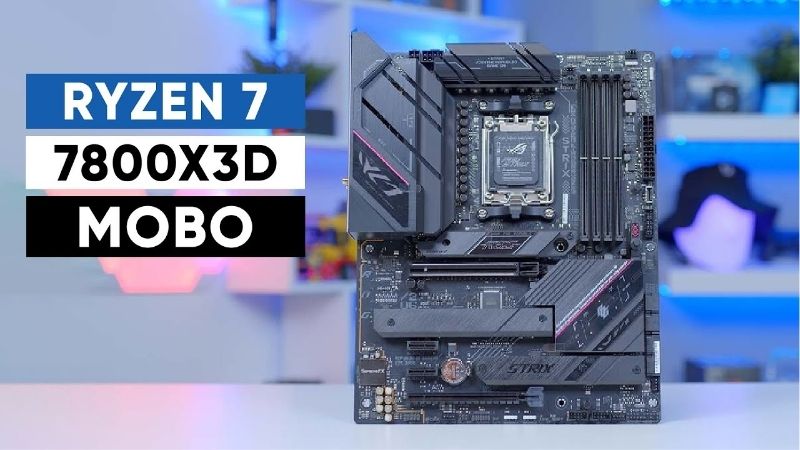
Chipset Tier for a Gaming-Only Build
B650 covers this processor completely, keeping PCIe 5.0 for the primary storage slot while running graphics at PCIe 4.0. No current card comes close to saturating that link, so the practical difference against a more expensive chipset in a gaming machine is precisely nothing.
B650E adds Gen5 graphics support and B850 refreshes the tier with more common Wi-Fi 7. Both are worth having if the price gap is small, but neither changes frame rates today. X870 and X870E exist for USB4 and expanded connectivity, which a single graphics card build rarely touches.
Cooler Clearance and VRM Heatsink Height
This chip concentrates heat into a small area because of the stacked cache die, so most people pair it with a substantial tower cooler or a 240mm liquid unit. Tall VRM heatsinks on gaming boards can collide with wide dual-tower coolers, particularly on the memory side of the socket.
Check the cooler manufacturer’s clearance diagram against the board layout before ordering, and note where the top M.2 heatsink sits. Some boards place it directly under the cooler, which both restricts installation and traps heat around a drive that would rather be somewhere cooler.
Upgrade Path Through 2029
AMD has committed to new processors on socket AM5 until the end of 2029, so the board you buy for this chip may well host something much faster in a few years. That makes firmware support quality and VRM cooling more valuable than any feature you can see on the retail box.
Favour vendors with a consistent BIOS update record, and prefer boards with BIOS Flashback so a future processor never leaves you unable to post. A board with generous power delivery also means the next chip you install will not be limited by a decision you made years earlier.
Top Picks: Best Motherboard for Ryzen 7 7800X3D Builds
These five candidates for the best motherboard for Ryzen 7 7800X3D span every budget, from a Micro-ATX value option to a well-equipped B650E design. All figures are vendor-published specifications and revisions vary, so confirm the exact model code before ordering. Stock was checked in August 2026.
| Board | Chipset | Form factor | Storage | Best for |
|---|---|---|---|---|
| MSI MAG B650 Tomahawk WiFi | B650 | ATX | 4 x M.2 | Best all-rounder |
| ASUS ROG Strix B650E-F Gaming WiFi | B650E | ATX | 3 x M.2 | Tuning and PCIe 5.0 |
| MSI MPG B650 Edge WiFi | B650 | ATX | 3 x M.2 | Show builds |
| Gigabyte B650 Gaming X AX | B650 | ATX | 3 x M.2 | Value ATX |
| ASRock B650M Pro RS | B650 | Micro-ATX | 2 x M.2 | Budget builds |
MSI MAG B650 Tomahawk WiFi – Best Overall
The Tomahawk pairs a 14+2+1 duet rail design with dual 8-pin connectors, four M.2 slots, 2.5GbE and Wi-Fi 6E, with VRM heatsinks large enough to stay comfortable during long sessions. Power delivery is far beyond anything this processor asks for, which leaves headroom for a future chip.
Wi-Fi 6E rather than Wi-Fi 7 dates it slightly and there is no USB4. Retail availability has also thinned as newer chipsets arrive. If you can find one at a sensible price, it is the board most 7800X3D owners should buy and then forget about for the next several years.
ASUS ROG Strix B650E-F Gaming WiFi – Best for Tuning
B650E brings PCIe 5.0 to both the graphics slot and primary storage, and ASUS pairs it with a strong power stage array and 2.5GbE. The real draw is the BIOS: per-core Curve Optimizer settings are the clearest here, and undervolting is the only meaningful tuning this locked chip allows.
Wi-Fi 6E rather than newer standards is the main compromise, and there is no USB4. Older stock may also need a firmware update for newer processors, so check for BIOS Flashback. For anyone who intends to undervolt rather than run stock, the interface alone justifies the price.
Gigabyte B650 Gaming X AX – Best Value ATX
The Gaming X AX covers the essentials on a full ATX board: adequate power delivery for a 162W processor, three M.2 slots with heatsinks, 2.5GbE and Wi-Fi 6E, at a price that usually sits below the better-known mid-range boards. Assembly is helped by the EZ-Latch mechanisms.
VRM heatsinks are smaller than on the Tomahawk, so a case with front-to-back airflow matters more here, and rear I/O is functional rather than generous. Audio is basic. For a gaming build that will not see heavy all-core work, none of that has any practical consequence.
MSI MPG B650 Edge WiFi – Best for a Visible Build
The Edge is the board to choose when the machine sits behind a glass panel. It carries substantial heatsinks with integrated lighting, a clean white or black layout depending on variant, three M.2 slots and the same solid MSI firmware that the Tomahawk uses, with 2.5GbE and Wi-Fi 6E.
You pay a premium for appearance rather than capability, since gaming performance matches far cheaper boards exactly. The lighting also generally needs vendor software running to synchronise properly. If the build is meant to be looked at, that is a reasonable trade to make knowingly.
ASRock B650M Pro RS – Best Budget Option
This Micro-ATX board delivers the essentials for the lowest price of any legitimate AM5 option: an 8+2+1 power phase design, a PCIe 5.0 M.2 slot and 2.5GbE. For a gaming machine built around this processor and a single graphics card, it leaves nothing important out.
There is no onboard Wi-Fi on this variant, VRM heatsinks are modest, and the rear panel is basic. It also drops the lower expansion slots, though most builds never use them. As the cheapest sensible home for this chip, it frees a useful amount of budget for memory or a better card.
What the 2026 Market Means for This Build
Assembling a machine around a previous-generation gaming chip in 2026 has real advantages, since the best motherboard for Ryzen 7 7800X3D builds is usually a discounted one. The surrounding market has shifted enough to change how the budget should be split, so three factors matter.
The Socket Is Supported Until 2029
AMD confirmed at Computex 2026 that AM5 will keep receiving new processors through the end of 2029, while Intel moves to a different socket with its next generation. A board bought for this chip today therefore has a credible path to hosting something considerably faster later on.
That is the argument for buying a mid-range board rather than the cheapest available. Since the board will likely outlive the processor, spending on VRM cooling and firmware quality returns value across the whole life of the machine rather than just the first build.
Memory Now Takes a Bigger Share of the Budget
DRAM prices have risen sharply through 2026, with further increases forecast and no meaningful new manufacturing capacity expected before late 2027. A 32GB DDR5 kit is now a much larger line item than it was, which changes what is left for the motherboard and everything else.
Since this processor is locked and gains nothing from a premium board, moving money from the motherboard into a 6000 MT/s EXPO kit with tight timings produces a measurably faster machine. That is the single clearest budget trade available to anyone building around this chip.
Nothing New Arrives Before CES 2027
Both AMD’s Zen 6 processors and Intel’s Nova Lake have slipped to CES in January 2027, so there is no imminent launch that would reward waiting. This chip remains a strong gaming processor and its board ecosystem is mature, with firmware quirks from the platform’s first year long resolved.
Practically, that means buying now carries little risk of immediate obsolescence. Board discounts around the late-year sales remain genuine, unlike memory and storage, so grouping a motherboard purchase into that window is a sensible plan if your build can wait a few months.
Frequently Asked Questions
The questions builders ask most when choosing the best motherboard for Ryzen 7 7800X3D: whether the newer chipsets help at all, what cooling this chip needs, which memory kit to target, and whether an older board will post without a firmware update being applied first.
Is B650 enough for this processor?
Yes, comfortably. The best motherboard for Ryzen 7 7800X3D is usually a B650 board, since the chip draws at most 162W at the package and any mid-range design handles that with margin, and gaming performance is identical to an expensive X870E board. The newer chipsets add connectivity rather than anything this processor can actually use.
What cooler should I pair with it?
A good dual-tower air cooler or a 240mm liquid unit. Despite the modest power rating, the stacked cache die concentrates heat, so it runs warmer than the number suggests. Curve Optimizer undervolting typically lowers temperatures more than upgrading from a competent cooler to a larger one.
Which memory kit works best?
A 32GB 6000 MT/s EXPO kit with tight timings, which keeps the memory controller at a 1:1 ratio. Faster kits usually require manual tuning on this generation and often force a less efficient ratio, giving back the gain. Check the board QVL before committing to a specific kit.
Will I need a BIOS update?
Probably not, since this processor launched alongside the B650 chipset and most boards shipped with support. Check the vendor list for your exact model anyway, and prefer boards with BIOS Flashback so any future processor upgrade never requires borrowing a compatible chip to update.
See More:
- Best thermal compound paste
- Thermal paste at Best Buy
- Graphics card at Best Buy
- Best AM4 CPU for gaming
- Best motherboard for 9800x3d
Final Thoughts
The best motherboard for Ryzen 7 7800X3D is a well-cooled mid-range B650 board with firmware you trust. The MSI Tomahawk is the safest all-round choice, the ROG Strix B650E-F suits anyone who plans to undervolt, and the ASRock B650M Pro RS covers tight budgets. Whatever you save belongs in the memory kit, not the motherboard.
As an Amazon Associate we earn from qualifying purchases at no extra cost to you.













Write Your Review
No reviews yet. Be the first to share your experience!