
- Top Pick: AMD Ryzen 5 5600X 6-core, 12-thread unlocked desktop processor with Wraith Stealth cooler
- Best Value: GIGABYTE B550 Gaming X V2 AMD AM4 ATX Motherboard, Supports Ryzen 5000/4000/3000 Series Processors, DDR4, 10+3 Power Phase, 2X M.2, PCIe 4.0, Front USB-C, GbE LAN, Q-Flash Plus, RGB Fusion
- Premium Choice: MSI B550M PRO-VDH WiFi ProSeries Motherboard (AMD Ryzen 5000, AM4, DDR4, PCIe 4.0, SATA 6Gb/s, M.2, USB 3.2 Gen 1, Wi-Fi, Bluetooth, D-SUB/HDMI/DP, Micro-ATX)
Best motherboard for Ryzen 5 5600X decisions are easier than for most chips, because this is a 65W six-core processor that almost any modern AM4 board handles without strain. That shifts the question from power delivery to features, form factor and how long you plan to keep the system.
As an Amazon Associate we earn from qualifying purchases at no extra cost to you.





As an Amazon Associate we earn from qualifying purchases at no extra cost to you.
By Ryan Cole, PC hardware writer at NVIDIA Review.
How to Choose the Best Motherboard for Ryzen 5 5600X
The 5600X runs six cores and twelve threads with a 4.6 GHz boost, 32 MB of L3 cache and a 65W TDP. Picking the best motherboard for Ryzen 5 5600X therefore turns on features rather than raw power delivery capacity.
B550 Is the Natural Fit
B550 gives the 5600X a PCIe 4.0 graphics slot and one Gen4 M.2 socket directly from the CPU, which is everything this chip can use. X570 adds Gen4 chipset lanes that a six-core gaming build rarely touches.
B450 remains workable after a BIOS update but drops the graphics slot to PCIe 3.0. The price gap between a decent B450 and an entry B550 is usually small enough that B550 is the better purchase for a new build.
VRM Requirements Are Modest
At 65W with a modest power ceiling, this processor does not stress power delivery. Boards that struggle with a 5900X will run a 5600X comfortably, which opens up the cheaper end of the range without a performance penalty.
What still matters is heatsinking on very cheap boards. Entirely bare power stages on the lowest-tier models can run warm in a poorly ventilated case, so a basic heatsink is worth having even for a low-power chip.
Confirm BIOS Support Before Buying
Every B450, B550 and X570 board supports Ryzen 5000 with the correct firmware, but boards that sat in storage may ship with older versions. Without a compatible processor on hand, an outdated BIOS means the system will not post.
BIOS Flashback eliminates that risk by writing firmware from a USB stick with no CPU installed. If you are buying the board and the 5600X together, treat that feature as effectively mandatory rather than a convenience.
Think About Form Factor and Connectivity
ATX offers four DIMM slots and the most expansion, Micro-ATX trims that sensibly for a gaming build, and Mini-ITX drops to two memory slots while often reaching higher stable memory frequencies thanks to shorter traces.
Networking varies more than expected. Better boards ship 2.5 Gb Ethernet and Wi-Fi 6, while budget models stick to gigabit with no wireless, and adding it later costs a PCIe slot or a USB port you may want for something else.
Rear USB count is worth a glance too. A keyboard, mouse, headset and controller receiver consume four ports immediately, and budget boards frequently provide little more than that before you reach for a hub.
Top Picks: Best Motherboard for Ryzen 5 5600X Builds
The best motherboard for Ryzen 5 5600X depends mostly on case size and connectivity needs, so these six span ATX through Mini-ITX. Specifications come from manufacturer spec sheets; stock on AM4 fluctuates, so confirm availability before committing to one model.
| Model | Chipset | Form Factor | Ethernet | Wireless |
|---|---|---|---|---|
| MSI MAG B550 Tomahawk MAX WiFi | B550 | ATX | 2.5 Gb | Wi-Fi 6 |
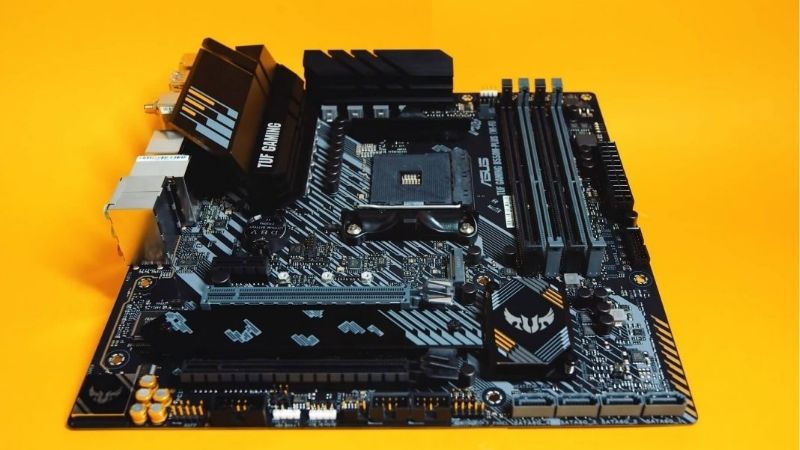
| ASUS TUF Gaming B550-PLUS WiFi II | B550 | ATX | 2.5 Gb | Wi-Fi 6 |
| ASRock B550M Steel Legend | B550 | Micro-ATX | 2.5 Gb | None |
| Gigabyte B550M DS3H | B550 | Micro-ATX | Gigabit | None |
| Gigabyte B550I AORUS Pro AX | B550 | Mini-ITX | 2.5 Gb | Wi-Fi 6 |
| MSI B450 TOMAHAWK MAX II | B450 | ATX | Gigabit | None |
MSI MAG B550 Tomahawk MAX WiFi
This is the board to buy if you want the 5600X to be a stepping stone. A 10+2+1 power design with substantial heatsinks, four DDR4 slots, one Gen4 and one Gen3 M.2 socket, 2.5 Gb Ethernet and Wi-Fi 6 cover everything.
The headroom means a later move to a 5800X3D needs no board change at all. The drawback is that BIOS Flashback is absent on some revisions, so check the exact SKU if you have no spare AM4 chip for a firmware update.
ASUS TUF Gaming B550-PLUS WiFi II
TUF sits in the practical middle and includes the feature the Tomahawk sometimes lacks. A 10+2 DrMOS layout, four DDR4 slots, two M.2 sockets, 2.5 Gb Ethernet, Wi-Fi 6 and BIOS Flashback make it a low-risk purchase.
For a 5600X it is comfortably more board than required, which is fine. The compromises are thinner rear I/O than the Tomahawk and an audio codec a step down, noticeable only if you drive headphones from the board directly.
ASRock B550M Steel Legend
For a Micro-ATX build this packs in more than its price suggests. Four DDR4 slots, two M.2 sockets, reinforced VRM heatsinking and 2.5 Gb Ethernet arrive in a compact board with a clean white and grey finish.
It suits the 5600X perfectly and leaves room for a later eight-core upgrade. The notable omission is onboard wireless, so plan for a Wi-Fi card or USB adapter unless the machine will be connected by cable.
Gigabyte B550M DS3H
When the goal is spending as little as possible on the board, this is the sensible floor. It supports the 5600X properly, provides four DDR4 slots, an M.2 socket with Gen4 support and the basic connectivity a build needs.
Paired with a 65W chip it does everything asked without complaint. The limitations are clear: gigabit networking, no wireless, lighter VRM heatsinking and rear I/O that runs out quickly once peripherals accumulate.
Gigabyte B550I AORUS Pro AX
Small-form-factor builders are well served here. Two DDR4 DIMM slots, two M.2 sockets with the second mounted on the rear of the board, 2.5 Gb Ethernet and Wi-Fi 6 fit onto a 170 x 170 mm Mini-ITX layout.
Two DIMM slots often reach higher stable memory speeds than four-slot designs, which suits the 5600X well. The trade-offs are inherent: tighter VRM cooling, limited cooler clearance and a price above equivalent Micro-ATX boards.
MSI B450 TOMAHAWK MAX II
If the budget is genuinely tight and you already own a Gen3 SSD, B450 still works. This board supports Ryzen 5000 after a firmware update, offers four DDR4 slots, a solid VRM for its class and BIOS Flashback for safe updating.
It runs the 5600X at full speed with no performance loss in games. The real cost is PCIe 3.0 on both the graphics slot and M.2 socket, which halves NVMe throughput and closes the door on Gen4 storage entirely.
Where This Upgrade Sits in the 2026 Market
Two market conditions make a 5600X build more sensible now than the platform’s age would suggest, and both come down to what the alternative costs.
AM4 Has No Future, but AM5 Costs More Up Front
AMD confirmed at Computex 2026 that AM5 receives new processors through the end of 2029, making it the stronger long-term platform. Moving there means buying a board, a processor and DDR5 memory in a single purchase.
If you already own DDR4 and an AM4 cooler, pairing a 5600X with a B550 board avoids replacing three components at once. That is the practical case for buying into AM4 now rather than migrating immediately.
DDR4 Ownership Has Become an Advantage
DRAM contract pricing rose sharply through 2026, with further increases forecast for the fourth quarter and no significant new manufacturing capacity expected before late 2027. DDR5 kits took the largest share of that increase.
A working 32 GB DDR4 kit is therefore worth more to your budget than it was a year ago. It shifts the break-even point in favour of finishing an AM4 system rather than starting a new platform at current prices.
Entry-Level Boards Are Restocking Less Reliably
Motherboard sales fell more than a quarter and manufacturers concentrated production on mid and high-tier models, with promotional pricing policies withdrawn in February 2026. Budget boards on older platforms feel that first.
The practical effect is availability rather than price shock. Check a few retailers rather than assuming the cheapest listing will still be there next week, but there is no reason to rush a purchase you have not planned.
Frequently Asked Questions
These questions come up most often when people pair a board with this specific processor.
Does the 5600X need a Z-tier or X570 board?
No. B550 provides the PCIe 4.0 graphics slot and Gen4 storage socket this chip can use. X570 adds Gen4 chipset lanes that a six-core gaming build almost never needs, at a higher price and often with a chipset fan.
Can I reuse the bundled Wraith Stealth cooler?
Yes, for stock operation. The 5600X ships with a cooler adequate for its 65W rating in a case with reasonable airflow. A tower cooler lowers temperatures and noise noticeably, but it is an improvement rather than a requirement.
Is the best motherboard for Ryzen 5 5600X worth spending extra on?
Only if you plan a later CPU upgrade. A stronger B550 board costs little more and comfortably handles a 5700X3D or 5800X3D later, which is the main reason to buy above the entry tier for a 65W chip.
Will a B450 board limit gaming performance?
Not measurably in games. The PCIe 3.0 graphics slot costs very little with current cards. The real cost is storage throughput, since a Gen4 NVMe drive runs at roughly half its rated speed on that platform.
See More:
- Best MSI motherboard
- Best motherboard processor combo for gaming
- Best B550 motherboard
- Best CPU for streaming
- What is the best AM4 CPU for gaming
Final Thoughts
The best motherboard for Ryzen 5 5600X is usually a mid-tier B550 rather than anything more expensive, because this chip simply does not demand heavy power delivery. The Tomahawk and TUF suit builds you may upgrade later, Steel Legend and DS3H cover Micro-ATX, and B450 remains a valid choice on a strict budget.











Write Your Review
No reviews yet. Be the first to share your experience!