
Best motherboard for Ryzen 7 9800X3D questions usually get answered with phase counts, which is the wrong place to start. This is an eight-core chip with a 162W package limit and an unlocked multiplier, so BIOS quality and memory tuning matter far more here than an oversized power stage array ever will.
As an Amazon Associate we earn from qualifying purchases at no extra cost to you.
By Ryan Cole, PC hardware writer at NvidiaReview
How to Choose the Best Motherboard for Ryzen 7 9800X3D
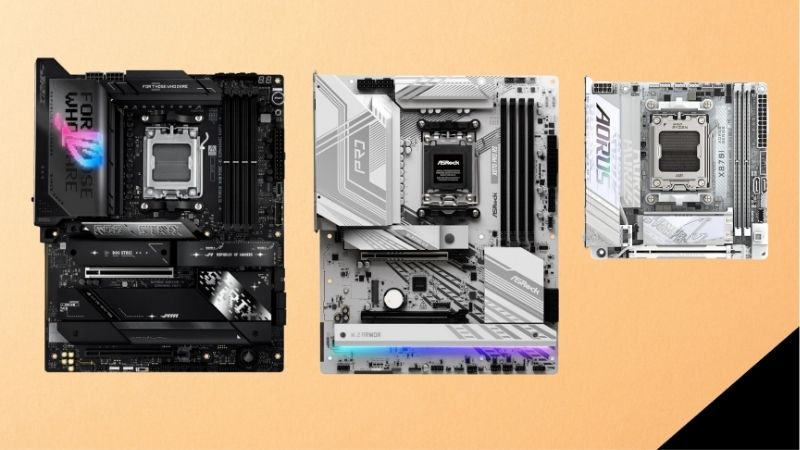
Unlike earlier 3D V-Cache parts, this processor is fully unlocked, which changes what you should look for. The best motherboard for Ryzen 7 9800X3D builds gives you a usable tuning interface, sensible memory behaviour and enough VRM cooling to hold boost clocks during long sessions.
BIOS Quality and Tuning Features
Per-core Curve Optimizer control is the feature worth checking. Undervolting individual cores typically buys extra sustained boost and lower temperatures on this chip, and boards vary a great deal in how cleanly they expose those settings and how reliably they save them across restarts.
Look for BIOS Flashback as well, which lets you update firmware with no processor installed. On a platform that has already seen several processor generations, that feature turns a potentially blocked build into a ten-minute job with a USB stick, and it costs nothing when the board includes it.
Power Delivery Headroom for a 162W Processor
At a 162W package power limit, this chip asks less of a board than a 16-core part does. A 12-phase array with 60A stages is comfortable, and the 14-phase designs with 80A stages found on mid-range boards leave enormous margin even with an aggressive tuning profile applied.
Heatsink mass and airflow around the socket matter more than the number on the box. Boards that pair a strong array with thin VRM heatsinks still run warm under long all-core loads, so favour reviews that publish VRM temperatures over marketing pages that only advertise phase counts.
Memory Support and the 1:1 Ratio
This processor gains real performance from fast memory, and the practical sweet spot remains a 6000 MT/s EXPO kit with tight timings, which keeps the memory controller running at a 1:1 ratio. Pushing beyond that often forces a less efficient ratio and gives back most of the gain.
Two-DIMM boards generally clock higher than four-slot designs because of shorter traces, so if you never plan to exceed 64GB there is no penalty in choosing one. Check the board QVL against your intended kit, and budget an evening for stability testing once EXPO is enabled.
Top Picks: Best Motherboard for Ryzen 7 9800X3D Builds
These five candidates for the best motherboard for Ryzen 7 9800X3D span every budget, from a value B650 option to a fully specified X870E flagship. All figures are vendor-published specifications, and revisions differ, so confirm the exact model code before ordering. Stock was checked in August 2026.
| Board | Chipset | VRM (vendor listed) | Memory slots | Networking |
|---|---|---|---|---|
| MSI MPG X870E Carbon WiFi | X870E | 18+2+1 | 4 | 5G LAN, Wi-Fi 7 |
| ASRock B850 Steel Legend WiFi | B850 | 16+2+1 | 4 | 2.5GbE, Wi-Fi 7 |
| Gigabyte B850 Aorus Elite WiFi7 | B850 | 14+2+2, 60A stages | 4 | 2.5GbE, Wi-Fi 7 |
| ASUS ROG Strix B650E-E Gaming WiFi | B650E | Vendor listed 16+2 | 4 | 2.5GbE, Wi-Fi 6E |
| MSI MAG B650 Tomahawk WiFi | B650 | 14+2+1 | 4 | 2.5GbE, Wi-Fi 6E |
Gigabyte B850 Aorus Elite WiFi7 – Best Overall Balance
Gigabyte specifies 14 vCore phases plus two for the SOC using 60A power stages, which is far more delivery than a 162W chip will ever draw. Wi-Fi 7, 2.5GbE, a PCIe 5.0 M.2 slot and the screwless EZ-Latch mechanisms for storage and graphics make assembly quick and tidy.
Independent testing has noted that VRM temperatures on this family run warmer than some rivals, so give the socket area decent airflow rather than relying on a closed front panel. Audio is mid-tier. For a gaming build around this processor, it hits the right balance of features and price.
ASRock B850 Steel Legend WiFi – Best Value Feature Set
ASRock lists a 16+2+1 power phase design with Dr.MOS stages, Wi-Fi 7, 2.5GbE and a PCIe 5.0 M.2 slot, generally undercutting comparable boards from the larger brands. The BIOS exposes Curve Optimizer settings clearly, which is what you actually want when tuning this chip.
The white and silver styling will not suit every build, and the rear I/O is adequate rather than generous. ASRock BIOS updates historically arrive slightly later than the competition. On specification per pound, though, it is one of the strongest options currently on the shelf.
MSI MAG B650 Tomahawk WiFi – Best Previous-Generation Value
The B650 Tomahawk pairs a 14+2+1 duet rail design with dual 8-pin connectors, 2.5GbE and Wi-Fi 6E, and because it belongs to the earlier chipset wave it frequently sells well below newer boards with similar capability. It supports this processor after a straightforward BIOS update.
You give up Wi-Fi 7 and USB4, and the primary M.2 slot runs at PCIe 4.0 rather than 5.0. Neither costs you frames today. Confirm the shipped firmware version or check that BIOS Flashback is present, then enjoy what is effectively last year’s mid-range board at a discount.
MSI MPG X870E Carbon WiFi – Best High-End Option
The Carbon brings an 18+2+1 array, dual chipset connectivity, USB4 at 40Gbps, 5G Ethernet, Wi-Fi 7 and PCIe 5.0 for both graphics and storage. The BIOS is among the more capable for memory tuning, with granular control over timings that helps when pushing an EXPO kit beyond its rating.
It costs roughly twice a competent B850 board while producing identical gaming frame rates with this processor. Buy it if you populate several NVMe drives, use high-speed external storage daily, or genuinely intend to chase memory overclocks rather than simply enabling EXPO and moving on.
ASUS ROG Strix B650E-E Gaming WiFi – Best BIOS for Tuning
The B650E chipset provides PCIe 5.0 for both graphics and the primary storage slot, and ASUS pairs it with a strong power stage array, 2.5GbE and Wi-Fi 6E. The ROG BIOS remains the most approachable for per-core Curve Optimizer work, which is exactly the tuning this chip rewards.
Wi-Fi 6E rather than Wi-Fi 7 dates it slightly, and there is no USB4. It also requires a firmware update for current processors, so check the shipped version or confirm Flashback support before buying. For someone who intends to tune rather than run stock, the interface alone justifies it.
What the 2026 Platform Market Means for This Build
Specifying the best motherboard for Ryzen 7 9800X3D in 2026 means looking at the rest of the parts list too, because the wider market has shifted where the money should go. Three factors are worth understanding before you order a board and the memory that goes with it.
AM5 Support Runs Through 2029
AMD confirmed at Computex 2026 that socket AM5 will keep receiving new processors until the end of 2029, while Intel’s next generation moves to a different socket. A board bought for this chip today therefore has a realistic path to hosting a much newer processor without a rebuild.
That argues for spending on the things that age well: VRM cooling, an extra M.2 slot, and a vendor with a good record of firmware updates. It argues against spending on a flagship chipset whose headline features, such as USB4, you may never actually connect anything to.
Nothing New Arrives Before CES 2027
The next processor generations from both vendors have slipped to CES in January 2027, so there is no imminent launch that would make waiting sensible. If you have been holding off on a build to see what appears next, the honest answer is that nothing appears until next year.
For this chip specifically, that stability is useful. It remains among the strongest gaming processors available, and the board ecosystem around it is mature with well-tested firmware. Buying now means fewer BIOS surprises than early adopters faced during the platform’s first year.
Memory Pricing Should Shape the Budget
DRAM prices have climbed sharply through 2026, with further increases forecast and no meaningful new manufacturing capacity expected before late 2027. A 32GB DDR5 kit now takes a much bigger share of a build than it did a year ago, which changes how much board is sensible to buy.
The practical answer is to buy the capacity you need rather than overspecifying, target a 6000 MT/s EXPO kit with tight timings, and put any saving from choosing B850 over X870E straight into that kit. Waiting for late-year sales is unlikely to help with memory this year.
Frequently Asked Questions
The questions builders ask most when choosing the best motherboard for Ryzen 7 9800X3D: whether the premium chipset tier is ever necessary, if older boards still work after an update, what memory kit to buy, and how much tuning this particular chip actually rewards.
Is a B650 board still fine for this chip?
Yes, after a BIOS update. The processor draws well within what a mid-range B650 board delivers, and gaming performance is identical to an expensive X870E board. Check the vendor support list for your exact model and prefer boards with BIOS Flashback so updating never requires a second processor.
Does this processor benefit from overclocking?
It is unlocked, but the bigger gains come from undervolting with per-core Curve Optimizer, which lowers temperatures and lets boost clocks hold longer under load. Raw multiplier overclocking offers limited headroom on 3D V-Cache silicon, so tuning efficiency generally beats chasing peak frequency.
What memory kit pairs best with it?
A 32GB 6000 MT/s EXPO kit with tight timings is the practical target, since it keeps the memory controller at a 1:1 ratio. Faster kits usually need manual tuning and may force a less efficient ratio, giving back the benefit. Check the board QVL before committing to a specific kit.
Do I need a board with PCIe 5.0 graphics support?
Not today. No current graphics card comes close to saturating PCIe 4.0 x16, so the feature is about longevity rather than performance. That is why B850 boards, which keep Gen5 for storage while using Gen4 for the graphics slot, remain a sensible choice for this processor.
See More:
- Best thermal compound paste
- Thermal paste at Best Buy
- Graphics card at Best Buy
- Best AM4 CPU for gaming
- Best motherboard for 9800x3d
Final Thoughts
The best motherboard for Ryzen 7 9800X3D is a well-cooled B850 or B650 board with a BIOS you enjoy using. The Gigabyte B850 Aorus Elite covers most builds, the ASRock Steel Legend delivers more features per pound, and a discounted B650 Tomahawk remains excellent value. Spend the savings on a good 6000 MT/s memory kit instead.
As an Amazon Associate we earn from qualifying purchases at no extra cost to you.















Write Your Review
No reviews yet. Be the first to share your experience!