
- Top Pick: PCIe Cable for Corsair, 25 Inch 8 Pin PSU Male to 6+2 Pin GPU Male Power Cable for Thermaltake, ARESGAME Modular Power Supply (Black)
- Best Value: J&D 2-Pack PCIe 8 Pin to Dual 8 Pin (6+2) Power Adapter Cable, 9 Inches
- Premium Choice: Cable Matters 2-Pack 6-Pin to 8-Pin PCIe GPU Power Adapter Cable, 4 Inches
pcie 8 pin power connector is the workhorse that has powered graphics cards reliably for well over a decade, and despite the arrival of the new 16-pin standard, it is far from obsolete. If you are checking how much power an 8-pin delivers, how many your card needs, or whether your older connector is still safe, this review has the answers. Drawing on the official specifications and a synthesis of long-term owner feedback, it explains exactly what the PCIe 8-pin does, why it earned such a trusted reputation, and how to use it correctly in 2026.
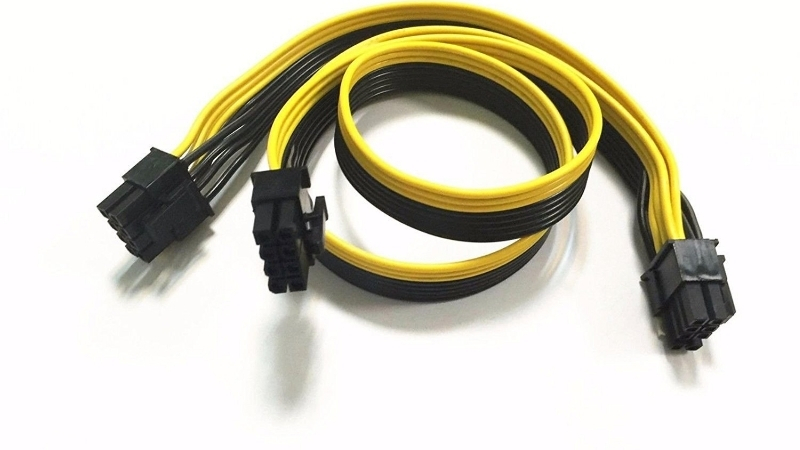
What the PCIe 8 Pin Power Connector Delivers
The quick answer: a single PCIe 8-pin connector is officially rated to deliver 150 watts of power to a graphics card, with a generous built-in safety margin that means it rarely runs anywhere near its limit. Combined with the 75 watts a card draws from the PCIe slot itself, the 8-pin is a simple, robust building block, and understanding its rating makes planning your power needs straightforward.
As an Amazon Associate we earn from qualifying purchases at no extra cost to you.




The 150W Rating and Real-World Headroom
The PCIe specification rates a single 8-pin connector at 150 watts. That figure is deliberately conservative, because the connector and its wiring can physically handle considerably more without stress, which is a large part of why it has proven so dependable.
In practice, this generous margin is exactly why the 8-pin earned its trusted reputation. Where the newer 16-pin runs close to its limit on the most demanding cards, an 8-pin at 150 watts is working well within itself, leaving plenty of thermal and electrical headroom.
This headroom is also why 8-pin connectors so rarely melt or fail. With the load sitting well below what the contacts can handle, there is little heat to build up even during long gaming sessions, which is the opposite of a connector run close to its ceiling.
How the 8-Pin Differs From the 6-Pin
The older PCIe 6-pin connector is rated for 75 watts, half that of the 8-pin. The 8-pin adds two extra ground pins, which is what allows the higher rating while keeping the same basic, reliable design.
Many 8-pin sockets are actually a 6+2 design, where two pins detach so the cable fits either a 6-pin or 8-pin port. This flexibility is handy, but always seat all eight pins on a card that calls for an 8-pin, since the extra pins are what unlock the full 150 watts.
If you only seat six of the eight pins on a card that expects an 8-pin, it may refuse to power on or limit performance, because the sense pins report the wrong cable. Always click all eight home on an 8-pin port to get the rated power and a stable connection.
Pinout and How Power Is Carried
An 8-pin connector uses three 12-volt power wires and a set of ground wires, with two sense pins that let the card confirm an 8-pin cable is connected. This simple arrangement is part of why it is so forgiving compared with the dense 16-pin.
Because the load is spread across multiple sturdy contacts with ample margin, the 8-pin tolerates imperfect seating far better than newer designs. It still deserves a firm, full connection, but it does not punish small mistakes the way a high-density connector can.
That forgiveness is a real, practical advantage. A slightly imperfect 8-pin seat still spreads current safely across sturdy contacts, whereas the same imperfection on a dense 16-pin can concentrate heat. It is one reason many builders feel relaxed about 8-pin cards.
Is the PCIe 8 Pin Still Relevant in 2026? What Users Report
With flagship cards moving to the 16-pin input, it is fair to ask whether the 8-pin still matters. The answer from the market and from owners is a clear yes: a huge range of cards still use it, and its reputation for reliability keeps it in demand. The feedback shows why so many builders still prefer it.
Cards That Still Use 8-Pin Connectors
The 8-pin remains standard on the vast majority of mid-range and many high-end cards, often in pairs or trios to supply higher-wattage models. Only the top flagship tier has fully committed to the single 16-pin input.
This means most buyers will still be plugging in 8-pins for years to come. If your card uses them, there is nothing outdated or unsafe about the connector; it is simply a proven solution doing its job.
So if your new card came with two or three 8-pin sockets, there is no cause for concern that it uses older technology. The choice reflects the card’s power level and the connector’s proven reliability, not a cost-cutting compromise.
8-Pin vs the New 16-Pin Standard
The 16-pin connector exists to carry far more power, up to 600 watts, through a single tidy plug, which the 8-pin cannot match individually. For the most power-hungry cards, that consolidation is genuinely useful.
The trade-off is margin. The 8-pin’s strength is its conservative rating and forgiving nature, while the 16-pin trades some of that headroom for compactness. Neither is simply better; they suit different power levels, and many owners appreciate the 8-pin’s lower-stress design.
For a mid-range card drawing 200 to 300 watts, two 8-pins with generous margin are arguably the ideal solution, leaving the 16-pin for flagship cards that genuinely need to push 500 watts or more through one plug. Matching the connector to the power level is the sensible way to think about it.
This barely affects efficiency at the wall, so do not overthink it. The connector type is about safe, reliable delivery, not about saving electricity; both 8-pin and 16-pin deliver the same clean power to the card when used correctly.
What Owners Value About the 8-Pin
Long-term users consistently praise the 8-pin for one thing above all: it just works. Reviews rarely mention failures, and the connector’s track record across many years of cards speaks for itself.
That reliability is why some builders actively prefer cards with 8-pin inputs, valuing the peace of mind over the cleaner look of a single 16-pin. For them, a proven connector with generous margin is worth more than tidiness.
That sentiment shows up again and again in long-term reviews, where the 8-pin is described less as a feature and more as something that simply never causes trouble. For a power connector, that is the highest praise there is.
Using and Buying PCIe 8 Pin Cables
Getting the most from the 8-pin is mostly about using the right number of them and choosing quality cables. This section covers the trade-offs, how to work out how many your card needs, and what to look for when buying cables or extensions.
Pros and Cons of the PCIe 8 Pin Connector
Here is the honest balance from the specs and owner feedback:
- Pros: a conservative 150-watt rating with large real-world headroom, an exceptionally reliable long-term track record, a forgiving fit, and wide compatibility across most current cards.
- Cons: it carries less power per cable than a 16-pin, so high-wattage cards need two or three, which means more cables and a busier-looking build.
For most systems, the 8-pin’s reliability and headroom outweigh the extra cabling, which is why it remains so widely trusted.
How Many 8-Pins Your GPU Needs
Work it out from your card’s total power draw. Each 8-pin supplies 150 watts and the slot adds 75 watts, so a card needing around 300 watts typically uses two 8-pins, and a 350-to-450-watt card often uses three.
Always use separate cable runs from the power supply where the unit provides them, rather than daisy-chaining one cable to feed two connectors on a high-draw card. Dedicated runs keep each connector comfortably within its rating.
If your power supply is short on separate PCIe outputs, that can be a sign the unit is underpowered for the card, not just under-connected. A higher-wattage unit with enough dedicated outputs is the proper fix, rather than splitting one cable across two hungry connectors.
Choosing Quality 8-Pin Cables and Extensions
Stick to the cables that came with your power supply, or quality replacements made for your specific unit, since 8-pin cables are not universally pin-compatible between brands. Using the wrong unit’s cable is one of the few ways to cause a problem with this otherwise forgiving connector.
For tidiness, a quality sleeved extension or a well-made replacement set works well, as linked in this review. As always, prioritise solid build quality over looks, and confirm each plug seats fully before powering on.
A quick final check pays off: with the system off, gently tug each 8-pin to confirm the latch has clicked. It takes seconds and rules out the one easy mistake, a plug that looks seated but is not, that can cause intermittent power problems.
The PCIe 8-pin remains one of the most dependable ways to power a graphics card, and the right cables keep it that way. Whether you need replacements, extensions, or a tidy sleeved set, take a look at the recommended options linked throughout this review and choose the ones that match your power supply.
See More:
- How to clean a GPU heatsink
- GPU vertical mount thermals
- GPU thermal throttle temp
- What PSU for RTX 4090
- What PSU for RTX 5080
Conclusion
The pcie 8 pin power connector is a proven, conservative design that delivers 150 watts per cable with generous headroom, and it remains the standard on most cards in 2026 for good reason. It carries less power than the new 16-pin, so high-end cards use several, but its forgiving nature and long track record make it a favourite among builders who value reliability. Use the right number, choose quality cables matched to your unit, and seat each one fully. Check the recommended 8-pin cables and extensions above to power your graphics card the safe, dependable way.
Top-Rated Picks


| Product | Brand | Rating | Reviews | Price |
|---|---|---|---|---|
| Cable Matters 8 Pin GPU Power Cable – 2ft, 8Pin PSU(E… | CableMatters | ★ 4.5 | 592 | $9.99 |
| Fasgear 16pin GPU Cable to 4X 8 Pin Pcie Extension – … | Fasgear | ★ 4.5 | 240 | $29.99 |
| PCIE 5.0 16Pin GPU Power 12VHPWR Extension Cable, 16P… | Bangfun | ★ 4.5 | 86 | $19.99 |
| YEZriler 8 Pin PCIe Cable for EVGA Power Supply, PCIe… | MoreOptionsForYou! | ★ 4.2 | 99 | $9.99 |
| (2-Pack) COMeap 12 Pin GPU Cable, Dual PCIe 8 Pin Fem… | COMeap | ★ 4.6 | 39 | $13.99 |
Frequently Asked Questions
How much power can a PCIe 8-pin connector deliver?
The specification rates each 8-pin at 150W, delivered over three 12V conductors and three grounds, with two additional sense pins that tell the card the connector is present and fully rated. A 6-pin provides 75W, and the PCIe slot itself supplies a further 75W, which is how total card power budgets are assembled.
Is the 150W limit conservative?
Considerably. The Mini-Fit Jr terminals used in these connectors can carry far more current than 150W represents, which is why the connector has such a strong safety record. The margin is deliberate and accounts for aged contacts, thinner gauge wire in budget cables and less than perfect insertion, all of which raise contact resistance.
Can I daisy-chain one cable to feed two connectors?
For cards under about 250W total it is usually within spec, since the cable itself is rated well above a single connector. For anything higher, run separate cables from separate ports on the power supply. Splitting a 300W demand down one wire harness concentrates current in a way the design never intended.
Why does my card have a 6+2 pin plug?
That is a combination connector designed to serve both standards. Snap the two-pin section onto the six-pin body for an 8-pin socket, or leave it detached for a 6-pin socket. Make sure both halves are clipped together and fully seated, because a loose two-pin section leaves a sense pin unconnected and the card may limit its power.
Are 8-pin connectors being replaced entirely?
They are being displaced at the high end by the 12V-2×6 16-pin connector, which carries up to 600W in a much smaller footprint. Mid-range and entry cards continue to use 8-pin connectors, and every modern power supply still ships with several, so the standard will remain relevant for many years.











Write Your Review
No reviews yet. Be the first to share your experience!