
- Top Pick: GIGABYTE B550 Eagle WIFI6 AMD AM4 ATX Motherboard, Supports Ryzen 5000/4000/3000 Processors, DDR4, 10+3 Power Phase, 2X M.2, PCIe 4.0, USB-C, WIFI6, GbE LAN, PCIe EZ-Latch, EZ-Latch, RGB Fusion
- Best Value: GIGABYTE B550M K AMD AM4 Micro-ATX Motherboard, Supports Ryzen 5000/4000/3000 Series Processors, DDR4, 3+3 Power Phase, 2X M.2, PCIe 4.0, USB 3.2 Gen 1, GbE LAN, Q-Flash
- Premium Choice: ASRock B550M-HDV Socket AM4 Micro-ATX Motherboard, Supports AMD Ryzen 5000/4000/3000 Series Processors, DDR4 4733+(OC), PCIe 4.0, Gigabit LAN
Best AM4 motherboard budget shopping is mostly about knowing which corners a manufacturer cut. Cheap boards all look similar in a listing, but they differ enormously in power delivery, BIOS support and whether they can accept a faster processor later without complaint.
As an Amazon Associate we earn from qualifying purchases at no extra cost to you.


As an Amazon Associate we earn from qualifying purchases at no extra cost to you.
By Ryan Cole, PC hardware writer at NVIDIA Review.
How to Find the Best AM4 Motherboard Budget Option
Spending less on a board is entirely reasonable, provided you know what disappears at each price step. Four checks separate the best AM4 motherboard budget options from cheap boards that limit the build within a year.
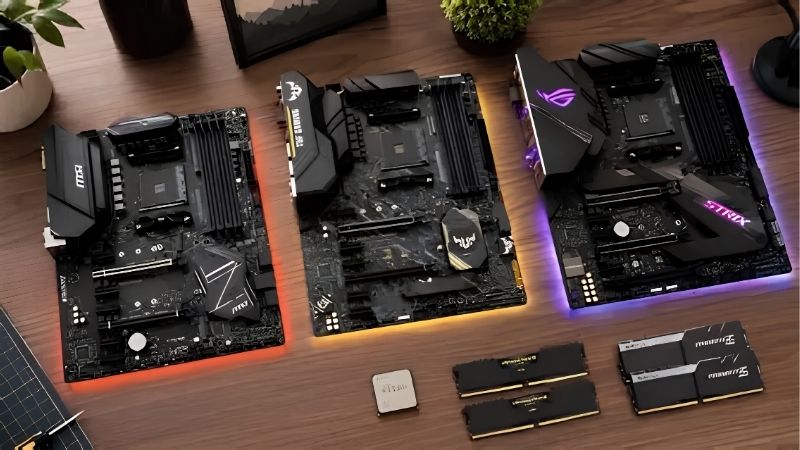
Know What Each Chipset Actually Gives You
B550 provides PCIe 4.0 on the graphics slot and one M.2 socket, plus CPU overclocking support. B450 drops to PCIe 3.0 throughout but keeps overclocking. A520 removes overclocking entirely and stays on Gen3.
For a gaming build with a mid-range card, the Gen3 versus Gen4 graphics slot difference is negligible. The storage difference is more real, since a Gen4 NVMe drive runs at roughly half speed on B450 or A520.
Chipset also affects memory tuning. B550 and B450 allow EXPO-style profiles and manual timing adjustment, while A520 restricts what you can change, which matters on Ryzen where memory speed influences frame rates.
BIOS Flashback Is Worth More Than Extra Features
Budget boards frequently sit in warehouses for months, shipping with firmware that predates Ryzen 5000. Without a compatible older processor on hand, that means the system will not post at all when you first assemble it.
Boards with BIOS Flashback let you write new firmware from a USB stick with no CPU installed. On a budget build where you are unlikely to own a spare AM4 chip, this single feature prevents the most expensive kind of mistake.
Check the VRM and Heatsinks Visually
The cheapest boards often use bare power stages with no heatsink at all. That is acceptable for a 65W six-core chip in a ventilated case, but it becomes a genuine limit if you later fit a 105W eight-core processor.
A board with even modest aluminium heatsinks over both power stage banks costs slightly more and removes that ceiling. On any budget list, that is the upgrade most worth paying for over extra USB ports or lighting.
Case airflow interacts with this directly. A board with bare power stages in a sealed case with one exhaust fan will run considerably warmer than the same board behind two front intakes, so plan both together.
Count What You Actually Lose
At the bottom of the market, expect gigabit rather than 2.5 Gb Ethernet, no onboard wireless, one M.2 socket, four SATA ports and a rear panel that runs out of USB quickly. None of that stops the machine working.
The question is which of those you will miss. Wireless is easy to add later with an adapter, while a single M.2 socket and a weak VRM are limitations you cannot work around without replacing the board entirely.
Rear USB count deserves a moment’s thought as well. Four ports disappear quickly once a keyboard, mouse, headset and controller receiver are connected, and front panel headers vary between two and four additional ports.
Top Picks for the Best AM4 Motherboard Budget Range
The best AM4 motherboard budget choice depends on which compromise you can live with, so these six run from capable B550 boards down to the cheapest A520. Specifications come from manufacturer sheets; availability on AM4 varies by retailer.
| Model | Chipset | Form Factor | M.2 Sockets | BIOS Flashback |
|---|---|---|---|---|
| ASUS Prime B550M-A WiFi II | B550 | Micro-ATX | 2 | Yes |
| Gigabyte B550M DS3H | B550 | Micro-ATX | 1 | Model dependent |
| MSI PRO B550M-VC WiFi | B550 | Micro-ATX | 1 | No |
| MSI B450 TOMAHAWK MAX II | B450 | ATX | 1 | Yes |
| ASRock B450M Steel Legend | B450 | Micro-ATX | 1 | No |
| Gigabyte A520M K V2 | A520 | Micro-ATX | 1 | No |
ASUS Prime B550M-A WiFi II
This is the budget board that gives up least. Four DDR4 slots, two M.2 sockets, a PCIe 4.0 graphics slot, integrated Wi-Fi and BIOS Flashback cover the features that matter, in a Micro-ATX layout that fits most cases.
Two M.2 sockets at this price is unusual and genuinely useful. The compromises are a modest VRM better suited to 65W chips than a 5800X3D, and gigabit rather than 2.5 Gb Ethernet on the rear panel.
Gigabyte B550M DS3H
The DS3H is the long-standing value B550 board and remains a sensible floor. It supports Ryzen 5000, offers four DDR4 slots, one Gen4 M.2 socket and the connectivity a straightforward gaming build requires.
Paired with a 5600 or 5600X it performs identically to boards costing considerably more. The limitations are a single M.2 socket, gigabit networking, no wireless and BIOS Flashback availability that varies by specific model revision.
MSI PRO B550M-VC WiFi
MSI’s PRO line targets office and value builds, and the wireless version adds convenience that budget boards usually omit. Four DDR4 slots, a Gen4 M.2 socket and integrated Wi-Fi make it well rounded for the money.
It suits a 65W processor and a mid-range graphics card comfortably. The drawbacks are the absence of BIOS Flashback, which matters if the board ships with older firmware, and a single M.2 socket for all your storage.
MSI B450 TOMAHAWK MAX II
For a full-size ATX board on a tight budget this is the strongest option. It carries a better VRM than most boards at this price, four DDR4 slots, six SATA ports, BIOS Flashback and a layout with room to work.
The VRM headroom means it handles a 5700X or even a 5800X3D without throttling. The cost is PCIe 3.0 throughout, so a Gen4 SSD runs at half speed and the graphics slot is a generation behind current boards.
ASRock B450M Steel Legend
Steel Legend brings better VRM heatsinking than most B450 boards at this level, along with four DDR4 slots and a clean finish that suits lighter builds. It runs Ryzen 5000 properly once the firmware is current.
For a first build it is a solid, unspectacular choice. The two caveats are the absence of BIOS Flashback, which makes that firmware update awkward without a spare CPU, and a single M.2 socket running at Gen3 speeds.
Gigabyte A520M K V2
This is the absolute floor of the platform and it exists for a specific purpose: getting a working machine assembled for as little as possible. It supports Ryzen 5000, takes four DDR4 modules and provides one M.2 socket.
For an office build or a first gaming PC on a hard budget, it functions. The limitations are substantial though: no CPU overclocking, PCIe 3.0 only, minimal VRM cooling and no realistic path to an eight-core upgrade later.
Why Budget Boards Are Harder to Find in 2026
The cheap end of the motherboard market has changed noticeably this year, and understanding why helps set realistic expectations before you shop.
Manufacturers Have Moved Upmarket
Motherboard sales fell by more than a quarter, and manufacturers responded by concentrating production on mid and high-tier models where margins are better. Promotional pricing policies were also withdrawn in February 2026.
The practical result is that the cheapest boards restock less reliably than they used to. If a specific budget model is unavailable, the nearest step up is often the only option actually on the shelf that week.
Reusing DDR4 Protects the Rest of Your Budget
DRAM contract pricing rose steeply through 2026, with further increases forecast into the fourth quarter and no meaningful new capacity expected before late 2027. DDR5 kits absorbed the largest share of that increase.
That is precisely why a budget AM4 build still makes sense. Reusing an existing DDR4 kit sidesteps the most inflated component in a modern build, which can fund a better graphics card or a larger SSD instead.
Know When to Spend Slightly More
AMD confirmed at Computex 2026 that AM5 accepts new processors through 2029, so AM4 is a finished platform. Buying the absolute cheapest board makes sense only if you intend to keep the same processor for its whole life.
If a later move to a 5700X3D is likely, spending a little more on a board with proper VRM heatsinking is money well spent. Beyond that point, extra spending buys features rather than capability on a 65W build.
Frequently Asked Questions
These questions come up most often from people assembling a first build on a strict budget rather than upgrading an existing machine.
Is A520 ever the right choice?
Only for locked processors in machines that will never be upgraded. It removes CPU overclocking and Gen4 support entirely, and the saving over a basic B550 board is usually small enough not to justify those limits.
Does the best AM4 motherboard budget option need Wi-Fi built in?
Not necessarily. A USB Wi-Fi adapter costs very little and can be added later, so onboard wireless is a convenience rather than a deciding factor. Prioritise BIOS Flashback and VRM heatsinking ahead of it.
Will a cheap board reduce gaming performance?
Not with a 65W processor. Frame rates are determined by the CPU and graphics card, not the board tier. Cheap boards limit you through storage speed, expansion and upgrade headroom rather than through raw performance.
How important is the number of SATA ports now?
Less than it once was, but four is a sensible minimum if you still use mechanical drives for bulk storage. With a single M.2 socket on most budget boards, SATA becomes the only route to adding capacity later.
See More:
- Best MSI motherboard
- Best motherboard processor combo for gaming
- Best B550 motherboard
- Best CPU for streaming
- What is the best AM4 CPU for gaming
Final Thoughts
The best AM4 motherboard budget pick is rarely the cheapest listing. A Micro-ATX B550 board with BIOS Flashback and modest VRM heatsinking costs slightly more than an A520 and removes the two limitations that actually matter, leaving room for a faster processor later without replacing anything else.











Write Your Review
No reviews yet. Be the first to share your experience!