
Best AM5 motherboard for 9800X3D decisions are more forgiving than most people assume, because this eight-core chip has a locked multiplier and a 120W TDP that no modern AM5 board struggles with. The real question is which chipset tier gives you features you will actually use.
As an Amazon Associate we earn from qualifying purchases at no extra cost to you.



As an Amazon Associate we earn from qualifying purchases at no extra cost to you.
By Ryan Cole, PC hardware writer at NVIDIA Review.
How to Choose the Best AM5 Motherboard for 9800X3D
The 9800X3D runs eight Zen 5 cores and sixteen threads to 5.2 GHz with 104 MB of total cache inside a 120W TDP. Four considerations shape the best AM5 motherboard for 9800X3D, and power delivery is the least pressing.
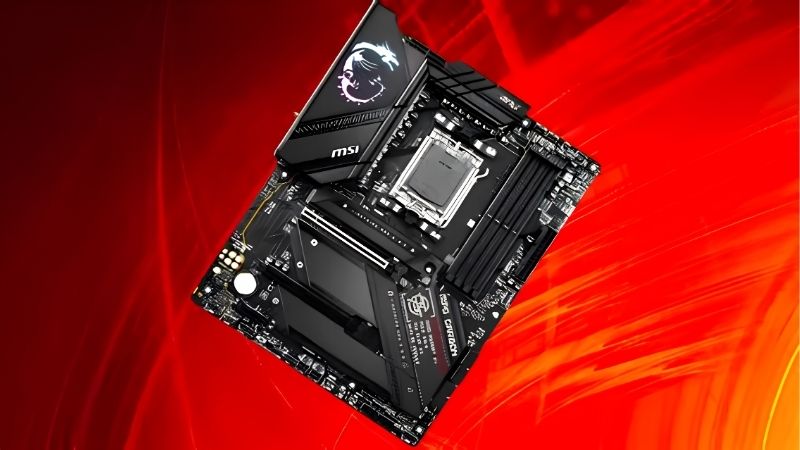
Understand What Each Chipset Tier Adds
B650 is the entry point, with a PCIe 4.0 graphics slot on most models and Gen4 storage. B650E adds a PCIe 5.0 graphics slot and Gen5 storage, which closes most of the gap to the higher tiers.
B850 provides a Gen5 graphics slot and Gen5 storage as standard, while X870 additionally mandates USB4 at 40 Gbps and adds rear I/O. None of that changes how fast the processor runs in games.
Power Delivery Requirements Are Modest Here
A locked eight-core chip at 120W does not stress any mid-tier VRM. Boards with a 12+2+1 arrangement or better run this processor at full boost indefinitely, which covers almost everything above the cheapest models.
The benefit of a heavier VRM is lower heatsink temperatures and quieter behaviour rather than higher clocks. Spend there only if you expect to move to a 16-core chip later, which AM5 makes possible through 2029.
Memory Configuration Deserves Real Thought
A 6000 MT/s DDR5 kit with a tight EXPO profile remains the practical sweet spot for this processor. Faster kits can work but often force a less favourable memory controller ratio, costing more time than they return in performance.
Populate two slots rather than four where possible. Two 16 GB or 32 GB modules run high-speed profiles far more reliably than four smaller sticks, which is why buying a matched kit matters more than total slot count.
Buying a single matched kit also protects you later. Combining two separately purchased kits risks mismatched dies that will not run the same profile together, which is a frequent cause of instability after a memory upgrade.
Count M.2 Sockets and Check Their Position
Three or four M.2 sockets means adding drives without removing the graphics card. Two-slot boards force choices later, and sockets positioned beneath a triple-slot card become awkward to reach once the build is complete.
Tool-free hardware genuinely helps here. Quick-release latches on the top PCIe slot and screwless M.2 clips turn a fiddly job into a two-minute one, which matters more than an extra rear USB port for most builders.
Heatsink coverage on those sockets varies too. A Gen5 drive generates real heat, so a thick heatspreader on the primary socket is worth more than a fourth socket you are unlikely to populate for years.
Top Picks: Best AM5 Motherboard for 9800X3D Builds
The best AM5 motherboard for 9800X3D depends on which features you will genuinely use, so these six run from a value B650 to a fully equipped X870. Specifications come from manufacturer sheets; pricing moves constantly, so treat tiers as guidance.
| Model | Chipset | Form Factor | Graphics Slot | Wireless |
|---|---|---|---|---|
| MSI MAG B850 Tomahawk MAX WiFi | B850 | ATX | PCIe 5.0 | Wi-Fi 7 |
| ASRock B850 Steel Legend WiFi | B850 | ATX | PCIe 5.0 | Wi-Fi 7 |
| Gigabyte B650 AORUS Elite AX | B650 | ATX | PCIe 4.0 | Wi-Fi 6E |
| ASUS TUF Gaming B650-PLUS WiFi | B650 | ATX | PCIe 4.0 | Wi-Fi 6 |
| MSI MAG X870 Tomahawk WiFi | X870 | ATX | PCIe 5.0 | Wi-Fi 7 |
| ASUS ROG Strix B650E-I Gaming WiFi | B650E | Mini-ITX | PCIe 5.0 | Wi-Fi 6E |
MSI MAG B850 Tomahawk MAX WiFi
This is the default recommendation for a 9800X3D build. A 14+2+1 power stage layout with 80A stages, four DDR5 slots, a PCIe 5.0 graphics slot, Gen5 storage and Wi-Fi 7 cover everything without X870 pricing.
Tool-free M.2 clips and a quick-release PCIe latch make maintenance straightforward. The compromise against X870 is USB4 and rear port count, which only matters if you use 40 Gbps external storage or a docking station.
ASRock B850 Steel Legend WiFi
Steel Legend delivers the same core capability at a lower price. A 14+2+1 arrangement, four DDR5 slots, a Gen5 graphics slot, a CPU-connected Gen5 M.2 socket and Wi-Fi 7 make it strong value for this processor.
The white and grey finish suits lighter builds and it runs the chip without any thermal concern. The trade-offs are thinner rear I/O and an audio implementation a step below MSI and ASUS equivalents at this tier.
Gigabyte B650 AORUS Elite AX
B650 remains entirely adequate for this chip, and this board is the sensible version of it. A robust digital VRM with proper heatsinks, four DDR5 slots, multiple M.2 sockets and Wi-Fi 6E cover a complete gaming build.
The PCIe 4.0 graphics slot costs essentially nothing with current cards. The limitation is future flexibility, since a Gen5 graphics card would be constrained, though no current card saturates a Gen4 x16 connection.
ASUS TUF Gaming B650-PLUS WiFi
TUF covers the practical value tier with a straightforward feature set. Four DDR5 slots, two M.2 sockets, a solid DrMOS power stage layout, 2.5 Gb Ethernet and Wi-Fi 6 handle the 9800X3D comfortably.
ASUS BIOS conventions make EXPO tuning easy for first-time builders. The compromises are two M.2 sockets rather than three or four, Wi-Fi 6 rather than a newer standard, and a PCIe 4.0 graphics slot.
Two M.2 sockets is the limitation likely to bite first. One fills with the boot drive immediately, which leaves a single slot for expansion before you start adding SATA storage instead.
MSI MAG X870 Tomahawk WiFi
If you want USB4 and the fullest rear I/O, this is the tier where it arrives. A 14+2+1 80A power design, four DDR5 slots, Gen5 graphics and storage, USB4 at 40 Gbps and Wi-Fi 7 make it comprehensive.
For a machine that also handles external NVMe enclosures it earns its price. The honest caveat is that for pure gaming with a 9800X3D, you are paying for connectivity rather than any performance the processor can use.
ASUS ROG Strix B650E-I Gaming WiFi
Mini-ITX builders get a genuinely capable option here. Two DDR5 slots, dual M.2 sockets, a PCIe 5.0 graphics slot and Wi-Fi 6E fit onto a 170 mm square board with a well-cooled power delivery.
Two DIMM slots often reach higher stable EXPO speeds than four-slot designs. The trade-offs are inherent to the format: tight cooler clearance, restricted airflow around the VRM and a price above equivalent ATX boards.
Where AM5 Sits in the 2026 Market
Three developments affect anyone specifying this build now, and all three concern timing rather than urgency.
AM5 Support Runs Through 2029
AMD confirmed at Computex 2026 that AM5 will accept new processors until the end of 2029. A board bought for a 9800X3D today can therefore host a later chip with only a firmware update, keeping memory and cooler in place.
That makes stepping up one board tier easier to justify than on a dead-end platform. Intel’s next generation moves to LGA 1954, so the equivalent upgrade there would require replacing the board as well.
Nothing New Launches Before CES 2027
Zen 6 desktop processors have moved to CES in January 2027, so the current lineup is what the market offers for the foreseeable future. Waiting for a successor means a long delay with nothing arriving in between.
That also means no competition-driven price correction is scheduled. Building when you actually need the machine is defensible, whereas delaying several months for a price movement is not supported by the roadmap.
Price DDR5 as a Real Budget Line
DRAM contract pricing climbed steeply through 2026, with further increases forecast into the fourth quarter and no significant new capacity expected before late 2027. Memory is a larger share of the build than it was a year ago.
The practical response is to price the kit alongside the board rather than treating it as an add-on. A 32 GB DDR5-6000 kit is the sensible target here, and buying more than you need is harder to justify at current levels.
Frequently Asked Questions
These questions come up most often when people pair a board with this particular processor.
Does the 9800X3D need X870?
No. B650 and B850 boards run it at full speed. X870 mandates USB4 and adds rear connectivity, which are convenience features rather than requirements for a chip with a locked multiplier and a 120W ceiling.
Is PCIe 5.0 on the graphics slot worth paying for?
Not currently. No consumer graphics card saturates a PCIe 4.0 x16 connection, so the Gen5 slot is future capability rather than present performance. It becomes relevant only for cards several generations away.
What memory speed suits the best AM5 motherboard for 9800X3D?
A 6000 MT/s kit with a tight EXPO profile is the practical target. Faster kits often force a less favourable controller ratio, and the gaming difference is small enough that stability is the better priority.
Will I need a BIOS update before first boot?
Possibly, on boards manufactured before the chip launched. BIOS Flashback writes firmware from a USB stick with no processor installed, which is the safest route if this is your only AM5 chip.
See More:
- Best MSI motherboard
- Best motherboard processor combo for gaming
- Best B550 motherboard
- Best CPU for streaming
- What is the best AM4 CPU for gaming
Final Thoughts
The best AM5 motherboard for 9800X3D is usually a B850 board rather than anything more expensive, since this processor cannot use the extra power delivery that flagships provide. The Tomahawk MAX and Steel Legend cover most builds, B650 remains entirely valid on a budget, and X870 earns its price only if you need USB4.











Write Your Review
No reviews yet. Be the first to share your experience!