
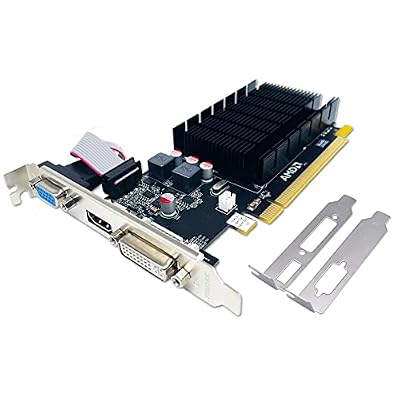

Editor's Pick
ASUS GeForce GT 1030 2GB GDDR5 HDMI DVI Graphics Card (GT1030-2G-CSM), 3 Year Warranty

Limited Time
ASUS GT730-4H-SL-2GD5 – Graphics Card – GF GT 730-2 GB GDDR5 – PCIe 2.0-4 x HDMI – fanless
A fanless GPU is the final piece in building a computer you can sit next to in total silence, with no whirring fans to break the calm of a living room, studio, or bedroom. If you have chased down every noisy component only to be defeated by a spinning graphics-card fan, this review is for you. It explains what fanless cards can realistically do, the thermal rules that keep them stable, and which silent cards are actually worth buying.
As an Amazon Associate we earn from qualifying purchases at no extra cost to you.




What a Fanless GPU Really Delivers
The appeal of a fanless card is obvious: zero noise and zero moving parts to fail. But removing the fan changes how the card must be cooled and used, so understanding those consequences up front is the key to a build that stays both silent and stable under load.
How Silent Cooling Actually Works
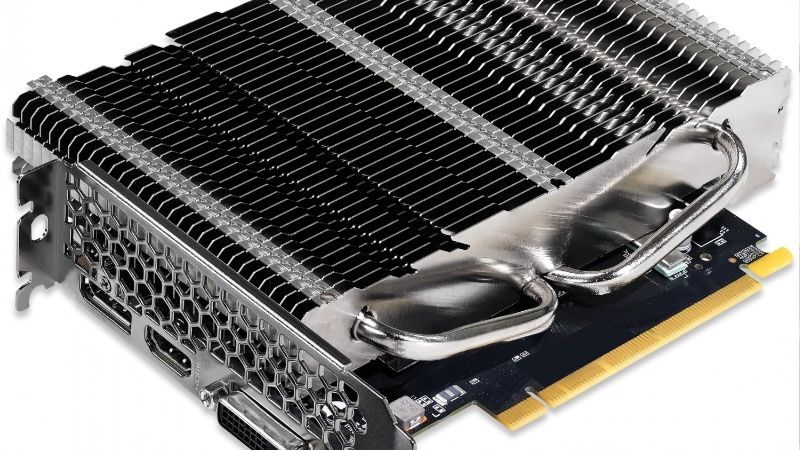
A fanless card replaces spinning fans with a large passive heatsink that sheds heat purely through its metal surface area and the air moving around it. With no fan to force airflow, the card relies on a generously sized heatsink and the natural convection inside your case.
This is why fanless cards look chunky despite modest performance. The oversized heatsink is doing the entire cooling job alone, so it needs far more metal than a fan-cooled card of similar power. That extra bulk is a feature, not a flaw, because it is exactly what keeps the card silent and safe.
The trade-off is a firm ceiling on power. A passive heatsink can only dissipate so much heat, which is why fanless cards live in the entry to mid-range tier rather than the high end. This is a law of physics, not a design shortcut, and setting expectations around it prevents disappointment.
It is worth understanding why this ceiling is non-negotiable. A fan-cooled card can simply spin its fans faster when the workload spikes, but a fanless card has no such lever; its only defence against heat is the fixed surface area of its heatsink. That means the entire card is engineered around a worst-case temperature, and the manufacturer deliberately caps its power so the silent cooling never falls behind. Knowing this makes it clear why a fanless flagship will never exist, and why the cards that do exist are so dependable within their limits.
Realistic Performance for a Silent Build
Within its limits, a fanless card is genuinely capable for the right tasks. It comfortably handles crisp 4K media playback, everyday desktop work, light photo editing, and older or less demanding games, all without a whisper of noise.
What it is not built for is heavy modern gaming at high settings, where the heat generated would overwhelm a passive heatsink. Buyers who want a silent media centre or a quiet productivity machine are delighted; those hoping for fanless flagship gaming are chasing something the physics does not allow.
Framing the purchase around silence rather than raw speed is the secret to satisfaction. For a home-theatre PC or a quiet office, the value of never hearing the machine easily outweighs the performance a noisy card would add.
There is also a quality-of-life benefit that specs never capture. In a quiet room, even a low hum from a fan becomes something your ear keeps returning to, whereas total silence lets you forget the computer is there at all. Owners of fanless machines often describe this as the single upgrade that changed how a room feels, which is why the modest performance ceiling rarely bothers the people who chose the card for the right reasons.
Fanless GPU Pros and Cons
Here is the honest balance sheet before you commit to a silent card:
Pros:
- Absolute silence with no fan noise whatsoever.
- No moving parts, so nothing to wear out or fail.
- Low power draw suits small, efficient builds.
Cons:
- Limited to entry and mid-range performance.
- Large heatsink needs real clearance inside the case.
- Depends on decent case ventilation to stay cool.
The trade is clear: you accept a performance ceiling and a bulky card in exchange for a machine that makes no sound at all, which for a silent build is the whole point.
Choosing the Best Fanless GPU for Your Setup
With the fundamentals clear, the next step is matching a card to your case, your ventilation, and how you use the machine. Owner feedback and spec sheets both point to a short list of sensible silent choices, grouped here by purpose rather than brand.
Best Picks by Use Case
For a home-theatre PC, an efficient fanless card focused on clean video output and smooth 4K playback is ideal. It runs cool, stays silent, and slips into the compact cases that living-room machines favour, making it the natural centrepiece of a quiet media build.
For a silent office or study machine, a low-power fanless card handles multiple displays and everyday acceleration without a sound. Here reliability and driver stability matter more than frame rates, since the card mostly supports productivity rather than gaming.
The table below groups the categories so you can shop with intent:
| Use case | Card type | Priority spec |
|---|---|---|
| Home-theatre PC | Efficient fanless card | 4K output, low heat |
| Silent office / study | Low-power fanless card | Multi-display, stability |
| Quiet light gaming | Larger-heatsink fanless card | Thermal headroom |
What Owners Praise and Complain About
Highly rated fanless cards win praise for one thing above all: the joy of a truly silent computer. Owners of media PCs and quiet offices repeatedly describe the pleasure of a machine they cannot hear, and they value the reassurance of a card with no fan that can wear out or rattle over time.
The recurring complaints trace back to heat and size. A minority report thermal throttling in poorly ventilated cases, and some are surprised by how large the heatsink is. Buyers who provided even gentle case airflow and chose a card sized to their space rarely raise these issues, which shows again that preparation drives satisfaction.
Read across the reviews and the message is consistent: the fanless format delivers exactly what it promises when treated on its own terms. The five-star owners bought for silence, measured their space, and gave the card a little air, while the disappointed few expected gaming-grade power or crammed the card into a sealed box. Almost every complaint is avoidable with a few minutes of planning, which is reassuring news for anyone considering a silent build.
Why Case Airflow Still Matters
Fanless does not mean cooling-free. The card sheds its heat into the case, so a chassis with even one slow, quiet fan or good natural convection keeps temperatures comfortably in check. A sealed, airless box is the one environment where a fanless card can struggle.
This is easy to plan for and costs almost nothing. A single low-speed case fan runs near-silently while dramatically improving the card’s thermal headroom, letting it hold full performance during long media sessions without ever making noise itself.
Think of the case and the card as a cooling team. The heatsink does the heavy lifting, and a whisper of airflow finishes the job, which together deliver silence and stability at the same time.
The type of airflow matters more than the amount. A large, slow-spinning intake or exhaust fan moves plenty of air at a noise level below the threshold of hearing, whereas a small, fast fan makes noise while moving less. Choosing quiet, oversized fans for the case is therefore the perfect companion to a fanless card, because it preserves the silence you paid for while quietly guaranteeing the card never runs short of cooling.
Buying a Fanless GPU in Today’s Market
Because silent cards are a specialist category, pricing and stock can move more than for mainstream models, so timing is part of the decision. Reading the current market alongside your build plan helps you secure the right card without overpaying or waiting for a deal that never arrives.
Prices, Stock and Timing in 2026
Graphics cards and their components have trended upward, driven largely by memory costs feeding through the supply chain. The encouraging news is that the sharp climb of late 2025 has flattened into a stretch of relative stability, even as makers caution that prices could move again.
A genuine drop is not close. New memory supply is coming, including Chinese DDR5 sources and two Micron plants under construction in Idaho, but those plants are not expected to run until 2027 or 2028. With prices plateaued rather than falling, waiting for a cheaper fanless card is unlikely to pay off, and these niche silent models can sell out unpredictably.
Given that, buying the right card when you find it in stock usually beats waiting. A well-reviewed silent card that fits your case and suits your tasks holds its value better than the hope of a future discount that may never reach this niche.
Matching the Card to Your Case
Measure clearance carefully, because fanless cards are bulky. Confirm the heatsink’s length, height, and thickness against your case, and check that it will not collide with a drive cage, memory, or the side panel before you buy.
Also plan the airflow. Ensure your case allows at least gentle ventilation near the card, since that quiet assistance is what keeps a fanless model stable under sustained load. Doing this alongside the card choice prevents the one scenario, a sealed case, where a silent card disappoints, and it is by far the cheapest insurance you can buy for a silent build.
Final Recommendation and Next Step
For most silent builds, choose the most efficient fanless card that clears your case and suits your workload, then guarantee a little gentle airflow around it. That order of priorities almost always produces a machine that is both silent and dependable for years.
Ready to build a computer you cannot hear? Compare current prices, dimensions, and stock on the recommended fanless cards through the links on this page, and secure the right one before it sells out or prices shift again.
See More:
Final Thoughts
A fanless GPU is the key to a genuinely silent computer, delivering capable media playback and everyday performance with zero noise and nothing to wear out, provided you match the card to your case and give it a little airflow. Measure your clearance, favour efficiency, and set expectations around silence rather than raw speed. With prices flat rather than falling and niche stock unpredictable, there is little reason to wait, so use the links above to secure the right fanless GPU for your quiet build today and finally own a machine you never have to listen to.
Frequently Asked Questions
What fanless options exist in 2026?
The market is small and concentrated at the low end, covering entry-level Nvidia cards, low-power Intel Arc models sold in passive ECO variants, and a handful of specialist boards from smaller brands. Availability changes frequently, so check current stock rather than assuming a specific model is still being produced.
Is a fanless card enough for 4K video playback?
Yes, comfortably. Modern entry-level GPUs include fixed-function decoders for H.264, HEVC and AV1, so 4K playback barely loads the shader cores and draws very little power. That makes a passive card an excellent match for a silent media machine, provided the case allows some natural convection.
Can I just remove the fans from a normal graphics card?
Not safely. Standard coolers are designed around forced airflow and have far too little fin surface for passive operation, so the card will throttle hard or shut down. Converting a card properly requires a dedicated passive heatsink assembly plus a substantial power limit reduction, which is a niche modification.
What temperatures should I expect from a fanless card?
Under sustained load, 65 to 85 degrees Celsius is normal, higher than an actively cooled card because the heatsink relies on case airflow alone. Idle temperatures often sit in the forties. Anything approaching 90 degrees suggests the chassis is too restrictive and needs at least one slow intake fan.
Is a fanless GPU better than modern integrated graphics?
Not always. Current integrated graphics in mid-range processors can match or beat entry-level passive cards while using no expansion slot at all. A fanless GPU still makes sense when you need extra display outputs, a specific encoder, or you are pairing it with a CPU that lacks integrated graphics entirely.
Ready to decide? Our #1 pick for 2026 is the Home-theatre PC.
Live price & availability on Amazon.









Write Your Review
No reviews yet. Be the first to share your experience!