
The GeForce RTX 4090 is built to run modern games at 4K with settings maxed and ray tracing enabled, and for most of its life it has had no real rival below the RTX 50 series flagship. In day-to-day gaming its limits are not the GPU itself but everything around it: the processor feeding it frames, the monitor you pair it with, the power supply behind it, and a small group of path-traced games that can strain even this card at native resolution.
- The Hardware Behind the Performance
- Resolution-by-Resolution Expectations
- Ray Tracing, Path Tracing, and DLSS
- Memory: Why 24GB Matters
- Real Limits: CPU, Power, and Case
- Efficiency, Noise, and Undervolting
- Who Should Buy or Skip It
- Is It Still Relevant Today?
- Before You Buy Checklist
- Frequently Asked Questions
- Related Guides
This guide explains where the card shines, where it is wasted, and what real-world constraints to plan for, from memory and power to CPU balance. It avoids quoting specific frame rates, because those change with game patches and drivers; use current independent reviews when you need numbers for a particular title.
The Hardware Behind the Performance
The RTX 4090 launched in October 2022 on the Ada Lovelace architecture, and it remains one of the largest consumer GPUs NVIDIA has built. The key numbers explain why it sits in a class of its own.
- CUDA cores: 16,384, well above the next card down the stack.
- Memory: 24GB of GDDR6X on a 384-bit bus, giving very high memory bandwidth.
- Board power: 450 watts for the reference specification.
- Recommended power supply: NVIDIA listed an 850-watt unit as the recommended class.
- Power connector: a 16-pin connector, usually supplied with an adapter to multiple 8-pin cables.
- Features: DLSS 3 with frame generation, AV1 encoding, and PCIe 4.0.
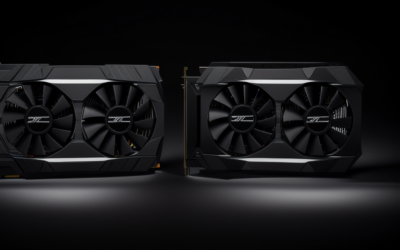
The size of the cooler on most partner boards is substantial, often occupying three or more slots, so physical clearance should be checked early.
Resolution-by-Resolution Expectations
The table below frames the card against common monitors. These are category descriptions rather than frame rate promises.
| Resolution | What the card does | Typical limiter |
|---|---|---|
| 1080p | Massive overkill outside of very high refresh rate competitive play | CPU, not GPU |
| 1440p high refresh | Maxes nearly everything, often with spare headroom | CPU in many games |
| 4K at high refresh | The ideal match; maximum settings in most titles | Ray tracing in the heaviest games |
| Ultrawide and super ultrawide | Strong across most games | Pixel count, especially with ray tracing |
| 8K | Possible in lighter games or with heavy upscaling | Raw pixel load and display support |
| High-resolution VR | Excellent for demanding headsets | Headset resolution and game optimization |
The surprising part for many first-time buyers is the 1440p row. A card this powerful at 1440p often reveals CPU limits, so the best value from a 4090 comes at 4K or on very high resolution displays.
Ray Tracing, Path Tracing, and DLSS
This is where the card earns its position. Ray tracing is the largest performance cost in modern graphics, and the RTX 4090 has the strongest hardware of its generation for handling it. Path-traced games, which use a more complete lighting simulation, remain the toughest test, and in those titles even this card usually relies on DLSS upscaling to reach smooth results at 4K.
DLSS 3 frame generation can further raise displayed frame rates in supported games. It works best when your base frame rate is already decent, since the extra generated frames smooth motion but do not reduce input delay. The multi-frame generation feature released with the RTX 50 series is not available on this card, so if that is important to you, check NVIDIA’s current feature list.
Memory: Why 24GB Matters
For gaming, 24GB is more than any current title needs, so it acts as long-term insurance rather than an immediate benefit. The memory capacity shines in other workloads: large video timelines, 3D scenes with heavy textures, and local AI models that benefit from big video memory pools. If you mix gaming with creative or AI work, the 4090’s memory is a major reason to consider it.
The flip side is that gamers who never touch those workloads are paying for capacity they will rarely use. A 16GB card covers nearly every current game.
Real Limits: CPU, Power, and Case
CPU bottlenecks
To feed this GPU, you need a strong modern processor. Below 4K, many games become CPU-limited, which means the card idles part of the time and your frame rate scales with the processor, not the graphics card. Prioritize a current-generation CPU and fast memory if you are buying a 4090.
Power delivery
A 450-watt card needs a quality power supply with the proper connector. Reports of melted 16-pin connectors in the card’s early life were commonly linked to cables not being fully seated, so push the plug in firmly and avoid sharp bends right at the connector. Consider a power supply with a native 16-pin cable if possible.
Case and thermals
Partner cards can be long, thick, and heavy. Verify clearance, consider a support bracket to prevent sag, and make sure your case has good airflow.
Efficiency, Noise, and Undervolting
A 450-watt rating sounds extreme, but in many games the card does not sit at its limit, particularly when frame rates are capped or DLSS reduces the rendering load. Many owners also reduce the power limit or apply an undervolt through widely used tuning software, which can cut power draw and temperatures noticeably while losing only a small slice of performance. Results vary by individual chip, so treat any tuning as an experiment and keep settings stable before relying on them.
Noise depends mostly on the cooler. The large heatsinks on most partner cards were designed with plenty of margin, which tends to keep fans quiet under typical gaming loads. Case airflow still matters, because a card of this size dumps a lot of heat into the chassis, and a cramped case can push temperatures up for the processor and storage drives as well.
If you are building around this card, plan the whole system for heat: intake fans that feed the GPU directly, a power supply with comfortable headroom, and enough space between the card and the side panel. These small choices matter more with a flagship than with a mid-range part.
Who Should Buy or Skip It
The 4K high-refresh enthusiast
If you game on a 4K display at a high refresh rate and want maximum settings with ray tracing, the 4090 is the card that makes that practical. Expect to use DLSS in the most demanding games.
The creator or AI hobbyist
If you edit video, render 3D scenes, or run local models, the 24GB of memory and the high compute throughput can save real time. It is among the most capable consumer cards for such workloads.
The 1080p or 1440p gamer on a modest CPU
If you play at lower resolutions or use an older processor, skip the 4090. A cheaper card paired with a better CPU will usually deliver more noticeable gains for the money spent.
Is It Still Relevant Today?
As of late 2026, the RTX 4090 has been succeeded by the RTX 5090, which brings newer architecture, GDDR7 memory, and multi-frame generation. The 4090 remains extremely powerful and continues to receive driver support, but new stock is scarce and used cards dominate the market. If a used 4090 sits well below a new 5090, it can still be a strong choice for 4K play.
Before You Buy Checklist
- Confirm your monitor is 4K or an equally high pixel count display.
- Check that your CPU can keep up with the card at your target resolution.
- Verify power supply wattage and connector, and plan a clean cable route.
- Measure case clearance for length, width, and thickness.
- For used cards, check the connector for heat marks and confirm the seller’s return window.
Frequently Asked Questions
Can the RTX 4090 play every game at 4K maxed out?
In most games, yes, especially with DLSS enabled. A few path-traced titles are heavy enough that upscaling is practically required at 4K.
Is the 4090 overkill for 1440p?
Often yes, because the CPU becomes the limiter. It can still be justified for very high refresh rate 1440p ultrawide monitors or if you plan to move to 4K soon.
How much power supply do I need?
NVIDIA lists an 850-watt unit as the recommended class. Consider more headroom if you have a power-hungry CPU or many components.
Does the RTX 4090 support multi-frame generation?
No. That feature belongs to the RTX 50 series. The 4090 supports DLSS 3 frame generation and the newer upscaling models.
Related Guides
- RTX 4090 Review: In-Depth Performance and Real-World Verdict
- RTX 4090 Ti: Does It Exist? The Truth and What to Buy
- Buy RTX 4090 in 2026: Smart Buyer's Guide and Verdict
- Is the RTX 4090 Price Worth the Investment in 2026?


Write Your Review
No reviews yet. Be the first to share your experience!