
- Top Pick: maxsun GeForce RTX 3050 6GB Graphics Cards GDDR6 Video Graphics Card GPU for Gaming PC Mini Small Form Factor SSF Slim Low Profile Design PCI Express 4.0, HDMI 2.1, DisplayPort 1.4a
- Best Value: Nvidia RTX 2000 ADA 16GB Graphics Card
- Premium Choice: msi Gaming GeForce GT 1030 4GB DDR4 64-bit HDCP Support DirectX 12 DP/HDMI Single Fan OC Graphics Card (GT 1030 4GD4 LP OC)


A half height GPU is the one upgrade that can turn a cramped, prebuilt office machine into something genuinely useful for gaming, editing, or media, without buying a whole new PC. If you own a slim Dell, HP, or Lenovo desktop and have stared in frustration at a case that swallows only the smallest cards, this review is written for you. It explains exactly what fits, what performance to expect, and which cards are worth your money in a slim chassis.
As an Amazon Associate we earn from qualifying purchases at no extra cost to you.





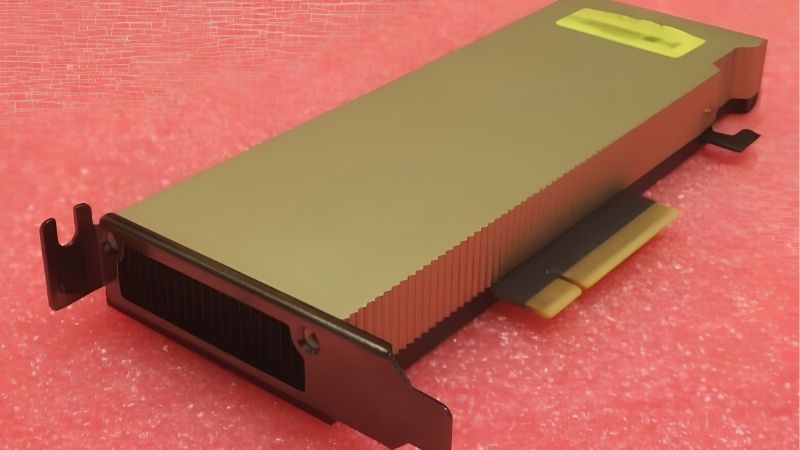
What a Half Height GPU Actually Fits
The whole point of a half height card is clearance, so the first job is understanding the measurements that decide whether a card drops in cleanly or bounces off the lid. Get these right and installation takes minutes; get them wrong and you are packing the card back into its box.
Half Height, Low Profile and Bracket Basics
Half height and low profile describe the same core idea: a card short enough to fit a slim case where a full-height card would hit the side panel. These cards stand roughly half the height of a standard card, which is exactly why they slot into compact prebuilt machines.
The detail buyers miss most is the bracket. Slim cases need the low-profile bracket fitted, and many cards ship with both a tall and a short bracket in the box. Swapping to the short bracket is a two-minute job, but forgetting it means the card physically will not screw into a slim chassis.
Length and thickness still matter alongside height. A card can be low profile yet long, or low profile yet dual-slot, so confirm all three dimensions against your case before buying. Checking the exact millimetre figures in the spec sheet, rather than trusting a vague slim label, is the surest way to avoid a return.
It also pays to look at how a dual-slot low-profile card sits in your case. Even when the card itself fits, a second-slot cooler can block a neighbouring expansion slot or crowd a cable header, so picturing the card in place, not just measuring it in isolation, prevents an awkward surprise during installation. A minute spent visualising the finished build saves an hour of rearranging afterwards.
Reading Your OEM Case Correctly
Prebuilt slim machines from major brands are the most common home for these cards, and they come with their own quirks. Some restrict card length tightly, others place a drive cage right where a longer card would sit, so the usable space is often smaller than the slot suggests.
The power supply is the second gatekeeper. Many slim OEM desktops ship with modest units and non-standard connectors, so a card that needs an extra power cable may not have one available. Cards that draw all their power from the slot sidestep this problem entirely and are the safest choice for an untouched prebuilt.
Measuring before you buy pays off twice here. Note the maximum card length and confirm what power connectors your supply offers, because those two checks prevent the overwhelming majority of slim-build disappointments.
If your case documentation is vague, a quick physical measurement with a ruler beats guessing. Measure from the slot to whatever the card would run into, whether a drive cage, the front fan, or the side panel, and note the shortest of those distances as your real length limit. That measured number is far more reliable than a manufacturer specification written for the whole product line rather than your exact configuration.
Half Height GPU Pros and Cons
Here is the honest balance sheet before you commit to the slim-card route:
Pros:
- Fits slim OEM and SFF cases that reject full-size cards.
- Many models need no extra power cable, ideal for weak supplies.
- Transforms a cheap prebuilt into a capable machine.
Cons:
- Capped at entry to mid-range performance by size and power.
- Smaller coolers can run warmer or louder under load.
- Bracket and length pitfalls trip up first-time buyers.
The trade is straightforward: you accept a performance ceiling in return for fitting a case that would otherwise take nothing, which for most upgraders is a bargain.
Choosing the Best Half Height GPU for Your Machine
With the fit rules clear, the next step is matching a card to your case, your power supply, and what you actually want to do with the machine. Owner feedback and spec sheets both point to a short list of sensible choices, grouped here by purpose rather than brand.
Best Picks by Use Case
For light gaming and everyday speed, a low-power half height card that runs entirely on slot power is the safest and most popular choice. It brings smooth esports and older-title performance to a slim prebuilt without touching the power supply, which is exactly what most upgraders need.
For media centres and home servers, an efficient low-profile card focused on video output and transcoding delivers quiet, cool operation that suits a machine left running for long stretches. Here efficiency and driver stability matter more than raw frame rates.
Enthusiasts building a deliberate small-form-factor rig sit at the top of the range, where a dual-slot low-profile mid-range card offers the most performance the format allows. These buyers accept a slightly larger cooler and a power connector in exchange for noticeably stronger gaming, and they typically pair the card with a case chosen specifically to feed it enough air.
The table below groups the categories so you can shop with intent:
| Use case | Card type | Priority spec |
|---|---|---|
| Slim office / light gaming | Slot-powered low-profile card | No power cable needed |
| HTPC / media server | Efficient low-profile card | Quiet cooling, output |
| SFF enthusiast build | Dual-slot low-profile mid-range | Performance per watt |
What Owners Praise and Complain About
Highly rated half height cards win praise for breathing new life into machines their owners had written off. Reviewers of slim prebuilts repeatedly describe the satisfaction of finally running modern games or smooth 4K media on a desktop that previously struggled, and they value the plug-in-and-go simplicity of slot-powered models.
The recurring complaints are predictable. A minority report higher temperatures or fan noise under sustained load in a tight case, and some wish for more powerful options that the form factor cannot support. Buyers who matched the card to their case and workload rarely raise these issues, which again shows that expectations drive satisfaction more than the hardware itself.
Read across enough reviews and a clear message emerges: the half height format rewards planning. The happiest owners measured carefully, checked their power supply, and chose a card sized to their real needs, while the frustrated few usually skipped one of those steps. In a category defined by tight tolerances, a little homework is the difference between a five-star upgrade and a returned parcel.
Matching Power and Cooling to a Slim Case
Confirm two things beyond size: the power connector and the airflow. A card that runs on slot power alone is the easiest match for a slim OEM machine, while a model needing an extra cable demands that you verify your supply has the right connector first.
Cooling deserves extra thought in a cramped case because a small cooler has less room to breathe. A slim chassis with even one working fan keeps temperatures and noise reasonable, turning a card that might run warm in a sealed box into a steady, quiet performer over long sessions.
Plan these details alongside the card choice rather than after it, since a power or airflow mismatch is what pushes an otherwise smart upgrade into the frustrating column. A few minutes spent matching the card, the supply, and the case airflow together is the single best predictor of a quiet, reliable result that you will still be happy with a year later.
Buying a Half Height GPU in Today’s Market
Because slim-form cards are a narrower category than standard models, pricing and stock can swing more, which makes timing part of the decision. Reading the current market alongside your build plan helps you buy the right card without overpaying or waiting for a deal that never comes.
Prices, Stock and Timing in 2026
Graphics cards and their components have trended upward, driven largely by memory costs feeding through the supply chain. The encouraging news is that the sharp climb of late 2025 has flattened into a stretch of relative stability, even as makers caution that prices could move again.
A real drop is not close. New memory supply is coming, including Chinese DDR5 sources and two Micron plants under construction in Idaho, but those plants are not expected to run until 2027 or 2028. With prices plateaued rather than falling, holding out for a cheaper half height card is unlikely to pay off, and niche low-profile models can sell out unpredictably in the meantime.
Given that, buying the right card when you find it in stock usually beats waiting. Spend on a well-reviewed model that fits your case cleanly rather than gambling on a future discount that may never reach this corner of the market.
How to Match the Card to Your Power Supply
Size the power supply to the whole system, not just the card. Many half height cards are efficient enough that a modest OEM unit is plenty, which is part of why they suit prebuilt machines so well, but confirm total system draw before finalising.
If your chosen card needs a power connector, check that your supply actually provides it, since slim prebuilts often use small units with limited cabling. This quick check prevents an easy oversight from stalling the whole upgrade after the parts arrive.
Final Recommendation and Next Step
For most slim builds, start by confirming length and bracket clearance, then choose the most efficient card that fits and suits your workload, favouring slot-powered models if your supply is modest. That order of priorities almost always leads to an upgrade you will be happy with for years.
Ready to give your slim PC real graphics? Compare current prices, dimensions, and stock on the recommended half height and low-profile cards through the links on this page, and secure the right one before it sells out or prices shift again.
See More:
Final Thoughts
A half height GPU is the smartest way to transform a slim prebuilt or small-form-factor machine into something capable, quiet, and genuinely useful, provided you match the card to your case and power supply. Confirm the bracket, length, and connectors, favour efficiency, and set expectations to the form factor. With prices flat rather than falling and niche stock unpredictable, there is little reason to wait, so use the links above to secure the right half height GPU for your build today.
Frequently Asked Questions
What is the difference between half height and low profile?
They describe the same thing. A half-height card has a bracket roughly 68mm tall instead of the standard 120mm, and the PCB is shortened to match. The terms are used interchangeably by manufacturers, so search both when hunting for a card that fits a slim desktop chassis.
Will one fit my slim office PC?
Most slim desktops accept them, but check three things: that the machine has a full-length PCIe x16 slot rather than only x1 or x4, that the card is single slot if the chassis provides only one low-profile opening, and that internal length clearance is not blocked by drive cages.
What is the realistic power ceiling for a half-height card?
Practical designs top out around 75 to 130 watts. Anything below 75 watts runs from the slot alone, which is ideal for OEM machines with no spare power cable. Above that you need a supplementary connector, and cooling a card beyond roughly 130 watts in a half-height cooler becomes impractical.
Do I need to upgrade the power supply?
Only if the card requires a PCIe connector your machine does not provide, which is common with 240 to 300 watt OEM units. Many slim desktops use proprietary form factor supplies that are hard to replace, so a slot-powered card under 75 watts is usually the safer route.
Which half-height card is the fastest available?
The performance crown in this segment sits with low-profile versions of current 60-class Nvidia cards and comparable Intel Arc models, all needing an eight-pin connector. If your system cannot supply that, the ceiling drops sharply to slot-powered cards that deliver perhaps a third of the performance.
Ready to decide? Our #1 pick for 2026 is the Slim office / light gaming.
Live price & availability on Amazon.









Write Your Review
No reviews yet. Be the first to share your experience!