
GPU making buzzing noise is a complaint that worries many owners, because an electrical buzz or whine feels like a sign of something failing inside an expensive card. In reality, most buzzing turns out to be harmless coil whine or a simple fan issue rather than a fault that genuinely threatens your hardware. Drawing on what users consistently report, this review-style guide separates the genuinely concerning noises from the cosmetic ones, ranks the fixes and the gear buyers rate highest, and explains when the buzzing is genuinely worth acting on versus simply learning to live with it.
What’s Behind a GPU Making Buzzing Noise
A buzzing card almost always traces to one of three sources: electrical coil whine, mechanical fan noise, or the power supply reacting to high loads. Each has a distinct character, and telling them apart is the key to choosing the right fix instead of replacing a perfectly healthy card over what is often a completely harmless sound.
As an Amazon Associate we earn from qualifying purchases at no extra cost to you.





Coil Whine Explained
Coil whine is the most common cause of an electrical buzz, and the most misunderstood. It comes from the tiny electrical components on the card vibrating at high frequency as current passes through them, especially when the GPU is running at very high frame rates.
Crucially, coil whine is not a defect and does not harm the card. Users across countless reviews describe even brand-new, high-end cards exhibiting some coil whine, and it has no effect on performance or lifespan whatsoever. Knowing this upfront changes how you approach the problem, since there is no urgency and no danger to the hardware.
The intensity varies from card to card, and it is loudest in menus or simple scenes where frame rates spike into the hundreds, which is a useful clue when diagnosing the source.
This unit-to-unit variation is why two identical cards can sound completely different, and why even premium models are not immune. Understanding that coil whine is normal saves a great deal of needless worry and a great many unnecessary returns.
Fan Rattle and Mechanical Buzzing
Not every buzz is electrical. A fan with a worn bearing, a build-up of dust, or a cable lightly touching the blades produces a mechanical buzz or rattle that is quite different from coil whine.
The tell-tale difference is that fan noise changes with fan speed and often appears at a specific RPM, while coil whine tracks frame rate instead. Users frequently report a buzz that turned out to be nothing more than a cable resting against a spinning blade.
Because this noise is mechanical, it usually responds to cleaning, reseating cables, or replacing a worn fan, unlike the electrical buzz of coil whine. This is good news, since mechanical noise is both easy to diagnose by ear and cheap to fix at its source.
Power Supply and High Frame Rate Triggers
Sometimes the buzz is not coming from the card at all, but from the power supply reacting to the load. A cheaper or aging unit can buzz under heavy demand, and the noise can be easy to mistake for the GPU itself.
Very high frame rates are a common trigger for both GPU coil whine and power supply noise, which is why capping frames so often reduces the buzz. The card and the supply are both reacting to the same intense electrical demand. This shared trigger is also why a single frame cap can quieten noise from two different components at once.
Identifying whether the noise rises and falls with frame rate is the simplest way to confirm this electrical, load-driven cause. If the buzz disappears the moment you cap your frames, you have both found the source and stumbled onto the easiest possible fix.
The Fixes and Gear Users Rate Highest
Once you know the source, the right fix is usually simple and often free. Here are the methods and products buyers rate most highly, ordered from the easiest free change to the most decisive, so you can match the effort to how much the noise actually bothers you.
Capping Frame Rates to Tame Coil Whine
The single most effective free fix for coil whine is capping your frame rate. Because the whine is loudest when the card pumps out hundreds of frames in menus or light scenes, limiting frames to a sensible number dramatically reduces the electrical strain that causes it.
Users repeatedly report that setting a frame cap, or enabling V-Sync, quietened or eliminated their coil whine entirely. It also reduces heat, noise, and power draw as a welcome bonus, so the single change tends to improve the whole experience at once.
This costs nothing, takes seconds, and is the first thing experienced owners try whenever a card buzzes at high frame rates. A cap a little above your monitor’s refresh rate is usually the sweet spot, keeping gameplay smooth while cutting the worst of the whine.
Fixing or Replacing Noisy Fans
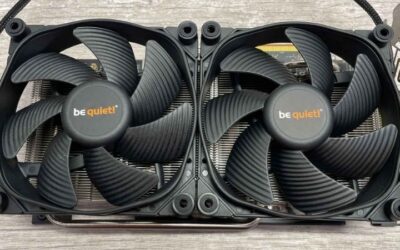
If the buzz is mechanical, the fix lies with the fans. Cleaning out dust, reseating any cable near the blades, and checking the fan spins freely resolves most mechanical buzzing without spending anything at all.
Where a fan bearing is genuinely worn, a matching replacement fan is an inexpensive and effective cure. Buyers who swapped a rattling fan consistently describe the card returning to near silence afterward, often for the price of a meal.
Matching the replacement to your exact card model is the detail that ensures a clean fit and a lasting fix. Reviews on replacement fans repeatedly stress checking the size and connector first, since a mismatched fan is the most common reason a swap disappoints.
Pros and Cons of Living With It vs Replacing
When the buzz is harmless coil whine, you face a genuine choice: live with it, or pursue a replacement. Each path has trade-offs worth weighing honestly before you act.
Living with coil whine costs nothing and risks nothing, since the noise is harmless and a frame cap usually reduces it to a minor background detail. The downside is purely comfort, as a sensitive listener in a quiet room may still find even mild whine distracting.
Replacing the card or returning it for one with less whine can deliver true silence, but coil whine varies unit to unit, so a replacement is a gamble that may whine just as much. Given that, most users find a frame cap and a little patience the more sensible route, reserving a replacement for genuinely severe cases.
Hardware and Accessories That Help
Most buzzing is harmless and free to manage, but some cases benefit from better hardware or a few inexpensive accessories. Knowing whether the supply, your fans, or the card itself is the source keeps any spending targeted on the real cause.
When a Quality Power Supply Reduces the Buzz
If the noise traces to a buzzing power supply, a quality unit is the cure. A well-reviewed power supply from a reputable maker, rated comfortably above your card’s draw, runs cleaner and quieter under the heavy loads that make cheaper units buzz.
Buyers who replaced a noisy budget unit with a solid, properly sized power supply frequently report the buzzing easing and the whole system feeling more stable and refined.
It is a fix that pays off across every component, improving reliability well beyond just silencing the noise. A clean, stable supply is one of those upgrades owners rarely regret, since it quietly protects the rest of the build too.
Tools and Accessories Worth Owning
A few simple accessories make diagnosing and managing a buzz far easier. A can of compressed air, a frame rate limiting tool, and a matching replacement fan cover nearly every cause between them.
Pairing these with a reliable USB flash drive holding clean drivers, such as a well-rated high-speed model, means you can roll back quickly if a driver update ever changes fan or power behaviour.
Together they turn a worrying buzz into a quick, confident diagnosis rather than an anxious guess about a failing card, which is exactly the peace of mind most owners are really looking for.
When a New Card Silences It for Good
If your card is old, buzzes severely, and has a genuinely worn cooler on top of the noise, a replacement may be the cleanest answer. A current-generation NVIDIA GPU brings refined power delivery and quieter cooler designs, alongside a major leap in performance, ray tracing, and DLSS support.
Reviewers upgrading from older or noisier cards frequently mention a calmer, quieter machine as a pleasant bonus on top of the performance gains. For someone who games in a quiet room, that drop in noise can be just as noticeable day to day as the extra frames.
If an upgrade was already tempting, a card that buzzes badly despite every fix is the practical push to compare current graphics cards known for refined, quiet operation, so it is worth checking today’s deals.
See More:
- GPU pink screen
- Nvidia Control Panel missing
- Nvidia Control Panel not opening
- GeForce Experience won’t open
- Nvidia app won’t install
Final Take on a GPU Making Buzzing Noise
A GPU making buzzing noise sounds alarming but is usually nothing to fear. The consistent message from user reports is that most buzzing is harmless coil whine or a simple fan issue, and a frame cap alone resolves a great many cases for free without any risk to the card.
Identify the source first, cap your frame rate to tame coil whine, and clean or replace fans for mechanical noise. Reserve a new power supply or card for genuinely severe or hardware-driven cases. Approach it in that order and a gpu making buzzing noise becomes a quick, low-cost matter rather than a reason to fear for your expensive card.
Top-Rated Picks


| Product | Brand | Rating | Reviews | Price |
|---|---|---|---|---|
| ARCTIC MX-4 (4 g) – Premium Performance Thermal Paste… | ARCTIC | ★ 4.8 | 104k | $4.99 |
| ARCTIC MX-4 (incl. Spatula, 4 g) – Premium Performanc… | ARCTIC | ★ 4.8 | 71.9k | $5.49 |
| Crucial 8GB DDR4 RAM 3200MHz (PC4-25600), Downclockab… | Crucial | ★ 4.8 | 62.8k | $74.99 |
| AMD Ryzen 5 5600X 6-core, 12-thread unlocked desktop … | — | ★ 4.8 | 30.2k | $177.60 |
| NVIDIA Shield Remote; Voice Search, Motion-Activated,… | — | ★ 4.7 | 10.6k | $25.99 |
Frequently Asked Questions
Is buzzing from my graphics card dangerous?
Electrical buzzing is usually coil whine, the audible vibration of inductors on the power delivery circuit as current switches through them. It is not a fault and does not shorten card life. It is only a problem when it is accompanied by burning smells, crashes, or visible scorch marks near the power connector, which would point to real electrical damage.
Why is the noise worse in menus and loading screens?
Uncapped frame rates in menus can push a card to thousands of frames per second, which drives extremely high switching frequency through the VRM. Capping frames to 120 or 141 with Nvidia Control Panel Max Frame Rate, RTSS, or in-game limiters dramatically reduces buzzing without hurting gameplay, and it lowers heat and power draw at the same time.
Can the power supply be the source of buzzing?
Yes. Cheaper PSUs with lower-quality chokes can whine under transient loads from modern GPUs, and the sound travels through the case. Swap-testing with a known-good, high-quality unit rated at least 750W for an RTX 4070 Ti or 5070 class card is the quickest way to identify whether the noise comes from the PSU or the card.
Does undervolting reduce buzzing?
Often significantly. Using MSI Afterburner’s curve editor to run, for example, 0.925V at 2700 MHz lowers current through the VRM, which reduces both coil vibration and temperature. Most Ada and Blackwell cards lose only one to three percent performance while dropping 40 to 70 watts, making undervolting the single most effective and free fix.
Should I return the card if it buzzes?
Manufacturers rarely accept coil whine as a defect, though some retailers will exchange within the return window. Before you go that route, try a different PSU cable, a frame cap, and an undervolt. If the buzzing changes pitch with fan speed rather than frame rate, it is a bearing or fan issue and that is a legitimate warranty claim.




Write Your Review
No reviews yet. Be the first to share your experience!