
- Top Pick: NVIDIA GeForce RTX 5080 Founders Edition
- Best Value: PNY NVIDIA GeForce RTX™ 5080 OC Triple-Fan Graphics Card
- Premium Choice: PNY NVIDIA GeForce RTX™ 5080 Triple-Fan Graphics Card
Nvidia graphics driver app options have changed, and if you own an Nvidia GPU you’ve probably noticed the shift from GeForce Experience to the newer, unified Nvidia App. But is the new app actually good, and do you even need it? This review answers both questions. Drawing on the patterns behind real user feedback — the satisfied 4 and 5-star reports and the honest 2 and 3-star complaints — it covers exactly what the app does, its standout features, its reliability, and whether it deserves a place on your PC. By the end, you’ll know if the Nvidia App is right for you.
What the Nvidia Graphics Driver App Does
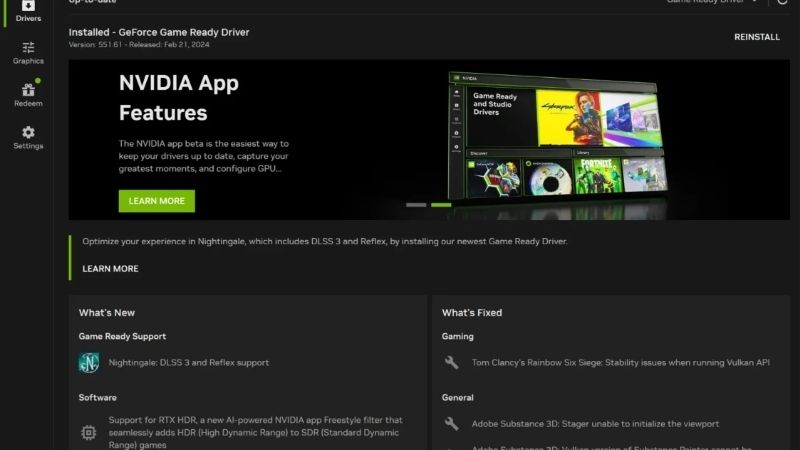
The main Nvidia graphics driver app is now the Nvidia App, a single program that combines driver management, game optimization, and system controls in one place. It replaced the older GeForce Experience and folded in features from the classic Control Panel, aiming to be a one-stop hub for everything Nvidia — which is exactly why understanding what it offers matters before you install it.
As an Amazon Associate we earn from qualifying purchases at no extra cost to you.








The Nvidia App: GeForce Experience Reborn
The Nvidia App is best understood as GeForce Experience rebuilt and modernized. It brings driver downloads, game settings, and system tuning together in a cleaner, faster interface that owners generally find far more pleasant to use.
Crucially, it removed the mandatory login that many users disliked in the old GeForce Experience. You can now manage drivers and features without signing in, which was one of the most requested changes.
This unification is the headline story. Instead of juggling separate tools, you get one modern app that handles nearly everything, which is a genuine quality-of-life improvement over the fragmented past. For years, Nvidia owners had to bounce between GeForce Experience for updates and the separate Control Panel for deeper settings, so bringing those worlds together in a single, faster app addresses one of the longest-standing complaints about Nvidia’s software.
Driver Management and Game Optimization
At its core, the app makes driver management effortless. It notifies you of new drivers, downloads them, and installs them with a click, while letting you choose between Game Ready and Studio branches to match how you use your PC.
It also offers one-click game optimization, automatically applying recommended settings for your specific hardware. For players who don’t want to tweak every setting manually, this feature delivers a good balance of visuals and performance instantly.
Together, these tools cover the essentials most people want from a driver app. Keeping your GPU current and your games well-tuned becomes a simple, low-effort routine rather than a chore. The one-click optimization is especially handy for newcomers who feel overwhelmed by graphics settings, since it applies a sensible balance tailored to their exact card and monitor without requiring any technical knowledge.
Overlay, Filters, and ShadowPlay Recording
Beyond drivers, the app packs powerful extras. An in-game overlay gives you performance stats, while ShadowPlay lets you record and stream gameplay with minimal performance impact, capturing your best moments effortlessly.
Freestyle filters let you tweak a game’s look in real time, and for RTX owners there are AI-powered enhancements to explore. These features add real value beyond simple driver updates.
For gamers, this toolkit is a big draw. Recording highlights, monitoring performance, and customizing visuals all live in one place, turning the driver app into a genuine gaming companion. ShadowPlay’s ability to capture footage with very little performance cost is a particular standout, letting you keep it running in the background and save your best moments after they happen, rather than having to remember to hit record beforehand.
What Users Say About the Nvidia App
To review the Nvidia graphics driver app fairly, it helps to weigh the praise against the complaints, since both are common. The overall reception is positive, especially for the cleaner design, with the main gripes centering on bugs and whether the app is necessary at all.
The 4-5 Star Reviews: Clean and Convenient
Satisfied users love the modernized interface and the removal of the login requirement. They praise how much snappier and cleaner it feels than the old GeForce Experience, making everyday tasks like updating drivers genuinely pleasant.
The convenience of having everything in one place earns frequent compliments. Managing drivers, optimizing games, and recording gameplay from a single app is exactly what many owners wanted for years.
ShadowPlay and the overlay are standout favorites. Being able to capture highlights with minimal performance cost is a feature owners consistently single out as a reason they keep the app installed. Many describe it as the feature that finally made them stop using third-party recording software, since it’s built in, free, and tuned specifically for Nvidia hardware to stay out of the way while you play.
The 2-3 Star Complaints: Bugs and Overhead
The critical reviews are honest about early rough edges. Some users report occasional bugs, crashes, or features not working as expected, which is common for a relatively new app still being refined.
Others question whether they need the app at all, since drivers can be installed manually without it. A few also dislike any background app running, preferring the leanest possible system.
These complaints are fair but often situational. Bugs get patched over time, and the “do I need it” question comes down to whether you value the extra features or just want the driver alone. It’s also worth noting that the app has steadily improved since its debut, so many early complaints about rough edges have already been addressed through updates, and the experience today is more polished than the initial reviews might suggest.
Pros and Cons of the Nvidia Graphics Driver App
Here’s a balanced summary of what the Nvidia graphics driver app offers, weighing its convenience against its drawbacks.
| Pros | Cons |
|---|---|
| Clean, modern, all-in-one interface | Occasional bugs as it matures |
| No mandatory login required | Runs as a background app |
| Easy driver updates and game optimization | Not strictly required to install drivers |
| ShadowPlay recording, overlay, and filters | Extra features are overkill for some |
The verdict is positive: for most gamers, the Nvidia App is a convenient, feature-rich upgrade over the old software and well worth installing. Those who want only the bare driver can skip it, but they’ll miss genuinely useful tools. For the price of a small background app, you get effortless updates, free recording, and one-click optimization, which is a trade the majority of Nvidia owners will happily make once they try it.
Getting the Most From the Nvidia App
Whether the Nvidia graphics driver app is right for you depends on how you use your PC. A little setup and an honest look at your needs will tell you whether to embrace it or stick to a leaner approach.
Installing and Setting It Up
Download the Nvidia App only from Nvidia’s official website to guarantee a clean, safe install. Once installed, it detects your GPU automatically and walks you through updating to the latest driver in minutes.
Take a moment to explore the settings, choosing the Game Ready or Studio branch and enabling the overlay and ShadowPlay if you want them. A few minutes here tailors the app to exactly how you play.
Setting it up thoughtfully from the start means it works quietly in the background, keeping you current and ready to record whenever you need it. It’s a genuinely low-maintenance tool once configured, quietly notifying you of new drivers and staying out of your way the rest of the time.
Do You Even Need the App?
The honest answer is that you don’t strictly need the app to run your GPU, since drivers can be downloaded and installed manually from Nvidia’s website. If you want the leanest possible system, that route works fine.
However, the app adds real convenience and features that many find worth it, from effortless updates to gameplay recording. For most gamers, the benefits outweigh the small footprint of a background app.
The decision comes down to your priorities. If you value features and convenience, install it; if you want minimalism, manual driver installs are a perfectly valid alternative. A good rule of thumb is that gamers who record clips, tweak settings, or like being notified of new drivers will get real value from the app, while users who treat their PC purely as a tool and rarely touch graphics settings can happily skip it.
See More:
- AMD graphics driver download
- Is Nvidia American
- Nvidia 1080 Ti drivers
- Radeon graphics driver update
- Nvidia RTX 3060 drivers
Tips and the Final Verdict
To get the best experience, keep the app updated alongside your drivers, since app updates fix bugs and add features over time. Enabling only the features you’ll actually use keeps it lightweight and unobtrusive.
If you hit a bug, a quick reinstall or waiting for the next app update usually resolves it, mirroring how driver issues are handled. The app is actively developed, so rough edges tend to get smoothed out.
For the majority of Nvidia owners, the app is a worthwhile, convenient companion. If you’re weighing whether your GPU can still take advantage of its features, you can compare current Nvidia cards through the links on this page. Newer cards unlock the most from the app’s RTX-specific enhancements and AI features, so if your current card is showing its age, an upgrade lets you enjoy everything the software has to offer.
Ultimately, the Nvidia graphics driver app — the new Nvidia App — is a clean, modern, feature-rich upgrade over the old GeForce Experience, bundling effortless driver updates, game optimization, and ShadowPlay recording into one login-free package. It’s an easy recommendation for most gamers, though minimalists can still install drivers manually. And if the app’s features have you wondering whether it’s time for a more capable card, explore the recommended Nvidia GPUs linked here to see what an upgrade would unlock.
Frequently Asked Questions
What replaced GeForce Experience?
The Nvidia App is the unified replacement, combining driver updates, game optimisation, the ShadowPlay capture overlay and the control panel settings that previously lived in a separate legacy utility. It also folds in the RTX features that were split between GeForce Experience and the Nvidia Control Panel.
Do I still need to sign in with an account?
No. Unlike GeForce Experience, the Nvidia App does not require a login for driver downloads, optimisation or recording. Signing in is only needed if you want to redeem bundled game codes or use GeForce Now integration, which is a genuine improvement for privacy-conscious users.
Is it worth installing, or should I use the driver alone?
If you only need display output, the bare driver package is enough and uses fewer resources. The app is worth it for Instant Replay, RTX HDR, per-game profiles, driver rollback and DLSS override controls, which let you force newer DLSS model versions in games that shipped with older ones.
Does the Nvidia App reduce gaming performance?
The overlay costs a small amount of performance in some titles, historically a low single-digit percentage, and there were early releases where the overlay had a measurable impact before it was patched. If you are chasing maximum frames, disable the in-game overlay and keep the app for driver management only.
How do I fix the app failing to detect my GPU or install drivers?
Confirm the Nvidia Display Container and Telemetry services are running, check that the card appears in Device Manager without a warning icon, and retry with antivirus temporarily paused since installers are sometimes blocked. If it still fails, run Display Driver Uninstaller in Safe Mode and install the standalone driver package first.



Write Your Review
No reviews yet. Be the first to share your experience!