
- Top Pick: GPU Support Bracket, GPU Sag Graphics Card Anti Sag Bracket Aluminum Magnet GPU Support Stand 0.6-7.5inch
- Best Value: GPU Support Bracket – Duty Adjustable GPU Anti Sag Holder Aluminum (Black) | Gpu Support Bracket, Gpu Stand Support,Graphics Card GPU Support Bracket, Adjustable Anti-Sag Stand
- Premium Choice: Graphics Card GPU Brace Support, Video Card Sag Holder Bracket, GPU Stand (L, 74-120mm)
Searching for a gpu sag fix usually happens about ten minutes after you first notice your card drooping in its slot, and the internet is very good at making that a stressful ten minutes. So here is the calm version first: sag is real, it is mostly cosmetic, and the genuine risks are narrower and more specific than the panic suggests. This review covers what sag actually damages, what it does not, which support types work and which are theatre, and how to pick the right one for your card. It costs under $15 and five minutes. It just does not deserve the anxiety.
What GPU Sag Actually Damages – and What It Does Not
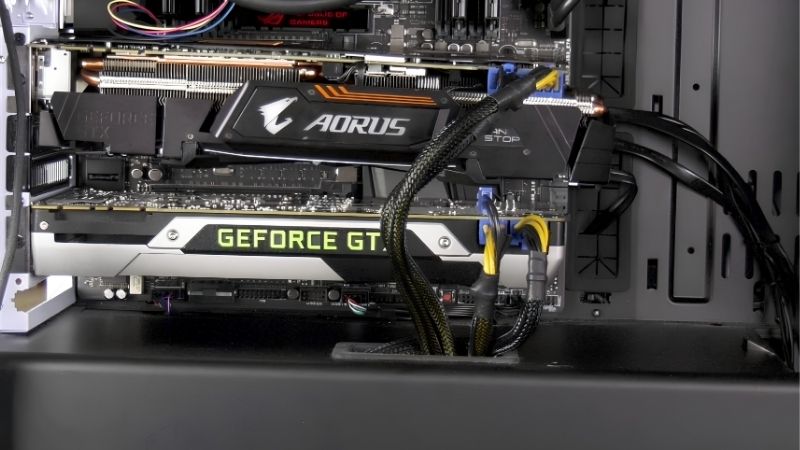
Start with the honest position, because most content on this topic sells fear before it sells a bracket. Modern graphics cards are heavy – a 300W triple-fan card can weigh 1.5-2kg, hanging off a PCIe slot and two screws at the bracket. Gravity does the rest. The question is not whether it sags. It is whether the sag is doing harm, and the answer is: usually not, occasionally yes, and the difference is measurable.
The Real Risks, Ranked Honestly
Three things can genuinely go wrong, and they are worth knowing in order of likelihood rather than in order of drama.
PCB flex is the first and the most legitimate. The circuit board bending puts stress on solder joints – particularly around the GPU die and the VRM components. This is a slow, cumulative problem measured in years rather than months, and it is worse on cards that are heavy, long, and cooled by a stiff heatsink that resists the bend unevenly. It is real. It is also not going to kill your card next Tuesday.
Connector strain is the second and the more urgent one. A sagging card pulls on its power cable at an angle, and on cards using the 16-pin 12V-2×6 connector that matters considerably more than it did with 8-pin cables. The 12V-2×6 needs to be fully seated and ideally not under lateral tension – and partial seating combined with cable strain is the mechanism behind nearly every reported melted connector. If your card uses 16-pin and it sags, this is the reason to fix it, not the aesthetics.
PCIe slot damage is the third and it is largely mythical. Slot retention clips break occasionally, and slots crack in genuinely extreme cases – usually during shipping with the card installed, not during normal use. If your card sags 3-5mm, the slot is fine. People worry about this most and it happens least.
When Sag Is Genuinely Worth Fixing
Not every drooping card needs intervention, and buying a bracket for a card that does not need one is a fine way to spend $12 on peace of mind. Here is the honest threshold.
Fix it if your card uses a 16-pin 12V-2×6 connector. That is the single strongest reason on this page. The connector is less tolerant of lateral strain than 8-pin cables, and removing that strain is cheap insurance against the one failure mode that actually destroys hardware.
Fix it if the sag exceeds roughly 5mm at the far end of the card, or if you can see visible bend in the PCB itself rather than just a droop at the end. Measure it: hold a ruler flush against the top edge of the card near the bracket and check the gap at the far end. Under 3mm is normal on almost every heavy card. Over 5mm is worth addressing.
Fix it if you move the machine – transport is when slots and solder joints actually break, and a supported card survives a car journey that an unsupported one might not. And fix it if you have a vertical GPU mount, which changes the stress direction entirely and often makes support more rather than less necessary.
Do not bother if your card is a compact dual-fan model under about 1kg with a barely visible droop and 8-pin connectors. It is fine. It has been fine for years. Go and play something.
The Support Types Compared
Four approaches exist and they are not equally good.
| Type | Cost | How it works | Verdict |
|---|---|---|---|
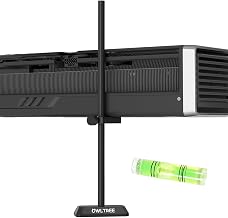
| Adjustable support bracket | $8-15 | Telescoping post from PSU shroud to card underside | The default – works, cheap, adjustable |
| Magnetic support stand | $10-18 | Magnet base on the shroud, adjustable arm | Good if your shroud is steel, useless if aluminium |
| Anti-sag brace bar | $12-25 | Spans PCIe slots, braces card from above | Cleanest look, needs a free slot |
| Fishing line / string | ~$0 | Tied from card to case roof | Genuinely works, looks terrible |
| Vertical GPU mount | $25-60 | Rotates card 90 degrees | Eliminates sag but can worsen thermals |
The adjustable bracket is the correct default for almost everyone and the reason is boring: it is cheap, it fits nearly every case, and it adjusts. The magnetic version is only worth it if you have confirmed your PSU shroud is steel – a surprising number of cases use aluminium or plastic, and the magnet will simply not hold. The fishing line method is genuinely effective and genuinely ugly, and if nobody sees inside your case, it is free.
How to Install It Properly
The installation is the part people rush and it is where the small mistakes live. Five minutes done carefully beats two minutes done badly, because an over-tightened support does more harm than sag ever would.
The Step-by-Step
Power the machine off fully and unplug it. Not sleep – off. You will be touching components near live rails.
Place the support under the card near the far end, roughly where the PCB stops and the shroud overhangs. The far end is where the leverage is greatest, and it is where the support does the most good. Extend the post until it just touches the underside of the card.
Then stop. This is the mistake everyone makes: do not lift the card back to level. Raise it only until the sag is reduced, not eliminated. A card pushed up past its natural resting position is under reverse stress – you have not fixed the PCB flex, you have inverted it. Support, do not correct.
Check that the support is not touching any components on the card underside – it should contact the shroud or the backplate, never exposed PCB or capacitors. And check that it is not blocking airflow into the card’s fans, which is a real risk with wide brackets in tight cases.
The Mistake That Causes Real Damage
Over-correction deserves its own section because it is the one way a sag fix actively hurts you, and it is common.
The instinct is to make the card look level, and level looks correct. But the card was mounted level and then settled – the PCB found its natural position under load. Forcing it back up bends it the other way, which is exactly the stress you were trying to eliminate, applied in the opposite direction.
The rule: reduce sag by roughly half, not to zero. If the card sagged 6mm, support it at 3mm. It should still visibly droop slightly. That is correct. A perfectly level heavy card in an adjustable bracket is a card someone cranked too far.
Check it again after a week. Cases flex, PSU shrouds compress slightly, and a support that was correct on day one is occasionally pressing too hard by day seven. Thirty seconds with the side panel off.
Pros and Cons of a GPU Sag Fix
| What it genuinely does | Where it is oversold |
|---|---|
| Removes lateral strain from the 12V-2×6 connector – the single failure mode that actually destroys cards | PCIe slot damage from normal use is largely mythical; the slot is almost never the victim |
| Reduces cumulative PCB flex and solder joint stress over years of ownership | PCB flex is a multi-year concern, not an emergency – nobody’s card dies next week from 4mm of droop |
| Genuinely protects the card during transport, which is when breakage actually happens | A compact card under 1kg with 8-pin cables does not need one at all |
| Costs $8-15 and takes five minutes – trivial insurance on a card worth hundreds | Over-tightening inverts the stress and is worse than the original sag |
| Looks better, which is a legitimate reason on its own in a windowed case | Does nothing whatsoever for temperature, noise, or performance |
The honest summary: it is cheap, it takes five minutes, and it addresses one genuine risk and one slow one. It is not urgent for most cards and it is not optional for heavy cards on 16-pin connectors. That distinction is the entire article.
Why Protecting the Card You Own Matters More in 2026
There is a reason sag supports have gone from an enthusiast curiosity to a routine purchase, and it is not that cards suddenly got heavier – though they did. It is that replacing one has become genuinely painful.
GPU Prices Have Flattened but Have Not Fallen
The memory-driven surge through late 2025 lifted component and laptop pricing broadly, and graphics cards were not exempt. The genuinely positive development is narrow but real: the steep climb seen at the end of 2025 has stopped, and manufacturers including Framework have reported a stretch of relative stability – while still warning openly that further volatility remains possible.
Read the distinction carefully. Flat is not falling. Nothing suggests the card you would replace yours with will be meaningfully cheaper in three months. The panic-buy urgency is gone; the reward for waiting never arrived.
Which makes the maths on this page almost absurd in your favour. A $12 bracket protecting a $600 card in a market where that $600 card is not getting cheaper is not a purchase you need to think about. It is the highest return-on-cost item in the entire hobby, and it takes five minutes.
New Memory Capacity Does Not Arrive Until 2027 or 2028
Genuine relief is being built. OEMs can now source DDR5 from Chinese suppliers such as CXMT, and Micron is constructing two fabrication plants in Idaho – funded, structural additions to global supply rather than speculation.
The obstacle is the calendar. Those Idaho plants do not come online until 2027-2028. Fabrication capacity takes years to stand up, and the whole 2026 cycle passes before any of it reaches a shelf.
So the strategy writes itself: the card in your machine right now is an asset whose replacement cost has risen and is not coming back down for years. Support it, keep it cool, seat its connector properly, and stop it flexing. Those are the things that decide whether it reaches 2029.
What Else to Buy While You Are In There
If the side panel is already off, two other things are worth doing in the same session and both cost less than the bracket.
Reseat the power connector. This is the free one and it matters more than the sag itself on 16-pin cards. Push it until it clicks, tug it gently, look at it. Partial seating is the mechanism behind nearly every melted connector, and a sagging card makes partial seating more likely – which is why these two problems travel together.
Check your intake airflow while you are looking. A heavy card is usually a hot card, and a 300W GPU in a case with one intake fan throttles regardless of how level it sits.
See More:
- A fan curve msi afterburner
- amd radeon rx 9070 vs rtx 5070
- 5060 ti vs 5070 benchmark
- rx 6600 vs rtx 3050
- 2060 vs 3060
Final Verdict
A gpu sag fix is worth doing, worth about $12, and not worth losing sleep over – and the internet gets all three of those slightly wrong.
Measure first. Under 3mm of droop on a compact card with 8-pin cables is normal and needs nothing. Over 5mm, or any card on a 16-pin 12V-2×6 connector, or any machine you transport – fix it. Buy an adjustable bracket, place it near the far end, and raise the card by about half its sag rather than back to level. Over-correction is the one way this goes wrong.
And keep the risks in proportion. Your PCIe slot is almost certainly fine. The PCB flex is a multi-year concern, not a crisis. The connector strain is the one that genuinely destroys hardware, and it is the reason to spend the five minutes.
With replacement cards priced the way they are in 2026 and no relief arriving before 2027, a $12 bracket and a properly seated cable are the cheapest protection available for the most expensive part in your machine. Do it once, check it after a week, and forget about it.
Frequently Asked Questions
Is GPU sag actually harmful or just ugly?
Mild sag of a few millimetres is cosmetic and harms nothing. Severe, sustained sag is a genuine concern because it places continuous shear stress on the PCIe slot solder joints and can flex the graphics card PCB itself, which over years may crack solder around the GPU package or memory modules. Modern triple-slot cards weighing over two kilograms make this far more relevant.
What is the most effective way to support a heavy card?
An adjustable support bracket that sits on the power supply shroud and props the far end of the card is the simplest and most reliable solution, and many cases now include one. Alternatives include a support post screwed into a case standoff, or a tensioned line anchored to the case roof. The key is supporting near the card outer end where leverage is greatest.
Does mounting the GPU vertically eliminate sag?
Yes, vertical mounting removes the cantilever load entirely because the card weight runs along the slot rather than perpendicular to it. The trade-off is airflow: a vertically mounted card sitting close to a glass side panel often runs several degrees hotter because its fans cannot draw fresh air. You also need a high quality PCIe 4.0 or 5.0 rated riser cable.
Do the anti-sag brackets included with cards actually work?
The small L-shaped brackets some manufacturers bundle help modestly by bracing against an adjacent expansion slot, but they often support the card too close to the bracket end where the leverage is lowest. A support that reaches the far end of the card is considerably more effective. Either is better than nothing on a card weighing more than about 1.5 kilograms.
What can I safely skip?
You can skip elaborate custom braces, decorative RGB support arms sold at premium prices, and any solution requiring you to modify the card itself. You can also skip support entirely for lightweight two-slot cards under roughly one kilogram, which barely deflect. Do not skip support on a flagship triple-slot card, especially in a system that gets transported.
As an Amazon Associate we earn from qualifying purchases at no extra cost to you.


Ready to decide? Our #1 pick for 2026 is the Adjustable support bracket.
Live price & availability on Amazon.





Write Your Review
No reviews yet. Be the first to share your experience!