
- Top Pick: Thermalright Peerless Assassin 120 SE CPU Cooler, 6 Heat Pipes AGHP Technology, Dual 120mm PWM Fans, 1550RPM Speed, for AMD:AM4 AM5/Intel LGA 1700/1150/1151/1200/1851,PC Cooler
- Best Value: Thermalright TL-C12C-S X3 CPU Fan 120mm ARGB Case Cooler Fan, 4pin PWM Silent Computer Fan wth S-FDB Bearing Included, up to 1550RPM Cooling Fan(3 Quantities)
- Premium Choice: Cooler Master Hyper 212 Black CPU Air Cooler, 4 Heat Pipes, PWM Fan
Best CPU fans for gaming are not necessarily the ones that win cooling benchmarks, because gaming loads behave differently from the sustained all-core tests reviewers run. This guide covers what a long play session actually demands, how the graphics card changes the picture, and which fans suit that pattern.
As an Amazon Associate we earn from qualifying purchases at no extra cost to you.








As an Amazon Associate we earn from qualifying purchases at no extra cost to you.
By Ryan Cole
How to Choose the Best CPU Fans for Gaming
Choosing the best CPU fans for gaming means planning a whole airflow setup rather than buying one impressive fan. Four considerations cover what matters during a three-hour session.
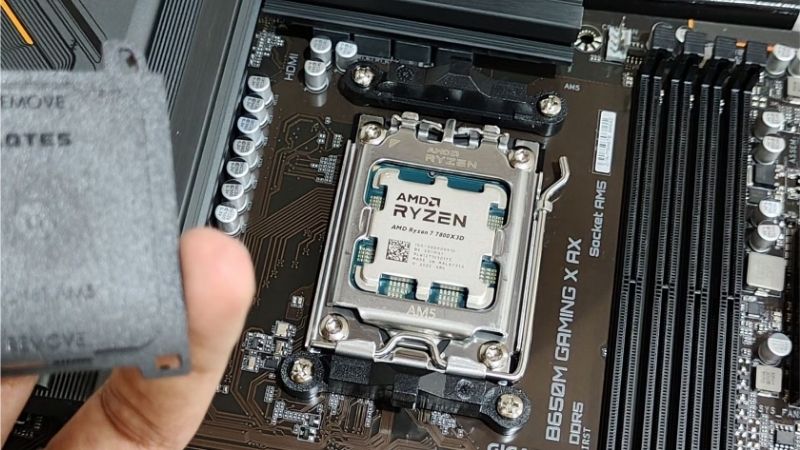
Gaming Loads Are Not Benchmark Loads
A game engages a handful of threads heavily rather than loading every core, so processor power draw during play is typically well below the figures a rendering benchmark produces. That lowers the cooling demand considerably.
What gaming does instead is sustain a moderate load for hours while the graphics card dumps two or three hundred watts into the same case. That second source is usually the larger contributor to rising temperatures.
The practical consequence is that case airflow matters at least as much as the fan on the cooler. A processor sitting in air warmed by the graphics card will run hot regardless of how good its own fan is.
Fan Curves and Hysteresis
Constantly changing fan speed draws far more attention than a steady one at the same volume. Setting a flatter curve that holds fans at moderate speed avoids the ramping that becomes distracting during quiet moments in a game.
Most boards offer a step-up and step-down delay, sometimes called hysteresis. Setting it to several seconds prevents fans reacting to brief spikes such as shader compilation, which is where most audible ramping comes from.
Mount Positions and How Many Fans
Three filtered intakes at the front with one or two exhausts at the rear and top is the reliable baseline. More fans running slowly is quieter than fewer running hard to move the same volume of air.
On the cooler itself, a second fan in pull configuration gains one to three degrees on a dual-tower design. On a single tower the benefit is smaller and often not worth the additional noise during long sessions.
Static Pressure Where It Is Needed
Fans on the cooler or a radiator need static pressure to push through fin stacks, while case panel fans mainly need volume. Buying one high-pressure model for everything is simpler and costs little in either role.
Front intakes sit behind dust filters, which create resistance too. That is why a moderately high-pressure fan usually outperforms a pure airflow design even in a position that looks unrestricted.
Keep those filters clean as part of normal maintenance. A clogged front filter costs more airflow than the difference between any two fans on this list, and it happens gradually enough that most people never notice.
Top Picks: Best CPU Fans for Gaming Setups
These six cover cooler mounts and case positions across several budgets, chosen for behaviour during long sessions rather than peak figures. Specifications are manufacturer-rated at maximum speed as of August 2026.
| Fan | Size | Max Speed | Rated Noise | Best Position |
|---|---|---|---|---|
| Arctic P12 PWM PST | 120mm | 1800 RPM | 0.3 sone | Anywhere, value sets |
| Noctua NF-A12x25 PWM | 120mm | 2000 RPM | 22.6 dBA | Cooler and radiator |
| be quiet! Silent Wings 4 140mm | 140mm | 1600 RPM | Very low | Case intake and exhaust |
| Lian Li UNI FAN SL-Infinity | 120mm | 1900 RPM | 29 dBA | Visible case mounts |
| Phanteks T30-120 | 120mm | 3000 RPM | Mode dependent | Thick radiators |
| Thermalright TL-C12C-S | 120mm | 1500 RPM | Low | Budget case fills |
Arctic P12 PWM PST – Best Value for a Whole Build
Rated at 0.3 sone with 2.2 mmH2O of static pressure, the P12 is the best cpu fans for gaming choice on a budget, working on a cooler, a radiator or a case panel, and the PST connector chains several fans from one header. A five-pack fills an entire case cheaply.
Build quality sits below the premium tier and motor hum becomes audible at higher duty cycles, which is exactly when a long gaming session pushes them. The two year warranty is also short against the premium alternatives.
Noctua NF-A12x25 PWM – Best on the Cooler
The very tight tip clearance produces strong pressure while staying quiet at moderate speeds, making it the safest choice for the fan doing the actual work on the heatsink. The SSO2 bearing carries a six year warranty.
Cost is the obvious barrier, since equipping a whole case with these approaches the price of a component upgrade. The brown and beige colour scheme also has no lighting option at the standard price.
be quiet! Silent Wings 4 140mm – Best Case Fan for Long Sessions
A 140mm fan moves the same air as a 120mm at lower speed, and speed is what you hear. On front intake and rear exhaust duty this keeps a gaming build genuinely quiet across a long evening.
Static pressure is lower than dedicated cooler fans, so it is not the right choice for a thick radiator. It also costs noticeably more per unit than the value options, which adds up across four or five mounts.
Lian Li UNI FAN SL-Infinity – Best Visible Option
The daisy-chain design removes most of the cable clutter from a six-fan build, and at 2.54 mmH2O it performs well enough to sit on a radiator rather than being purely decorative. Lighting looks strong through a glass panel.
It requires the Lian Li controller and its software running in the background. The plastic frame also produces more audible resonance at high RPM than the premium non-lit competition.
Phanteks T30-120 – Best for Restrictive Builds
The 30mm depth generates static pressure no standard fan matches, and three physical modes let you cap it for quiet operation or unlock it when a thick radiator demands more.
Thickness limits where it fits, fouling tall memory on many coolers and side panels in compact cases. At full speed it is loud enough that it belongs on a radiator rather than anywhere near your ear.
Thermalright TL-C12C-S – Cheapest Way to Fill a Case
When you need three or four fans and the budget belongs to the graphics card, this moves adequate air in open case positions for very little money per unit.
Static pressure is modest, so keep it away from dense heatsinks and thick radiators. Bearing noise also appears sooner than on premium models, particularly in horizontal top-mount positions.
Airflow Upgrades in the 2026 Market
Fans sit in one of the few categories still behaving normally, which shapes when to buy the best cpu fans for gaming and how to stage the upgrade.
Cheap Upgrades Still Deliver Real Gains
With graphics pricing elevated and no new architectures arriving before CES in January 2027, more gamers are extending the life of existing systems. Replacing tired fans is among the few changes producing an immediate, obvious result.
Old fans develop bearing noise long before they fail, and a set of replacements often transforms how a three-year-old machine sounds during a long session. It costs a fraction of any performance upgrade.
Cooling Parts Still Discount Properly
While memory and storage climbed steeply through 2026, fans, coolers and cases stayed close to normal pricing with genuine seasonal reductions and manufacturer increases in the single digits.
That makes November a legitimate time to buy a multi-pack, unlike storage where sale stock carries elevated contract costs. If you are building over several months, this is a component worth timing to a sale.
The Budget Tier Is Thinning
Manufacturers have shifted focus toward mid and high-tier products as entry-level sales declined, and promotional pricing tightened in early 2026. Some of the cheapest fan lines have quietly left listings.
That is not urgent, but it does argue for buying a multi-pack rather than single units if a specific budget model suits your case, since finding the same model again in two years is less certain than it once was.
Frequently Asked Questions
The best cpu fans for gaming question usually arrives with these, from gamers whose systems get progressively louder over a long session.
Do the best cpu fans for gaming need to be high static pressure?
On the cooler and any radiator, yes, because they push through dense fin stacks. Case panel positions need volume more than pressure, though filters create enough resistance that a moderately high-pressure fan still performs well there.
Why does my PC get louder the longer I play?
Case air warms up over a session as the graphics card sheds heat into it, so fans ramp to compensate. Improving case airflow usually helps more than upgrading the cooler fan alone, since the intake air itself is the problem.
How many fans should a gaming build have?
Three intakes and one or two exhausts is a reliable baseline. Beyond about six, returns diminish quickly and noise rises faster than temperatures fall. Running more fans slowly beats running fewer at high speed.
Is a second fan on the CPU cooler worth it?
On a dual-tower cooler it typically gains one to three degrees and is worth doing. On a single tower the benefit is smaller, and during gaming loads specifically the processor rarely draws enough power for it to matter.
See More:
- Best 4TB NVMe SSD
- Best thermal grizzly paste
- Best thermal paste for 7800X3D
- Best CPU case fans
- Best motherboard for gaming computer
Final Thoughts
The best CPU fans for gaming are the ones that stay steady and quiet through a long session rather than the ones topping a benchmark chart. The NF-A12x25 is the strongest choice on the cooler itself, the Arctic P12 covers a whole build for very little, and 140mm fans on the case panels keep everything quieter. Pair whichever you choose with a flat fan curve and a few seconds of hysteresis, and remember that cooling parts are still discounting normally through late 2026.











Write Your Review
No reviews yet. Be the first to share your experience!