
- Top Pick: CORSAIR RS120 ARGB 120mm PWM Fans – Daisy-Chain Connection – Low-Noise – Magnetic Dome Bearing – Triple Pack – Black
- Best Value: Thermalright 5 Pack TL-C12C-S CPU Fan 120mm ARGB Case Cooler Fan, 4pin PWM Silent Computer Fan with S-FDB Bearing Included, up to 1550RPM Cooling Fan(5 Quantities)
- Premium Choice: Thermalright TL-C12C-S X3 CPU Fan 120mm ARGB Case Cooler Fan, 4pin PWM Silent Computer Fan wth S-FDB Bearing Included, up to 1550RPM Cooling Fan(3 Quantities)
Best RGB case fans are the ones that improve temperatures and tidy up the wiring behind the motherboard tray, not just the ones that photograph well. These six 120 mm and 140 mm options cover intake, exhaust and radiator duty, with cabling and noise trade-offs stated plainly.
As an Amazon Associate we earn from qualifying purchases at no extra cost to you.



As an Amazon Associate we earn from qualifying purchases at no extra cost to you.
By Ryan Cole, PC hardware writer at NVIDIA Review.
How to Choose the Best RGB Case Fans
Case fans are cheap individually and expensive in sets of six, so choosing well matters. Four decisions determine whether the best RGB case fans for your build actually improve temperatures or simply add twelve more cables behind the tray.
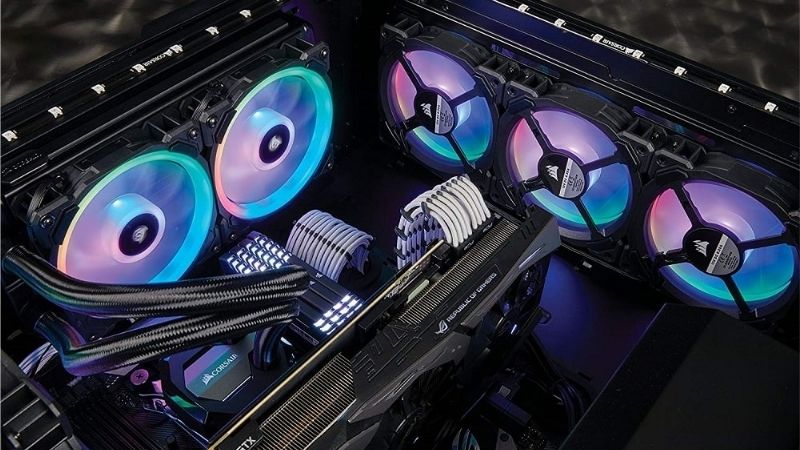
Decide Between 120 mm and 140 mm
A 140 mm fan moves comparable air to a 120 mm at lower rotational speed, which usually means less noise for the same cooling. Where a case supports both, 140 mm is generally the quieter choice for front intake and top exhaust positions.
The catch is fitment. Many cases only take 120 mm in the rear exhaust position, and radiator mounting is far more standardised around 120 mm sizes, so a mixed set is common rather than a compromise.
Match the Fan Type to Its Position
Front intakes pull air through dust filters and panel mesh, so static pressure in mmH₂O matters there. Rear and top exhaust positions face little resistance, where a higher CFM airflow design does the job perfectly well.
Radiators are the strictest case. Fin density creates real back pressure, so a fan with a high CFM figure but weak static pressure will disappoint, regardless of how good it looks mounted on the front of an AIO.
Plan the Cabling Before You Buy
A conventional ARGB fan needs two cables each: 4-pin PWM and 3-pin 5V ARGB. With six fans that is twelve connections, which quickly exceeds available headers and requires splitters or a dedicated controller hub.
Daisy-chain ecosystems address this by combining power, speed control and lighting into one interconnect. The tidiness is real, but you are committing to one manufacturer’s controller and paying a premium for the convenience.
Check Bearings, Warranty and Mounting Hardware
Bearing type is the best predictor of how a fan sounds after two years. Fluid dynamic and rifle bearings age better than sleeve designs, particularly in horizontal top-mounted positions where gravity works against cheaper bearings.
Small details matter in a set of six. Rubber corner pads reduce transmitted vibration noticeably, and included long screws for radiator mounting save a separate order when you decide to move fans onto an AIO later.
Top Picks: Best RGB Case Fans for 2026 Builds
The best RGB case fans depend on position and how much cabling you will tolerate, so these six span daisy-chain systems, quiet 140 mm options and value multipacks. Specifications come from manufacturer sheets; noise ratings are not comparable between brands.
| Fan | Size | Lighting | Cabling | Best Position |
|---|---|---|---|---|
| Lian Li Uni Fan SL120 V2 | 120 mm | Proprietary | Daisy-chain | Any, tidy builds |
| Corsair iCUE Link RX140 RGB | 140 mm | iCUE Link | Single hub cable | Front intake |
| Arctic P14 PWM PST A-RGB | 140 mm | 3-pin 5V ARGB | PWM daisy-chain | Intake and filters |
| NZXT F120 RGB Core | 120 mm | 3-pin 5V ARGB | Standard | Exhaust and mid-build |
| Cooler Master MF120 Halo² | 120 mm | 3-pin 5V ARGB | Standard | Radiators |
| Thermalright TL-K12 ARGB | 120 mm | 3-pin 5V ARGB | Standard | Budget multipacks |
Lian Li Uni Fan SL120 V2
The V2 remains the reference for tidy builds. Fans interlock so a bank of three needs only one cable back to the controller, and the second-generation design improved the connector reliability that occasionally troubled early units.
Performance is solid enough for radiator use as well as case positions. The drawbacks are ecosystem lock-in, a controller that needs mounting somewhere, and a price per fan well above conventional ARGB models when buying six.
Corsair iCUE Link RX140 RGB
The 140 mm iCUE Link fan is the pick for quiet front intake in a case that supports the larger size. A single cable runs from the hub to the first fan and the rest chain onward, which is genuinely transformative for cable management.
Larger blades let it move air at lower speeds. The reservations are cost, the required hub, and dependence on iCUE software for full lighting and curve control, which not everyone wants running in the background permanently.
Arctic P14 PWM PST A-RGB
Arctic’s 140 mm P-series prioritises static pressure, making it well suited to intakes behind dust filters. It runs from a low minimum speed so it idles quietly, and PST chaining keeps motherboard fan headers free.
Price per fan is among the lowest here for a genuinely capable design. The compromise is the lighting, which is simpler in diffusion than premium fans, and the separate ARGB cable that still needs routing for each unit.
NZXT F120 RGB Core
The Core series is NZXT’s more affordable RGB fan, and it strikes a reasonable balance. Airflow is adequate for exhaust and general case positions, the frame is clean, and lighting diffusion is better than most fans at this price.
It works well when you want consistent appearance without an ecosystem commitment. The limitation is static pressure, which is modest, so it is not the fan to mount on a dense 360 mm radiator expecting strong results.
Cooler Master MF120 Halo²
The Halo² is built around dual light loops and a frame designed to sit close to neighbouring fans. More usefully, its blade design targets static pressure, which makes it a legitimate radiator fan rather than a decorative one.
It is widely available in retail, which matters when you need a matching replacement. The drawbacks are noise at higher RPM, where it becomes audible sooner than the be quiet! or Arctic options, and standard two-cable wiring per fan.
Thermalright TL-K12 ARGB
Thermalright continues to undercut everyone while delivering acceptable performance. Sold in multipacks, these fans provide reasonable airflow and functional lighting for builders who need to fill six or seven positions on a strict budget.
For a first build the value is difficult to argue with. The honest caveats are bearing noise that becomes noticeable above roughly two-thirds speed and lighting that looks plainer than premium fans through a tempered glass panel.
Warranty length is shorter than the premium options here, which is worth factoring in across six fans. If one fails outside coverage, replacing a single unit from a multipack is cheap enough that it rarely becomes a real problem.
Why Fan Upgrades Make Sense Right Now
Two market conditions make cooling one of the more rational places to spend a modest upgrade budget this year, particularly if a graphics card purchase is out of reach.
Cooling Is the Upgrade That Still Pays Off
With graphics card pricing elevated, adding case fans is one of the few changes that improves a system without a large outlay. Better intake and exhaust lower component temperatures and reduce how aggressively everything else has to spin.
The gain is largest in cases with restrictive front panels or a single stock exhaust fan. Two decent intakes frequently drop graphics card temperatures enough that the card’s own fans audibly back off under load.
Fans and Cases Are Still Real Discount Categories
The usual advice to wait for seasonal sales does not apply to memory, storage or prebuilt machines this year, since those are assembled from components bought at elevated contract prices. Cooling hardware is not in that position.
Fans, coolers, cases and power supplies remain categories where genuine discounts still appear during sale events. If a fan upgrade is not urgent, this is one of the few places where holding out for a sale is still sensible.
Budget Options Have Crept Upward in Price
Cooling hardware has absorbed some broader cost pressure, with cooler pricing up roughly 6 to 8 percent and promotional pricing policies withdrawn in February 2026. Entry-level multipacks feel that more than premium ranges do.
That is a reason to compare price per fan across pack sizes rather than a reason to rush. Buying a six-pack is usually better value than three separate two-packs, and the difference has grown as budget pricing tightened.
Frequently Asked Questions
These are the questions people ask most often when replacing a full set of case fans rather than a single unit.
Should intakes outnumber exhaust fans?
Slight positive pressure, with a little more intake than exhaust, helps keep dust out because air enters mainly through filtered openings. The difference in temperatures between mild positive and negative pressure is small in practice.
Do the best RGB case fans need a controller?
Only if your motherboard lacks enough headers or you choose a daisy-chain ecosystem. Standard ARGB fans work directly from board headers, though six fans usually requires a splitter or hub to distribute both PWM and lighting signals.
Can I use case fans on an AIO radiator?
Yes, but check static pressure first. Airflow-oriented fans lose effectiveness against dense radiator fins, so a pressure-focused model such as the Arctic P-series or Halo² is a better match for that specific position.
Is it worth replacing the fans a case ships with?
Often, particularly on budget cases where stock fans use sleeve bearings and lack PWM control. On cases from quality manufacturers the included fans are usually decent, and replacing them is a cosmetic decision rather than a thermal one.
See More:
- Best MSI motherboard
- Best motherboard processor combo for gaming
- Best B550 motherboard
- Best CPU for streaming
- What is the best AM4 CPU for gaming
Final Thoughts
The best RGB case fans for your build depend on position, case support and how much cabling you are willing to manage. Daisy-chain systems from Lian Li and Corsair are the tidy premium answer, Arctic covers filtered intakes at low cost, and Thermalright remains the sensible way to fill a case on a tight budget.











Write Your Review
No reviews yet. Be the first to share your experience!