
- Top Pick: msi Gaming GeForce RTX 3060 Ventus 2X 12G OC V1 Graphics Card – 15 Gbps GDRR6 Boost Clock: 1807 MHz 192-Bit HDMI/DP PCIe 4 Torx Twin Fan Ampere
- Best Value: GIGABYTE GeForce RTX 3060 WINDFORCE OC 12G (rev. 2.0) Graphics Card, 2X WINDFORCE Fans, 12GB 192-bit GDDR6, GV-N3060WF2OC-12GD Rev2.0 Video Card
- Premium Choice: NVIDIA GeForce RTX 3060 Ti Founders Edition 8GB GDDR6 PCI Express 4.0 Graphics Card (Renewed)


radeon rx 7600 vs rtx 3060 is one of the few comparisons where the newer, faster card might be the wrong buy – and that inversion is the entire reason this question keeps getting asked. The RX 7600 is a generation newer and wins on frames. The RTX 3060 is older, slower, and carries 50% more memory. In 2026, that trade is genuinely close, and which side you land on depends on one thing: whether 8GB is still enough for what you play. This article answers that with numbers rather than opinion, then tells you honestly which card survives the next three years.
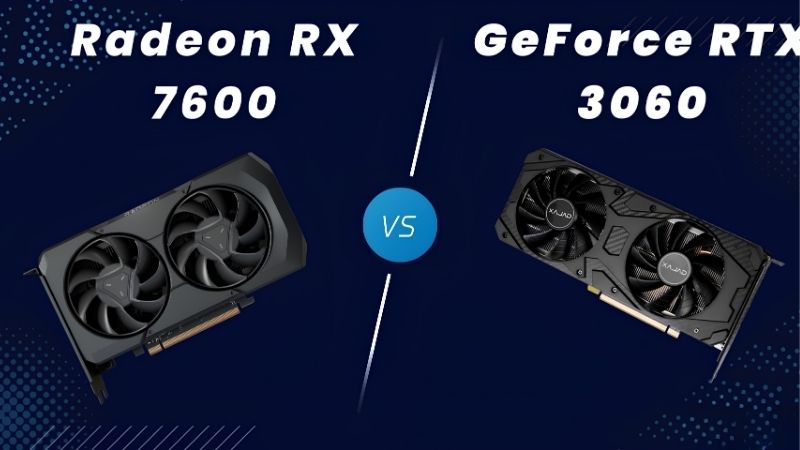
Quick Verdict: RX 7600 vs RTX 3060 for 1080p
The RX 7600 is roughly 8-12% faster at 1080p and costs less. The RTX 3060 has 12GB against the 7600’s 8GB. For pure 1080p at medium-high settings today, the 7600 is the better buy. For 1080p at high textures, any 1440p aspiration, or a card you intend to keep past 2027, the 3060’s memory buffer wins – and it wins in the way that actually matters, by preventing stutter rather than by adding frames. If you have to pick blind, pick the 12GB card.
As an Amazon Associate we earn from qualifying purchases at no extra cost to you.








Where the RX 7600 Genuinely Wins
Being a generation newer buys real things and they should not be dismissed just because VRAM dominates the conversation.
Raw performance first. At 1080p high the 7600 typically delivers roughly 75-90 fps in modern AAA titles where the 3060 manages 65-85. That is an 8-12% lead – modest, but consistent, and it comes at a lower price which makes the frames-per-dollar gap wider than the frames gap.
Efficiency second, and this one is underrated. The 7600 draws roughly 165W against the 3060’s 170W while being faster, and it runs comfortably on a 450-500W supply with a single 8-pin. It is also physically smaller in most designs, which matters if you are upgrading a prebuilt.
Features third. The 7600 supports the newer FSR revisions and AV1 encoding, which the 3060 does not – AV1 matters if you stream to platforms that support it, and the newer FSR versions are noticeably better than what the 3060 could use through AMD’s older releases. Being a generation newer also means longer driver support ahead of it, which on a budget card you intend to keep is worth something real.
Why 12GB Beats 8GB Anyway
Here is the argument that overturns everything above, and it rests on how the two cards fail rather than how fast they run.
A card short on shader power runs slower. That is annoying, predictable, and tunable – you drop a setting and move on. A card short on VRAM does something different and worse: it hitches, streams textures in late, and its 1% lows collapse while the average frame rate stays deceptively healthy. You cannot tune your way out of it except by dropping textures, which is the single setting people most notice.
At 1080p high in 2026, several current titles brush against 8GB. Turn on ray tracing – even lightly – and they pass it. At 1440p, 8GB is regularly insufficient at high textures. The 7600’s 8% frame advantage disappears entirely in those scenarios, replaced by stutter the 3060 simply does not exhibit.
The 3060’s 12GB was an accident of its 192-bit bus configuration and it looked overspecced at launch. It looks prescient now. The card carries more memory than an RTX 5070 selling new today for several times the price – which tells you how badly the industry misjudged where this was going.
The practical test costs nothing. Open MSI Afterburner, enable VRAM usage in the monitoring tab, and play your most demanding game for twenty minutes. If you are sitting near 7.5GB, the 7600 will stutter where the 3060 will not. That single data point is worth more than every benchmark on this page.
Full Spec and Performance Table
The whole comparison in one scan.
| Specification | AMD RX 7600 | Nvidia RTX 3060 12GB |
|---|---|---|
| Typical price | $230-269 | $160-210 used |
| VRAM | 8GB GDDR6 | 12GB GDDR6 |
| Memory bus | 128-bit | 192-bit |
| Board power | ~165W | ~170W |
| Recommended PSU | 450W | 550W |
| AAA 1080p high (avg) | ~75-90 fps | ~65-85 fps |
| 1080p high, VRAM-heavy | Stutters | Holds |
| 1440p high | ~45-58 fps, VRAM-limited | ~50-62 fps |
| Ray tracing | Weak | Weak but ahead |
| Upscaling | FSR 3 / newer | DLSS 2/3, no Frame Gen |
| Encoder | AV1 supported | No AV1 |
| Best for | 1080p medium-high, new warranty | 1080p high textures, longevity |
Look at rows six and seven together, because that pairing is the entire article. The 7600 is faster on the average. The 7600 stutters where the 3060 holds. Both are true simultaneously, and only one of them is something you feel while playing.
Deep Dive: New Card vs Used Card
There is a second comparison hiding inside this one that most articles ignore. The 7600 is typically bought new; the 3060 is typically bought used. That is not a footnote – it changes the risk, the price, and the recommendation.
What Buying New Actually Gets You
The 7600 comes with a warranty, a known history, and fans that have never spun. On a budget card that you need to last, those are not trivial.
A 3060 in 2026 is roughly six years old. The factory thermal paste has long since pumped out, the thermal pads have hardened, and the fan bearings have hours on them. Budget $15-25 for paste and pads regardless of what the seller tells you, and expect to spend an afternoon on it. That is not a dealbreaker – a repasted 3060 runs fine – but it belongs in the price comparison.
The risk profile differs too. A used card can arrive dead, arrive with artifacts, or die in three months with no recourse. Test it the same day: run a real game for twenty minutes and watch for artifacts, driver timeouts, or temperatures above 80C. Every dead-card story starts with someone who tested it next weekend.
Run the total honestly. A $180 used 3060 plus $25 in paste and pads plus the risk of no warranty is not obviously cheaper than a $240 new 7600 with three years of cover. It is close – and close enough that the VRAM argument, rather than the price, should decide it.
Pros and Cons: RX 7600 vs RTX 3060
| AMD RX 7600 | Nvidia RTX 3060 12GB | |
|---|---|---|
| Pros | 8-12% faster at 1080p; newer generation with longer driver support ahead; AV1 encoding; 450W PSU and compact designs; bought new with warranty and no thermal history; better frames per dollar on paper | 12GB is the reason this card is still relevant; holds high textures where the 7600 cannot; 192-bit bus scales better; DLSS support broader in older titles; more VRAM than cards costing three times as much |
| Cons | 8GB is at or below the 2026 floor and fails as stutter, not slowdown; 128-bit bus caps it hard; 1440p is out of reach; the VRAM problem gets worse every year, not better | Six years old – budget for repaste and pads; slower on average; no AV1; no Frame Generation; used purchase means no warranty and real risk; 550W PSU |
The shape of this is unusual. The 7600’s weakness is structural and worsening – 8GB does not become 12GB, and games do not need less memory over time. The 3060’s weaknesses are all fixable or one-time: repaste it, test it, accept the risk once. That asymmetry is why the older card keeps winning arguments it should lose.
Who Should Buy Which
Buy the RX 7600 if you play at 1080p medium-high, play mostly esports or older titles, want a warranty and a card with no history, need AV1 encoding, or have a 450W supply that will not stretch further. It is the right call for a genuinely light workload and it is a good card at what it does.
Buy the RTX 3060 12GB if you play modern AAA titles at high textures, if 1440p is anywhere in your plans, if you keep cards for four-plus years, or if you have ever been annoyed by stutter that a frame counter could not explain. Confirm it is the 12GB 192-bit version – an RTX 3060 8GB with a 128-bit bus also exists, and buying it by accident lands you in the exact problem you were trying to escape.
Why the VRAM Question Is Getting More Expensive
Every argument above rests on today’s prices, and the price situation is the reason the VRAM decision matters more now than it would have two years ago.
Prices Flattened – the Escape Route Got Expensive
The memory-driven surge through late 2025 lifted component and laptop pricing broadly, and used GPUs followed with a lag – the used market is priced against the cheapest new alternative rather than against age. That is why a six-year-old 3060 still commands $180.
The genuinely positive news is narrow but real: the steep climb seen at the end of 2025 has stopped, and manufacturers including Framework have reported a period of relative stability, while still warning openly that volatility has not ended.
Flat is not falling, and that inverts the classic budget strategy. Buying the 8GB card now and upgrading when it becomes a problem assumes upgrades get cheap. They are not getting cheap. Which means choosing 8GB in 2026 is not deferring a cost – it is scheduling one at full price.
New Memory Capacity Arrives in 2027 or 2028
Relief is genuinely under construction. OEMs can now source DDR5 from Chinese suppliers such as CXMT, and Micron is building two fabrication plants in Idaho – funded, structural additions to global supply rather than speculation.
The obstacle is the calendar. Those Idaho plants do not come online until 2027-2028. Fabrication capacity takes years to stand up, and any purchase you make this year concludes long before that supply reaches a shelf.
So the strategic conclusion for a budget buyer is uncomfortable but clear: buy the memory now, because the market is not going to hand it to you cheaply later. The 3060’s 12GB is not nostalgia – it is the cheapest headroom currently available at this price point, and headroom is the thing that has stopped getting cheaper.
The Alternative If Neither Convinces You
Two options genuinely deserve a price check before you commit. The RX 7600 XT 16GB solves the VRAM problem within the newer generation – it costs more than the plain 7600 but delivers both the headroom and the warranty, which makes it the honest answer for anyone who wants to stop thinking about this. The Intel Arc B580 offers 12GB at an aggressive price, with the caveat that it requires Resizable BAR and is inconsistent in older titles.
And if you already own an 8GB card that stutters, check temperatures before you spend anything – a throttling card in a case with one intake fan is losing frames you already paid for, and that is free to fix.
See More:
- A fan curve msi afterburner
- amd radeon rx 9070 vs rtx 5070
- 5060 ti vs 5070 benchmark
- rx 6600 vs rtx 3050
- 2060 vs 3060
Final Verdict and Recommendation
On radeon rx 7600 vs rtx 3060, the newer card wins the benchmark and the older card wins the purchase – which is an unusual outcome and a genuine one.
Buy the RX 7600 if your ceiling is 1080p medium-high, you want a warranty and no thermal history, you need AV1, or your PSU is limited. It is 8-12% faster, cheaper per frame, and a perfectly good card for a light workload. Just be honest that 8GB is a wall you will meet, not a limit you can tune around.
Buy the RTX 3060 12GB if you play modern titles at high textures, want any 1440p headroom, or intend to keep the card past 2027. Budget $25 for paste and pads, test it the day it arrives, and confirm it is the 12GB 192-bit variant.
And weigh the memory heavily rather than the frames. With used prices propped up by a flat new market and real memory supply still two to three years out, the buffer you buy today is the buffer you live with – because replacing it later will cost you the full price all over again.
Frequently Asked Questions
Is 8GB of VRAM still enough in 2026?
At 1080p with medium to high settings it generally holds, but several recent titles now exceed 8GB at high textures or with ray tracing and respond with texture pop-in and frame time spikes. The RTX 3060 12GB has the safer buffer, which is unusual since it is otherwise the slower raster card.
Which card is faster in normal games?
The RX 7600 is typically around ten to fifteen percent faster than the RTX 3060 in rasterized 1080p gaming, and it clocks higher with newer RDNA 3 architecture. The 3060 closes the gap or wins outright where memory capacity becomes the bottleneck, or where ray tracing is enabled.
What are the power and PSU differences?
The RX 7600 draws roughly 165W and the RTX 3060 roughly 170W, so both are happy on a decent 550W unit with a single 8-pin connector. Neither needs a new power supply for most prebuilt upgrades, though very cheap 450W units with weak 12V rails should still be replaced.
How do the upscalers compare?
The 3060 gets DLSS, which on the newer transformer model produces the cleanest image at quality and balanced presets. The RX 7600 uses FSR 3.1, which is good but shows more shimmering in fine detail, and it does not run the hardware-accelerated FSR 4 model reserved for RDNA 4 cards.
Which is better for streaming and video work?
Both include hardware encoders, with AV1 encode present on the RX 7600 and absent on the 3060. For streaming to platforms that still favour H.264 and for broad application support, NVENC on the 3060 remains the more reliable path, and its 12GB helps in timeline previews and light 3D work.
Ready to decide? Our #1 pick for 2026 is the Typical price.
Live price & availability on Amazon.






Write Your Review
No reviews yet. Be the first to share your experience!