
- Top Pick: GIGABYTE GeForce RTX 5070 Ti Gaming OC 16G Graphics Card, 16GB 256-bit GDDR7, PCIe 5.0, WINDFORCE Cooling System, GV-N507TGAMING OC-16GD Video Card
- Best Value: EVGA GeForce GTX 1080 Ti SC Black Edition Gaming, 11GB GDDR5X, iCX Cooler & LED, Optimized Airflow Design, Interlaced Pin Fin Graphics Card 11G-P4-6393-KR (Renewed)
- Premium Choice: MSI Computer V809-2277R Video Card (GTX 1050 TI 4GT OC)
1660 ti to 2060 is a question almost nobody makes content about anymore, which is precisely why it deserves an honest answer. YouTube covered this matchup in 2019 and moved on. But there are still a lot of 1660 Ti machines out there, and the people running them are asking a reasonable question: is the 2060 a real upgrade or a $110 lateral move? The frame rate says lateral. DLSS says otherwise. And 6GB says be careful. Verdict below, table second, and an honest section on why most 1660 Ti owners should probably not do this.
Quick Verdict: Is the 2060 Worth It From a 1660 Ti?
Only if you specifically want DLSS. In raw frames the RTX 2060 is roughly 15% faster than the GTX 1660 Ti – a gap most people cannot identify in a blind test. What it actually gives you is access to DLSS, which on hardware this modest is worth considerably more than 15%, and ray tracing hardware you will never usefully enable. What it costs you is nothing in VRAM: both cards have 6GB, which means the upgrade does not solve the problem that will actually retire your machine. That is the catch, and it is the reason to think twice.
The 15% That Is Not Worth Paying For
Run the maths before you open a marketplace tab. At 1080p high, a 1660 Ti delivers roughly 50-65 fps in modern AAA titles where the 2060 manages 55-70. On a 60Hz panel that difference is invisible. On a 144Hz panel it is a small improvement in a range that still feels the same.
The threshold where a GPU upgrade feels transformative is roughly 40-50% – that is where a game moves between perceptual tiers, from choppy to smooth. Below 25%, most people cannot reliably tell without a frame counter open. Fifteen percent is not close to either number.
So if you are upgrading for frames, stop reading. You will spend $110 net and notice nothing, which is an expensive way to learn something you could have learned here. The 2060’s case has to be made on features, and it is – just not on this axis.
DLSS Is the Only Real Reason to Do This
Here is the argument that justifies the upgrade, and it is genuinely strong on hardware this weak.
DLSS renders the game at a lower resolution and uses AI to enlarge it intelligently. On a card delivering 55 fps, that is often the difference between 55 and 80 – which crosses the perceptual threshold that a 15% raster gain does not. It requires Tensor cores, which the 1660 Ti does not have and never will. This is not a performance gap; it is a capability the older card cannot access at any settings.
What makes it strategically interesting is the trajectory. Nvidia has repeatedly improved DLSS after purchase – the transformer model upgrade landed on hardware people had already owned for years and made those cards visibly better than they were at launch. A 2060 bought today receives value it did not pay for. A 1660 Ti receives nothing and never will, because Turing’s non-RTX variants were built without the hardware.
The limits are real though. DLSS support is broad but thinnest in exactly the older and niche titles a budget machine often runs. And crucially: DLSS reduces the rendering load, not the memory load. Textures occupy the same VRAM at the same settings. A 6GB card running DLSS is a faster 6GB card – not a 8GB one. Which brings us to the problem.
The 6GB Problem This Upgrade Does Not Fix
This is the part that should give you pause, and it is why this upgrade is harder to recommend than it looks.
Both cards have 6GB. In 2026, 6GB is below the working floor for modern titles at high textures. And the failure mode is what matters: a card short on shader power runs slower – annoying, predictable, tunable. A card short on VRAM hitches, streams textures in late, and its 1% lows collapse while the average frame rate stays deceptively healthy.
If your 1660 Ti stutters in modern games, that stutter is very likely a VRAM wall – and the 2060 has exactly the same wall. You would be spending $110 to move from a card that stutters at 55 fps to a card that stutters at 65 fps. The symptom you are trying to fix survives the upgrade intact.
Diagnose before you buy. Install MSI Afterburner, enable VRAM usage in the monitoring tab, and play your worst-performing game for twenty minutes. If you are sitting at 5.7-5.9GB with hitching, the 2060 does not help you and you need a 12GB card. If you are at 4GB with a low but steady frame rate, DLSS on a 2060 genuinely will.
Full Comparison Table
Framed as what changes, rather than as two products.
| Specification | Your GTX 1660 Ti | RTX 2060 6GB | What changes |
|---|---|---|---|
| VRAM | 6GB | 6GB | Nothing – the catch |
| Memory bus | 192-bit | 192-bit | No change |
| 1080p high (avg) | ~50-65 fps | ~55-70 fps | +15%, barely felt |
| 1080p with DLSS | Not supported | ~75-95 fps | The real gain |
| Ray tracing | None | Technically, unusably | Not a reason |
| Board power | ~120W | ~160W | +40W |
| PSU | 450W | 500W | Check yours |
| Driver support | Turing – full | Turing – full | No change |
| Net upgrade cost | – | ~$40-70 after selling | The question |
Read the “what changes” column top to bottom. One row is a real gain. One row is the catch. Everything else says no change or barely felt. The good news buried in there is the last row: both cards are cheap enough that selling yours makes the net cost genuinely small – which is the strongest argument for doing this at all.
When You Should Not Do This
Three explanations for a slow 1660 Ti are more likely than “the GPU is too weak,” and all three are cheaper to fix than $110. Check them first.
Your Card May Be Throttling, Not Aging
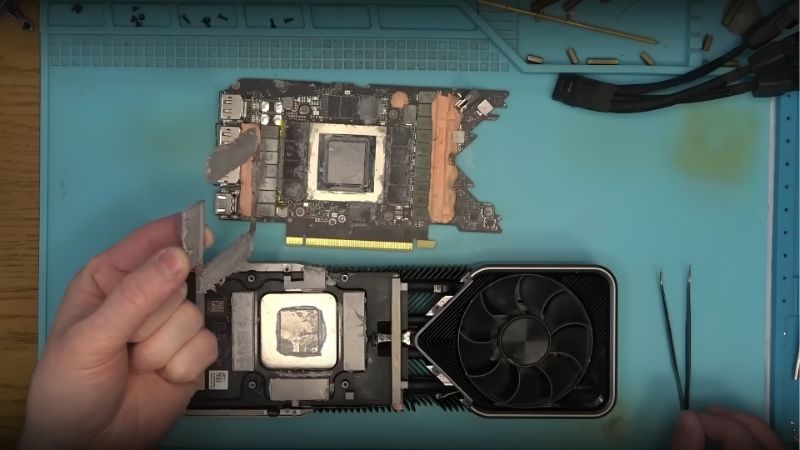
A 1660 Ti is roughly seven years old. Factory thermal paste has long since pumped out, fan bearings have hours on them, and the case has been collecting dust the whole time.
A card throttling at 82C is not delivering the performance you already paid for. Nvidia’s GPU Boost drops roughly one clock bin for every few degrees past the mid-fifties, so a card at 80C may be 60-90 MHz below where it belongs. Add a dusty heatsink and the loss compounds.
Before spending anything: pull the card, clean the heatsink, repaste it, build a fan curve in Afterburner, and check that your case has genuine intake airflow rather than one exhaust fan pulling against a sealed front panel. People routinely recover 10-15% this way – which is most of the 2060 gap, for the price of a tube of paste.
Your CPU or RAM May Be the Limiter
The second most common misdiagnosis, and the most expensive one to get wrong.
A 1660 Ti is usually paired with a CPU from the same era. If that CPU is the bottleneck, dropping a 2060 into the system produces almost no change at all. The test is free: enable GPU usage in Afterburner’s overlay and play. If GPU usage sits at 95-99% under load, the GPU is the limit and the upgrade helps. If it hovers at 60-80% while frames stay low, your CPU is the problem and no graphics card fixes that.
Check RAM too. Many machines from that era run 16GB in single channel because someone added one stick, or run at JEDEC speeds because XMP was never enabled in BIOS. Both cost real frames, and both are free to fix in about two minutes.
Pros and Cons of the 1660 Ti to 2060 Upgrade
| Upgrade to the RTX 2060 | Keep your GTX 1660 Ti | |
|---|---|---|
| Pros | DLSS is a genuine capability change worth more than 15% on hardware this weak; 15% more raw frames; net cost is small after selling; DLSS keeps improving after purchase | Costs nothing; a repaste, fan curve and airflow fix recover 10-15% for about $25; 120W runs on a 450W PSU; the money stays available for a jump that actually matters |
| Cons | Same 6GB – the wall that will retire your machine survives the upgrade; ray tracing is unusable; +40W and a 500W PSU; you inherit another seven-year-old card | No DLSS, ever – a permanent ceiling; 6GB stays below the modern floor; texture settings keep dropping each year |
The shape is unusual. Both columns share the same fatal flaw, which is what makes this upgrade awkward rather than obvious. You are paying to add a feature to a card that has the same expiry date as the one you own.
Why the Better Move May Be to Skip This Entirely
Everything above assumes today’s prices, and the pricing situation is exactly what makes the $110 half-step questionable.
Used Prices Followed the Component Surge
The memory-driven surge through late 2025 lifted laptop and component costs broadly, and used GPUs followed with a lag – the used market prices against the cheapest new alternative rather than against age. That is why seven-year-old cards still cost real money.
The genuinely positive news is narrow but real: the steep climb seen at the end of 2025 has stopped, and manufacturers including Framework have reported a period of relative stability, while still warning openly that volatility has not ended.
Flat is not falling. But the same logic protects you: your 1660 Ti is holding value too, which means selling it recovers more than it would in a healthy market. That is why the net cost of this upgrade is only $40-70 rather than $110 – and it is the single strongest argument in favour of doing it.
New Memory Capacity Arrives in 2027 or 2028
Genuine relief is under construction. OEMs can now source DDR5 from Chinese suppliers such as CXMT, and Micron is building two fabrication plants in Idaho – funded, structural additions to global supply rather than speculation.
The obstacle is the calendar. Those Idaho plants do not come online until 2027-2028. Fabrication capacity takes years to stand up, and any upgrade you make this year happens long before that supply reaches a shelf.
Which is why the half-step is questionable. The classic move – buy the cheap sidegrade now, jump to something real when prices fall – assumes prices fall. They are not falling. So either fix what you own for $25 and wait properly, or make a jump big enough to matter. The $110 middle path neither solves your VRAM problem nor buys you a card you will still want in 2028.
The Alternative Worth Considering Instead
Price an RTX 3060 12GB before committing to the 2060. It typically costs $160-210 used – roughly $80-100 more net – and it gives you both DLSS and double the memory. That is the upgrade that actually crosses the transformative threshold and solves the problem the 2060 leaves untouched. For most 1660 Ti owners, it is the correct answer to this entire question.
And before spending anything at all, spend $25. Thermal paste, a fan curve, two intake fans, and XMP enabled in BIOS routinely recover 10-15% on a seven-year-old machine – which is the entire 2060 gap, for a fifth of the price.
See More:
- A fan curve msi afterburner
- amd radeon rx 9070 vs rtx 5070
- 5060 ti vs 5070 benchmark
- rx 6600 vs rtx 3050
- 2060 vs 3060
Final Verdict and Recommendation
On the 1660 ti to 2060 upgrade, the honest recommendation is that most owners should skip it – and the ones who should do it want one specific thing.
Upgrade if your diagnostic shows GPU usage pinned at 95-99%, VRAM comfortably under 5GB, a clean repasted card still falling short, and a library full of DLSS-supported titles. Then the 2060 gives you a capability your card cannot access at any price, the net cost is only $40-70, and it is a reasonable move.
Do not upgrade if your VRAM sits near 5.7GB with stutter – the 2060 has the same 6GB and the same wall, and you would be paying to move the problem rather than solve it. Do not upgrade if GPU usage sits below 85%, because your CPU is the limiter. And do not upgrade if you have not run the $25 fix first.
Honestly though: stretch to an RTX 3060 12GB if you possibly can. It is the only card in this conversation that gives you both DLSS and the memory headroom, and in a market where nothing gets cheaper before 2027, buying half a solution twice is the expensive path.
Frequently Asked Questions
How much performance do I actually gain going from a GTX 1660 Ti to an RTX 2060?
In pure rasterization the gain is modest, typically around ten to fifteen percent at 1080p. The two cards are close relatives on the Turing architecture. The upgrade case rests almost entirely on features rather than raw speed, since the RTX 2060 adds RT cores and tensor cores that unlock DLSS and hardware ray tracing which the 1660 Ti cannot access.
Is ray tracing on an RTX 2060 actually usable?
Only in limited form. First generation RT cores are considerably slower than modern equivalents, so enabling full ray tracing in demanding titles usually drops the frame rate below comfortable levels even at 1080p. It is workable in lighter implementations and older RT titles, particularly when combined with DLSS performance mode, but path traced games are entirely out of reach.
Does DLSS make the RTX 2060 worthwhile?
This is the strongest argument for the upgrade. DLSS lets the card render at a lower internal resolution and reconstruct a sharp image, often gaining thirty to fifty percent frame rate at quality settings, and NVIDIA has continued improving the DLSS model in ways that benefit older RTX cards. It effectively extends the card useful life in a way the 1660 Ti cannot match.
Do both cards have the same memory?
Both standard versions ship with 6GB of GDDR6, the 1660 Ti on a 192-bit bus and the RTX 2060 on a 192-bit bus as well, with a later 12GB RTX 2060 variant also released. Six gigabytes is now genuinely limiting in modern titles at high textures, so if you find a 12GB RTX 2060 at a reasonable price it is the far better buy.
Is this upgrade worth spending money on in 2026?
Honestly, usually not. Both cards are around seven years old and the performance delta is small. If you are spending money at all, saving a little more for an RTX 3060 12GB, RTX 4060 or Intel Arc B580 delivers a much larger jump, better memory capacity, newer feature support and considerably longer driver support ahead of it.
As an Amazon Associate we earn from qualifying purchases at no extra cost to you.


Ready to decide? Our #1 pick for 2026 is the VRAM.
Live price & availability on Amazon.






Write Your Review
No reviews yet. Be the first to share your experience!