
- Top Pick: msi Gaming GeForce RTX 3060 Ventus 2X 12G OC V1 Graphics Card – 15 Gbps GDRR6 Boost Clock: 1807 MHz 192-Bit HDMI/DP PCIe 4 Torx Twin Fan Ampere
- Best Value: GIGABYTE GeForce RTX 3060 WINDFORCE OC 12G (rev. 2.0) Graphics Card, 2X WINDFORCE Fans, 12GB 192-bit GDDR6, GV-N3060WF2OC-12GD Rev2.0 Video Card
- Premium Choice: NVIDIA GeForce RTX 3060 Ti Founders Edition 8GB GDDR6 PCI Express 4.0 Graphics Card (Renewed)


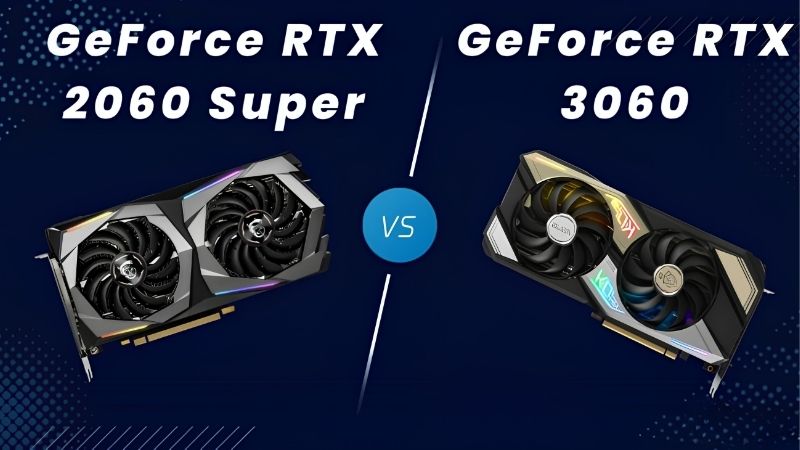
rtx 2060 vs rtx 3060 gets searched by two very different people, and this article is written for the second one: you already own the 2060, it is starting to feel slow, and you want to know whether the 3060 is a real fix or a lateral move that costs $180. That is a different question from which card to buy fresh, and it deserves a different answer. The verdict is below, the numbers are in a table, and the section on when NOT to upgrade is the one that will probably save you money. If you are shopping both cards used from scratch, our 2060 vs 3060 buying guide covers that scenario instead.
Quick Verdict: Is the RTX 3060 a Real Upgrade From a 2060?
Upgrade only if you are hitting VRAM walls, not because you want more frames. The RTX 3060 is roughly 15-20% faster than the RTX 2060 at 1080p – a gain most people would struggle to identify blind. What it actually gives you is 12GB instead of 6GB, and that is a category difference rather than a percentage. If your games stutter, pop textures, or feel inconsistent despite a decent average fps, the upgrade fixes something real. If your games simply run at 60 instead of 75, you are about to spend $180 for a difference you will forget in a week.
As an Amazon Associate we earn from qualifying purchases at no extra cost to you.








Why 15-20% Is Not an Upgrade Worth Paying For
Run the maths honestly before you open a marketplace tab. A 2060 delivering 60 fps becomes a 3060 delivering roughly 69-72 fps. On a 60Hz panel that is invisible. On a 144Hz panel it is a small improvement in a range that still feels the same.
The threshold where a GPU upgrade feels transformative is generally around 40-50% – that is where a game moves between perceptual tiers, from choppy to smooth or from smooth to fluid. Below roughly 25%, most people cannot reliably distinguish the two in a blind test, and every enthusiast who claims otherwise has a frame counter open.
This is the trap in the whole comparison. The 3060 is faster. The 3060 is not meaningfully faster. Both statements are true, and the marketplace listing only tells you the first one.
The 6GB Wall Is the Actual Reason to Move
Here is what the fps chart hides, and it is the entire justification for this upgrade.
Your 2060 has 6GB. In 2026, 6GB is below the working floor for modern titles at high textures. When a card runs short on VRAM it does not slow down gracefully – it hitches, streams textures in late, and its 1% lows collapse while the average frame rate stays deceptively healthy. That mismatch is exactly why your card can report 65 fps and still feel wrong.
The 3060 has 12GB. Double. That is an oddity of its 192-bit bus configuration which looked overspecced at launch and looks prescient now – it carries more VRAM than the RTX 5070 selling new today for several times the price.
So the diagnostic is simple. Open MSI Afterburner, enable VRAM usage in the monitoring tab, and play your worst-performing game for twenty minutes. If you are sitting at 5.7-5.9GB with stutter, the upgrade solves your actual problem. If you are at 4GB and just want higher numbers, it does not.
Full Comparison Table for Existing 2060 Owners
Framed as what changes, rather than as two products.
| Specification | Your RTX 2060 6GB | RTX 3060 12GB | What changes |
|---|---|---|---|
| VRAM | 6GB | 12GB | The real upgrade |
| Memory bus | 192-bit | 192-bit | No change |
| AAA 1080p high | ~55-70 fps | ~65-85 fps | +15-20%, barely felt |
| 1% lows (VRAM-limited) | Collapses | Holds | The felt difference |
| 1440p high | ~40-50 fps | ~50-62 fps | Still not a 1440p card |
| Board power | ~160W | ~170W | No PSU change needed |
| PSU | 500W | 550W | Check yours |
| DLSS | DLSS 2/3 | DLSS 2/3 | No change, no Frame Gen |
| Ray tracing | Unusable | Slightly less unusable | Not a reason |
| Upgrade cost | – | ~$180 net after selling | The question |
Read the “what changes” column top to bottom and the decision resolves itself. Two rows say something meaningful. Everything else says no change or barely felt. You are paying roughly $180 for one row – and whether that row matters is answerable in twenty minutes with Afterburner open.
Deep Dive: When Upgrading Is the Wrong Move
This is the section that gets left out of upgrade content, because it does not help anybody sell anything. But if you own a 2060 and it feels slow, there are three explanations more likely than “the GPU is too weak” – and all three are cheaper to fix.
Your Card May Be Throttling, Not Aging
A 2060 is roughly seven years old. Factory thermal paste has long since pumped out, fan bearings have hours on them, and the case it lives in has been collecting dust the entire time.
A card throttling at 82C is not delivering the performance you already paid for. Nvidia’s GPU Boost drops roughly one clock bin for every few degrees past the mid-fifties, meaning a 2060 running at 80C may be 60-90 MHz below where it should be. Add a dusty heatsink and the loss compounds.
Before spending $180, spend twenty minutes: pull the card, clean the heatsink properly, replace the thermal paste, build a custom fan curve, and check that your case actually has intake airflow rather than one exhaust fan pulling against a sealed front panel. People routinely recover 10-15% this way – which is most of the gap to a 3060, for the price of a tube of paste.
Your CPU or RAM May Be the Real Limiter
The second most common misdiagnosis. If your 2060 is paired with a CPU from the same era, there is a good chance the GPU is not the bottleneck at all – and dropping a 3060 into that system will produce almost no change, which is a genuinely expensive way to learn something.
The test is free. Open Afterburner, enable GPU usage in the monitoring overlay, and play. If GPU usage sits at 95-99% under load, the GPU is the limiter and an upgrade helps. If it hovers at 60-80% while frames stay low, your CPU is the problem and no graphics card fixes that.
Check RAM too. Many systems from that era run 16GB in single-channel because someone added one stick, or run at JEDEC speeds because XMP was never enabled. Both cost real frames. Enabling XMP in BIOS takes thirty seconds and is free.
Pros and Cons of Upgrading From a 2060 to a 3060
| Upgrade to the 3060 12GB | Keep your 2060 | |
|---|---|---|
| Pros | Doubles VRAM and fixes stutter in texture-heavy titles; 15-20% more fps; a newer card with more life left; same PSU class; strong resale on the 2060 offsets the cost | Costs nothing; a repaste, fan curve and airflow fix can recover 10-15% for under $25; you keep the money for a genuinely bigger jump later; no risk of buying someone else’s dead card |
| Cons | ~$180 net for a gain most people cannot feel blind; still not a 1440p card; still no Frame Generation; you inherit another used card that is already six years old | 6GB stays below the modern floor and the stutter does not go away; texture settings keep dropping; the problem gets worse each year, not better |
Notice the shape of the trade. The upgrade fixes one specific problem well and everything else barely. Keeping the card fixes nothing structurally but costs nothing – and if your diagnostic says VRAM is not your issue, doing nothing is genuinely the correct answer.
Why This Upgrade Costs More Than It Used To
Anyone weighing a $180 sidegrade deserves to know why a six-year-old card still costs $180 at all. Cards this old should be nearly worthless. The reason they are not has nothing to do with these cards.
Used Prices Followed the Component Surge Upward
The memory-driven price surge through late 2025 lifted laptop and component costs broadly, and used GPUs followed with a lag – the used market is priced against the cheapest new alternative, not against age. When entry-level new cards got expensive, everything beneath them got pulled up.
The genuinely positive news is real but narrow: prices have stopped rising at the steep rate seen at the end of 2025, and manufacturers including Framework have reported a period of relative stability, while still warning that further volatility is possible.
Flat is not falling. A $180 RTX 3060 is unlikely to become a $140 RTX 3060 by spring. But the same logic protects you: your 2060 is holding value too, which means selling it to fund the upgrade recovers more than it would have in a normal market. The net cost of moving is lower than the sticker suggests – that is the one piece of good news in this section.
New Memory Capacity Does Not Arrive Until 2027 or 2028
Real relief is being built. OEMs can now source DDR5 from Chinese suppliers such as CXMT, and Micron is constructing two fabrication plants in Idaho – funded, structural additions to global supply rather than speculation.
The problem is the calendar. Those Idaho plants do not come online until 2027-2028. Fabrication capacity takes years to stand up, and any upgrade you make in 2026 happens well before that supply reaches a shelf.
This changes the strategy in a way most upgrade advice has not caught up to. The classic move – buy the cheap sidegrade now, jump to something real when prices fall next year – assumes prices fall. They are not falling. So either fix what you have for $25 and wait properly, or make a jump big enough to matter. The $180 half-measure is the worst of both, because it neither solves your problem cheaply nor buys you a card you will still want in three years.
The Alternative: Skip the 3060 Entirely
If your diagnostic confirms VRAM is genuinely your problem, consider skipping this rung on the ladder. The RTX 4060 Ti 16GB or RX 7600 XT 16GB cost more but deliver both the VRAM headroom and a performance jump large enough to actually feel – the 40-50% threshold where an upgrade stops being a number and becomes an experience.
Alternatively, spend $25 instead of $180. Thermal paste, a set of thermal pads, and two intake fans routinely recover 10-15% on a card this age, which is most of the 3060 gap. Do that first, re-run your test, and then decide with real data rather than frustration.
See More:
- A fan curve msi afterburner
- amd radeon rx 9070 vs rtx 5070
- 5060 ti vs 5070 benchmark
- rx 6600 vs rtx 3050
- 2060 vs 3060
Final Verdict and Recommendation
On rtx 2060 vs rtx 3060 as an upgrade rather than a purchase, the honest recommendation is that most 2060 owners should not do it – and the ones who should already know why.
Upgrade if your diagnostic shows VRAM at 5.7GB-plus with stutter, GPU usage pinned at 95-99%, and a clean, repasted card still falling short. Then the 12GB buffer is a genuine fix and the 3060 is a reasonable landing spot at roughly $180 net after selling your old card.
Do not upgrade if you have not run the test, if your GPU usage sits below 85%, or if you simply want a bigger number. Clean the card, repaste it, build a fan curve, fix your case airflow, and enable XMP – that is $25 and an afternoon, and it recovers most of what the 3060 would have given you.
And be strategic about timing. With used prices propped up by a flat new market and real memory relief still two to three years out, the $180 half-step is the least efficient money in this decision. Fix what you own cheaply, or save for a jump large enough to feel. The middle path is the one that leaves you upgrading again next year.
Frequently Asked Questions
How much faster is the RTX 3060 than the RTX 2060?
Expect roughly fifteen to twenty-five percent more performance in rasterized games at 1080p, with a wider gap in ray-traced titles thanks to second-generation RT cores. The more important difference is memory: 12GB versus 6GB, which prevents the texture stutter that increasingly cripples the older card.
Is 6GB of VRAM the real problem with the 2060?
Yes. Many 2026 releases exceed 6GB even at 1080p high settings, and once the buffer overflows you get pop-in, hitching and sudden frame time spikes rather than a graceful drop in average frame rate. The 3060 generous 12GB buffer is the single strongest reason to upgrade.
Do both cards support DLSS?
Both support DLSS super resolution and the newer transformer model, and both support ray reconstruction. Neither supports frame generation, which requires 40 series hardware or newer. So upscaling image quality is comparable, but the 3060 simply has more raw throughput and memory to feed it.
What are the power and PSU requirements?
The 2060 draws around 160W and the 3060 around 170W, both on a single 8-pin connector. A quality 550W supply covers either card with a mainstream CPU. If you are upgrading inside an old prebuilt, check the actual 12V rail rating rather than trusting the sticker wattage.
Is the upgrade worth the money in 2026?
Only at used prices. A 3060 12GB bought secondhand for a modest sum is a sensible step up from a 2060, especially for 1080p high settings. If you are spending meaningfully more, a current-generation card with 12GB or 16GB and frame generation support is the better use of the budget.








Write Your Review
No reviews yet. Be the first to share your experience!